Table of Contents
What a GTM Tech Stack Actually Includes
What Enterprises Are Actually Replacing
What Is Driving the Rebuild Now
The Costs That Do Not Appear on the Invoice
What a Stack Rebuild Actually Looks Like
What Usually Goes Wrong
Where Outsourced Execution Fits Into a Modern Stack
Conclusion
Frequently Asked Questions
Modified On :
October 15, 2026
Key Takeaways
- A GTM tech stack usually fails at the design level, not the tool level. Each layer was bought separately, and nobody owned the whole system.
- Upgrading in 2026 mostly means removing. The cost of keeping a dozen-plus systems connected has outgrown the value of adding another one.
- When agents can read and write across systems, the value moves from the tool to the data and the decision logic. Single-function workflow tools lose their case first.
- The costs that matter sit off the invoice: RevOps hours, lost selling time, and unused seats. Audit your own numbers instead of borrowing someone else’s savings percentage.
- Fix definitions and data standards before you migrate. Then cut in sequence, and judge success by selling time and pipeline, not license savings.
For ten years, the answer to every enterprise revenue problem was another tool. In 2026, the answer is increasingly to remove several.
Your GTM tech stack isn’t being rebuilt because the tools got worse. It’s being rebuilt because keeping a dozen-plus systems connected now costs more than those systems are worth.
Gartner’s 2024 survey of 1,026 B2B sellers found that half of them feel overwhelmed by the amount of technology their role requires. Another one - Salesforce’s State of Sales research puts the average at 10 tools to close a deal, with two-thirds of reps saying that’s too many.
A second force is also at work. An agentic layer that decides who to contact and what to say makes a whole tier of single-function tools hard to defend.
So the question on your desk is simple. Is your stack behind, and what would upgrading actually mean?
This guide covers what a GTM stack includes now, what’s being replaced, what’s driving it, what it really costs, and what a rebuild looks like.
What a GTM Tech Stack Actually Includes
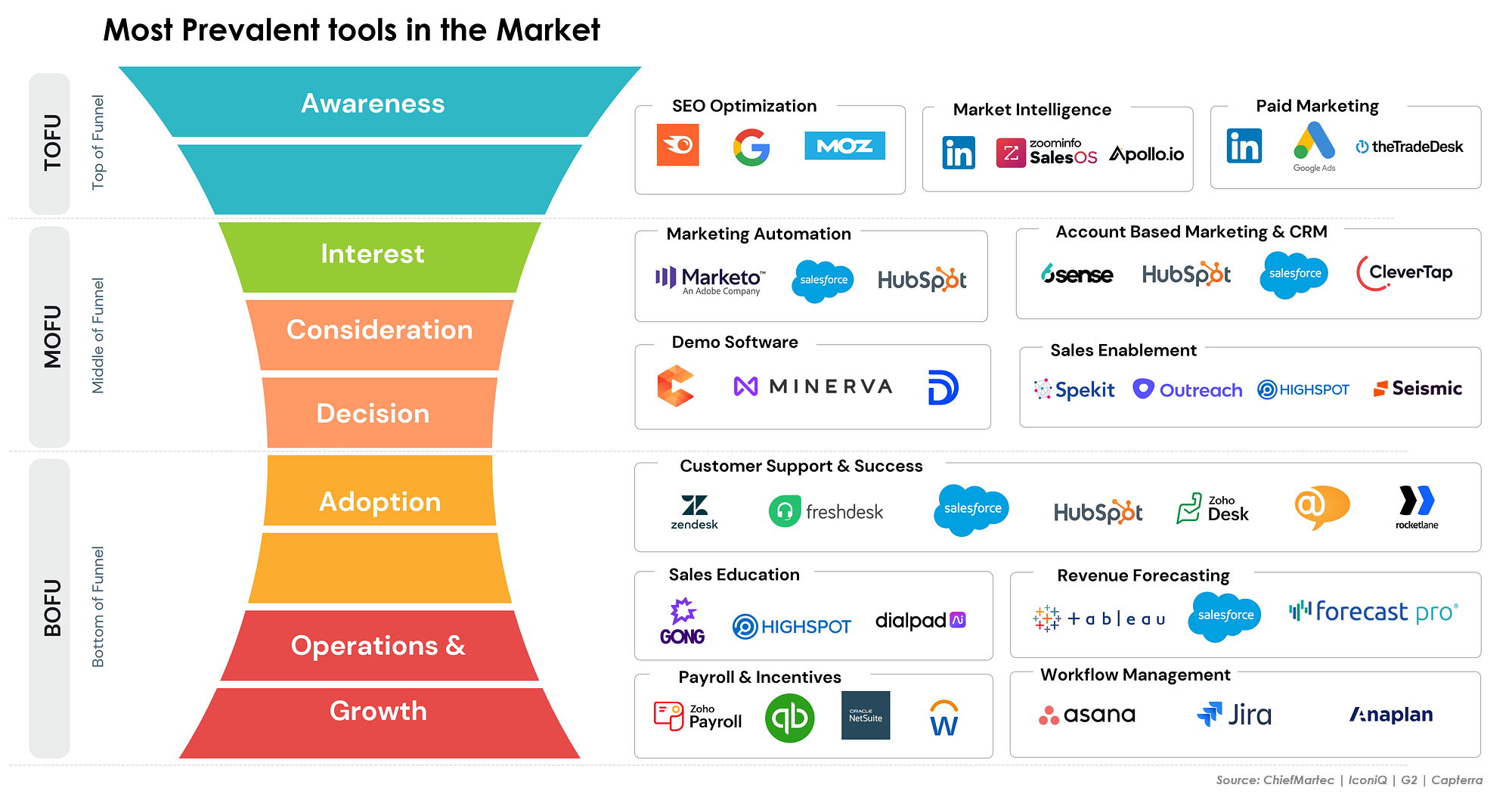
If you’re asking what a GTM tech stack is, the plain answer is this. It’s every system that takes your company from identifying a market to retaining a customer. That spans marketing, sales, customer success, and the data layer underneath all of them.
It’s not just your sales tools. It’s the whole path a prospect or account travels, and every system that touches it along the way.
The Layers Worth Naming
Most enterprise GTM tools setups break down into the same eight layers. The labels vary by company, but the shape doesn’t.
Why Enterprise Stacks Get Messy
Look at the “Usually bought by” column again. Each layer was bought by a different function, at a different time, to solve a different problem. Nobody was handed the job of designing the whole thing.
Enterprise stacks also pick up weight in predictable ways:
- Acquisitions. You buy a company and inherit its tools, contracts, and workarounds.
- Team changes. A new VP arrives with a favorite platform and adds it next to the old one.
- Pilots that never ended. A 90-day trial quietly becomes a three-year renewal.
- Org restructures. The champion for a tool moves teams, and the tool stays.
The Problem Is the Design
This sets up everything that follows. It’s rare that any single tool in your stack is bad. The issue is that nobody designed the system as a whole. A set of good tools, bought in isolation, still produces a messy stack.
⚙️ Fewer Tools. More Qualified Meetings.
Your GTM stack should create pipeline, not complexity. Cleverly handles prospecting and multichannel outreach so your team can focus on revenue.
What Enterprises Are Actually Replacing
We’ll stick to categories here, not vendors. Categories age better, and the pattern is what matters. As you read, notice which ones you already suspect are in your own environment.
Single-Function Workflow Tools
These are point solutions that handle one step of a process. Think of a tool that only logs meeting notes, only routes leads, or only drafts a first-touch email.
An agentic layer can now handle that whole process end to end. That’s why this category is the first to lose budget. The value was always the workflow, not the tool. Once the workflow can run without a dedicated product, the product has less to defend.
Overlapping Data and Enrichment Subscriptions
Marketing buys one provider. Sales ops buys another. An SDR team adds a third because the first two missed their segment. Now you’re paying three times to cover many of the same accounts.
Consolidating to waterfall enrichment across fewer contracts is a common move. With waterfall enrichment, you check sources in sequence and stop when you get a verified answer. That gives you broad coverage without stacking redundant licenses.
Legacy Sequencing Platforms
Some tools built their entire value on scheduling touches. That was a real advantage once. Today, sequencing is a commodity feature inside broader platforms.
These tools are being folded into one of two places: the CRM or an orchestration layer. If your sequencing tool does little beyond sending steps on a timer, it’s a candidate.
Analytics Tools Nobody Opens
Someone bought a dashboard to answer a specific question. The question got answered. The dashboard stayed.
These are among the easiest to cut and the most common to find in a license audit. A quick login report will usually tell you the whole story.
Tools With No Owner
Pilots that were never sunset. Tools whose champion left the company two reorgs ago. Nobody uses them, nobody manages them, and the renewal keeps auto-processing.
This is frequently the largest single source of recoverable spend. It’s also the least controversial cut, since nobody is around to object.
What Is Driving the Rebuild Now
This is the core argument. Each driver below is a claim, not just an observation. We’ll tell you where we stand on each.
Integration Debt Reached a Breaking Point
Maintaining connections between a dozen-plus systems stopped being a project. It became a standing cost. Every new tool adds another set of syncs, field mappings, and failure points.
RevOps teams ran out of capacity to absorb it. When your best operators spend their week fixing broken syncs, the stack is no longer serving the business. The business is serving the stack.
The Agentic Layer Changed What a Tool Is For
When an agent can read and write across your systems, the tool itself matters less. What matters is the data it reads and the decision logic it follows.
That’s a real shift. For years, you bought tools for their interfaces and features. Now the interface is increasingly the agent. The durable assets are your records, your rules, and your definitions of a good account.

Budget Scrutiny Returned
Software spend per rep used to get approved. Now it gets interrogated. Finance wants to know what each seat produces, and “it’s what we’ve always used” no longer works as an answer.
This pressure is healthy for your GTM tech stack. It forces a question most teams skipped for years: what does each tool do that we can’t get elsewhere?
Data Quality Became the Visible Bottleneck
Layering AI on fragmented records exposed how much of the CRM was incomplete or stale. Missing titles, outdated accounts, duplicate contacts, conflicting owner fields. The agent can only work with what it’s given.
No amount of tooling fixes this. You can buy a better engine, but if the fuel is dirty, the engine still sputters. This is also why rebuilding without fixing data first usually fails.
Seat-Based Pricing Stopped Matching How Work Happens
Per-seat pricing assumed a human sat in each seat doing the work. When agents do work that used to require seats, per-seat models look mismatched to the value delivered.
You may be paying for 200 seats on a tool where agents now handle half the activity. That’s a pricing model drifting away from reality, and buyers are noticing at renewal.
AI Exposed the Handoffs
Deploying AI across the funnel made every broken handoff visible at once. Marketing’s definition of a qualified lead doesn’t match sales’. Sales’ definition of an opportunity doesn’t match customer success’. Humans papered over those gaps with judgment and side conversations. Agents don’t.
We cover this in depth in our piece on AI workflows for GTM teams (internal link placeholder). If you only read one more thing before starting an audit, read that one.
🚀 Make Your GTM Stack Pay Off
Turn your strategy into sales conversations with done-for-you LinkedIn, cold email, and cold calling. We find the buyers. You close the deals.
The Costs That Do Not Appear on the Invoice
License spend is the visible number, and it’s usually the smaller one. Whatever common B2B GTM tech stack tools sit in your environment, the real cost of owning them hides in places finance never sees.
We’re deliberately not giving you a published savings percentage. Those models rarely match your situation. Instead, here are the categories to audit with your own numbers.
Integration Maintenance
Measure this in RevOps hours per month, not dollars on a contract. Ask your team how many hours go to fixing syncs, updating field mappings, and debugging automations. Multiply by a loaded hourly rate. That’s a real cost that never appears on a vendor invoice.
Unused Licenses
Audits routinely find a meaningful share of seats are inactive. Pull login and usage data for every tool and count how many paid seats saw real activity in the last 90 days. Seats nobody touches are the cheapest dollars you’ll ever recover.
Duplicate Data Entry and Context Switching
This cost hits selling time, not budget. When a rep logs the same call in two places or toggles between six tabs to prep for one meeting, you lose minutes that never come back. Ask a handful of reps to track it for a week. The result is usually uncomfortable.
Training and Onboarding Time
Every time a tool changes hands, someone has to relearn it. New hires, reorgs, and migrations all trigger onboarding. Count the hours your teams spent in training sessions last year across all tools. Then ask how many of those tools are still in active use.
Opportunity Cost of RevOps Capacity
This one is the hardest to see and the most expensive. Every hour your RevOps team spends on maintenance is an hour not spent on revenue work like territory design, forecasting accuracy, or pipeline analysis. Write down what your team would do with 20% more capacity. That’s the real price of sprawl.
What a Stack Rebuild Actually Looks Like
A good rebuild is mostly a sequencing exercise. These are the steps we’d follow, in order.
Step 1: Audit What Exists
List every tool. For each one, record who owns it, what it costs, and what it actually gets used for. The last part matters most. “Used for lead routing” and “mentioned in a 2022 slide” are very different answers.
Step 2: Score Every Tool
Rate each tool on three things: usage, overlap, and whether removing it breaks a workflow. This gives you a decision rule instead of an argument.
That last row matters. A tool nobody seems to use but that quietly feeds a workflow is exactly the one that causes problems when it disappears.
Step 3: Require Three Names on Every Decision
Every keep or cut needs sign-off from three people: the budget owner, the tool owner, and RevOps. This stops one function from cutting what another depends on. It also stops a tool from surviving just because no one wanted the argument.
Step 4: Let Owners Contest With Data
Tool owners should be able to push back, but with usage data instead of opinion. “My team loves it” isn’t evidence. “My team ran 4,000 workflows through it last quarter” is. This keeps the process fair and keeps it fast.
Step 5: Fix Definitions and Data Standards First
Before migrating anything, agree on what a qualified lead is, what an opportunity is, and what fields are required. Migration inherits whatever mess already exists. Move dirty data into a new system and you now have a new system with dirty data.
Step 6: Sequence the Cuts
Order matters, and the easiest wins go first:
- No-owner tools. Nobody objects, and savings are immediate.
- Overlapping data contracts. Consolidate to fewer sources.
- Single-function workflow tools. Replace them once the agentic layer is ready to take the process.
Step 7: Set a Measurement Window
Decide upfront how you’ll know it worked. A clear test is whether selling time has actually moved within six weeks. Pick a measure, set the window, and check it.
An Illustrative Example
Say you find 38 tools in your audit. Nine have no owner. Eleven overlap with another tool on data or sequencing. Six are single-function workflow tools that an agent can absorb. Four have low usage but feed a hidden workflow.
You cut the nine first. You merge the eleven into four. You replace the six on a staggered schedule. You investigate the four before touching them. You end up with a stack in the low twenties, each tool with a named owner. That’s a typical GTM tech stack example shape. It’s an illustration, not a benchmark, so use your own counts.
One caution worth repeating: consolidation that cuts spend but also cuts pipeline is not a win.
What Usually Goes Wrong
We’ve seen the same mistakes repeat across enterprise rebuilds. Watch for these.
Cutting Tools Before Fixing Data and Definitions
If your definitions are inconsistent, the new stack will be too. You’ll move the same confusion into a cleaner-looking system. Fix the standards first.
Consolidating Onto One Vendor and Finding a Depth Gap
One platform for everything looks efficient on a slide. Then, after migration, you discover it handles 80% of a workflow well and the last 20% is a problem. Test depth on your hardest use case before you commit.
Measuring Success by License Savings Alone
Savings are easy to report. Selling time and pipeline are harder, and they’re the ones that matter. If a rebuild saves money but your reps spend more time on admin, you lost.
Removing a Quietly Load-Bearing Tool
Some tools hold up workflows nobody documented. A scoring rule, a routing step, a notification only one manager relies on. Cut it and something breaks weeks later with no obvious cause. Interview users before you pull the plug.
Running the Audit Without the People Who Use the Tools
If the audit happens in a conference room with only leadership, you’ll miss how work actually gets done. Include reps, SDRs, CS leads, and RevOps analysts. They know which tools matter.
Treating the Agentic Layer as a Data Quality Fix
An agent doesn’t repair bad records. It acts on them faster. The agentic layer depends on clean data, not the other way around.
Rebuilding the Stack but Not the Org
If handoffs and ownership stay the same, you’ll recreate the same sprawl within two years. The stack mirrors the org. Change one without the other and the old shape returns.
Where Outsourced Execution Fits Into a Modern Stack
The rebuild question is really about which capabilities you should own and which you shouldn’t. Owning your data layer and CRM makes sense, since they hold your institutional knowledge.
Owning the infrastructure and headcount to run outbound is a different question. Outbound carries a stack of its own: sending domains, warm-up, enrichment, dialers, and the people to run all of it. Most consolidation projects forget this part.
At Cleverly, we’re a done-for-you B2B lead generation agency, and we run that stack for you.

We define your ICP, build verified multi-source lists, and run LinkedIn outreach, cold email on managed infrastructure, and cold calling. We then handle replies through to booked meetings. Those meetings arrive qualified against criteria we agree on together, with context attached. That’s an output, not another system to integrate.
This fits teams who want outbound capacity without adding tools, seats, and maintenance to a stack they’re trying to simplify. We optimize for qualified meetings held, not tools deployed or activity logged. Our work has generated $312M in client pipeline and $51.2M in client revenue.
Simplifying the stack but still need pipeline? Cleverly delivers meetings, not another subscription. Book a strategy call.
Conclusion
The shift in 2026 is from accumulation to design. Your GTM tech stack is being rebuilt, not extended, because the constraint was never tool availability. It was integration capacity and data quality. The agentic layer only pays off on top of clean data and agreed definitions, which is why sequencing matters so much.
Try this diagnostic before your next budget cycle: if you removed your five least-used tools tomorrow, what would actually break? The companies pulling ahead aren’t the ones with the most capable stack. They’re the ones whose stack someone actually designed.
Frequently Asked Questions
Free Resource
How to Scale a Profitable Cold Call System
Get the complete guide — download it instantly now.

Free Ebook
Download the Free Guide
Enter your details to get instant access.
You're all set! 🎉
Your ebook is downloading now.
Click below if the download didn't start automatically.