Table of Contents
Run a Time Audit Before Changing Anything
Where SDR Hours Usually Disappear
Eliminate, Automate, Delegate or Batch: How to Improve SDR Productivity
Protect Calling and Conversation Blocks
Fix the Upstream Problems That Create Admin
SDR Productivity Tools That Genuinely Save Time
How to Measure SDR Productivity Properly
How Cleverly Removes the Non-Selling Work Entirely
Conclusion
Frequently Asked Questions
Modified On :
November 4, 2026
Key Takeaways
- Run a one-week time audit before you change anything. Your own hour distribution beats any published benchmark.
- Flat meeting counts usually come from non-selling work and fragmented days, not low effort.
- Sort every task into eliminate, automate, delegate, or batch. Never automate a broken process.
- Much of rep admin traces back to bad data, a fuzzy ICP, and tool sprawl. Fix the source.
- Judge the result by hours per booked meeting. If that number has not fallen, the work only moved.
Your reps are logged in all day, the activity dashboard looks healthy, and meetings booked stays flat. That gap is a SDR productivity problem, and it rarely shows up where managers look first.
The runway is short. The Bridge Group’s 2025 survey of 351 B2B companies puts average SDR ramp time at 3.0 months and average tenure at 1.9 years. Only about 60% of SDRs in that report are at quota. With a window that short, every wasted hour costs a real pipeline.
We skip the familiar “percent of time spent selling” statistic on purpose. Those figures come from vendor surveys, they swing widely, and none of them describe your team. The number that matters is your own.
At Cleverly, we run outbound for B2B companies every day, so we see where SDR hours go. This guide shows you how to find them, what to do with each block, and how to tell whether anything improved. One warning up front: most productivity projects relocate work instead of removing it. Automating a task does not free time by itself.
This guide is for SDR managers, sales leaders, and founders running their own outbound.

Run a Time Audit Before Changing Anything
Every decision later in this guide depends on this step. Without it, you are fixing the problems you assume you have. A time audit is the fastest way to improve SDR efficiency because it shows you which blocks are actually worth attacking.
How to Run the Audit
- Have reps log their time for one full week, not a “typical” day. Typical days do not exist in outbound.
- Use broad categories so logging takes seconds, not minutes.
- Run it across several reps. The spread between reps is usually wider than managers expect.
- Keep it light. A heavy tracking exercise distorts the very week you are measuring.
Suggested Categories
What to Look For
Two patterns matter most:
- Large blocks of non-selling work. Usually list building, research, or admin.
- Fragmentation. The day is chopped into pieces too short to do anything well.
Pro tip: Share the results with the team. If reps think the audit is a performance review, they will log a flattering week and your data is useless. Frame it as “help us find what is wasting your time.”
The Output You Want
A ranked list of where the hours actually go. That list drives every decision below.
⏱️ Stop Letting Admin Work Eat Up Selling Time
Free SDRs from repetitive prospecting and outreach tasks. Let Cleverly handle lead generation while your team focuses on selling.
Where SDR Hours Usually Disappear
When we look at outbound operations, the same time sinks show up again and again. Your ranking will differ, but the usual suspects are below. This is where sales development productivity quietly leaks away.
The Visible Time Sinks
- List building and data sourcing. Often the single largest non-selling block. Reps hunt for contacts, check titles, and copy data between tools.
- Account research. Valuable, but rarely time-boxed. One rep spends 20 minutes on an account another would skip.
- CRM updates and admin. A lot of this exists for reporting, not for selling.
- Internal meetings. Recurring ones with no clear output are the worst offenders.
The Hidden Time Sinks
- Reply triage. Out-of-office messages, referrals, unsubscribes, and “not me, try Sarah” replies all need sorting before a single real conversation happens.
- Tool switching. The cost here is attention, not minutes. Ten seconds to switch tabs can cost five minutes of focus.
- Waiting and context loss. The gaps between tasks never appear on any report, but they add up.
- Fixing bad data. Chasing wrong numbers and bounced addresses. This is a symptom of an upstream problem, which we cover later.
Who Needs to Fix It
Here is the observation worth sitting with. Most of these are organizational failures, not rep failures. Reps did not choose the data source, the CRM fields, or the meeting schedule. That changes who needs to act. Coaching a rep to “work faster” will not fix a broken list process. A manager has to.
Eliminate, Automate, Delegate or Batch: How to Improve SDR Productivity
A tips list will not help you improve SDR productivity. A decision framework will. Take each item from your audit and run it through four questions, in this order.
Eliminate
Ask this first about every task: what happens if we stop doing this?
- Internal meetings without a decision or an output
- CRM fields nobody reports on
- Research on accounts that should have been disqualified earlier
- Activity targets that push volume without improving outcomes
If the answer to the question is “nothing much,” stop doing it. Removing work beats optimizing it every time.
Automate
Automation fits repetitive work with clear rules:
- List building, enrichment, and verification
- CRM logging and activity capture
- Reply classification and routing
- Sequence execution and follow-up scheduling
One caution. Automating a bad process makes it faster, not better. If your ICP is vague, automated list building just produces bad lists at scale. Fix the process first. For a deeper look at how this fits together, see our AI outbound sales workflow guide.
Delegate
Some work does not need rep judgment:
- Data and list work
- First-line reply triage
- Research briefs produced centrally instead of rebuilt by each rep
The principle is simple. Reps should do the things only reps can do: talk to buyers, qualify intent, and handle objections.
Batch
Group similar work into blocks instead of interleaving it.
- Protect uninterrupted calling blocks. The same dials spread across a day perform worse than dials made in one focused stretch.
- Batch research, batch admin, and batch replies.
Fragmentation is the hidden cost most time audits reveal. Batching is the cheapest fix for it.
Quick Sorting Guide
🚀 More Selling Time. More Meetings. Less Busywork.
Take prospecting and follow-ups off your team's plate. Cleverly handles outreach so your SDRs can focus on closing.
Protect Calling and Conversation Blocks
The quality of selling time matters as much as the quantity. Two hours of uninterrupted calling often beats four scattered ones. This is the part of SDR efficiency that most audits underrate.
Block It and Defend It
Put calling time on the calendar and defend it the way you would defend a meeting with a prospect. If a manager can pull a rep out of a block for a “quick question,” the block does not exist.
Match Blocks to Prospect Behavior
Schedule calling when your buyers actually answer, not when it suits the internal schedule. Test a few windows and look at connect rates by time of day. Your data will tell you more than any generic “best time to call” article.
Prepare Before the Block Starts
A block should be spent talking, not looking things up. Before it starts:
- Load the call list
- Have research and talk tracks ready
- Close every other tab and tool
Keep Blocks Long Enough
The first few calls of any block are the weakest. Reps need time to get into rhythm. Short blocks mean you pay that warm-up cost over and over.
The Manager’s Responsibility
Most interruptions to selling time start inside your own company. Internal messages, meeting requests, and “can you jump on a call” pings. Set a rule that nothing interrupts a calling block unless it is urgent, and mean it.
Pro tip: Count how many times a rep gets pulled out of a block in one week. That number is usually a surprise, and it makes the case for protecting them.
Fix the Upstream Problems That Create Admin
Much of what looks like a productivity problem is a data and process problem showing up in someone else’s calendar. SDR workflow automation only pays off after you fix these.
Bad Data
This is the largest hidden tax on rep time. Every wrong number and bounced address costs minutes and momentum. Multiply that across a week and a team, and you have lost days.
Vague ICP Definition
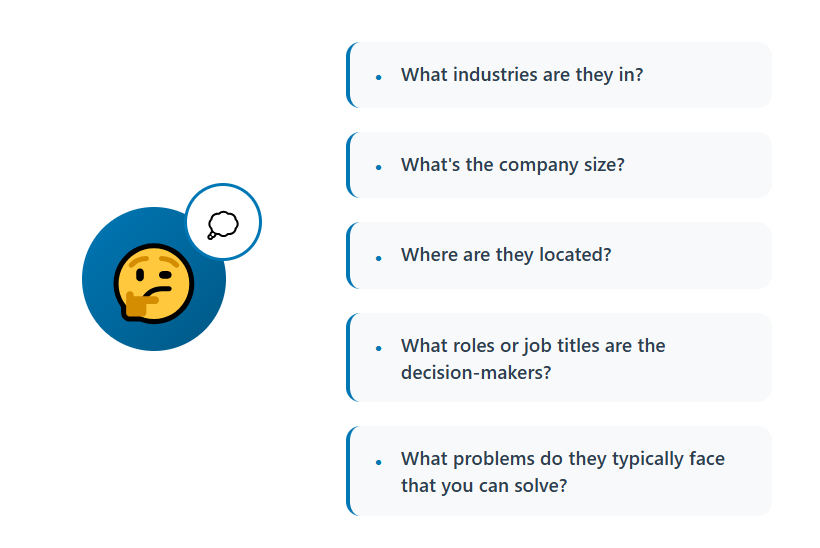
If the ICP is fuzzy, reps compensate by researching more. That research should never have been necessary. A sharp ICP turns “is this account worth my time?” into a quick yes or no.
Poor List Quality and Unclear Qualification
When lists are weak, reps qualify during calls instead of before them. When qualification criteria are unclear, decisions bounce back to reps, who then over-research to feel confident. Write the criteria down. Make disqualification easy and normal.
Missing Suppression Lists
Without suppression lists, you get awkward conversations and wasted touches: calling existing customers, current opportunities, or people who already said no.
Tool Sprawl
Tool sprawl creates switching costs no individual notices but everyone pays. Count how many tools a rep touches in a normal day. If it is more than a handful, you likely have a hidden tax.
SDR Productivity Tools That Genuinely Save Time
We sort SDR productivity tools by job, not by brand, because categories outlast vendors. Each tool below removes one specific block from your time audit. If your audit did not flag that block, skip the tool.
Data and Enrichment (removes list building and data hunting)
Apollo
- Best for: Small to mid-size teams that want a contact database and basic sequencing in one place.
- Watch for: Data accuracy varies by segment, so verify before sending.
ZoomInfo
- Best for: Larger teams that need deep US company and contact coverage.
- Watch for: Cost and contract terms. It can be more than a small team needs.
Cognism
- Best for: Teams calling or emailing in Europe that need phone-verified contacts.
- Watch for: Check US coverage for your specific niche.
Lusha
- Best for: Reps who need quick one-off contact lookups while browsing LinkedIn.
- Watch for: Better for spot lookups than for building large lists.
Clay
- Best for: Teams that want to pull data from several sources, enrich it, and build custom lists without manual copying.
- Watch for: Setup takes real thought. Without a clear ICP, you just build bad lists faster.
Sequencers and Dialers (removes execution overhead)
Outreach and Salesloft
- Best for: Larger SDR teams that need structured cadences, reporting, and tight CRM sync.
- Watch for: Heavy admin. Someone has to own the setup.
Instantly and Smartlead
- Best for: High-volume cold email with inbox rotation and warmup built in.
- Watch for: Sending tools do not fix bad copy, bad data, or deliverability basics.
Orum
- Best for: Teams making high call volume that want parallel dialing to reduce time spent on voicemails and no-answers.
- Watch for: Works best with clean call lists and trained reps.
Nooks
- Best for: Teams that want an AI-assisted dialer plus call coaching and research in one workspace.
- Watch for: Make sure the dialer actually shrinks your dialing block before adding more features.
Kixie
- Best for: Teams that want a power dialer tightly connected to their CRM, with call logging handled automatically.
- Watch for: Fewer advanced features than the larger platforms.
Conversation Intelligence and AI Notetakers (removes post-call admin)
Gong
- Best for: Teams that want call recordings, deal insights, and coaching at scale.
- Watch for: Priced and built for bigger teams. Overkill for a small SDR group.
Fathom
- Best for: Individual reps and small teams that want automatic call notes and summaries without a big commitment.
- Watch for: Lighter on coaching and analytics.
Fireflies
- Best for: Teams that want searchable transcripts and action items across many meetings.
- Watch for: Review the output. Summaries still need a human check before they hit the CRM.
AI Research Assistants (compresses account briefs)
Claude
- Best for: Turning a company’s site, news, and filings into a short account brief with a suggested angle.
- Watch for: Give it a clear brief format, and verify claims before using them in outreach. See our Claude account research guide.
Perplexity
- Best for: Fast, sourced answers on a company or market when you need to check recent news.
- Watch for: Still check the cited sources, especially for numbers.
Reply Classification (removes inbox sorting)
Built-in AI inbox features in cold email platforms
- Best for: Auto-tagging replies as interested, not interested, out-of-office, or referral so reps only see the replies worth answering.
- Watch for: Test accuracy on referrals and “not me, try Sarah” replies. Those are the ones that get misrouted.
For more detail, see our conversation intelligence tools guide and our Claude account research guide.
The Rule for Buying
Only buy a tool for a block your time audit identified. Then measure whether that block actually shrank. If it did not, the tool is not working, whatever the demo promised.
The Honest Warning
Every tool adds its own administration: setup, logins, data syncing, and training. A stack with no owner creates more work than it saves. Assign someone to own each tool, and review the stack twice a year.
How to Measure SDR Productivity Properly
The wrong SDR productivity metrics reward the wrong behavior. More dials against a bad list is not progress. Use outcome-focused measures instead.
Focus on the First Row
If hours per booked meeting has not fallen, the productivity work did not work, whatever else improved. Here is a simple example with made-up numbers. Four reps working 160 hours each is 640 hours a month. If they book 32 meetings, that is 20 hours per meeting.
If a quarter of work later they book 40 meetings in the same hours, it drops to 16. That is a real gain. Higher dial counts with the same 20 hours per meeting is not.
Avoid Activity Metrics as Productivity Measures
Dials, emails sent, and touches logged show effort. They do not show results. They are fine as diagnostics, but a poor goal. When activity becomes the target, reps hit the number and quality drops.
Measure Against Your Own Baseline
Use your time audit as the starting point. Published benchmarks mix different deal sizes, industries, and team structures. Your baseline reflects your actual situation, and the only question is whether you are getting better against it.
How Cleverly Removes the Non-Selling Work Entirely
Every fix above shrinks non-selling work. The alternative is to stop owning it. List building, data verification, sending infrastructure, and reply triage have to happen whether or not your reps do them. The real question is who does them.
That is what we run at Cleverly as a done-for-you outsourced SDR team. We define your ICP, build verified multi-source lists, and run LinkedIn outreach, cold email, and cold calling. We handle replies and book qualified meetings straight onto your calendar.
Our cold calling work alone covers 1M+ calls and 53K appointments set.
It also works alongside an internal team. We cover top of funnel while your in-house reps focus on the conversations that convert. Accurate contact data removes the single largest source of wasted rep time. What we optimize for is qualified meetings held with real decision-makers.
Over 10,000 B2B companies have chosen this route instead of managing tools and headcount themselves. Want your reps selling instead of list building? Book a strategy call with Cleverly.
Conclusion
Start with the time audit. Every team’s distribution is different, and published statistics will not tell you yours. Sort what you find into eliminate, automate, delegate, and batch, and resist the urge to automate everything. Then fix the upstream causes, because most SDR admin is a data and process problem appearing in someone else’s day.
Your next step is small. Run the audit for one week, pick the single largest non-selling block, and remove it instead of optimizing it. Then judge the result on hours per booked meeting. If that number has not moved, your SDR productivity work relocated the problem instead of solving it.
Frequently Asked Questions
Free Resource
How to Scale a Profitable Cold Call System
Get the complete guide — download it instantly now.

Free Ebook
Download the Free Guide
Enter your details to get instant access.
You're all set! 🎉
Your ebook is downloading now.
Click below if the download didn't start automatically.