

Table of Contents
How Clay Works and What Credits Actually Cost You
Set Up Your Table and Source Your Companies
Find the Right Contacts Inside Each Account
Qualify Before You Enrich (The Step That Saves the Most Money)
Build Your Waterfall Enrichment Correctly
Add AI Research Columns for Context and Personalization
Score, Segment and Prioritize the List
Export and Push to Your Outreach Tool
Mistakes That Waste Clay Credits
Why a Managed Lead Generation Program Beats Running Clay Yourself
Conclusion
Frequently Asked Questions
Modified On :
October 6, 2026
Key Takeaways
- Qualify first, enrich second. Paid lookups should only run on rows that already passed your ICP check.
- Clay is an orchestration layer, not a database. Your cost depends on list size and workflow design, not team size.
- Order waterfalls by cost and hit rate, and keep email and phone in separate waterfalls.
- Use AI columns for judgment calls a filter can't make, and run them only on qualified rows.
- A list is a means to an end. Judge it by replies and meetings, not row count.
A Clay table can grow from 500 rows to 5,000 in an afternoon. Your credit balance can shrink just as fast. This guide shows you how to build a prospect list with Clay without that happening.
Clay is very good at turning a rough ICP into an enriched, scored, campaign-ready list in one table. The catch is its credit-based pricing. It punishes a badly ordered workflow, and the bill arrives before the first reply does.
Bad data makes this worse. B2B contact data decays at about 22.5% a year, based on the HubSpot/MarketingSherpa benchmark that gets cited across the industry. Gartner puts the average cost of poor data quality at $12.9 million a year per organization. A weak list costs you twice: once to build, then again when it bounces.
One principle shapes this whole guide: qualify first, enrich second. Get that order wrong and Clay gets expensive fast.
We'll cover table setup, sourcing companies and contacts, waterfall enrichment, AI research columns, scoring, export, and credit management. It's written for SDRs, growth marketers, and agencies.
If you're still deciding whether you need Clay, Apollo, or both, read our Clay + Apollo guide first.
How Clay Works and What Credits Actually Cost You
Before you build anything, you need to understand what you're paying for. Most overspend starts here.
Clay is an orchestration layer, not a database
Clay doesn't hold its own contact database. It sits on top of 150+ data providers and calls them for you from inside a table. Each row is a company or a person. Each column is an action: find, verify, scrape, or ask AI.
That's why clay lead generation works so well for custom lists. You can combine sources that no single database covers. It's also why costs can climb quickly. Every column you add is another call.
Two meters: Data Credits and Actions
Since March 2026, Clay bills through two separate meters:
- Data Credits pay for data bought from outside providers, like emails, phones, and firmographics.
- Actions measure the platform's own work, like running a step, an AI call, or a CRM push.
The same workflow can draw down both. Check Clay's pricing page for current plan allowances, because they have changed more than once this year. The Free plan gives you 100 Data Credits and 500 Actions a month, with a 200-row table cap. That's enough to test a workflow, not to run one.
What costs more and what costs less
Empty lookups and top-ups
Clay has moved toward not charging Data Credits for lookups that return nothing. That makes deeper waterfalls more viable, because you don't pay for every miss. Check the current rule in your own workspace before you build around it.
Top-up credits cost meaningfully more than the ones included in your plan. Blowing through your monthly pool is the expensive failure mode. Plan your volume so you never have to buy more.
The framing that matters
Clay's cost scales with list size and workflow design, not with team size. Seats are unlimited. Wasted lookups are not.
The 7 steps to build a prospect list with Clay
- Set up your table and source companies
- Find the right contacts inside each account
- Qualify before you enrich
- Build your waterfall enrichment
- Add AI research columns
- Score, segment, and prioritize
- Export and push to your outreach tool
🎯 Build Better Prospect Lists
Cleverly handles targeting, list building, and personalized outreach to help B2B teams generate 15–30 qualified meetings every month.
Set Up Your Table and Source Your Companies
Good Clay company search starts before you open Clay.
Start from a written ICP
Write your ICP down first. Then translate it into filters. Don't do it the other way around.
A usable ICP has hard criteria, not vibes:
- Industry and sub-industry
- Employee range
- Geography
- Revenue or funding stage
- Tech stack or trigger (for example, hiring a VP of Sales)
- Exclusions (agencies, competitors, companies under 10 people)
If a filter can't be tied to a line in your ICP, don't add it.
Pick your source
You can mix sources in one table. Just dedupe on domain before anything else runs.
Keep your first table small
Start with 25 to 50 rows. Build the full workflow on that sample. Check the output by hand. Then scale.
A small table lets you catch a broken prompt or a bad provider order for pennies. A full table makes you find out at full price.
Turn off auto-update while you build
Auto-update re-runs columns whenever data changes. While you're still editing the table, that means repeated spend on rows you'll delete anyway. Switch it off until the workflow is final. This one setting prevents a lot of waste.
Add only the columns you need
Clay will happily give you 40 firmographic fields. Your outreach will use maybe six. Add what you need for qualification, personalization, and routing. Skip the rest.
Output at this stage: a clean company-level table with no enrichment run yet.
Find the Right Contacts Inside Each Account
Now you map people to your qualified accounts. This is where Clay people search earns its keep, and where lists quietly double in size.
Define roles before you search
Decide by function and seniority first. For example:
- Function: Sales, RevOps, Marketing
- Seniority: VP, Head of, Director
- Exclude: interns, assistants, "former" titles
Writing this before the search keeps the results from pulling everyone with "sales" in their title.
Decide how many contacts per account
Capture the LinkedIn URL now
Get the profile URL at this stage. You'll need it for AI research and for LinkedIn outreach later. Pulling it once saves you a second lookup.
Don't pull every contact
You don't need every employee at a company. Filter to roles that could actually buy. A 40-person list for a 200-person account is a research dump, not a prospect list.
Output: named contacts mapped to qualified accounts.
🚀 Turn Data Into Pipeline
With 224.7K+ leads generated, 53,000+ meetings booked, and $312M+ pipeline, Cleverly helps 10,000+ businesses turn better prospect data into qualified opportunities.
Qualify Before You Enrich (The Step That Saves the Most Money)
If you read one section, read this one. Qualification decides how much your list costs.
The core rule
Filter the list down before you run any paid enrichment. Every row you enrich is a row you pay for. Every non-fit you enrich is money gone.
Suppress first
Before enrichment, remove:
- Existing customers
- Open opportunities
- Past leads already in your CRM
- Competitors
- Your own team and partners
- Domains on your do-not-contact list
Do this with a lookup against your CRM export. Then delete obvious non-fits instead of leaving them in the table. Rows you leave in tend to get enriched by accident.
Use column conditions
Clay lets you set a condition on each enrichment column. Use it. A column should only run when a row passes your ICP check.
A simple pattern:
- Create a column called ICP Pass (true or false).
- Base it on free data: employee count, industry, country, and title match.
- On every paid column, set it to run only when ICP Pass is true.
Use free and cheap signals first
Save paid lookups for rows that survive. Free or cheap qualification signals include:
- Employee count and industry from the source export
- Title keywords
- Country and time zone
- Domain checks (is the site live?)
- Simple formulas on data you already have
What this saves
Here's a worked example. The credit costs are illustrative, not Clay's rate card, but the ratio is realistic.
That's about 86% less spend, and the list is better. Every remaining row is worth paying for.
Pro tip: Treat any row you can't justify enriching as a row you shouldn't have pulled. Tighten the source filters next time.
Output: a shorter list where every row is worth paying to enrich.
Build Your Waterfall Enrichment Correctly
This is where B2B lead enrichment gets its coverage. It's also where most of the spend is decided.
What a waterfall does
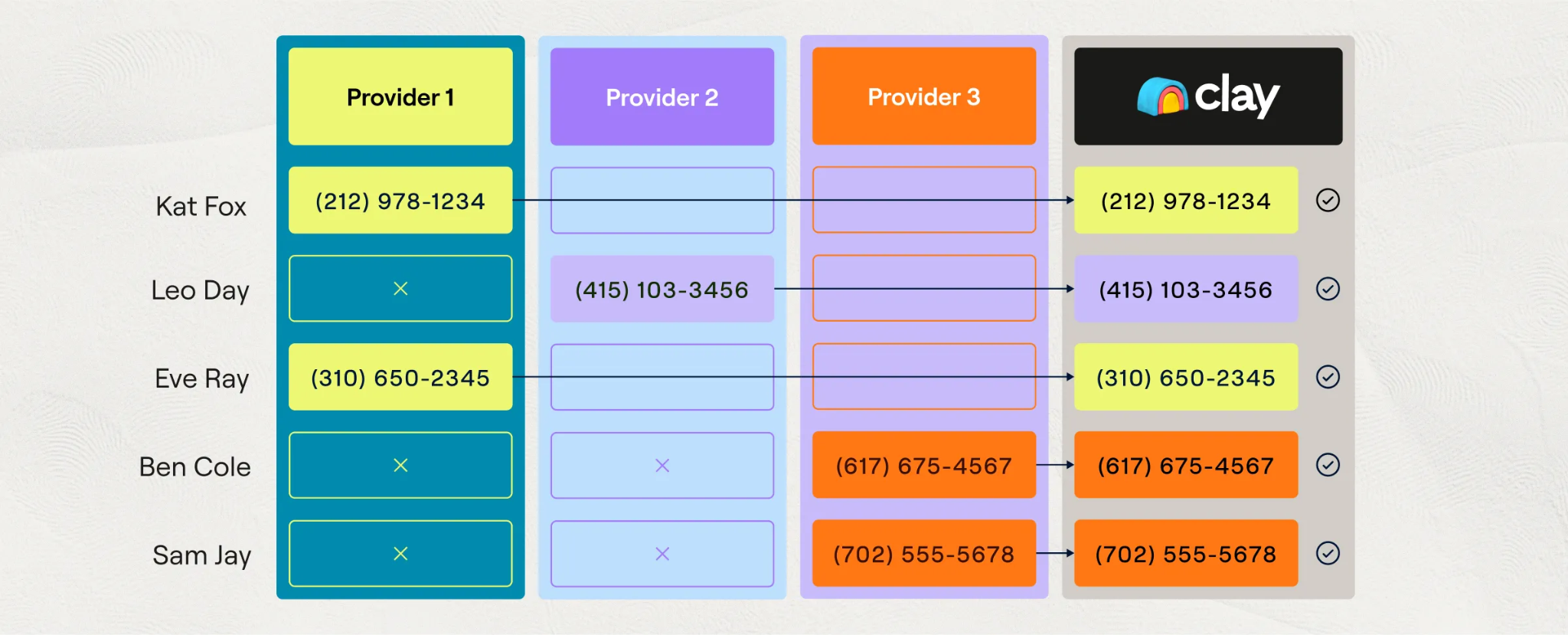
A waterfall calls providers in sequence. It stops at the first validated result. If Provider A finds the email, Providers B and C never run. If A misses, B tries. You pay for what gets found, and coverage ends up well above what any single provider delivers.
Order matters
Put your cheapest, highest-coverage provider first. Fewer rows reach the expensive ones.
Don't order by brand preference. Order by cost and hit rate. Test both on your 25-row sample.
Separate waterfalls for email and phone
Phone data costs considerably more than email. Build two separate waterfalls so you can control each one. A combined "find everything" column hides where your money goes.
Enable phone only where you'll call
Phone enrichment should run on the segment you'll actually dial. If a prospect will only get email and LinkedIn touches, a mobile number is wasted spend. Use a column condition to limit phone lookups to your call tier.
Consider bringing your own API keys
Where Clay supports it, connecting your own provider accounts can cut costs substantially at volume. It adds a bit of setup and billing to manage. It's usually worth it once you're running thousands of rows a month.
End the email waterfall with verification
Don't trust provider output on its own. Add a verification step at the end, using a dedicated verifier such as ZeroBounce or NeverBounce. Keep only emails that come back valid. This protects your sender reputation, which is much harder to repair than a list.
Batch weekly
Run enrichment in weekly batches instead of row by row as records arrive. Batching lets you review a sample, catch errors, and avoid paying for rows that get disqualified an hour later.
Output: coverage well above any single provider, at a controlled cost.
Add AI Research Columns for Context and Personalization
AI columns are where a Clay prospecting tutorial gets interesting. They're also where people burn money the quietest.
What AI columns are good for
- Classifying job titles into your persona buckets
- Checking industry fit when the data is ambiguous
- Summarizing what an account does
- Spotting trigger events like hiring, funding, or launches
Run them only on qualified rows
AI columns are among the pricier operations per row. Put the same ICP Pass condition on them as on every other paid column. Never run AI across an unfiltered table.
Write tight prompts with a defined output
A loose prompt gives you a paragraph you have to edit. A tight prompt gives you something you can drop into a sequence.
Example prompt:
Research {{Company}} using its website and recent news. Answer three things. 1) Does it sell to mid-market B2B companies? Reply Yes or No. 2) Name one trigger from the last 90 days (hiring, funding, launch, leadership change). If none, write NONE. 3) Write one opening line under 20 words that a rep could use. Return JSON with keys: fit, trigger, opener.
Structured output means no cleanup, and it's easy to filter on later.
Use AI for judgment, not for filters
If a simple condition can handle it, use the condition. "Employee count above 50" doesn't need AI. "Does this company look like it sells to enterprise?" does. Every task you move from AI to a formula is credits saved.
One angle per account
Generate one specific outreach angle per account. A long research dump won't get read by the rep or the writer. A single sharp line will.
Spot-check before you trust it
Read 15 to 20 outputs before running the full table. Look for made-up facts, stale news, and wrong company matches. AI sounds confident when it's wrong.
Output: personalization inputs a writer or sequencer can use directly.
Score, Segment and Prioritize the List
A pile of verified contacts isn't a campaign yet. Scoring is what turns it into an automated prospect list that tells your team where to start.
Build a simple scoring model
Keep it to a handful of inputs. For example:
A 100-point scale is easy to explain and easy to adjust.
Tier the list
- Tier A (80+): high-touch, multichannel, custom first lines
- Tier B (50 to 79): standard sequence with personalized openers
- Tier C (under 50): light email-only touch, or hold
Match outreach effort to account value. Don't send your best copy to your worst-fit rows.
Segment by persona and problem
Messaging should change for each persona. A VP of Sales cares about pipeline. A RevOps lead cares about process and data. Split by role, then by problem, and write to each.
Fast-track trigger events
Flag accounts with a fresh trigger for immediate outreach. A funding round or new hire loses its pull in a few weeks. Pull those rows out and move them first.
Document the logic
Write down how the score works in a notes column or a doc. The next person will thank you. So will you, three months from now.
Output: tiered segments in priority order, not one undifferentiated list.
Export and Push to Your Outreach Tool
You've done the hard part. Don't lose the list at the last mile.
Clay lead generation is only worth it if the data lands cleanly in your sender, dialer, or CRM.
Pre-export checklist
- Verify every email. Do this regardless of provider confidence scores.
- Map fields to your sequencer or CRM, including every personalization variable your copy uses.
- Check for blank variables. An empty {{opener}} is the most common reason emails look broken.
- Attach signal context (trigger, angle, tier) so outreach can reference it.
Field mapping example
Clean company names matter more than people expect. "Acme Inc., LLC" in a subject line looks automated.
Refresh on a schedule
Don't reuse the same export for months. People change jobs and addresses go dead. Re-run verification on a schedule and re-export fresh rows.
Keep Clay as the source of truth
Make edits in the Clay table, then re-export. If you fix things downstream in the sequencer, your next export will overwrite or contradict them.
Output: a verified, segmented, campaign-ready list.
Mistakes That Waste Clay Credits
Most overspend comes from the same ten mistakes. Here they are, with the fix for each.
Quick checklist before you build a prospect list with Clay
- ICP is written down
- First table is under 50 rows
- Auto-update is off
- Paid columns have conditions
- Phone is limited to the call tier
- Verification is the last step
Why a Managed Lead Generation Program Beats Running Clay Yourself

Clay is genuinely powerful. It's also a system that rewards an operator. Someone has to design waterfalls, watch credit burn, and rebuild tables as your ICP sharpens. The real cost isn't just the subscription. It's the credits, provider keys, a sending tool, and the hours of whoever maintains all of it every week.
At Cleverly, we run this category of stack every day as a B2B lead generation agency. We handle ICP definition, multi-source verified list building, LinkedIn outreach, cold email, cold calling, and reply handling through to booked meetings. You skip the credit management and the learning curve. You get meetings, not an enriched spreadsheet.
Data quality is where we put the most effort. Everything goes through multi-source enrichment and verification before anything sends.
We optimize for qualified meetings held, not list volume or enrichment coverage. Across our client work, that approach has produced 224.7K leads and $312M in pipeline.
Spending more time on tables than talking to prospects? Book a strategy call with Cleverly.
Conclusion
Clay builds excellent lists when the workflow is ordered correctly. Qualify first, enrich second. Waterfall order and field selection decide most of your cost. AI columns add real value, but only on rows that already passed your ICP filter.
Your next step is simple. Build one small table end to end and check the credit cost per usable contact. Then scale. And remember, the list is never the deliverable. When you build a prospect list with Clay, judge the work by replies and meetings, not row count.
Frequently Asked Questions
Free Resource
How to Scale a Profitable Cold Call System
Get the complete guide — download it instantly now.

Free Ebook
Download the Free Guide
Enter your details to get instant access.
You're all set! 🎉
Your ebook is downloading now.
Click below if the download didn't start automatically.


