Table of Contents
What Good B2B Account Research Actually Covers
What Claude Does Well in Account Research (And What It Can't)
The Account Research Workflow, Step by Step
Claude Prompts for Account Research
Turning Research Into a Brief Reps Actually Use
How to Keep AI Account Research Accurate
Where Account Research Fits in Your Outbound Process
How Cleverly Builds Research Into Outbound at Scale
Conclusion
Frequently Asked Questions
Modified On :
October 5, 2026
Key Takeaways
- Account research only earns its place in outbound if it changes your message or your timing. Anything else is wasted effort.
- Claude's real value is synthesis, not data access. It turns scattered information into a usable picture, but it can't verify facts or pull private data on its own.
- A repeatable workflow (context, sources, company picture, triggers, buying committee, angle, brief) beats ad hoc prompting every time.
- Treat Claude's output as hypotheses to confirm, not facts to ship. Names, titles, and numbers need a second check before they go in an email.
- Match research depth to account value. Light-touch synthesis for your broad list, deeper briefs reserved for accounts that are actually worth the extra ten minutes.
You can tell within two sentences whether a rep did real research or just mail-merged your company name into a template. So can everyone else.
Personalized outreach generates up to 142% more replies than generic sends, and AI-personalized messages built around real buying signals are now landing reply rates in the 15-25% range, compared to roughly 3% for standard cold email.
Research is no longer a nice-to-have step before outreach. It's most of what separates a reply from a delete.
The problem was never that reps didn't know this. It's that real research takes 10 to 20 minutes per account, and nobody has that kind of time across a 500-account list.
Claude for account research doesn't fix the time problem by giving you new data. It fixes it by handling the synthesis step, the part where you turn ten open tabs into one clear picture of who you're calling and why now.
This guide covers one thing well: going deep on a single account, not building a list (we've got a separate guide for that). You'll get what to research, a step-by-step workflow, copy-paste prompts, a brief template, and the accuracy checks that keep AI research from embarrassing you in an email.
What Good B2B Account Research Actually Covers
Most people research aimlessly because they never decided what output they needed first. Before you open a single tab, decide what the research has to produce: a trigger to reference, an angle to pitch, or a name to address. Everything else is noise.
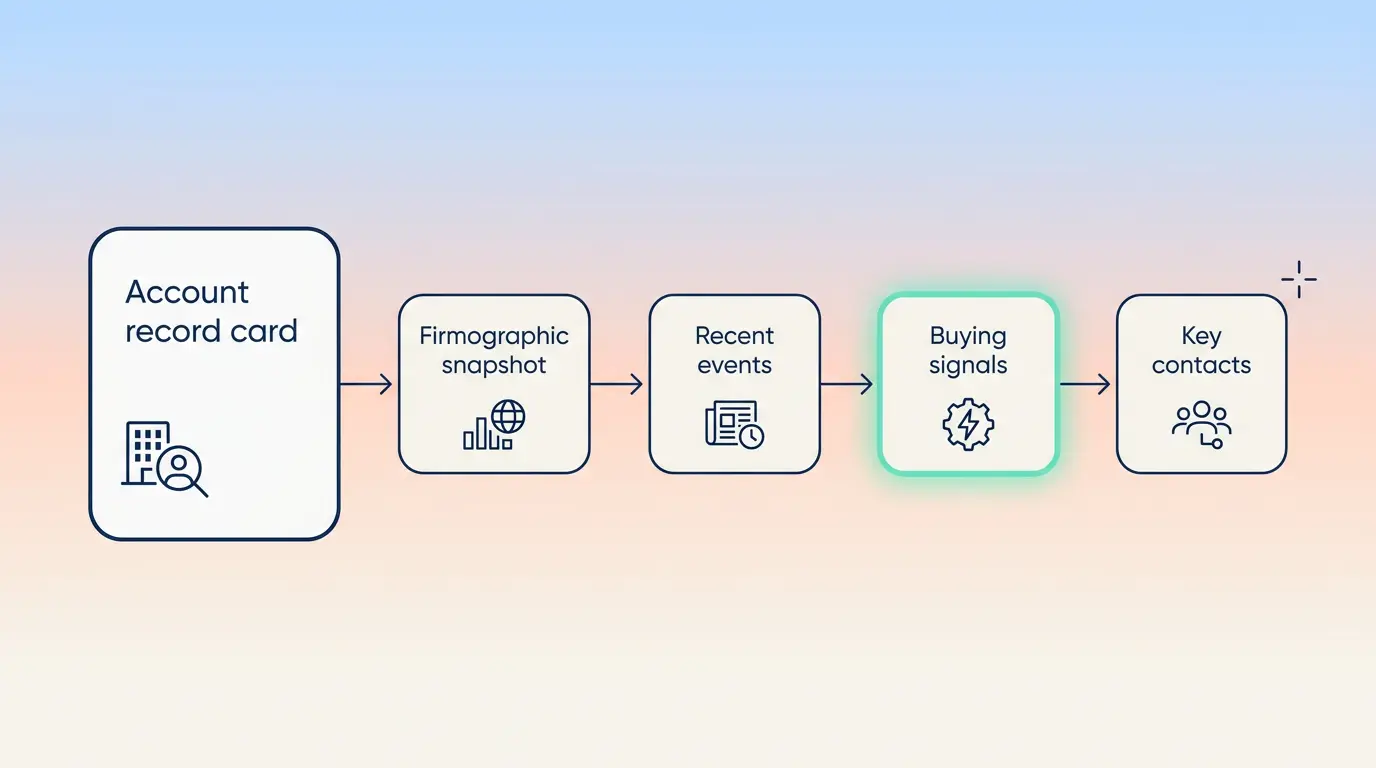
Here's what actually belongs in solid B2B prospect research:
1. Company context. What do they sell, to whom, and at what size and stage? A 40-person Series A startup and a 4,000-person public company need completely different messaging, even if their job titles match.
2. Trigger events. Funding rounds, leadership changes, expansion into new markets, product launches, hiring surges. These are your reason to reach out now instead of next quarter.
3. Buying committee. Who's the economic buyer, who's the champion, who's the technical evaluator, and who's likely to block the deal. Each of these people needs a different message.
4. Current state. What tools do they already use, where are the visible gaps, and how are they solving your problem today without you?
5. Competitive position. Who do they compete against, and where are they under pressure? A company losing market share behaves differently than one riding a tailwind.
6. Prior engagement. Have they visited your site, downloaded content, or had a past touch with your team? Context like this should shape your opening line.
The filter that keeps this from turning into a research rabbit hole: every item on this list should either change your message or change your timing. If a fact doesn't do one of those two things, skip it and move on.
🔎 Research Smarter. Sell Better.
Cleverly combines AI with proven prospecting to help 10,000+ businesses find and reach high-fit B2B buyers.
What Claude Does Well in Account Research (And What It Can't)
Where Claude Is Genuinely Strong
Claude is built to hold a lot of context at once and make sense of it. In practice, that means it's good at:
- Synthesizing large volumes of source material into one coherent summary instead of ten disconnected facts.
- Holding an entire account's research in a single conversation: earnings reports, LinkedIn posts, job ads, call transcripts, all at once.
- Inferring a likely buying committee from org structure and job titles, even when nobody published an org chart.
- Turning raw research into a specific outreach angle instead of a generic summary.
- Producing consistent, structured briefs at volume, so account #40 reads the same way as account #1.
Where It Falls Short
This is where people get burned, so it's worth being direct:
- Claude doesn't have live access to private or paywalled data unless you connect a source or paste it in yourself.
- Public web information can be stale, and Claude won't always flag that it's working from an old snapshot.
- It can produce confident-sounding inferences that are not verified facts, and the confidence makes them easy to mistake for research.
- It can't verify contact details. Inventing an email address or a phone number is the single biggest risk in AI account research.
- It won't replace an actual conversation. Some things you only find out by asking the prospect directly.
The Right Mental Model
Think of Claude as the synthesis layer, not the data layer. You supply or connect the sources. Claude turns them into something a rep can actually use. That means your research quality is capped by your input quality, not by how clever your prompts are. Feed it thin sources, get a thin brief back.
The Account Research Workflow, Step by Step
Here's the full process, using an example: you're prospecting into Brightline Freight, a mid-market logistics software company that just raised a Series B and is hiring aggressively in engineering.
Step 1: Give Claude Your Context First
Before you ask about Brightline, tell Claude who you are and what you sell. Say you sell a deliverability monitoring tool for outbound teams, targeting VP Sales and RevOps leaders at 100-500 employee B2B companies, and a good-fit account is one that's scaling its own outbound function.
Without this, Claude gives you a neutral company overview. With it, Claude already starts filtering Brightline's situation through "does this look like a company about to run into deliverability problems."
Step 2: Gather the Source Material
Pull Brightline's website, their Series B funding announcement, their open job postings (three SDR roles, two engineering roles), and their LinkedIn page. Paste these in directly, or connect your CRM and a web browsing source so Claude can pull from them in one pass instead of five separate copy-paste rounds.
Step 3: Build the Company Picture
Ask Claude for the commercially relevant summary: Brightline sells freight-matching software to mid-size carriers, raised $18M in Series B six weeks ago, and is scaling go-to-market fast based on the SDR job postings.
If Claude comes back with something generic like "Brightline is a growing logistics company," push back: ask specifically what the funding round was earmarked for, based on the announcement language, and what the SDR postings say about their current outbound maturity.
Step 4: Identify Trigger Events
The Series B and the three open SDR roles are your triggers. Ask Claude to rank them by relevance to what you sell. The SDR hiring surge ranks higher than the funding round itself, since a company standing up a new outbound team is exactly who runs into deliverability issues in month two or three.
Step 5: Map the Buying Committee
Ask Claude to infer roles from Brightline's LinkedIn page and job postings. It should surface something like: VP Sales (likely economic buyer, posted about "scaling outbound" last month), Head of RevOps if one exists (likely champion, owns the tech stack), and the newly hired SDR manager (technical evaluator, will actually use the tool day to day).
Step 6: Find the Angle
This is where it comes together. Ask Claude to connect your deliverability tool to Brightline's specific situation: they're about to send cold email at volume for the first time with three new SDRs, and most teams don't think about sender reputation until it's already damaged. That's your angle, not "we help with deliverability."
Step 7: Produce the Brief
Output a one-page brief: Brightline snapshot, the SDR hiring trigger, the three likely buyers, the angle above, and one ready-to-send opening line referencing the new SDR hires specifically. Keep it to one page. A three-page brief on Brightline doesn't get read before the call.
🚀 Turn Research Into Pipeline
With 224.7K+ leads generated, 53,000+ meetings booked, and $312M+ pipeline, Cleverly helps B2B teams turn account insights into qualified conversations.
Claude Prompts for Account Research
Each prompt below includes the exact fields to fill in and what good output looks like, so you're not guessing whether the response is usable.
1. Context-setting prompt
"We sell [specific product, one sentence]. Our ICP is [company size range] companies in [industry/vertical], and we typically sell to [buyer titles]. A good-fit account for us shows these signals: [2-3 concrete signals, e.g. 'recently hired their first outbound SDRs' or 'uses a CRM but no dedicated sales engagement tool']. Keep this in mind for everything I ask about in this conversation, and flag it if an account I bring you doesn't match this profile."
Fill in: your actual product in one sentence, real ICP parameters, and signals specific enough that Claude could actually check for them in research, not vague ones like "growing fast."
Good output looks like: Claude restating your ICP back in its own words and asking a clarifying question if anything's ambiguous, not just saying "got it."
2. Company overview prompt
"Here's what I know about [company name]: [paste website copy, funding announcement, or LinkedIn About section]. Summarize their business model, company size, growth stage, and current priorities in under 150 words. Don't include generic company history or mission statement language. If the source material doesn't mention something, say so instead of inferring it."
Fill in: the actual pasted source material, not a link Claude can't access unless you've connected a browsing tool.
Good output looks like: specific facts tied back to the source ("per their Series B announcement, funding is earmarked for go-to-market expansion"), not a paraphrase of their homepage tagline.
3. Trigger event prompt
"Based on this source material [paste job postings, news, LinkedIn activity], list every change at [company] from the last 6 months that could signal a buying trigger. For each one, rate it high, medium, or low relevance to [your specific offer], and explain the reasoning in one line."
Fill in: your offer specifically enough that the relevance rating means something. "A deliverability tool" works. "A sales tool" doesn't give Claude enough to rank against.
Good output looks like: a ranked list with reasoning, not just a list of events. If Claude ranks a stale trigger as high-relevance without explaining why, ask it to redo the reasoning.
4. Buying committee prompt
"Based on [company]'s job postings and LinkedIn presence [paste the specific postings and any team page info you have], who is the likely economic buyer, champion, and technical evaluator for a [category, e.g. 'sales deliverability tool']? For each role, name the likely title, one thing they probably care about based on what you can see, and whether this is a confirmed fact or your inference."
Fill in: your actual source material on their team, not just the company name. Claude can't infer an org chart from nothing.
Good output looks like: Claude explicitly labeling guesses as guesses ("likely VP Sales, inferred from the LinkedIn job posting language, not confirmed").
5. Competitive context prompt
"Based on [company]'s public positioning and recent news, who do they likely compete against in [their category], and is there any visible sign of competitive pressure, like a pricing change, a notable customer loss, or a pivot in messaging?"
Fill in: their category specifically, so Claude isn't guessing at competitors from a different market.
Good output looks like: named competitors with a reason, not a generic "they operate in a competitive space" non-answer.
6. Outreach angle prompt
"Here's our offer: [one sentence]. Here's what we know about [company]: [paste the trigger and buying committee findings from above]. Give me one specific angle connecting our offer to their actual situation, not a generic value proposition. Then write one opening line for a cold email that uses this angle without sounding like a template."
Fill in: the real findings from steps 3-5, not just the company name again. This prompt is only as good as what you feed it.
Good output looks like: an angle that references something specific to this account (the SDR hiring, the funding earmark) rather than something that could apply to any company in their industry.
7. Call prep prompt
"Based on everything above on [company], what are the two most likely objections I'll hear on a first call, and what two questions should I ask in the first five minutes to confirm this is actually a good-fit account?"
Fill in: nothing extra needed if you're running this in the same conversation as the steps above, since it pulls from that context automatically.
Good output looks like: objections tied to their specific situation (e.g. "they may say they're not ready to add new tools mid-ramp"), not generic objections like "budget" or "timing" with no connection to the account.
Turning Research Into a Brief Reps Actually Use
A pile of research notes doesn't help anyone close a deal. A brief does, but only if it's constrained. Keep it to one page, scannable, and identical in structure across every account so reps don't have to relearn the format each time.
A workable structure looks like this:
Two things make this template actually trustworthy instead of just tidy:
Separate facts from inferences explicitly. If Claude inferred the buyer's priorities from a job title rather than confirming them, say so in the brief. Reps need to know what's verified and what's a guess before they build a pitch around it.
Include the source for anything you'd quote in outreach. If you're referencing a funding round or a quote from a press release, note where it came from so it can be checked in ten seconds, not ten minutes.
Standardize this across your team so briefs are comparable, and store them somewhere everyone can find, not buried in individual chat histories where the next rep who touches the account has to start over.
How to Keep AI Account Research Accurate
This is the part that actually protects your reply rates and your reputation. Here's the practical checklist:
- Verify anything you'd state as fact in outreach, especially names, titles, numbers, and dates. A wrong title in the first line kills the email before it gets read.
- Treat inferences as hypotheses to confirm on the call, not as established facts you build a pitch around.
- Check recency on anything time-sensitive. Leadership changes and funding details go stale fast, and a reference to an outdated CEO is an instant credibility hit.
- Never let Claude supply contact details it didn't retrieve from a connected source. If it offers an email address it clearly guessed at, don't use it.
- Cross-check high-value accounts against a second source before you send anything. A few extra minutes on your top 20 accounts is cheap insurance.
- Build the habit of asking Claude directly to flag its confidence level and name what it doesn't know. This one prompt habit catches most of the risk above.
The asymmetry here is worth remembering: a wrong detail in a first email costs you more than a missing one. When in doubt, leave it out rather than guess.
Where Account Research Fits in Your Outbound Process
Not every account deserves the same depth of research, and treating them all the same wastes time on the wrong accounts. Match research depth to account value: a few minutes of synthesis for mid-market volume, a deeper brief for enterprise or named accounts where a single meeting matters.
A practical tiered approach looks like light personalization across your broad list and deep briefs reserved for priority accounts. Research belongs before sequencing, not after, since the angle you find should shape the message, not get bolted onto a template that was already written.
Refresh briefs before meetings rather than relying on research you pulled weeks earlier. Things change fast enough that a two-week-old brief can already be wrong. And feed call outcomes back into your process so the next brief gets sharper instead of repeating the same gaps.
The honest limit here: research raises reply rates on a good list. It does not rescue a bad one. If your targeting is off, no amount of personalization fixes that underlying problem.
How Cleverly Builds Research Into Outbound at Scale

The workflow above is straightforward to run on ten accounts. It breaks down at a thousand, not because the method stops working, but because consistency across months of campaigns is a different problem than one good brief.
The real gap most teams hit isn't research quality. It's that research only pays off when it reaches the right person, carries verified data, and actually lands in the inbox instead of a spam folder. That's three separate problems, and most teams solve one of them.
This is the part of outbound Cleverly runs end to end: ICP definition and verified list building, account research built directly into messaging, and execution across LinkedIn outreach, cold email, and cold calling, through to reply handling and booked meetings.
We use AI for exactly the synthesis layer described in this guide, paired with trained people who write the actual outreach angle and handle the replies that come back. In practice that means lighter personalization across the broad list and deeper research on priority accounts, the same tiered approach covered above, but run consistently across hundreds of accounts a month.
Our campaigns have generated 224.7K leads and $312M in client pipeline across industries, because the team optimizes for qualified meetings held, not research volume for its own sake.
Researching accounts but still not booking meetings? Book a strategy call with Cleverly.
Conclusion
Claude compresses the slowest part of outbound: turning scattered, disconnected information into a usable reason to reach out. But it only works if you give it your context first. Skip that step and you get a summary. Include it and you get a sales brief.
Verify anything you'd state as fact, and never trust a contact detail Claude didn't pull from a real source. Your next move is simple: build one brief template, run it on five target accounts this week, and compare the reply rates against your usual outreach.
Claude for account research doesn't replace judgment, but it removes the excuse for sending another generic email. The advantage in outbound right now goes to whoever turns research into a specific, timely reason to reach out, not whoever researches the most.
Frequently Asked Questions
Free Resource
How to Scale a Profitable Cold Call System
Get the complete guide — download it instantly now.

Free Ebook
Download the Free Guide
Enter your details to get instant access.
You're all set! 🎉
Your ebook is downloading now.
Click below if the download didn't start automatically.