

Table of Contents
What Clay and Apollo Each Do (And Where They Overlap)
Why Use Clay and Apollo Together Instead of Just One
How to Connect Apollo to Clay (Setup Walkthrough)
The Clay + Apollo Workflow: From ICP to Campaign-Ready List
What Running Clay and Apollo Together Actually Costs
When One Tool Is Enough and You Don't Need Both
Common Clay and Apollo Mistakes That Waste Credits
How Cleverly Delivers Lead Generation Without You Managing the Stack
Conclusion
Frequently Asked Questions
Modified On :
October 2, 2026
Key Takeaways
- Apollo and Clay aren't rivals fighting for the same job. Apollo supplies contact data, Clay decides what to do with it and where else to look when Apollo comes up empty.
- Waterfall enrichment, running Apollo and backup providers in sequence, is the single biggest reason teams run both tools instead of picking one.
- ICP filtering has to happen before enrichment, not after. Enriching records you were never going to contact is where most of your credit budget quietly disappears.
- The two tools price completely differently. Apollo charges per seat, Clay charges per credit and action, so the "cheaper" option flips depending on your team size and list volume.
- A Clay and Apollo stack only pays off when someone owns it. Without a dedicated operator, you end up with an expensive, half-maintained list instead of a working pipeline.
Here's a conversation that plays out in RevOps Slack channels every week: "Should we get Clay or Apollo?" The question itself is the problem. It assumes you're picking one.
In practice, most serious outbound stacks run both, just not for the same reason. Research shows 89.9% of B2B companies now use two or more data tools just to research prospects before making contact, and that number keeps climbing as single-source databases hit their coverage limits.
Separately, reps still report spending around 40% of their week hunting for the right people to call instead of actually calling them, which is exactly the time sink Apollo and Clay are each trying to shrink from a different angle.
So here's the honest answer upfront: you probably don't need both. Some teams do fine on Apollo alone. Others only need Clay because they already have data sources elsewhere. But if you're scaling outbound and hitting the ceiling on one tool, combining them is one of the more common moves in modern B2B data stacks.
This guide covers what each tool actually does, why they complement each other, how to connect them, the full workflow from ICP to campaign-ready list, what it really costs, and when you genuinely don't need both.
It's written for SDRs, growth marketers, and RevOps teams building or auditing their data stack, not for beginners trying to understand what lead generation is.
What Clay and Apollo Each Do (And Where They Overlap)
People compare Clay and Apollo like they're interchangeable. They're not. One is a data source. The other is a decision layer.
Apollo
Apollo is a contact database with sequencing, a dialer, and CRM sync built in. You search for people by title, seniority, industry, and company size, and Apollo hands you verified (or supposedly verified) contact info straight from its own database.
It's sold per seat, with credits bundled into each plan tier.
Strengths:
- Broad B2B coverage across most industries.
- Genuinely all-in-one for a small team: database, sender, and dialer in one login.
- Low entry cost, with a usable free tier and paid plans starting around $49 per seat per month on annual billing.
Limits:
- It's a single data source. When Apollo doesn't have a contact's email or mobile number, there's no fallback. You get a blank cell, not a second attempt.
- Full API access and the more advanced integrations sit behind the higher Organization tier, which has a three-seat minimum, so lighter teams often hit access walls before they hit volume walls.
Clay
Clay isn't a database. It's an orchestration and enrichment layer that calls dozens of data providers, Apollo included, and lets you build logic around what happens to each record.
It's sold on Data Credits (for buying enrichment data) and Actions (for running workflow steps), not seats. Clay repriced in March 2026, replacing its old Starter, Explorer, and Pro tiers with a simpler Free, Launch (185/month),andGrowth(495/month) structure, plus custom Enterprise contracts. That means your Clay bill scales with how much list you're processing, not how many people are logged in.
Strengths:
- Waterfall enrichment across many providers at once.
- AI research columns that pull in context no static database holds, like recent funding, job changes, or trigger events.
- Granular ICP filtering before anything moves downstream.
Limits:
- Clay can't send anything. No sequencing, no dialer. You still need Apollo, Instantly, Smartlead, or a dialer on the other end.
Why They're Complementary
Here's the one-line version: Apollo is one source. Clay is the logic that decides what to do with every source, including Apollo.
Clay doesn't replace Apollo's data. It makes Apollo one input among several, which is a meaningfully different job.
🎯 Build Better Lead Lists
Cleverly combines targeting, list building, and personalized outreach to help B2B teams generate 15–30 qualified meetings every month.
Why Use Clay and Apollo Together Instead of Just One
If Apollo alone covered your market with 95%+ match rates and your list sizes were small, you wouldn't need Clay. Most teams aren't in that position. Here's what running them together actually buys you.
Waterfall enrichment. When Apollo has no email on file for a contact, Clay automatically tries the next provider in line, then the next. You're not stuck with a blank row just because one database missed a record. This alone is usually the deciding factor for teams who add Clay on top of Apollo.
Higher match rates than any single source. No database, Apollo included, covers every market equally well. Stacking providers closes the gaps that cost you real contacts every month.
Pay-per-result economics. Clay's current pricing model doesn't charge Data Credits for lookups that fail, so you're not burning budget chasing contacts that don't exist in any provider's database.
AI research columns add context Apollo doesn't hold. Trigger events, qualitative fit notes, one-line account summaries, the kind of thing an SDR used to Google manually before a call. Clay can generate this at scale, per row.
Aggressive ICP filtering before anyone enters a sequence. This protects deliverability. Sending to loosely-qualified records is one of the fastest ways to tank a domain's sender reputation.
One source of truth before records hit your CRM or sender. Instead of exporting raw Apollo CSVs into three different tools, Clay gives you one clean, deduplicated, scored table as the handoff point.
How to Connect Apollo to Clay (Setup Walkthrough)
Let's walk through this with a real scenario. Say you're on a 4-person growth team at a Series B cybersecurity company, and you want to pull IT Director and CISO contacts from Apollo into Clay so you can run them through a waterfall before they hit your sequencer.
1. Check your Apollo plan before you touch anything else.
This is the step people skip, and it's the one that causes the most wasted time. Full API access on Apollo is typically locked behind the Organization tier, which has a three-seat minimum. If you're on Basic or Professional, log into Apollo's settings and confirm what level of API access you actually have. There's nothing worse than building a Clay table around Apollo as your primary source, only to find out mid-build that your plan caps you at a few hundred API calls a month.
2. Generate your Apollo API key.
Inside Apollo, go to Settings, then Integrations, and generate an API key. Treat this like a password. If multiple people on your team will be building in Clay, use a shared workspace key rather than someone's personal one, so the integration doesn't break the day that person changes roles or leaves.
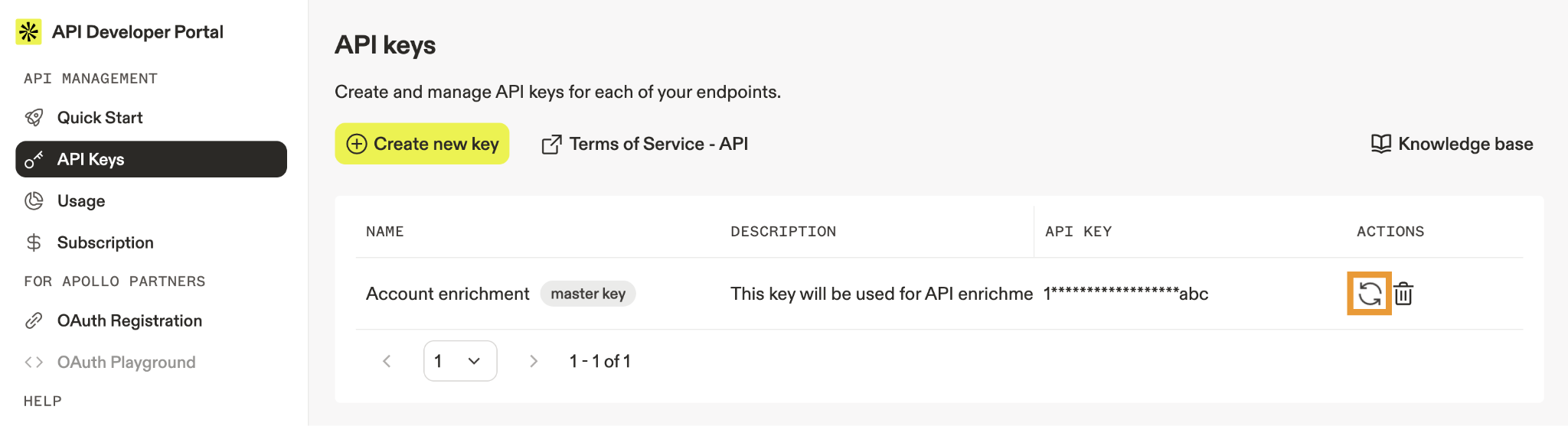
3. Add Apollo as a provider inside Clay.
In Clay, go to your integrations panel and connect Apollo using the API key from step 2. Once it's connected, Apollo shows up as a selectable provider anywhere you build an enrichment column.
4. Build a small test table first.
Don't start with your real target list. Create a table with 20 to 30 sample contacts, say, IT Directors at cybersecurity companies you already know, and run them through an Apollo enrichment column. This tells you two things fast: whether the API connection is actually working, and roughly what your match rate looks like on this specific persona before you commit real budget.
5. Watch your credit burn on both sides during the test.
This is the part that catches teams off guard. You're spending two separate currencies at once: Apollo credits on one side, Clay's Data Credits and Actions on the other. On your 20 to 30 record test, note how many Apollo credits got consumed and how many Clay credits it took to run the enrichment step. Multiply that out to your real list size (say, 3,000 contacts) before you run the full table.
If your test used 25 Apollo credits for 25 contacts but burned 150 Clay Actions in the process (because the workflow has multiple steps per row, like a title classification step plus the enrichment step plus a verification step), you now know your real cost per 1,000 contacts before you've spent a dollar on the full run.
6. Only then, scale to your full list.
Once the test confirms match rates and cost per record look reasonable, point the same workflow at your actual target list. If something looks off (a sudden drop in match rate, a spike in credit use), you catch it on 30 rows instead of 3,000.
🚀 Turn Data Into Pipeline
With 224.7K+ leads generated, 53,000+ meetings booked, and $312M+ pipeline, Cleverly helps 10,000+ businesses turn better prospect data into sales opportunities.
The Clay + Apollo Workflow: From ICP to Campaign-Ready List
Let's run the same cybersecurity company example through the full workflow, start to finish, so you can see how each step actually connects to the next.
Step 1 — Define the ICP and Source Companies
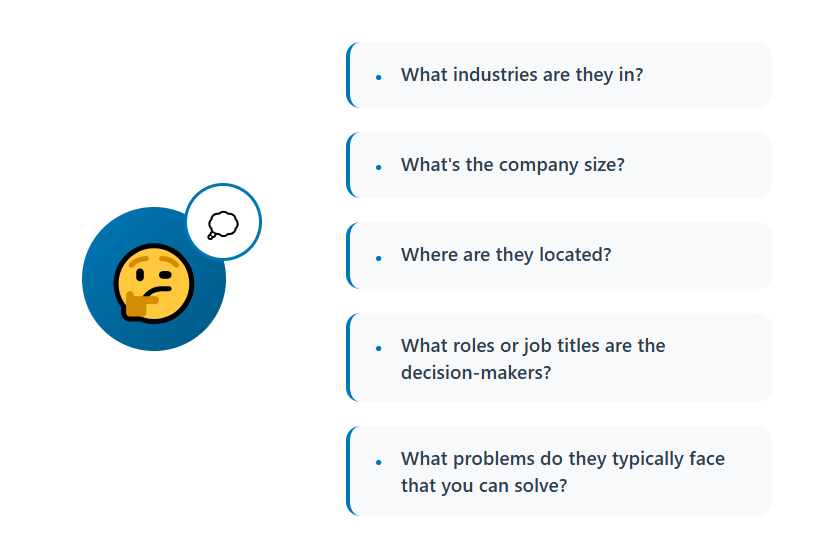
Your ICP: cybersecurity and IT services companies, 200 to 1,000 employees, US-based, using at least one of three specific compliance frameworks (SOC 2, HIPAA, or ISO 27001) as a buying trigger.
Pull companies matching this profile from Apollo's company search, filtering by employee count, industry, and location. Export that list into a company-level table in Clay. At this stage you have, say, 400 companies, no people yet, just accounts worth targeting.
Step 2 — Find the Right Contacts
For each of those 400 companies, use Apollo to pull contacts matching your buyer personas: IT Director, VP of IT, CISO, or Head of Security. Set a filter for seniority (director level and above) so you're not pulling in analysts or interns who happen to have "IT" in their title.
Output: roughly 800 to 1,200 named contacts, two to three per account, mapped back to their company row.
Step 3 — Build the Email Waterfall
Here's where the orchestration layer does its job. Set Apollo as your first enrichment provider in the column. If Apollo returns an email, Clay keeps it and stops there, no extra cost. If Apollo comes back empty (which happens more often than you'd expect for smaller or more security-conscious companies that scrub their public contact info), Clay automatically tries your second provider, then a third if needed.
On a typical run like this, you might see Apollo alone resolve emails for around 55 to 65% of contacts. Adding two fallback providers in the waterfall often pushes that to 80% or higher, without you doing anything manually for the records Apollo missed.
Step 4 — Add a Phone Waterfall
Same logic, for mobile numbers, since your cold calling motion needs direct dials, not switchboard numbers. Apollo first, then your fallback providers. For this persona (security leaders at mid-market companies), expect phone match rates to run lower than email, often in the 30 to 45% range even after waterfalling, since direct mobile numbers are harder to source at this seniority for security-focused companies. That's normal. Don't expect phone coverage to match email coverage.
Step 5 — Layer AI Research Columns
This is where Clay earns its cost over a plain Apollo export. Add columns that:
- Check whether the company's job postings mention any of your three compliance frameworks (a genuine buying signal).
- Summarize the account in one line using whatever public data is available (funding stage, recent news, headcount growth).
- Flag if the contact has posted or commented on LinkedIn about security tooling in the last 90 days.
None of this comes from Apollo's database. It's Clay calling an AI model against the enriched data you've already pulled, turning raw fields into something an SDR can actually use in a first line.
Step 6 — Filter and Score
Now cut the list down. Drop any company outside your 200 to 1,000 employee range that slipped through. Suppress anyone already in your CRM as a customer, an open opportunity, or a contact from a dead deal in the last 6 months. If you sell against specific competitors, suppress their employees too.
Out of your original 800 to 1,200 contacts, this step typically trims the list by 20 to 35%, not because the data was wrong, but because "technically matches the ICP" and "worth contacting right now" are two different bars.
Step 7 — Verify and Export
Run every remaining email through a verification step before export, confirming they're not just formatted correctly but actually deliverable. Then route the finished table to your sequencer for email, your dialer for calls, and your CRM, with the AI research notes attached so reps see the context, not just a name and a phone number.
End result: instead of a raw 1,200-row Apollo export with blank cells and no context, you have a verified, scored list of maybe 500 to 600 contacts that reps can actually work, each one with a reason attached for why they're on the list.
What Running Clay and Apollo Together Actually Costs
The two pricing models work on completely different logic, which is exactly why "which one is cheaper" doesn't have a single answer.
Apollo charges per seat: Free, Basic around $49/seat/month, Professional around $79/seat/month, and Organization around $119/seat/month on annual billing, with credits bundled into each tier.
Clay charges per credit and action, with 2026 self-serve pricing running Free, Launch at $185/month, and Growth at $495/month, each with its own Data Credit and Action allotment, plus custom Enterprise contracts above that.
What that means in practice:
A few practical notes: Apollo tends to be cheaper for a one- or two-person outbound motion. Clay's flat, seat-free pricing becomes more competitive as your team grows, since you're not paying per login. But Clay's cost scales with how much you enrich, so a large table with deep waterfalls and heavy AI research use gets expensive fast, regardless of headcount.
Running both means two subscriptions, plus any fallback data providers in your waterfall. Model your real monthly cost against your actual list volume, not the plan's headline numbers, and set credit guardrails before you run a full table rather than after you've blown through the budget.
When One Tool Is Enough and You Don't Need Both
This is the part most content skips because it doesn't sell more tools. Here's the honest breakdown.
Apollo alone is enough when:
- Your volume is modest and your ICP is straightforward.
- Apollo's native coverage already holds up well in your specific market.
- You don't have the bandwidth to maintain a second tool.
Clay alone is enough when:
- You already have data sources and a sending tool.
- You only need the orchestration and filtering layer on top of what you have.
Neither is strictly necessary when:
- Your total addressable market is small enough to research by hand without burning your week.
Signs you've actually outgrown Apollo alone: poor match rates in your specific niche, no fallback when a contact isn't in Apollo's database, and no real way to filter on qualitative criteria like trigger events or account fit.
Signs Clay would be overkill for you right now: a simple, well-defined ICP, low monthly volume, and nobody on the team with the time to build and maintain tables.
The honest framing here: both tools reward someone who operates them regularly. That person has to actually exist on your team, or the stack becomes dead weight fast.
Common Clay and Apollo Mistakes That Waste Credits
1. Running a full table before testing on a sample. A broken enrichment step at 5,000 rows is a very different (and much more expensive) problem than the same mistake at 50.
2. Skipping the ICP filter. Enriching records you were never going to contact is the fastest way to burn through a credit budget for nothing.
3. Treating enrichment output as verified. Enrichment and verification are two different steps. Skip the second one and your bounce rates will tell you about it later.
4. Over-building tables with columns nobody actually uses. Every extra enrichment column is extra credit spend, whether or not anyone looks at it.
5. Forgetting suppression logic. Without it, existing customers and open deals end up back in a cold outreach sequence.
6. Letting the stack become one person's undocumented system. When that person leaves or goes on vacation, nobody can touch the tables.
7. Measuring list size instead of meetings booked. A bigger enriched list isn't the goal. A fuller calendar is.
How Cleverly Delivers Lead Generation Without You Managing the Stack

Everything above is a genuinely effective workflow, and it's also a system that needs a full-time owner. Someone has to build the tables, watch the credits, maintain the waterfalls, and iterate every week when match rates slip or a provider changes its API. The real cost of a Clay and Apollo stack isn't just two subscriptions. It's the hours of whoever has to run it well.
We built Cleverly around a different starting point: deliver the outcome, not the tooling. Instead of handing you an enriched spreadsheet, we run ICP definition, multi-source verified list building, LinkedIn outreach, cold email, and cold calling end to end, through to booked meetings on your calendar.
We already operate this category of data stack internally, which means you get the output without owning the subscriptions, the credit management, or the learning curve that comes with either tool.
Data quality is where this actually shows up. Multi-source enrichment and verification happen before anything goes out the door, which is a direct reason we've generated $312M in client pipeline across the accounts we've run campaigns for. What we optimize for is qualified meetings held, not list volume or enrichment coverage.
Rather have booked calls than another tool to babysit? Get a free consultation with Cleverly and see what a done-for-you pipeline looks like for your team.
Conclusion
Clay and Apollo aren't really competitors once you look at what each one does. Apollo supplies the data. Clay decides what to do with it, including when to look somewhere else. Waterfall enrichment and ICP filtering are the two features that actually justify running both, not just having more tools for the sake of it.
Cost scales completely differently between the two, so model it against your real list volume before you commit to anything. A good next step: test the waterfall on a sample of 100 records and compare match rates against what Apollo delivers on its own. If the lift is real, scale it. If it's marginal, you may not need the second tool at all.
Either way, remember the stack only pays off if someone actually owns it. Otherwise you've just built an expensive list that nobody acts on.
Frequently Asked Questions
Free Resource
How to Scale a Profitable Cold Call System
Get the complete guide — download it instantly now.

Free Ebook
Download the Free Guide
Enter your details to get instant access.
You're all set! 🎉
Your ebook is downloading now.
Click below if the download didn't start automatically.


