Table of Contents
What Claude Can (and Can't) Do for Prospecting
What You Need Before You Start
The 8-Step Workflow to Build a Prospect List in Claude
Claude Prompts for Prospecting (Copy and Adapt)
How to Keep the List Accurate
Common Mistakes When Using AI for List Building
When This Workflow Stops Scaling
How Cleverly Turns Targeted Lists Into Booked Meetings
Conclusion
Frequently Asked Questions
Modified On :
September 11, 2026
Key Takeaways
- Claude works best as the reasoning layer, not the data source. It sharpens your ICP, builds scoring logic, and structures messy exports, but it can't invent verified emails or phone numbers without a connected data source.
- The eight-step workflow moves ICP definition, buying signals, list pulls, cleaning, scoring, and account research into one continuous process, instead of five disconnected tools.
- Segmentation by problem beats segmentation by size. A tiered, persona-specific list built on real buying signals consistently outperforms a bigger, undifferentiated one.
- Verification is non-negotiable. Every AI-assisted list still needs an email verification pass and a manual spot-check before it goes anywhere near a sequencer.
- This workflow has a ceiling. It's excellent for narrow, controlled prospecting, but running multiple ICPs at volume with constant refresh cycles usually means handing execution to a team that already runs the infrastructure.
Right now, building a single targeted prospect list means opening four or five different tabs. A data tool for the raw pull. A spreadsheet to clean it up. A verifier to check the emails. LinkedIn to fill in the gaps the data tool missed.
By the time the list is actually ready to load into a sequencer, most of the week's prospecting time is already gone before a single message goes out.
That reality shows up clearly in the data. Sales reps now spend 60% of their time on non-selling work, and prospecting alone eats up 18% of that according to Salesforce's 2026 research.
Account research isn't quick either. A human SDR doing thorough research on one prospect spends 20 to 30 minutes gathering context per account, before any outreach even starts. Multiply that across a list of 500 accounts and you can see exactly where the week disappears.
With connectors and MCP integrations, Claude can now sit at the center of that workflow. It can define the ICP, query connected data sources, structure and score the output, and draft the research that makes a cold message land instead of getting ignored.
But there's a boundary that matters more than any feature, and it's worth stating upfront because it's what separates a useful workflow from a risky one: Claude is a reasoning and orchestration layer, not a contact database. Without a connected data source, it can't produce verified emails or phone numbers, and it shouldn't be asked to.
This guide covers what Claude for sales prospecting can and can't do, what you need before you start, an eight-step workflow for claude targeted prospect lists, copy-paste prompts, how to keep the list accurate over time, the mistakes that quietly wreck AI-assisted prospecting, and when this approach stops scaling.
It's written for SDRs, founders running their own outbound, growth marketers, and RevOps teams evaluating where AI actually fits in the prospecting stack. Tools and interfaces change fast, so the focus here is on the method, not on specific button clicks that might look different in six months.

What Claude Can (and Can't) Do for Prospecting
This is the honesty section, and it's worth reading closely because it's the part most AI prospecting content skips entirely. Being upfront about the limits here is exactly what makes the rest of this guide worth trusting.
What Claude Does Well
Claude is genuinely strong at the reasoning-heavy parts of prospecting that used to require a human sitting with a spreadsheet for hours:
- Turns a vague ICP into specific, filterable criteria. "Mid-market SaaS companies" becomes a defined set of headcount ranges, tech stack signals, and org structure patterns.
- Builds segmentation logic and scoring frameworks from your own inputs, so the scoring reflects your actual best-fit customers instead of a generic template.
- Queries connected data sources and CRMs through connectors and MCP integrations, returning structured output instead of raw exports you have to reformat by hand.
- Researches accounts from public information and summarizes what actually matters for outreach, cutting the 20 to 30 minute manual research window down to a fraction of that.
- Structures messy exports. Deduplicating, normalizing job titles and company names, and formatting for upload are exactly the kind of repetitive work Claude handles cleanly.
- Drafts personalized angles per account or segment at list scale, so the research feeds directly into messaging instead of sitting in a separate document nobody opens.
What Claude Can't Do on Its Own
This is the part that determines whether your list is trustworthy or a liability:
- It is not a contact database. No verified emails or direct dials come from Claude alone, ever, without a connected source behind it.
- It can't guarantee data accuracy or freshness. That responsibility sits entirely with whatever source you've connected.
- It doesn't replace an email verification step. No AI-assisted workflow removes the need to verify before you send.
- It can't scrape platforms whose terms prohibit it. If a source doesn't allow programmatic access, that limit doesn't disappear because Claude is involved.
- It shouldn't be asked to invent contact details. This is the single biggest risk in AI-assisted prospecting. If you ask a language model for an email address it has no verified source for, there's a real chance it produces something that looks plausible and is completely wrong. That's not a minor inconvenience. Sending to fabricated addresses tanks deliverability, damages your domain reputation, and wastes the exact time you were trying to save. The fix is simple: never accept contact details Claude provides unless they came through a connected source you can trace back.
The Right Mental Model
Think of Claude as the reasoning and orchestration layer sitting on top of your data, not the data itself. It thinks through the targeting logic, structures what comes back, and drafts the research.
The quality ceiling on the entire list is set by the sources you connect and the ICP you feed it, not by Claude's capabilities. Garbage inputs still produce a garbage list, just faster.
🎯 Build Better Prospect Lists
Cleverly helps 10,000+ businesses find and reach the right B2B prospects through targeted LinkedIn, cold email, and cold calling.
What You Need Before You Start
A few things need to be in place before this workflow actually works, rather than just producing a list that looks organized but isn't useful:
1. A written ICP, even a rough one. Claude is far better at sharpening an existing starting point than inventing one from nothing. If you walk in with zero direction, you'll get generic output back.
2. A data source connected through a connector or MCP integration. This could be a B2B contact database, your CRM, or a data enrichment platform. Without this, you're missing the piece that turns reasoning into a real list.
3. Access to existing customer data. The best ICP research starts with who already buys from you, not with who you assume should buy from you.
4. An email verification tool for the final step before anything goes out.
A destination for the finished list, whether that's your CRM, a sequencer, or a spreadsheet your team already works from.
If you don't have a connected data source yet, this workflow still has value. Claude can handle ICP definition, segmentation, account research, and list structuring on its own. You'd just source the actual contact data separately and bring it in at the cleaning and scoring stage instead of pulling it directly.
The 8-Step Workflow to Build a Prospect List in Claude
This is a sequential workflow. Each step below covers what to do, what to ask Claude for, and what "done" looks like before you move to the next one.
Step 1: Define and Sharpen Your ICP
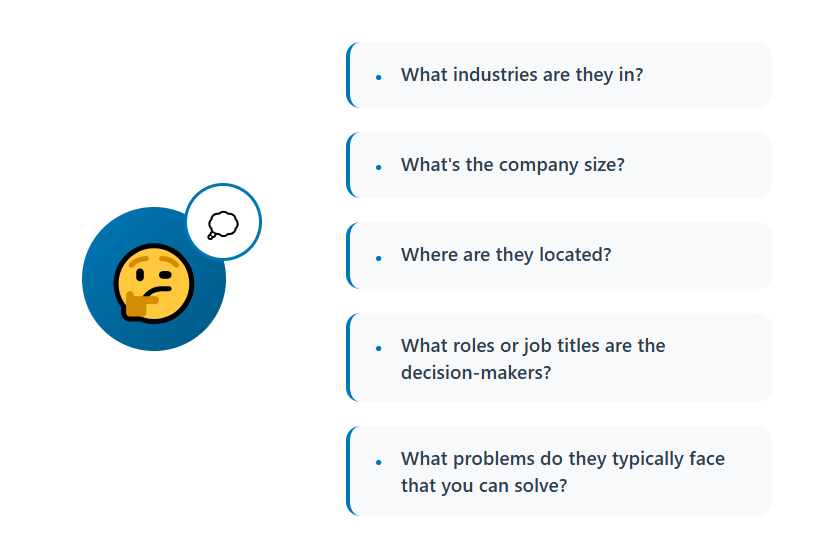
Feed Claude a list of your best-fit customers, the accounts that closed fast, renewed, and expanded, and ask it to identify the patterns you haven't consciously noticed.
Push past basic firmographics like industry and headcount into the operational traits that actually predict fit: how they're structured internally, what tools they already run, what triggered them to start looking for a solution like yours.
Output: A written ICP with specific, filterable criteria, not a vague paragraph.
Step 2: Translate the ICP Into Search Criteria
An ICP description doesn't run against a database. Convert it into the exact filters your data source understands: industry, headcount, revenue, geography, tech stack, role, and seniority.
Output: A filter set you can actually run, not a description someone still has to translate manually.
Step 3: Layer in Buying Signals
Add the trigger events that indicate timing, not just fit: funding announcements, hiring activity in relevant departments, leadership changes, expansion into new markets, or recent tooling changes.
Signal-driven lists consistently outperform static pulls because you're reaching people who are more likely to be actively evaluating something right now, not just people who technically match your filters.
Output: A prioritized subset of the total addressable list, ranked by timing rather than size.
Step 4: Pull the List Through a Connected Source
Query the connected database or CRM and return the results in a structured format. Set the exact return fields you need rather than pulling everything the source offers. A cleaner request produces a cleaner output.
Output: A raw list with company and contact records.
Step 5: Clean and Structure the Output
Deduplicate records, normalize job titles and company names, and standardize columns so the file is consistent from top to bottom. Flag incomplete records instead of silently deleting them. A record missing a phone number might still be useful for email outreach.
Output: An upload-ready file.
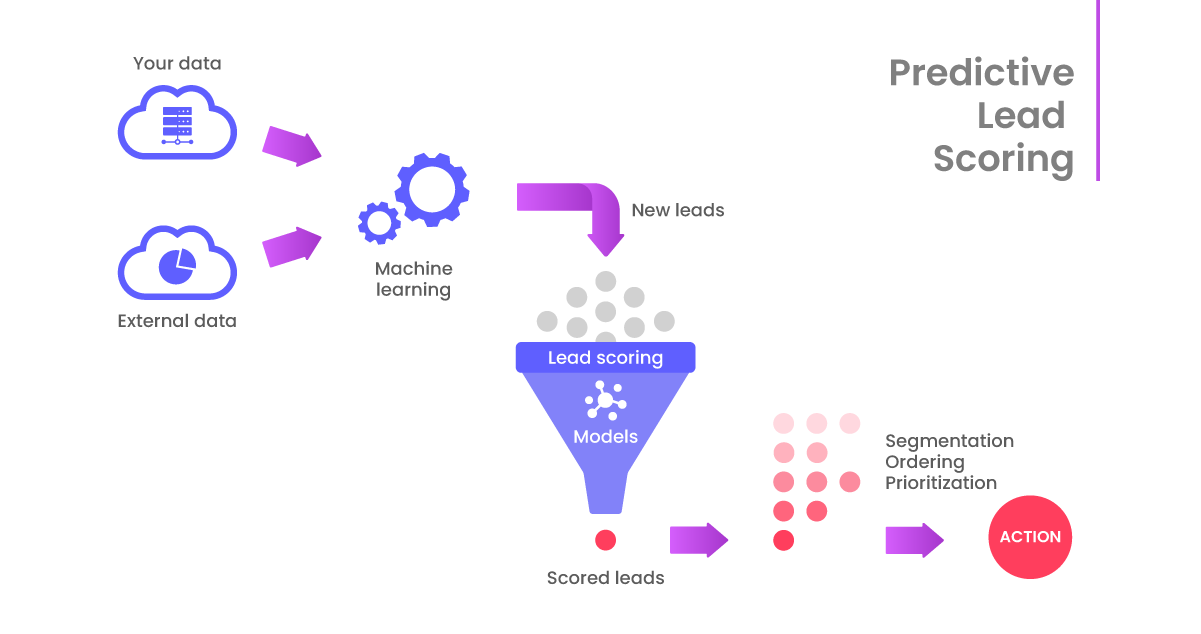
Step 6: Score and Segment
Apply a lead scoring model against your ICP criteria and split the list into tiers, so your best-fit accounts get the most attention. Segment by persona and by problem, not just by tier.
A VP of Sales and a RevOps lead at the same company are dealing with different problems, and the messaging should reflect that.
Output: Tiered segments with a clear priority order for your team.
Step 7: Research Accounts for Personalization
Generate a short research brief per account or per segment: relevant context, the likely pain point, and a specific angle to open with. Keep these brief. A three-paragraph research document doesn't get read by whoever's actually writing the outreach.
Output: Usable personalization inputs, not essays nobody has time to skim.
Step 8: Verify Before You Send
Run every email through a verification tool, regardless of which source it came from. Then spot-check a sample manually against LinkedIn or the company's own site, especially for your highest-value accounts.
Output: A verified, campaign-ready list.
🚀 Turn Lists Into Leads
With 224.7K+ leads generated and $312M+ pipeline, Cleverly turns targeted prospect data into qualified conversations and meetings.
Claude Prompts for Prospecting (Copy and Adapt)
These map directly to the workflow above. Keep them short when you adapt them. Long, over-engineered prompts don't get reused, and reuse is the whole point.
ICP Definition Prompt
Swap in your own customer list and the metrics that matter most to your business.
ICP-to-Filters Prompt
Name your actual data source so the filter syntax matches.
Buying Signal Prompt
Adjust based on whether your offer is more relevant to growth-stage signals or stability-stage signals.
List Pull Prompt
Change the return fields to exactly what your team uses, nothing extra.
Data Cleaning Prompt
Adjust the normalization list to match the title variations common in your industry.
Lead Scoring Prompt
Swap in the weights that reflect what actually correlates with closed deals for you.
Account Research Prompt
Cap the length explicitly, or the briefs will run long and stop getting used.
Segmentation and Messaging Angle Prompt
Adjust based on how many distinct problems your product actually solves.
How to Keep the List Accurate
A list that's accurate today won't stay that way. B2B contact data decays at roughly 2.1% per month, compounding to about 22.5% annually according to HubSpot's Database Decay Simulation, based on MarketingSherpa research, and Gartner puts the decay rate even higher, near 3% per month in high-churn conditions which can push annual decay well past that baseline.
People change roles, companies restructure, and email domains go dark. None of that slows down because AI helped you build the list faster
A few habits keep the decay from quietly wrecking your outreach:
- Always verify emails before sending. No AI-assisted workflow, no matter how good, removes this step.
- Cross-check a sample against a second source, especially for high-value accounts where a bad send actually costs you something.
- Watch for fabricated or hallucinated details. Treat anything Claude didn't retrieve directly from a connected source as unverified until you check it.
- Refresh lists on a defined cadence instead of reusing the same export for months. A list built in January is a different list by June.
- Suppress against existing customers, open opportunities, and prior outreach before launching, so you're not re-annoying people who already said no or already bought.
- Log which records came from which source. Over time, this tells you which of your data sources are actually reliable and which ones you should stop paying for.
Common Mistakes When Using AI for List Building
Most of the damage from AI-assisted prospecting doesn't come from Claude itself. It comes from how people use it:
Asking Claude for contact details without a connected data source, then trusting whatever comes back without checking it.
Starting with a vague ICP. AI amplifies imprecise targeting instead of correcting it. If the input is fuzzy, the output is fuzzy at scale.
Prioritizing volume over fit because the list suddenly feels cheap to build. A bigger list of the wrong people is still the wrong people.
Skipping verification because the workflow felt automated. Automation doesn't mean accuracy.
Personalizing on trivia like company name or city instead of on a real problem or trigger event. Surface-level personalization gets ignored just as fast as no personalization at all.
Building one giant list instead of segmenting by persona and by problem. A single undifferentiated list forces generic messaging.
Never revisiting the ICP as deals close and the real best-fit profile becomes clearer over time.
Treating the list as the deliverable. It isn't. The deliverable is booked meetings, and a list is only the first input toward that.
When This Workflow Stops Scaling
This approach is genuinely strong at low-to-mid volume, and for teams that want direct control over their targeting logic. It's worth being honest about where it strains.
Running multiple ICPs simultaneously, refreshing lists weekly instead of monthly, and maintaining verification across thousands of records all start to demand more hands-on management than a single operator or small team can sustain alongside everything else on their plate.
The costs here are often underestimated too: data subscriptions, verification credits, and the hours per week someone spends babysitting the pipeline all add up quietly.
The bigger point is that list building is only the first step. Deliverability infrastructure, sequencing, reply handling, and follow-up discipline are what actually convert a list into meetings, and none of that gets solved by the list itself, no matter how well-targeted it is.
That leaves a real decision: build and operate the whole system in-house, or hand the execution layer to a team that already runs it end to end.
How Cleverly Turns Targeted Lists Into Booked Meetings

A great list is an input, not an outcome. Most teams that get genuinely good at list building still stall at the next stage: deliverability, sequencing, and reply handling. That's usually where the real bottleneck sits, not in the targeting itself.
Cleverly runs that entire layer end to end. That means ICP definition and multi-source, verified list building, cold email and LinkedIn outreach, domain and deliverability infrastructure, sequence copywriting, and reply handling all the way through to a booked meeting on your calendar.
We use automation and AI for exactly the same repetitive work this guide covers: research, enrichment, structuring, and prioritization. The difference is that trained humans handle the messaging, objection handling, and qualification, the parts where judgment still matters more than speed.
Data quality is the real differentiator here. Every AI prospecting workflow is capped by how accurate its source data is, and most in-house stacks quietly under-invest in that piece.
We’ve generated $312M in client pipeline and $51.2M in closed revenue across its client base, optimizing for qualified conversations with the right decision-makers rather than raw list size or send volume.
If you've built the list but not the pipeline, book a free consultation and outreach audit and see how Cleverly runs outbound end to end.
Conclusion
Claude meaningfully compresses the slowest parts of list building: ICP definition, structuring, scoring, and account research. But the data source behind it and the verification step in front of it still decide whether the list is actually good. That boundary is what keeps this workflow trustworthy: never treat unverified, unsourced contact details as real, no matter how confident they look.
Targeting precision beats list size every time, and segmenting by problem rather than by firmographic bucket is what makes a list usable once it reaches a sequencer.
The practical next step is simple: run this workflow once on a single narrow segment, verify the output thoroughly, and measure reply quality before you scale the process to your full pipeline.
AI has made building a list cheap. That means the advantage has shifted entirely to whoever targets sharpest and executes the outreach best, not whoever built the biggest list the fastest.
Frequently Asked Questions
Free Resource
How to Scale a Profitable Cold Call System
Get the complete guide — download it instantly now.

Free Ebook
Download the Free Guide
Enter your details to get instant access.
You're all set! 🎉
Your ebook is downloading now.
Click below if the download didn't start automatically.