Table of Contents
Why Hiring Activity Is a Strong Buying Signal
4 Ways to Find Companies Hiring Specific Roles on LinkedIn
How to Choose Which Roles to Track
Reading the Job Post: Turning a Listing Into an Angle
Building a Prospect List From Hiring Signals
How to Reach Out Without Sounding Like You're Stalking Their Job Board
Mistakes That Kill Hiring-Signal Prospecting
How Cleverly Runs LinkedIn Outreach on Signals Like These
Conclusion
Frequently Asked Questions
Modified On :
September 14, 2026
Key Takeaways
- Hiring signals work because they solve the timing problem outbound usually gets wrong. A job post means the budget is already approved and the pain is already live.
- You have four ways to find companies hiring on LinkedIn, ranging from free manual search to paid signal tools that push data straight into your CRM.
- Not every open role is a signal worth acting on. The role only matters if it maps directly or indirectly to the problem you solve.
- The job description itself is your best research document. It tells you the pain, the current stack, the goals, and often the decision-maker.
- Speed beats volume. A short list of ten accounts worked within a week outperforms a database of five hundred you get to eventually.
A job posting is one of the few honest signals left in B2B prospecting. Everything else, funding announcements, exec hires, product launches, gets seen by every competitor at the same time and picked apart within hours.
A hiring post sits there quietly, and most sales teams scroll right past it. That's a mistake, because the data backs it up.
Companies post 73% of their job openings within 30 days of approving new budget allocation, which means a live posting is close to a public announcement that money has already been committed.
Outreach that references a real signal like this gets roughly 18% response rates, more than five times the generic cold outreach average of 3.4%. And the timing edge is real: hiring activity tends to show up 60 to 90 days before a company starts formal vendor research, so you're in the conversation before your competitors even know there's a conversation to have.
This guide covers why hiring signals work, four ways to find companies hiring on LinkedIn, how to pick which roles to track, how to turn a job post into an outreach angle, and how to build (and refresh) a list without wasting your week on it.
Written for SDRs, founders doing their own outbound, and RevOps teams trying to build a signal-driven pipeline instead of a spray-and-pray one.

Why Hiring Activity Is a Strong Buying Signal
A posted role isn't just a headcount update. It's proof that someone with budget authority looked at a gap, decided it was worth paying to close, and got a sign-off to go find a person for it. That approval process rarely happens in a vacuum.
If a company is hiring a "Demand Generation Manager," someone above that role already agreed the current output isn't good enough.
Here's what makes hiring a better signal than most people give it credit for:
The job description is written in the company's own words. Nobody writes a job post in vague corporate language when they're trying to attract a specific type of hire. It lists the tools they use, the outcomes they expect, and often the exact problem the new hire is supposed to fix.
Hiring reflects spending capacity, not just team size. A company adding headcount in a function is telling you, indirectly, that there's a budget flowing into that area right now. That's different from a company that simply exists and fits your ICP on paper.
Signal-based outreach consistently beats generic prospecting. The response-rate gap isn't small. Instantly's 2026 benchmark report found signal-specific personalization landing around 18% response rates compared to a 3.4% cold average, and that gap comes almost entirely from relevance and timing, not better copywriting.
The window is real and it closes. Companies that ramp up hiring don't stay in "actively evaluating" mode forever. Some fill the pain internally with the new hire before you even reach out. Others move on to another priority. The earlier you show up in that window, the more useful you look.
One caveat worth stating early: hiring is only a buying signal when the role connects to what you actually sell. A company hiring a warehouse manager isn't a signal for your marketing automation tool. Match the role to the offer first, or you're just doing volume prospecting with extra steps.
🎯 Find. Target. Connect.
Cleverly helps 10,000+ businesses reach high-value prospects with done-for-you LinkedIn outreach and targeted lead generation.
4 Ways to Find Companies Hiring Specific Roles on LinkedIn
You've got four real options here, and they scale from free and manual to paid and automated. Use the free ones if you're testing this approach for the first time. Move up the list once you know which roles actually convert for you.
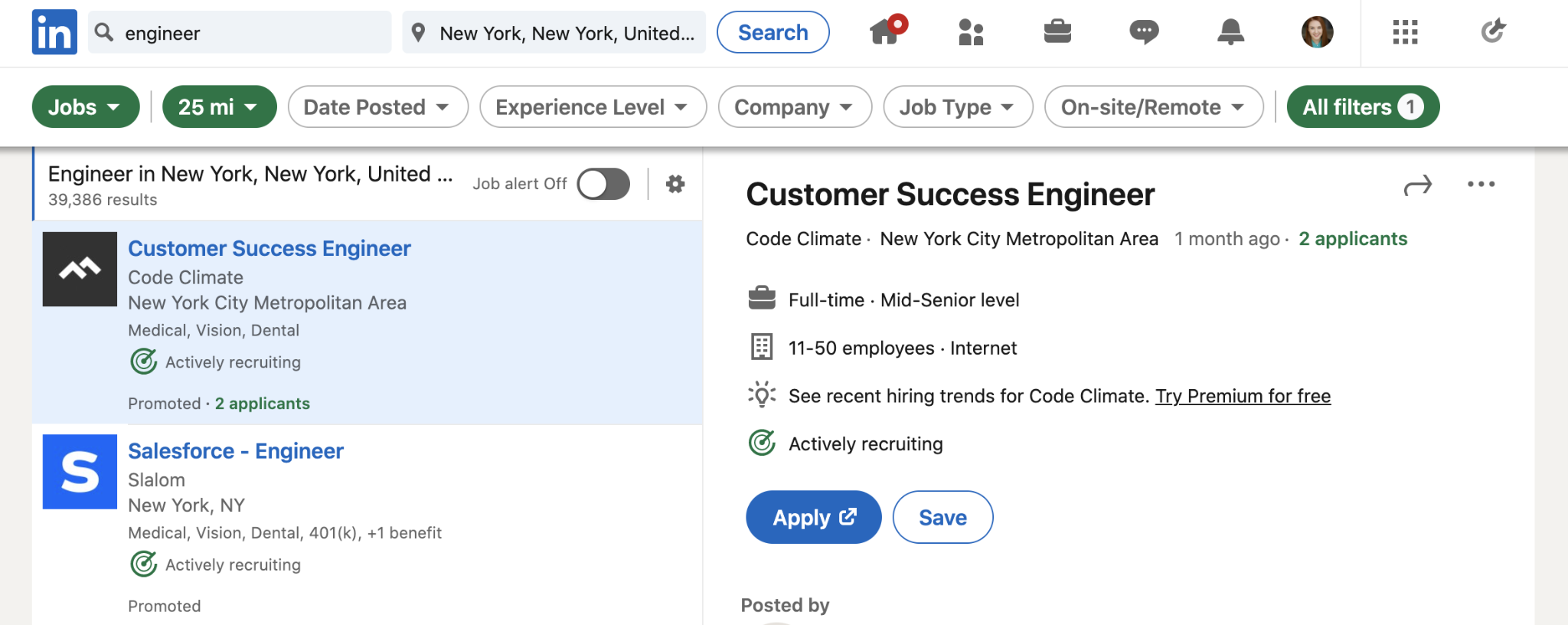
1) LinkedIn Jobs Search (Free)
This is the most direct method and it costs nothing. Search the role title, then filter by location, industry, company size, and date posted. Sort by most recent so you're catching fresh postings before three other vendors do.
This works fine for occasional prospecting or spot-checking a handful of target accounts. The limitation shows up fast once you try to scale it: there's no way to save your search or export the list of companies that come up.
You're doing this manually, every single time, which makes it hard to build any real repeatable process.
2) Company Page "Jobs" Tab
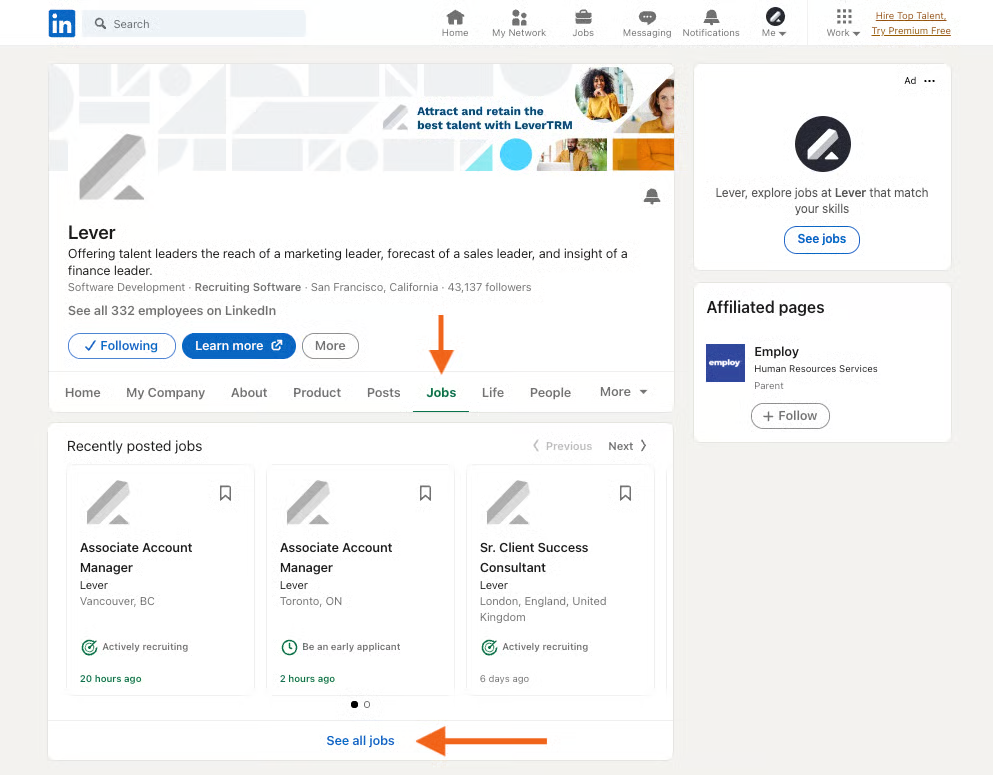
If you already have accounts sitting in your pipeline, check their company page's Jobs tab directly. This is less about discovery and more about timing an opportunity you're already working.
A prospect who's gone quiet for two months but just posted three openings in the department you sell into is worth a fresh touch.
The limitation is obvious: this only works one company at a time. It's a research tool for accounts you already know about, not a way to find new ones.
3) Sales Navigator Account Filters and Spotlights
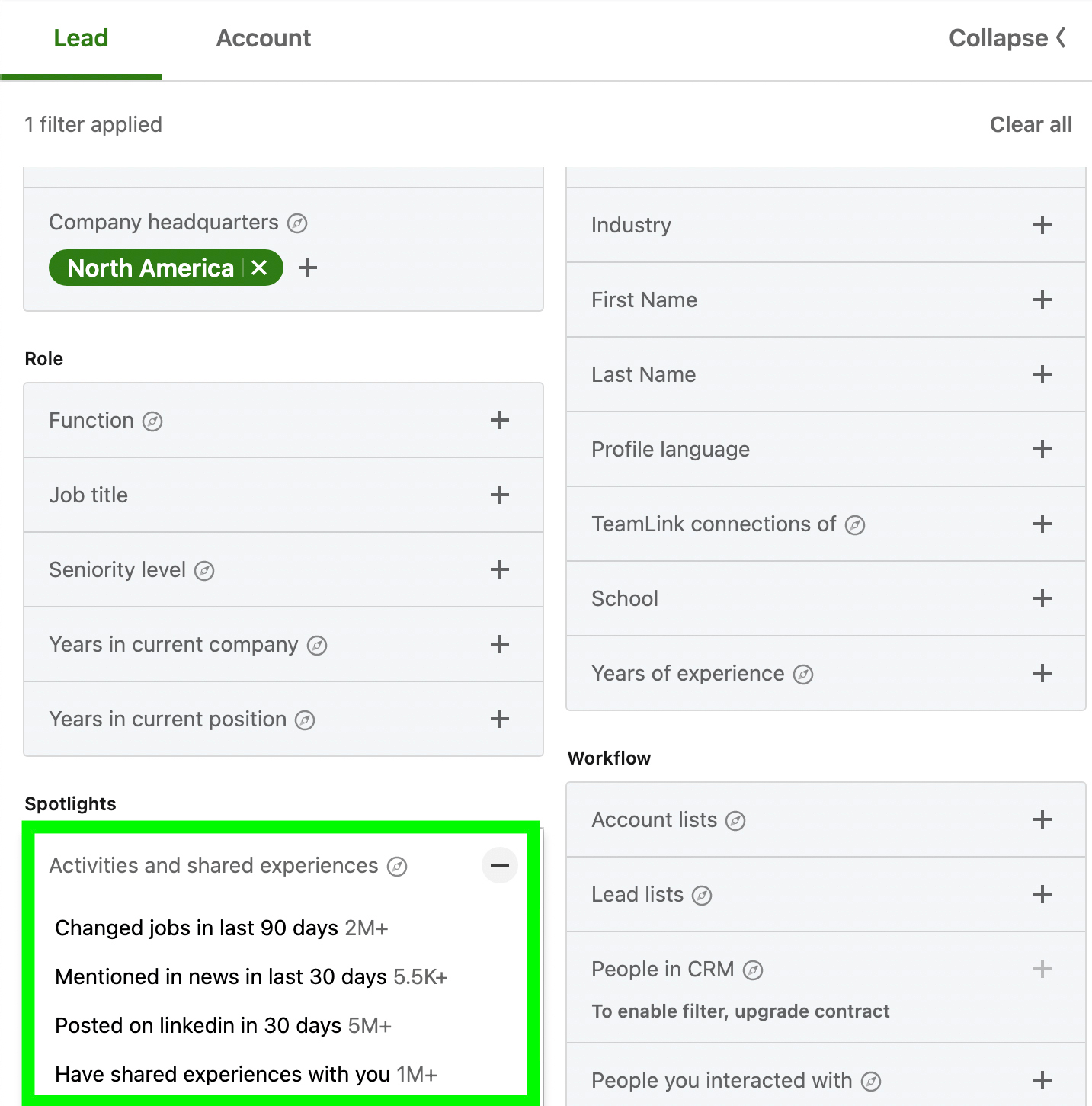
Sales Navigator's "hiring" spotlight surfaces accounts actively recruiting in a function you choose. This is where hiring-signal prospecting starts to become a real system instead of a manual chore.
You can stack the hiring filter with headcount growth, industry, geography, and technologies used, which narrows your list down to accounts that are genuinely worth your time.
Save the search, and Sales Navigator will alert you when new accounts match. That alone turns this from a one-time list-build into an ongoing pipeline source.
4) Third-Party Hiring Signal Tools
Job-board scrapers and dedicated signal platforms monitor postings at scale across the web and push matches straight into your CRM. These are built for teams tracking dozens or hundreds of accounts at once, or teams that need clean exports and automation rather than manual list-building.
A quick note on compliance here: respect the platform terms of any source you use, and avoid unauthorized scraping of LinkedIn itself. Plenty of legitimate signal platforms operate within these boundaries, so there's no reason to cut corners.

How to Choose Which Roles to Track
The biggest mistake in hiring-signal prospecting isn't using the wrong tool. It's tracking too many roles because "hiring" feels like it should always mean something.
Start by working backwards from your own offer. Ask: which role's existence tells you our problem is now live at this company? That gives you two categories of signals worth watching.
1. Direct signals are roles you sell into or directly support. If you sell a sales engagement platform, an SDR or BDR hire is a direct signal. The person filling that role will likely need your tool on day one.
2. Indirect signals point to a wider initiative even if the role itself isn't your buyer. A company hiring its first RevOps lead is signaling a broader process overhaul, which often means new tooling decisions are coming across sales, marketing, and CS.
A few other things worth watching for:
- Role clusters matter more than single postings. Three related openings in the same function usually mean a real initiative, not a backfill for someone who quit.
- Seniority changes the meaning of the hire. A company posting its first-ever "Head of Growth" role is a much stronger signal than a company backfilling a junior marketing coordinator.
- A short, written list beats broad monitoring. Pick your five to eight trigger roles and track those consistently, rather than trying to react to every hiring update that crosses your feed.
🚀 Turn Hiring Signals Into Leads
With 224.7K+ leads generated and $312M+ pipeline, Cleverly helps B2B teams turn the right prospects into qualified conversations.
Reading the Job Post: Turning a Listing Into an Angle
Once you've found a relevant posting, the real work starts. The job description is a research document, not just a trigger to log in your CRM.
The responsibilities section names the problem directly. If a job post says the hire will "build and scale outbound processes from scratch," that's the company telling you they don't have that infrastructure today.
Listed tools reveal the current stack. Job posts often mention specific software the new hire will use or manage. That tells you what they already have, and sometimes what they're planning to replace.
Goals and KPIs show you what success looks like to them. If the post mentions a target like "book 40 qualified meetings per month," you now know exactly what outcome to speak to in your outreach.
Team structure points you to the real decision-maker. Reporting lines in the post ("reports to the VP of Sales") tell you who to actually contact, which usually isn't the recruiter or HR.
Multiple similar postings signal scale pressure. If a company has five open SDR roles at once, they're not backfilling. They're scaling a function fast and likely feeling growing pains around process, tooling, or management.
Post age tells you where they are in the process. A posting from three days ago means the initiative is forming right now. A posting that's been live for two months might mean they're struggling to fill it, which is its own kind of signal worth a different approach.
Building a Prospect List From Hiring Signals
This is the part where most teams lose momentum. They find a good signal once, get excited, and never build a system that keeps working after week one. Here's how to actually operationalize it.
Step 1: Define your trigger roles and ICP filters in writing.
Don't keep this in your head. Put it in a doc or a spreadsheet tab: the exact job titles that count as signals (including common variants, since "Head of Revenue Operations," "RevOps Lead," and "Director of Sales Operations" often mean the same thing), plus the ICP filters the account has to sit inside, company size range, industry, geography, and funding stage if that matters for your offer. This becomes your filter logic for every search you run afterward.
Step 2: Set up the search and make it recurring.
In Sales Navigator, build the search using your trigger roles under the "hiring" spotlight, stacked with your ICP filters, then save it and turn on alerts.
If you're using a signal tool like Clay, Persana, or a similar platform, set up a recurring workflow that pulls new matches on a schedule (daily or weekly, depending on volume) rather than running the search manually.
The goal is that new matches show up in your inbox or CRM without you having to remember to go look.
Step 3: Identify the actual contact, not just the company.
Once you have a matching account, find the hiring manager's peer or leader, not the recruiter who posted the role.
A practical shortcut: search the company on LinkedIn for titles one or two levels above the open role (if they're hiring an SDR, look for the VP of Sales or Head of Sales; if they're hiring a RevOps analyst, look for the Director of RevOps or CRO).
Cross-check this against the "reports to" language in the job description when it's listed.
Step 4: Capture the signal detail alongside the contact, in one place.
Every record needs more than a name and email. Log the exact role title, the date the post went live, the source (LinkedIn Jobs, Sales Nav, third-party tool), and one or two specific lines from the post worth remembering (a listed tool, a stated goal, a team size).
A simple spreadsheet works: columns for Company, Contact, Title, Trigger Role, Post Date, Signal Detail, Source, Status.
If you're further along, this maps directly to custom fields in your CRM so reps can see the context without digging back through LinkedIn.
Step 5: Verify contact data before it touches a sequence.
Run the email and phone number through a verification tool (Prospeo, LeadMagic, or similar) before adding anyone to outreach.
A great signal wasted on a bounced email or a disconnected number is a wasted week, not a wasted minute.
This step gets skipped constantly under time pressure, and it's the reason "good lists" produce bad results.
Step 6: Score and prioritize instead of treating every match equally.
Not every hit deserves the same urgency. A simple lead scoring approach:
- High priority: cluster hiring (3+ related roles open at once) or a first-of-its-kind senior hire.
- Medium priority: a single direct-signal role at a company that fits your ICP tightly.
- Low priority: an indirect signal, or a role at a company outside your ideal size range.
Work high priority first, and don't let medium and low priority matches sit for weeks waiting for "extra time" that never shows up.
Step 7: Set a refresh cadence and actually stick to it.
Postings expire, get filled, or get taken down, usually within 30 to 45 days. Set a recurring calendar block, weekly for high-volume trigger roles, biweekly for narrower ones, to pull fresh matches and archive anything past its useful window.
A list that's two months old is mostly dead weight. Treat this step the same way you'd treat any other recurring pipeline task, not an optional cleanup chore.
How to Reach Out Without Sounding Like You're Stalking Their Job Board
The signal should shape your message, not become your message. Here's the difference between referencing the initiative and just narrating what you saw on their careers page.
Reference the initiative, not the post itself.
Skip anything that sounds like "I saw you're hiring for X." Speak to the problem the hire implies instead.
"Scaling outbound usually breaks down at the handoff between SDR and AE. Curious how you're planning around that as the team grows."
Lead with the problem, not congratulations.
Don't open with praise for their growth. Open with the pain that growth tends to create.
"Most RevOps hires spend their first 90 days untangling reporting before they can touch strategy. Happy to share what usually causes that if it's useful."
Keep the ask small.
You're asking for a reply or a short conversation, not booking a demo in message one.
"Worth a quick chat, or should I just send over what we've seen work for teams in a similar spot?"
Move fast and say so implicitly through relevance, not urgency language.
Avoid anything that sounds like pressure ("act now," "before it's too late"). Instead, make the timing obvious through specificity.
"Saw your team's expanding on the demand gen side this quarter. That's usually when lead routing starts to break."
Multichannel: pair a LinkedIn touch with an email that references the same context.
LinkedIn connection note:
"Hey [Name], noticed your team's growing on the sales ops side. Curious how you're thinking about tooling as that scales. Open to connecting."
Follow-up email a few days later:
Subject: Scaling sales ops without the usual reporting mess
"Hi [Name], following up from LinkedIn. Teams scaling sales ops usually hit the same wall around month two: too many manual reports, not enough clean data. If that's on your radar, happy to share what's worked for similar teams. Worth 15 minutes?"
Avoid the obvious misfires.
Don't pitch recruiting services if that's not what you sell, and never imply the company is struggling or understaffed. Both read as tone-deaf rather than helpful, and they tend to kill the reply before it's even considered.
Mistakes That Kill Hiring-Signal Prospecting
Even teams that understand the theory here tend to trip on execution. The usual mistakes:
❌ Treating any hiring activity as a signal. Not every open role connects to what you sell. If you're tracking roles just because they exist, you're back to volume prospecting wearing a signal-based disguise.
❌ Reaching out weeks after the post went live. By the time you send that message, the initiative might already be handled by the new hire, or the moment has simply passed.
❌ Messaging HR or the recruiter instead of the business owner. The person posting the job usually isn't the person who'll buy your product. Go to the hiring manager or their leader instead.
❌ Quoting the job description back verbatim. This is the fastest way to sound automated. Reference the underlying need, not the exact phrasing from the post.
❌ Ignoring company size and stage. The same role means something different at a 20-person startup versus a 2,000-person enterprise. A "Growth Marketer" hire at a startup might mean they have zero infrastructure. At an enterprise, it might mean a team reorg.
❌ Using the signal as the whole pitch. The hiring activity is your reason for timing, not your entire value proposition. Lead with the problem and outcome, and let the signal explain why now.
❌ Building the list once and never refreshing it. Job postings expire. A static list from two months ago is stale before you've worked through half of it.
How Cleverly Runs LinkedIn Outreach on Signals Like These

Finding the signal is the easy half. The actual work is monitoring it continuously and reaching out while the window is still open, which is where most in-house efforts fall apart after the first few weeks of enthusiasm.
We run this end to end for clients: defining the ICP and trigger roles, setting up Sales Navigator targeting, building and verifying the prospect list, writing and sending the LinkedIn outreach, and handling replies through to booked meetings.
Signal-based targeting isn't a one-off list we build and hand off. It's built into how the campaign is structured from day one, so it keeps running as new matches come in.
Our messaging frameworks come from testing across thousands of real conversations, which is why outreach references the hiring initiative naturally instead of sounding like it was pulled straight from a job description.
We're not optimizing for connection volume. We're optimizing for qualified conversations with the actual decision-maker behind the hire, the kind that turn into real pipeline instead of empty inbox activity.
If you want outreach that actually lands while the hiring window is open instead of three weeks after it closes, book a free strategy call with Cleverly.
Conclusion
Hiring signals solve the one problem most outbound never fixes: timing. A job posting tells you the budget is approved and the pain is real, right now, not sometime theoretically in the next quarter. But the method only works when the role you're tracking actually maps to the problem you solve. Track the wrong roles, and you're just doing volume prospecting with a fancier filter.
The practical next step is small. Pick two trigger roles that clearly connect to your offer, save a Sales Navigator search against them, and work the first ten matching accounts this week.
Signals like this are becoming table stakes across B2B sales. The real edge isn't in knowing they exist anymore. It's in how fast and how relevantly you act on them.
Frequently Asked Questions
Free Resource
How to Scale a Profitable Cold Call System
Get the complete guide — download it instantly now.

Free Ebook
Download the Free Guide
Enter your details to get instant access.
You're all set! 🎉
Your ebook is downloading now.
Click below if the download didn't start automatically.