Table of Contents
What Is Data Append?
Why Data Append Matters for B2B Lead Management
Types of Data You Can Append to Your Records
How the Data Append Process Works (Step-by-Step)
How Data Append Directly Boosts Lead Management
Common Mistakes to Avoid With Data Appending
How to Choose the Right Data Appending Companies
How Cleverly Uses Data Append to Deliver Better B2B Lead Generation
Conclusion
Frequently Asked Questions
Modified On :
June 29, 2026
Key Takeaways
- B2B contact data decays at 22.5% annually — about 1 in 4 records in your CRM becomes inaccurate within 12 months, silently killing outreach performance.
- Data append is the process of filling gaps in existing contact records — adding missing emails, phone numbers, job titles, firmographics, and tech stack info to make records actionable.
- Enriched records convert 20–30% better than unenriched ones, making data append one of the highest-ROI investments in your lead management workflow.
- Appending data once and calling it done is one of the most common and costly mistakes — data decay is continuous, so your refresh cadence needs to be too.
- The right B2B data append process improves lead scoring, speeds up routing, reduces bounce rates, and helps reps start better conversations with the right people, faster
Your outbound is only as good as the data behind it.
B2B data decays at roughly 22.5% per year — about 2.1% per month, compounding silently. That means by December, one in four records you rely on to drive pipeline could be wrong. Wrong titles. Wrong emails. Wrong companies entirely.
Gartner estimates that poor data quality costs organizations an average of $12.9 million per year. For sales teams, that number shows up in bounced sequences, missed routing rules, wasted SDR hours, and pipeline that never converts.
Teams using enriched lead data see a 20–30% improvement in conversion rates. A 2025 study by DemandGen Report found that enriched leads produced a 47% increase in qualified conversions compared to raw form submissions.
That gap — between a stale record and an enriched one — is what data append closes.
This guide covers exactly what data append is, how it works, what types of data you can append, how it directly improves B2B lead management, and what to look for when choosing a provider.
By the end, you'll have a practical framework for turning your existing database into a cleaner, more actionable pipeline asset.
What Is Data Append?
Data append — sometimes called append data — is the process of adding missing or updated information to contact records you already own. Instead of buying a new list, you enrich what's already in your CRM.
Think of it this way: you have a lead who filled out a form with just a name, company, and email. That's not enough to score them accurately, route them to the right rep, or personalize a message. But if you can append their job title, direct phone number, LinkedIn URL, company size, and tech stack — that record becomes actionable overnight.
Data Append vs. Buying a New List
These are fundamentally different activities. When you buy a list, you're starting from scratch with contacts you've never touched. When you append data, you're improving the records you already have — leads from forms, events, past campaigns, or your legacy CRM.
Appending is almost always higher ROI because the record already has some identifying context. You're enriching signal, not building from zero.

What "Appending" Actually Means
It's also worth separating data append from scraping. Appending is structured and verified — your existing records are matched against a third-party database, and only confirmed, validated fields are added. Scraping is unstructured and often unverified. The output quality is completely different.
Fields commonly appended through a B2B data append process include:
- Work email addresses
- Direct dial phone numbers
- LinkedIn profile URLs
- Job title and seniority level
- Company size, industry, and revenue range
- HQ location and funding stage
- Tech stack and software usage (technographics)
📊 Better Data = Better Meetings
We enrich, verify, and target the right prospects—helping clients generate 15–30 qualified meetings every month.
Why Data Append Matters for B2B Lead Management
Incomplete records don't just sit quietly in your CRM. They actively break things.
A lead without a job title can't be scored against your ICP. A contact without a validated email can't receive your outreach. A record without company size can't be routed to the right segment. Every missing field is a broken workflow somewhere downstream.
The Real Cost of Doing Nothing
A reports that sales reps spend 27.3% of their time dealing with inaccurate data. That's 546 hours per rep per year — more than 13 full working weeks — spent chasing wrong numbers, updating stale records, and verifying information that should already be correct.
Validity's 2025 State of CRM Data Management report found that 37% of CRM users lost revenue directly due to poor data quality, and companies lose an average of 16 sales opportunities per quarter from unreliable data.
What Clean, Appended Data Unlocks
Data appending doesn't just make your database look healthier — it has direct downstream effects on pipeline performance:
- Better lead scoring: enriched firmographic and role data means you can score by company size, title, or tech stack fit — not just lead source.
- Faster lead qualification: reps spend less time researching and more time selling.
- Higher personalization: knowing what tools a company uses, what industry they're in, and what role the contact holds enables relevant messaging at scale.
- Fewer bounced emails: validated emails protect your sender reputation and keep inbox placement rates high.
88% of B2B marketers confirm that enriched data significantly improves lead quality and conversion rates. That's not a marginal improvement — it's a structural one.
Types of Data You Can Append to Your Records
Not all enrichment is created equal. Here's a breakdown of the main data types covered in a solid B2B data append workflow:
Contact-Level Data
This is the most commonly appended layer and the one with the most direct impact on outreach execution:
- Work email addresses — the single most important field for deliverability
- Direct dial phone numbers — skips gatekeepers and gets reps to the right person
- LinkedIn profile URLs — enables multi-channel sequencing and social touches
- Job title and seniority — critical for ICP matching and lead scoring
- Department and reporting structure — helps navigate org complexity
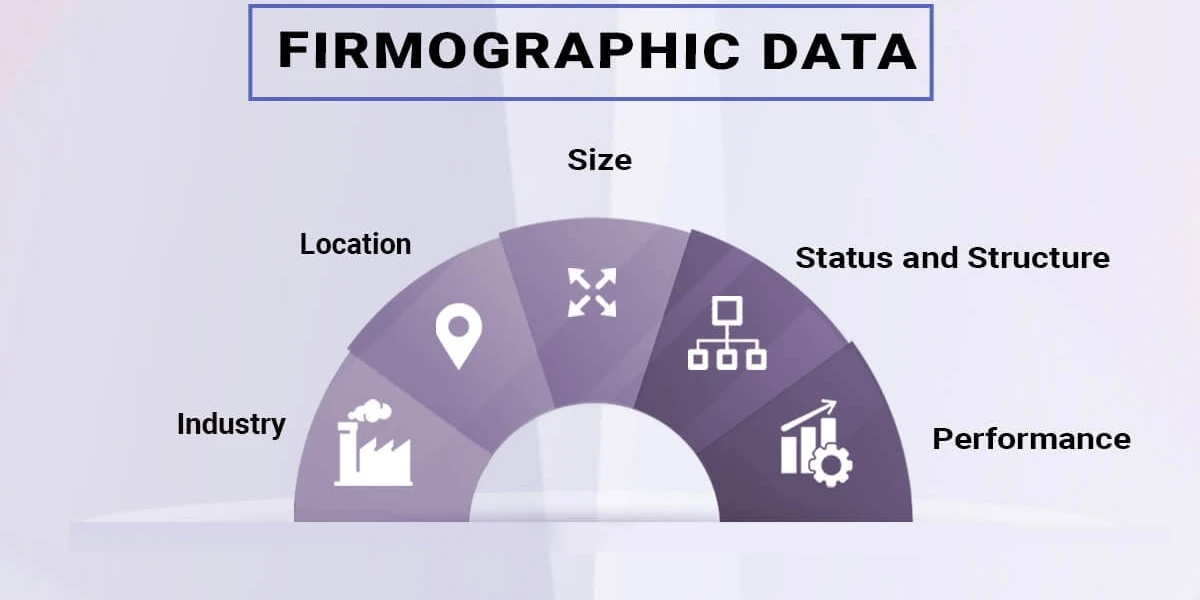
Firmographic Data
This layer is what feeds your segmentation and routing logic:
- Company size (headcount and revenue)
- Industry and vertical
- HQ location and number of offices
- Funding stage and recent investment rounds
Technographic Data
One of the most underused append types — and one of the most valuable for personalized outreach. Knowing what CRM a company uses, what marketing automation platform they're on, or what cloud infrastructure they run changes how you position your product entirely.
Campaigns using technographic signals to personalize messaging see 3.4x higher conversion rates compared to firmographic-only targeting.
Email and Phone Validation
This is technically a form of appending — confirming that the data you already have is still accurate. Running existing emails through bounce checks and role verification catches stale records before they damage your sender reputation. A good bounce rate sits below 2%. At 2–5%, your list quality is slipping. Above 5%, you should pause sending entirely and run verification plus source investigation.
🚀 Stop Prospecting With Incomplete Data
10,000+ businesses trust Cleverly to turn accurate data into predictable pipeline through done-for-you outbound campaigns.
How the Data Append Process Works (Step-by-Step)
A well-run data appending workflow follows a consistent process. Here's what it looks like end-to-end:
Step 1: Export your existing contact list
Pull records from your CRM with whatever identifiers you have — first name, last name, company name, partial email, or domain. The more identifiers per record, the higher your match rate will be.
Step 2: Submit to a data appending provider or tool
Upload the file to your enrichment provider of choice — either as a batch upload or by triggering via API. Providers match your records against their database using the identifiers you supplied.
Step 3: Provider matches and fills missing fields
The provider runs your records against their database. High-quality providers use waterfall enrichment — querying multiple sources sequentially until a verified match is found. Single-source databases often deliver match rates around 62%, while multi-source approaches can reach 98% in controlled tests.
Step 4: Validate the appended data
Appended does not mean verified. Run bounce checks on appended emails, confirm role and title accuracy where possible, and remove duplicates before re-importing.
Step 5: Re-import enriched records into your CRM
Push the cleaned, enriched records back into your CRM with the new fields mapped correctly. Update lead scoring models and routing rules to reflect the new data you now have.
Step 6: Set a refresh cadence
This is where most teams fall short. Data appending isn't a one-time project. Continuous verification and quarterly re-enrichment are the only way to keep your database accurate. For high-volume outbound teams, monthly refreshes on active segments make more sense.
Batch vs. Real-Time Append
Two distinct models exist:
- Batch append — you upload a file of records and get results back. Best for periodic database cleanup and CRM hygiene projects.
- Real-time append — triggered via API when a new record enters your system (for example, on a form fill). Records get enriched instantly before they ever hit your CRM in an incomplete state.
For teams running high-velocity outbound, real-time append is worth the investment — it prevents the incomplete record problem from accumulating in the first place.
How Data Append Directly Boosts Lead Management
A data append project isn't just a database cleanup exercise. Every enriched field has a downstream operational effect. Here's where it shows up:
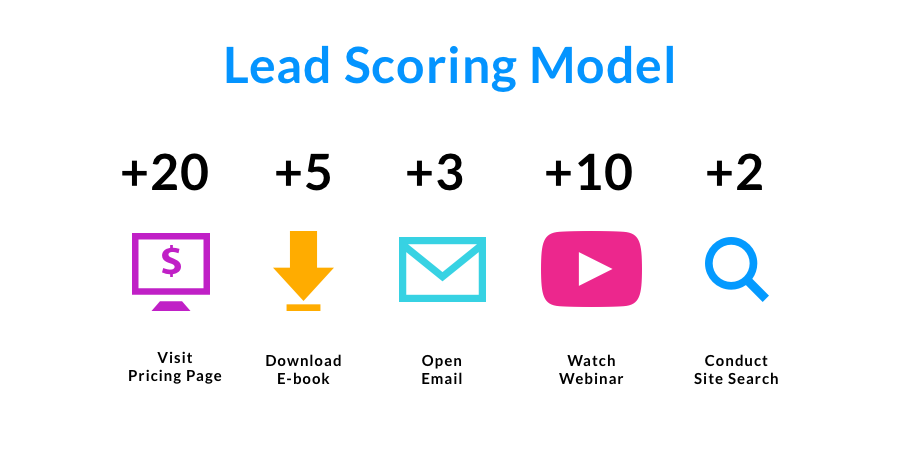
Better Lead Scoring
Most scoring models rely on job title, seniority, company size, and industry. If 30% of your records are missing those fields, your scoring model is making decisions on incomplete information — and that means misrouted leads, wasted follow-up, and pipeline that doesn't convert.
Once you've appended firmographic and role data, you can build scoring models that actually reflect your ICP. You prioritize VP-level contacts at 200+ person companies using the tech stack your product integrates with — not just whoever submitted the most recent form.
Faster Lead Routing
Routing rules depend on clean data. Territory assignment by geography requires a valid company HQ location. Segment assignment by company size requires a headcount field. When those fields are missing, leads get stuck in manual review queues or dropped into the wrong bucket entirely.
Enriched records trigger routing automation correctly the first time — no manual intervention required.

Higher Personalization at Scale
Generic outreach gets ignored. Personalized CTAs convert 202% better than generic ones, and AI-driven personalization delivers roughly a 10% uplift across outreach in 2026 data.
But personalization requires data. Knowing what tools a prospect's company uses, what stage they're at, and what department they're in is the difference between an email that sounds relevant and one that sounds like a mass blast.
Reduced Bounce Rates
High bounce rates from outdated emails don't just waste outreach. They damage your sender reputation and reduce deliverability for future campaigns.
Validated, appended emails protect your domain. Fewer hard bounces means better inbox placement, which means higher open rates on every campaign you run — not just the one targeting newly enriched records.

Shorter Sales Cycles
When reps open a record and immediately see company revenue, tech stack, direct dial, and the contact's actual title, discovery calls get shorter and sharper. Reps skip the research stage and go straight to a relevant conversation. When a rep opens a lead and immediately sees company revenue, tech stack, and recent intent signals, the discovery call can shrink from 30 minutes to 15.
Common Mistakes to Avoid With Data Appending
Getting the mechanics right matters. These are the mistakes that cost teams the most:
❌ Appending without validating. Appended data is only as good as the source it came from. Always run validation on appended emails and phone numbers before pushing records into active sequences. Appended does not mean deliverable.
❌ Running one append and treating it as permanent. After two years at 22.5% annual decay compounding monthly, barely 60% of your database remains reliable. After three years, you're working with less than half of what you originally paid for, yet most teams operate as if the data is current. Build a recurring cadence.
❌ Over-relying on a single data provider. No single source has complete coverage across all industries and geographies. Vendors routinely claim 90–95% match rates, but reality tells a different story — Validity surveyed 602 CRM users in 2025 and found 76% say less than half of their CRM data is accurate and complete. Multi-source enrichment always outperforms single-source.
❌ Appending personal emails for B2B outreach. Personal email addresses (Gmail, Yahoo, Outlook personal) hurt deliverability and tend to perform significantly worse in B2B sequences. Always target work emails tied to a company domain.
❌ Ignoring compliance. GDPR, CCPA, and CAN-SPAM all apply to appended data. Just because a provider gives you a contact record doesn't mean you have permission to market to that person under applicable regulations. Verify your provider's compliance posture before you scale.
❌ Appending everything regardless of ICP fit. More data isn't always better. Appending fields that don't map to your scoring criteria just adds noise. Know what signals matter for your ICP and prioritize those fields specifically.
How to Choose the Right Data Appending Companies
The vendor you pick determines the quality of what you get back. Here's what actually matters when evaluating data appending companies:
👍 Coverage. Does the provider have strong data for your target geographies, industries, and company sizes? A provider with excellent US tech company coverage might have thin data on European SMBs. Know your ICP before evaluating vendors.
👍 Accuracy and freshness. Ask how often their database is refreshed. Top-tier data providers deliver 97%+ accuracy on verified records. The average provider delivers closer to 50%. That gap is the difference between a campaign that works and one that damages your domain.
👍 Match rate. What percentage of your submitted records will actually return enriched results? This varies dramatically by provider and by the quality of your source records. Request a test batch with your own ICP contacts before committing.
👍 Compliance posture. Are they GDPR and CCPA compliant? Do they have documented data sourcing policies? This matters both for legal reasons and because compliance-first providers typically maintain cleaner, more verified data.
👍 Delivery method. Batch file upload works for periodic cleanup. API-based real-time enrichment is better for teams running high-volume outbound or with active CRM workflows.
👍 Pricing model. Per-record pricing scales well for one-time appends. Subscription or usage-based models work better for teams enriching continuously. Match the pricing model to your volume and cadence.
Notable providers worth evaluating include ZoomInfo, Cognism, Apollo.io, Clay, Clearbit, and Lusha. Each has different strengths in coverage, freshness, and pricing — and none has 100% coverage on everything, which is why multi-source enrichment tends to outperform any single tool.
How Cleverly Uses Data Append to Deliver Better B2B Lead Generation

Good outreach doesn't start with a message. It starts with the record behind it.
At Cleverly, every campaign we run for clients is built on clean, verified, ICP-aligned data. Before a single message goes out, we build lead lists using multi-source enrichment and validation — making sure each contact record has the right title, company size, direct contact info, and industry context to make personalization possible and meaningful.
That data layer is what separates a campaign that reaches people from one that converts them. Knowing a prospect's role, the tools their team uses, and the size of their company isn't just useful for personalization — it's what lets us route leads correctly, score them accurately, and make sure reps are spending time on the right conversations.

We've helped 10,000+ B2B companies generate $312M in pipeline revenue and $51.2M in closed revenue through LinkedIn outreach and cold email — and none of those outcomes happen without the data infrastructure underneath them.
LinkedIn lead generation with Cleverly starts at $397/month, and our cold email lead generation model is performance-based, meaning you only pay for the meeting-ready leads we deliver.
If you're running outbound on top of a decaying database and wondering why results aren't moving, the data is usually where the problem starts — and where the fix starts too.
Want a done-for-you B2B lead generation system built on verified, enriched data? Book a strategy call with Cleverly.

Conclusion
Data append is not a cleanup project you run once a year. It's an operating discipline that keeps your pipeline healthy and your outreach working the way it should.
The teams consistently hitting reply rate and meeting targets aren't just generating more leads — they're improving the quality of the ones they already have. Start with a clear picture of what's missing in your current database, pick a reliable append process with a recurring cadence, and make enrichment a built-in part of how your lead management workflow runs. Your reps will close more, bounce less, and spend their time where it actually counts.
Frequently Asked Questions
Free Resource
How to Scale a Profitable Cold Call System
Get the complete guide — download it instantly now.

Free Ebook
Download the Free Guide
Enter your details to get instant access.
You're all set! 🎉
Your ebook is downloading now.
Click below if the download didn't start automatically.