Table of Contents
Why You Should Never Send Cold Outreach From Your Main Email
Separate Domain, Subdomain or Alias: What Actually Protects You
How Many Domains and Mailboxes You Actually Need
Setting Up Authentication on Every Sending Domain
Warming Up New Inboxes Before You Send Anything
Making the New Address Look and Feel Professional
Protecting Your Privacy: Best Practices for Professional Outreach Without Using Personal Emails
Common Mistakes When Setting Up Outreach Infrastructure
How Cleverly Handles Outreach Infrastructure for You
Conclusion
Frequently Asked Questions
Modified On :
October 9, 2026
Key Takeaways
- Sending reputation is scored at the domain level. Isolating outreach on its own domain is the whole strategy.
- Only a fully separate domain gives real protection. A subdomain is partial, and an alias gives none.
- Scale by adding domains, not by stacking mailboxes. Two to three mailboxes per domain is a sensible ceiling.
- SPF, DKIM, and DMARC must be live and verified on every sending domain before the first warm-up email goes out.
- Warm-up takes weeks and runs whether or not your campaign is ready, so buy domains first.
Your cold email campaign and your invoices share one reputation score. Nobody warns you about that when you launch your first sequence from the address you already use.
Gmail asks bulk senders to keep user-reported spam rates under 0.1% and treats 0.3% as the danger line. That’s about one complaint per 1,000 delivered emails to hit the first mark. Cold outreach creates complaints, bounces, and unsubscribes by nature.
Instantly’s 2026 benchmark puts the average cold reply rate at 3.43% and says bounce rates should stay under 2%. Most recipients stay silent, and a few will hit the spam button.
That’s why professional outreach without personal email isn’t a style choice. It decides whether your regular email keeps working.
In this guide, we cover why separation matters, how to structure domains and mailboxes, how to set up authentication, how to warm up inboxes, how to look professional, and how to protect your privacy.
It’s built for founders, consultants, and sales teams about to start outreach, and for anyone sending from their main address right now. For the platform-level setup, see our Smartlead campaign setup guide.
Why You Should Never Send Cold Outreach From Your Main Email
A business email for cold outreach should never be the one your company runs on. Mailbox providers score reputation per domain. Damage from your outreach doesn’t stay in your outreach.
What Actually Gets Damaged
When your main domain takes a reputation hit, the fallout shows up in places you care about:
- Invoices land in spam, so payments slow down.
- Client replies go missing.
- Contracts and proposals never arrive.
- Your team’s day-to-day email gets flagged along with the campaign.
You usually find out from a client asking, “Did you get my message?”
Why Cold Outreach Creates Risk by Design
Cold email sends to people who never asked to hear from you. That produces three signals that hurt reputation:
- Bounces from outdated or mistyped addresses.
- Spam complaints from people who don’t want the message.
- Spam-trap hits from old or scraped addresses.
You can reduce all three with good list hygiene and good targeting. You can’t reduce them to zero. So the question isn’t whether your outreach will generate bad signals. It’s where those signals land.
Recovery from a blocklisted domain is slow and sometimes incomplete. Some blocklists delist quickly. Others need appeals and weeks of clean sending.
The Privacy Cost
Your name, address, and signature also travel with every send. Run a few thousand emails from your personal address and your details sit in thousands of inboxes, CRMs, and forwarded threads you’ll never see.
The Asymmetry
Here’s the trade in one line. The upside of using your existing address is convenience. The downside is your entire email infrastructure.
Where Your Primary Domain Should Stay
Keep your main domain for:
- Transactional email like invoices and receipts
- Client and team communication
- Opt-in marketing, such as newsletters people signed up for
Everything cold goes somewhere else.
🔎 Better Data. Better Outreach.
Cleverly combines targeted prospecting with done-for-you LinkedIn, cold email, and cold calling to help 10,000+ businesses generate qualified leads.
Separate Domain, Subdomain or Alias: What Actually Protects You
This is the section most readers need, because people confuse these three options constantly. Only one of them gives you a separate domain for cold email in the way that matters.
Fully Separate Domain: The Right Answer
A different registered domain gives you the cleanest reputation isolation. If it gets burned, your main domain doesn’t notice. You retire the sending domain and replace it.
Pick a close, recognizable variant of your brand so recipients still trust it. If your company is Acme at acme.com, you might use:
- tryacme.com
- getacme.com
- acmehq.com
Keep it an obvious variant. Anything that reads as an impersonation of another company will get you reported and can create legal trouble.
Subdomain: Partial Protection at Best
A subdomain like outreach.acme.com is cheaper and faster to set up. It also shares some reputation signals with the root domain, so damage can bleed through.
Sources disagree on how much a subdomain insulates you. Treat it as a compromise, not a solution. If you use one, you accept that a bad campaign could still touch your main domain.
Alias: Not Protection at All
An alias is a routing rule, not a separate sending identity. It sends through the same underlying mailbox and the same domain. It adds no capacity and no isolation.
Aliases are useful for routing replies and consolidating role addresses like hello@ or support@. They just don’t solve this problem.
The short version: Aliases look like a shortcut and solve nothing here.
How Many Domains and Mailboxes You Actually Need
A good cold email domain setup starts with your target daily volume. Don’t start from how many domains feel reasonable.
Work Backwards From Volume
Decide how many cold emails you want to send per day. Then divide by a conservative per-mailbox limit. Sources vary on safe limits, so start at the cautious end.
Two to Three Mailboxes Per Domain
The common guidance is two to three sending mailboxes per domain, with three as a sensible ceiling.
More mailboxes on one domain don’t scale. Every mailbox inherits the same domain reputation, so one bad inbox drags the rest down. If one mailbox starts generating complaints, all of them feel it.
Scale by adding domains, not by stacking mailboxes on one.
A Simple Planning Table
This table assumes 30 cold emails per mailbox per day and three mailboxes per domain. Warm-up emails don’t count toward it. Treat these as starting numbers, not rules.
If you plan to send 300 a day, you need four domains, not one domain with ten inboxes.
Name Mailboxes Like People
Use realistic human names such as jordan@ or jordan.lee@. Avoid generic role addresses like sales@ or info@. People reply to people, and role addresses look like bulk infrastructure.
Pro tip: Keep a simple sheet with each domain, its mailboxes, its purchase date, and its warm-up start date. It saves you once you’re running more than two domains.
🚀 Skip the Data. Build Pipeline.
With 224.7K+ leads generated, 53,000+ meetings booked, and $312M+ pipeline, Cleverly helps B2B teams turn targeted prospects into real sales opportunities.
Setting Up Authentication on Every Sending Domain
Authentication is the heart of any cold email domain setup. All three records must be live before the first warm-up email, not just before the first campaign. Each domain needs its own records. Nothing is inherited from your primary domain.
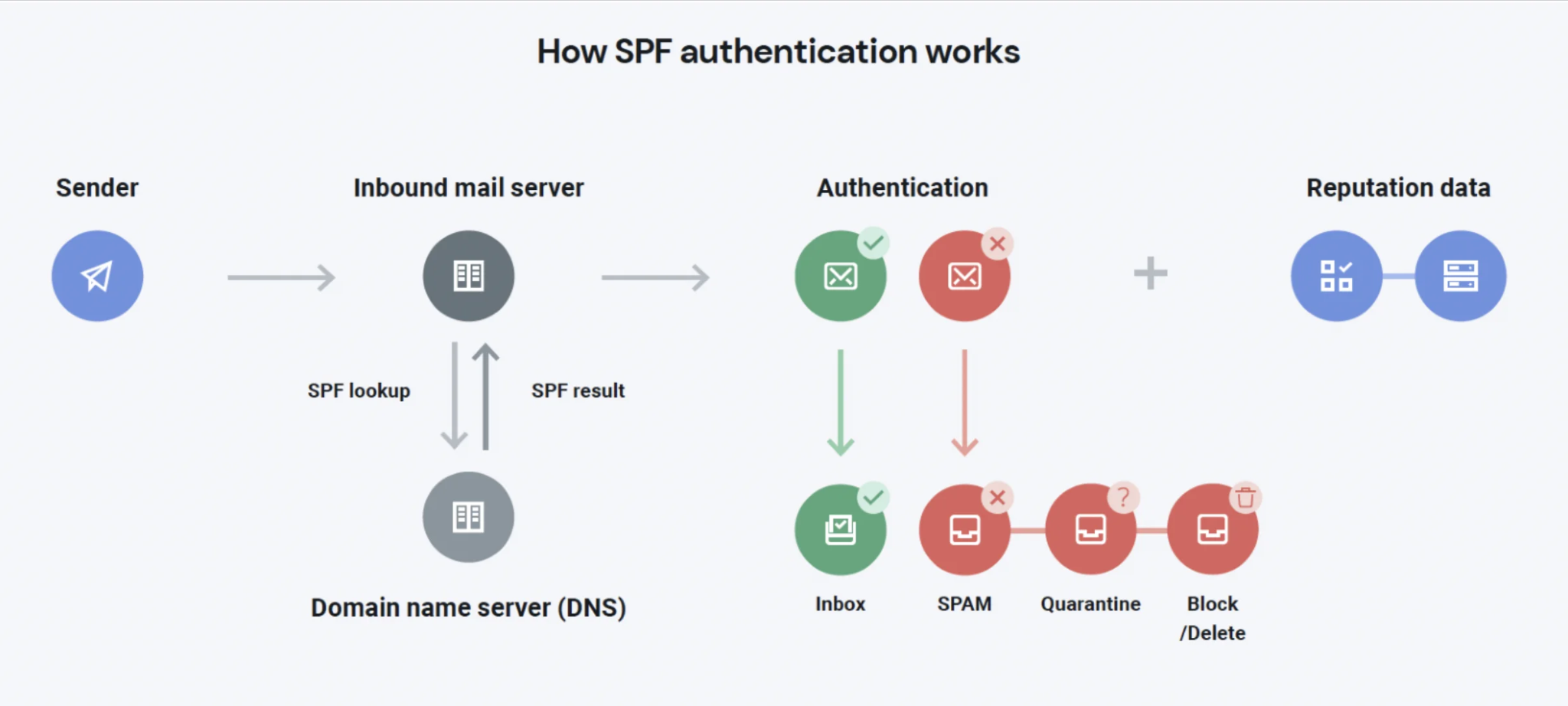
SPF: Who Is Allowed to Send
SPF is a TXT record at the domain root that lists the servers allowed to send for your domain. A Google Workspace example looks like this:
v=spf1 include:_spf.google.com ~all
Edit any existing SPF record. Never add a second one. Two SPF records on one domain make SPF fail. Include every service that sends mail for that domain, and keep the total number of DNS lookups under 10.
DKIM: Proof the Message Wasn’t Altered
DKIM is a cryptographic signature that proves the message wasn’t changed in transit. Your email provider generates a key. You publish it as a DNS record, then switch signing on. In Google Workspace, you generate the key in the admin console and add it as a TXT record.
DMARC: Tying It Together
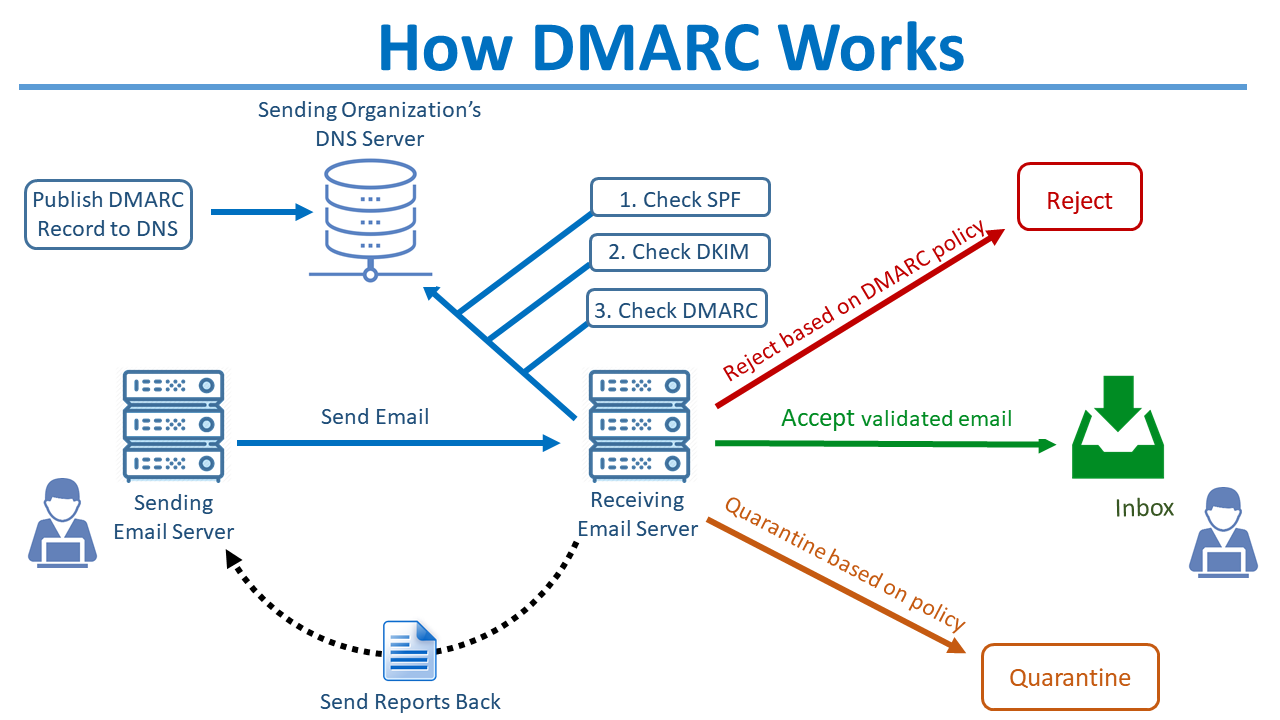
DMARC links SPF and DKIM and tells providers what to do when a message fails. A monitoring policy is a fine starting point:
v=DMARC1; p=none; rua=mailto:dmarc@yourdomain.com
You can tighten the policy later once your reports look clean. Gmail requires at least this level for bulk senders. The visible From domain also needs to align with your SPF or DKIM domain.
Verify Before You Move On
Silent misconfiguration is common. A record can look right in your DNS panel and still fail. Before warm-up starts:
- Wait for DNS propagation.
- Check each record with a free tool like MXToolbox or Google’s Admin Toolbox.
- Send a test email to a Gmail account, open “Show original,” and confirm SPF, DKIM, and DMARC all say PASS.
Keep Documentation
Write down what’s configured where. Once you’re running several domains, you’ll forget which domain has which provider, which selector, and which DMARC inbox. A shared document takes ten minutes and saves hours later.
Warming Up New Inboxes Before You Send Anything
New domains and new mailboxes have no sending history. Volume from day one looks like spam. Warm-up is how you build email outreach without personal email that mailbox providers trust. It’s also the step people skip most often, and the most common cause of a failed first campaign.
How Warm-Up Works
Warm-up tools send and reply to emails between real inboxes. That builds a pattern of normal activity: messages sent, opened, replied to, and rescued from spam.
Plan for several weeks per mailbox. Start with a handful of sends a day and ramp gradually.
An Example Ramp
Treat this as a starting shape. Exact numbers vary by tool and provider.
Introduce light cold volume only in the final stretch.
Keep Warm-Up Running
Warm-up isn’t a one-time setup task. Keep it running at a maintenance level for the life of the mailbox. Stopping it removes the steady positive signals that protect you when a campaign has a rough week.
Stagger Your Mailboxes
Don’t warm up everything at once. Activate mailboxes in waves. That keeps the activity pattern natural and gives you time to catch setup problems on the first inbox before you repeat them on ten.
Professional Outreach Without Personal Email: A Launch Order
The warm-up clock runs regardless of how fast you build the campaign. So the order matters:
- Day 1: Buy the sending domains and create mailboxes.
- Day 1 to 2: Set up SPF, DKIM, and DMARC. Verify them.
- Day 2 to 3: Start warm-up on the first mailboxes.
- Weeks 1 to 3: Build your list, write your copy, and set up your campaign.
- Week 4: Add light cold volume and watch your bounce and complaint numbers.
If you buy domains last, you lose weeks you can’t get back.
Making the New Address Look and Feel Professional
Good authentication gets you into the inbox. Professional email outreach is what gets the reply. A new domain has no brand recognition, so every detail has to signal that a real person sent this.
Use a Real Person’s Name
Send from a real name, not a role address. Keep the display name consistent with the person’s LinkedIn profile, since prospects check.
Keep the Signature Plain
Use a simple text signature with name, title, company, and a link to your real site:
Jordan Lee
Head of Partnerships, Acme
acme.com
Avoid heavy HTML signatures, tracking-heavy footers, and image-based logos in cold email. They add weight, look like marketing mail, and can push messages toward spam.
Put a Real Website Behind the Domain
Recipients will paste your sending domain into a browser. A bare domain with no website looks like spam infrastructure. Redirect it to your main site, or put up a simple one-page site with your company details.
Include a Working Unsubscribe Path
An opt-out path is a legal requirement in many places, and it reduces complaints. People who can leave politely don’t report you as spam. A plain line works well:
“If this isn’t relevant, just tell me and I won’t follow up.”
If your volume ever approaches Gmail’s bulk-sender range of 5,000 or more messages a day, one-click unsubscribe headers become a requirement too.
Monitor the Reply Inbox
Route replies to a mailbox someone checks daily. Interest goes cold quickly. A reply answered in two hours is a conversation. A reply answered in two days is often a lost lead.
Protecting Your Privacy: Best Practices for Professional Outreach Without Using Personal Emails
Separation protects your personal identity as well as your domain reputation. These best practices for professional outreach without using personal emails keep your own details out of campaigns.
- Use business contact details only. Put a business email and a business phone number in signatures. Never use personal numbers or home addresses.
- Use a business postal address. Rules like CAN-SPAM in the US require a valid physical address in commercial email. A registered office, coworking address, or PO box works.
- Check domain registration privacy. Most registrars offer WHOIS privacy. Turn it on so your personal details aren’t publicly attached to the sending domain.
- Handle opt-outs and data requests promptly. CAN-SPAM allows up to 10 business days to honor an opt-out. Don’t wait that long. Same-day removal protects both compliance and reputation. In the EU and UK, data requests carry tight deadlines.
- Keep outreach records in a shared business system. A CRM or sending platform means the data isn’t tied to one person’s inbox. If someone leaves, the history stays.
Note: Compliance obligations vary by country and state. This is general guidance, not legal advice. Check your rules before you launch.
Common Mistakes When Setting Up Outreach Infrastructure
Almost every failed first campaign traces back to one of these.
Sending from the primary company or personal domain. One bad week can hurt invoices and client email. Fix it by moving all cold sending to a separate domain.
Assuming an alias or subdomain provides real isolation. An alias gives none, and a subdomain gives partial protection at best. Use a separate domain.
Stacking too many mailboxes on a single domain. They share one reputation, so one bad inbox hurts all of them. Cap it at three and add domains instead.
Launching before authentication records are verified. Records that look fine in DNS can still fail. Send a test to Gmail and confirm the PASS results.
Skipping or shortening warm-up. This is the top cause of first-campaign failure. Give each mailbox several weeks.
Starting at full volume on day one. Sudden volume from a brand-new sender looks like spam. Ramp up gradually.
A sending domain with no live website. It looks like throwaway infrastructure. Redirect it to your main site or build a simple page.
Generic role addresses instead of real names. Sales@ gets ignored. Jordan@ gets replies.
Nobody monitoring the reply inbox. Interest cools fast. Assign an owner and check daily.
No plan for when deliverability drops. It will happen eventually. Decide now what you’ll do: pause sending on that domain, check for blocklisting and complaint rates in Google Postmaster Tools, and move volume to a healthy domain while you investigate. If the domain stays damaged, retire it and replace it.
How Cleverly Handles Outreach Infrastructure for You
The setup above is a few hours of work followed by several weeks of waiting. Then the real job begins: monitoring domain health, keeping warm-up running, rotating senders, and reacting when inbox placement dips. Domains also age out and need replacing.
As a cold email agency, we run that layer for you. We set up and warm the domains and inboxes, define your ICP, and build verified lists from multiple sources. We also write the sequences, manage deliverability, and handle replies through to booked meetings. Your primary domain is never used. You also skip the expensive lessons that come from learning deliverability by damaging it.
Our cold email outreach service has helped generate $312M in client pipeline and 224.7K leads. We optimize for qualified replies and booked meetings, not send volume or inbox count.
Rather not build and babysit sending infrastructure? Let Cleverly run cold email on the infrastructure we manage. Book a free consultation!
Conclusion
Reputation is scored at the domain level, which is why separation is the whole strategy. A fully separate domain gives real protection. A subdomain gives partial protection, and an alias gives none. Scale by adding domains instead of stacking mailboxes, and keep per-domain volume conservative.
Your next step is simple. Buy the sending domains today and start warm-up, because that clock runs regardless of when your campaign is ready. Getting professional outreach without personal email right isn’t a technicality. It protects the email your business actually runs on.
Frequently Asked Questions
Free Resource
How to Scale a Profitable Cold Call System
Get the complete guide — download it instantly now.

Free Ebook
Download the Free Guide
Enter your details to get instant access.
You're all set! 🎉
Your ebook is downloading now.
Click below if the download didn't start automatically.