Table of Contents
SPF, DKIM, and DMARC Explained in Plain English
SPF vs DKIM vs DMARC: What's the Difference?
Why Cold Email Specifically Needs All Three
How to Set Up SPF for Cold Email
How to Set Up DKIM for Cold Email
How to Set Up DMARC for Cold Email
How to Check and Verify Your SPF, DKIM, and DMARC Setup
Common Mistakes When Setting Up Cold Email Authentication
How Cleverly's Cold Email Outreach Service Handles Deliverability Setup
Conclusion
Frequently Asked Questions
Modified On :
August 6, 2026
Key Takeaways
- Authentication isn't a technical checkbox. It's the foundation your entire cold email reputation sits on, and skipping steps almost always costs more time than doing it right the first time.
- Order matters more than most guides admit. SPF and DKIM have to be confirmed working before DMARC goes live, because DMARC has nothing to enforce without them.
- Gradual enforcement beats aggressive enforcement. Starting DMARC at a monitoring policy and working up to full rejection protects legitimate mail while you learn what your sending actually looks like.
- Deliverability is a system, not a record. Authentication gets you in the door, but warmup, sending volume, and domain reputation decide whether you stay there.
- A dedicated sending domain isn't optional caution anymore. It's the difference between protecting your main business domain and risking it every time a cold campaign goes out.
A single missing DNS record can take down a cold email domain. Not slow it down. Take it down, permanently blacklisted, with your primary business domain caught in the blast radius if you weren't careful about separation.
That's not a scare tactic. It's just where email has landed. Only 16% of domains have implemented DMARC, which leaves 87% vulnerable to spoofing and delivery failures.
And the gap between senders who get authentication right and those who don't is no longer subtle. Compliant senders average 89% inbox placement, while non-compliant senders see 22 to 34% of their email routed to spam, a 3x to 7x penalty.
Since February 2024, Google and Yahoo have required SPF and DKIM for every sender, with DMARC mandatory for anyone sending 5,000 or more emails a day. Microsoft joined with its own enforcement in 2025. None of this is optional anymore, and none of it is going away.
This guide breaks down what SPF, DKIM, and DMARC actually do, the order you need to set them up in, step-by-step instructions for each one, and how to verify everything is actually working before you send a single cold email.
If you're a founder, SDR, marketer, or agency setting up or auditing a sending domain, this is for you.
SPF, DKIM, and DMARC Explained in Plain English
Forget the acronyms for a second. Here's what each one is actually doing.
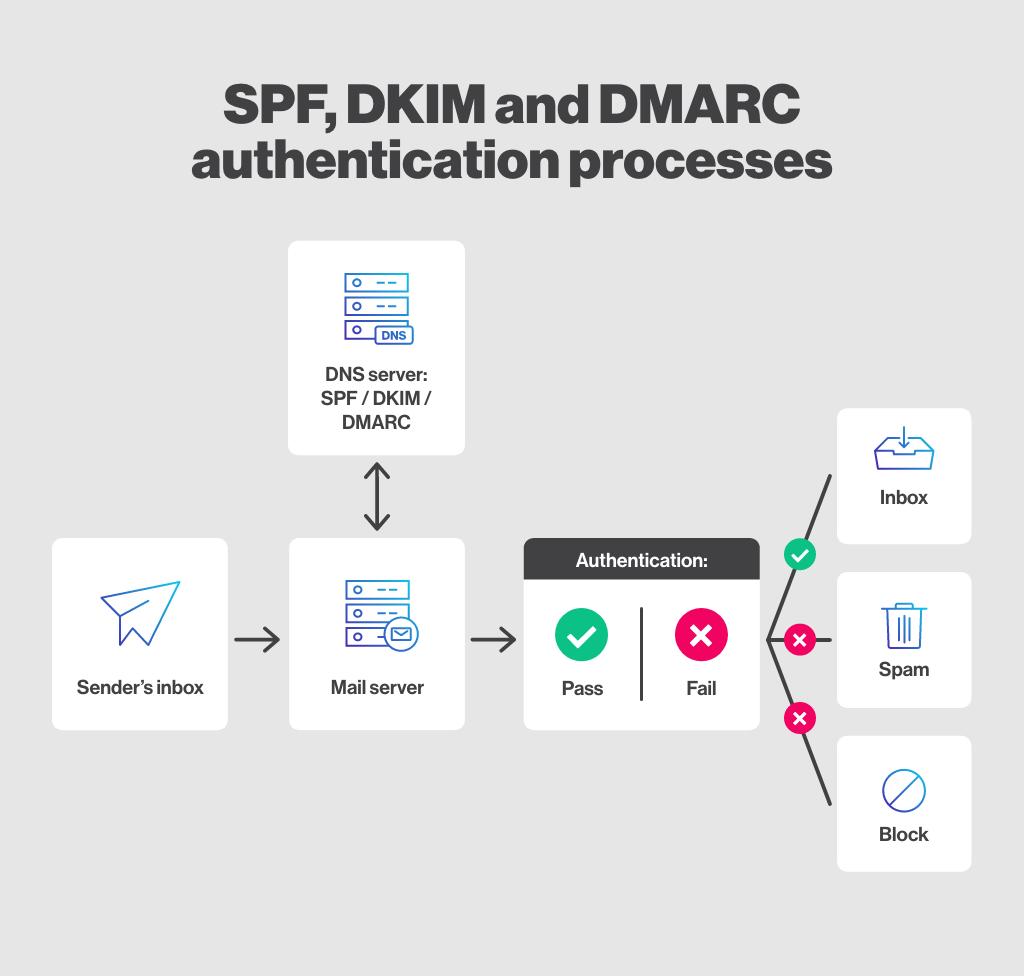
SPF is your guest list. It's a DNS record that tells receiving mail servers exactly which IP addresses and services are allowed to send email on behalf of your domain. If an email claims to be from you but comes from a server not on that list, SPF flags it.
DKIM is a wax seal. It's a cryptographic signature attached to every outgoing message. That signature proves the email wasn't altered in transit and that it genuinely came from a server you authorized. Break the seal (change the content after signing), and the signature stops matching.
DMARC is the bouncer. It ties SPF and DKIM together and tells inbox providers exactly what to do when a message fails those checks: let it through, send it to spam, or reject it outright. DMARC also gives you reporting so you can see who's sending mail using your domain, including senders you never authorized.
Put together, these three protocols answer three separate questions:
- Is this sender authorized? (SPF)
- Is this message authentic and unaltered? (DKIM)
- What should happen if something looks wrong? (DMARC)
You need all three answered. One or two out of three still leaves a gap that spoofers and spam filters both notice.
📧 Authenticate Your Domain. Maximize Inbox Placement.
Pair proper email authentication with campaigns that generate 15–30 qualified meetings every month through cold email that gets delivered.
SPF vs DKIM vs DMARC: What's the Difference?
Here's where the three protocols are compared side by side, since that's usually where the confusion starts.
Key takeaway: DMARC depends entirely on SPF and DKIM working correctly first. It's not a standalone fix, and setting it up before the other two is one of the most common mistakes in cold email authentication.
Why Cold Email Specifically Needs All Three
Regular business email and cold email don't get treated the same way by inbox providers, even when both are technically authenticated.
Cold email volume and sending patterns look inherently more suspicious. You're emailing people who haven't opted in, often at scale, from a domain that might be new. Inbox providers weigh that risk heavily, and missing or broken authentication is one of the fastest ways to end up in spam or get a domain blacklisted entirely.
Google, Yahoo, and Microsoft now require SPF, DKIM, and DMARC authentication for bulk email senders, with non-compliant emails getting rejected or sent to spam. That's not a suggestion anymore. It's the price of getting into the inbox at all.
A practical rule that separates people who protect their sender reputation from people who eventually lose it: never cold email from your primary business domain.
Use a separate sending domain, get all three records configured and verified, and only then connect it to any outreach tool. If that domain ever takes a reputation hit, your main domain (and the inbound email that depends on it) stays untouched.
🚀 Inbox Placement Is Just the Beginning
With 53,000+ meetings booked and $312M+ in pipeline generated, Cleverly turns high-deliverability cold email into predictable revenue.
How to Set Up SPF for Cold Email
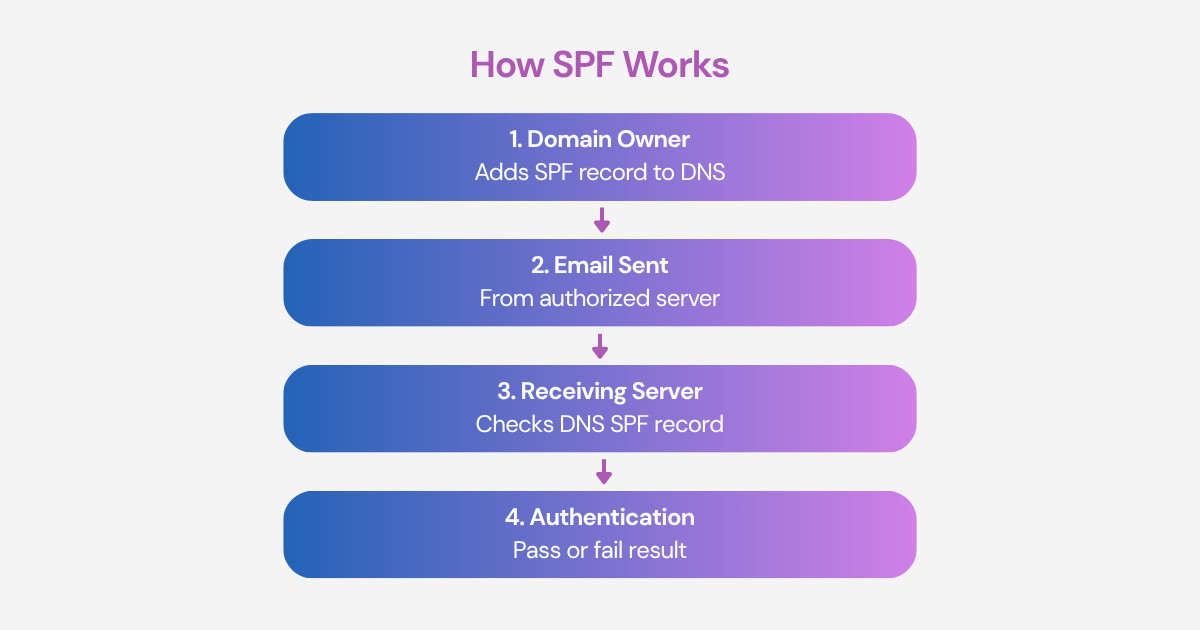
SPF setup happens first, and it's the simplest of the three records.
The steps:
- Add SPF as a TXT record on your root domain (the @ entry in your DNS).
- If you're on Google Workspace, your record will typically look like: v=spf1 include:_spf.google.com ~all
- Watch the include limit. SPF has a hard cap on DNS lookups. Chain more than 10 include statements and the record fails silently, meaning it looks fine but doesn't actually validate anything.
- Run a free SPF checker to confirm propagation and syntax before you send a single email.
That last step matters more than it sounds. A malformed SPF record won't throw an error. It just quietly stops protecting you, and you won't know until deliverability drops.
How to Set Up DKIM for Cold Email
DKIM comes second, and it takes a bit longer to go live because of propagation time.
The steps:
- Generate a DKIM key inside your email provider's admin console. On Google Workspace, that's Admin Console → Apps → Google Workspace → Gmail → Authenticate Email.
- Copy the generated TXT record into your domain's DNS. The record name usually follows the pattern [selector]._domainkey.yourdomain.com.
- Give it time. Propagation can take 24 to 48 hours, and sending before it's confirmed live defeats the purpose of setting it up.
- Verify with a DKIM checker like MXToolbox before connecting the domain to any sending or outreach tool.
Pro tip: don't skip the verification step just because the setup felt straightforward. DKIM records are easy to get slightly wrong (a copy-paste error, a missing character), and a broken signature is worse than no signature at all in some spam filter logic.
How to Set Up DMARC for Cold Email
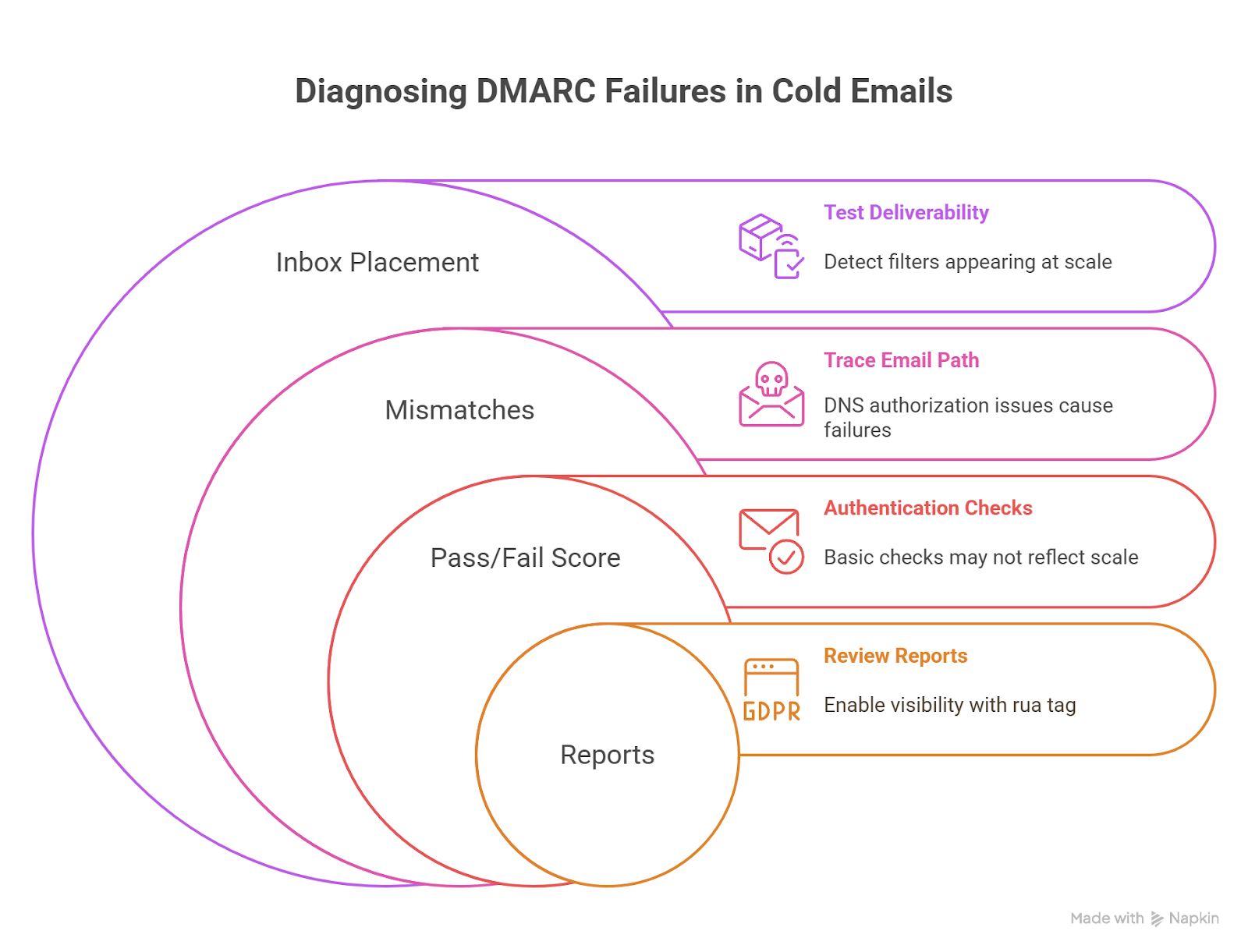
DMARC goes last, and only after you've confirmed SPF and DKIM are both working. This is the step most guides rush, and it's where most damage happens.
The setup sequence:
- Start with a monitoring-only policy: v=DMARC1; p=none; rua=mailto:dmarc@yourdomain.com
- This collects reports without blocking or filtering any mail. It's the safe first move, and it's non-negotiable if you want to avoid blocking legitimate email by accident.
- Monitor those reports for 2 to 4 weeks. If your legitimate email is passing cleanly, move to p=quarantine.
- After another clean monitoring stretch, move to p=reject for full enforcement.
Recommended timeline: p=none → p=quarantine within 30 to 60 days of clean monitoring, then p=reject once you're confident nothing legitimate is getting caught in the net.
Jumping straight to p=reject without monitoring first is one of the fastest ways to accidentally block your own real mail. Patience here isn't optional.
How to Check and Verify Your SPF, DKIM, and DMARC Setup
Setting the records up is half the job. Verifying they actually work is the other half, and it's the part people skip most often.
How to run a proper SPF DMARC DKIM check:
- Use free tools like MXToolbox, Google Admin Toolbox, or dmarcian to confirm each record resolves correctly in DNS.
- Send a test email to a checker address and review the authentication headers. You want to see a clear pass on all three: SPF, DKIM, and DMARC.
- Confirm DMARC alignment specifically. This trips people up constantly: SPF and DKIM can each pass individually and still fail DMARC alignment if the domains don't match up correctly.
- Re-check after any DNS change or any switch in sending tools. A single misconfiguration can silently break deliverability without any obvious warning sign.
Think of this as a recurring habit, not a one-time task. Every time something changes upstream (a new ESP, a new subdomain, a new integration) it's worth running the check again.
Common Mistakes When Setting Up Cold Email Authentication
Most authentication failures come down to a handful of repeated mistakes. Here's what to watch for:
❌ Setting up DMARC before SPF and DKIM are confirmed working. DMARC has nothing to enforce without them, and skipping ahead usually means it does nothing at all.
❌ Exceeding the 10-lookup limit on SPF by chaining too many include statements across multiple sending tools.
❌ Sending cold email before DNS propagation completes. Give records the full 24 to 48 hours before you rely on them.
❌ Using your primary business domain for cold outreach instead of a dedicated sending domain built to absorb the risk.
❌ Jumping straight to p=reject on DMARC without a monitoring period first, which can silently block legitimate mail along with anything malicious.
Every one of these is avoidable with the sequencing outlined above. The fixes aren't complicated. The mistakes just happen when people treat authentication as a quick checkbox instead of a process with a correct order.
How Cleverly's Cold Email Outreach Service Handles Deliverability Setup
Getting SPF, DKIM, and DMARC configured correctly is table stakes. It's just one piece of a much larger deliverability system that also includes domain warmup, sending limits, and ongoing monitoring, and most of the deliverability failures we've seen trace back to setup mistakes made before a single email went out.
As a cold email outreach service, Cleverly handles domain setup, full authentication (SPF, DKIM, and DMARC), warmup scheduling, and inbox management as part of every campaign. None of it gets left for the client to configure alone.
That includes dedicated sending domains built specifically for outreach, complete authentication setup verified before launch, a structured warmup schedule, and ongoing monitoring for the life of the campaign.
We've generated $312M in client pipeline running campaigns like this, and a large share of that traces back to getting the unglamorous infrastructure right before the copywriting or targeting ever mattered. Authentication and warmup don't get headlines, but they decide whether anything else you do even reaches an inbox.
If you'd rather run cold email from properly authenticated, warmed-up domains without personally managing DNS records and inbox health, book a free consultation with Cleverly and we'll walk you through how the setup works for your domain.
Conclusion
SPF, DKIM, and DMARC aren't optional extras for cold email in 2026. They're the baseline inbox providers now require before your mail even gets a chance to be judged on subject lines or copy.
Set them up in order: SPF first, DKIM second, DMARC last, starting at p=none and escalating gradually as your monitoring data gives you confidence. Verify every record with a checker tool before you send anything at scale, since silent failures are common and they're expensive when you catch them late.
Get this foundation right, and everything you build on top of it (deliverability, sender reputation, actual replies) has somewhere solid to stand.
Frequently Asked Questions
Free Resource
How to Scale a Profitable Cold Call System
Get the complete guide — download it instantly now.

Free Ebook
Download the Free Guide
Enter your details to get instant access.
You're all set! 🎉
Your ebook is downloading now.
Click below if the download didn't start automatically.