Table of Contents
What You Need Before You Touch Smartlead
Connect Your Email Accounts in Smartlead
Build and Import Your Lead List
Write and Structure Your Sequence
Set the Schedule and Sending Limits
Pre-Launch Checklist
What to Watch in the First 48 Hours
Common First-Campaign Mistakes
How Cleverly Runs Cold Email Campaigns End to End
Conclusion
Frequently Asked Questions
Modified On :
October 1, 2026
Key Takeaways
- A failed first Smartlead campaign almost never comes down to the platform or the copy. It comes down to infrastructure that wasn't ready before the first send.
- The order matters more than the steps themselves: domains, authentication, warmup, a verified list, then your sequence. Reverse that order and you're gambling with deliverability.
- An already-warmed inbox can go live in under an hour. Starting from zero takes roughly three weeks before your first cold send, and there's no way to skip that clock.
- Smartlead handles sending, rotation, and reply management well. It cannot fix a list that was never verified or a domain that jumped straight to full volume.
- Your first campaign should be judged on replies and booked meetings, not opens or send volume. Those numbers tell you if the message landed, not just if it arrived.
Your Smartlead campaign setup can be technically perfect and still fail, because the platform was never the thing deciding whether your emails land.
Smartlead handles sending, rotation, and reply management better than most tools in its category. What it can't do is fix a domain with no sending history or a list nobody verified.
The numbers back this up. Unwarmed, newly registered domains get rejected by Gmail and Outlook at a rate of 32% for cold sends. Meanwhile, fully authenticated and warmed domains reach 94.2% deliverability, a gap that decides whether your campaign has a chance before you've written a single line of copy.
So here's the honest timeline. If you already have a warmed inbox sitting in Smartlead, you can launch a Smartlead cold email campaign in under an hour. If you're starting from scratch, plan on roughly three weeks before your first cold send goes out.
This guide covers both paths: pre-launch infrastructure, connecting your accounts, importing your list, building your email sequence, setting your schedule, and what to actually watch in the first 48 hours.
It's built for founders, SDRs, and agencies running their first campaign in the platform, and it includes the setup work most Smartlead tutorials leave out entirely.
What You Need Before You Touch Smartlead
This is the part that gets skipped in most Smartlead tutorial content, and it's the part that decides whether your campaign lands or gets buried in spam.
Buy Separate Sending Domains
Never send cold email from your primary brand domain. If something goes wrong, and something usually does on a first campaign, you don't want your main domain's reputation on the line.
Buy two to three secondary domains that closely resemble your main one. Something like trycompanyname.com or companyname.io works. The logic is simple: a deliverability problem stays contained to a domain you can abandon, instead of damaging the domain your actual business runs on.
Create Mailboxes and Plan Volume
Work backwards from your target sending volume. A safe ceiling is roughly 30 to 50 cold sends per mailbox per day. If you need higher volume, you add more mailboxes rather than pushing a single inbox past its limit.
A rough planning guide for a first campaign: a handful of mailboxes spread across two domains gets you a modest, sustainable daily volume. Scale up from there once you've seen the campaign perform.
One detail worth knowing: Google Workspace and Microsoft 365 tolerate slightly different sending ceilings, so don't assume a limit that works on one provider transfers cleanly to the other.
Set Up SPF, DKIM, and DMARC
All three authentication records need to be live before your first warmup email, not before your first campaign. This is a common mix-up. Warmup is part of building sending history, and unauthenticated domains don't build good history.
- SPF: a single TXT record at your domain root. If one already exists, edit it. Never add a second SPF record; having two breaks authentication entirely.
- DKIM: the cryptographic signature that proves your message wasn't altered in transit. Most domain registrars and Smartlead itself walk you through generating this.
- DMARC: ties SPF and DKIM together and tells receiving servers what to do if a message fails either check. Starting at a monitoring-only policy (p=none) is acceptable while you get comfortable.
Verify every record propagated before moving forward. DNS changes can take anywhere from a few minutes to 48 hours, and skipping this check is how people end up warming an inbox that was never actually authenticated.
Warm Every Mailbox
Plan on roughly three weeks of warmup, starting with a handful of sends per day and ramping gradually. This is the single most common cause of a failed first campaign, because it's the step people are most tempted to rush.
Introduce light cold volume only in the final stretch of warmup, not day one. And once your mailbox is live, keep warmup running at a maintenance level for the life of that inbox. Warmup isn't a one-time setup task. It's ongoing reputation maintenance.
Pro tip: if you're tempted to skip or shorten warmup because you're in a hurry, that urgency is exactly what causes most first-campaign failures. The three weeks aren't optional; they're the foundation everything else sits on.
📧 Launch Better Campaigns
Cleverly handles list building, inbox setup, copy, warmup, and optimization to help B2B teams generate qualified meetings through cold email.
Connect Your Email Accounts in Smartlead
Once your mailboxes are authenticated and warming, it's time to actually connect them inside the platform. This is where most Smartlead tutorial content starts, but by the time you get here, the hard part is already done.
- Add each mailbox individually and confirm it authenticates cleanly before moving to the next one.
- Configure per-account daily limits yourself rather than relying on platform defaults, which are built for general use, not your specific domain age and warmup status.
- Enable inbox rotation so your volume spreads across mailboxes instead of concentrating on one. This is one of Smartlead's strongest features and the reason many agencies default to it for multi-mailbox sending.
- Turn on in-platform warmup for any mailbox you're using it on, and let it run alongside your campaign, not just before it.
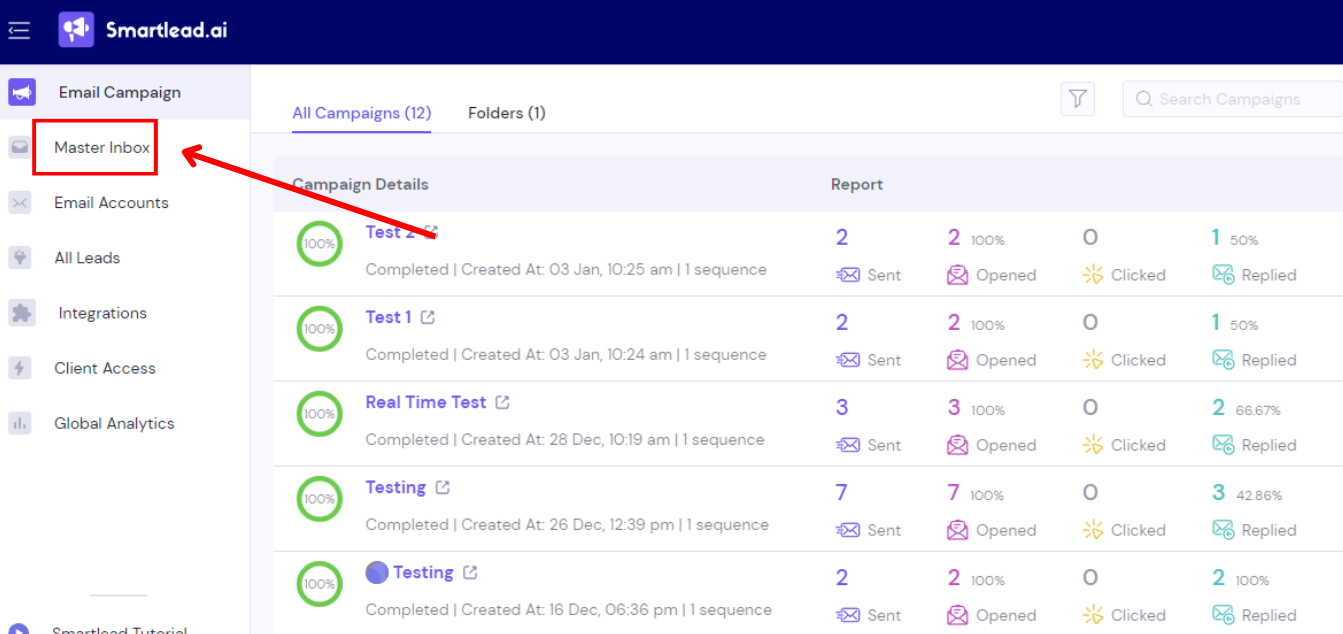
- Set a realistic sending window that matches business hours in your recipient's time zone, not yours.
- Add random delays between sends so your sending pattern doesn't look automated to spam filters.
- Check account health indicators before assigning any mailbox to a live campaign. A mailbox that's flagged yellow or red has no business going into rotation yet.
Build and Import Your Lead List
Your sequence can be well-written and your infrastructure airtight, and a bad list will still sink the campaign. This step deserves more care than most people give it.
Define your ICP before you source anything. A tight, well-matched list of a few hundred contacts outperforms a loose list of a few thousand, especially on a first campaign where you're also trying to learn what works.
- Verify every address before import. Bounces on a brand-new domain do disproportionate damage to your sender reputation compared to the same bounce rate on an established domain.
- Format your CSV with clean column headers and map custom fields correctly for personalization.
- Include every variable your sequence actually uses, and check that none of them are blank. A blank {{first_name}} in a live send is an easy way to torch a first impression.
- Suppress existing customers, open opportunities, and anyone you've already contacted before you upload.
- Start small. A few hundred contacts is the right size for a first campaign, not thousands.
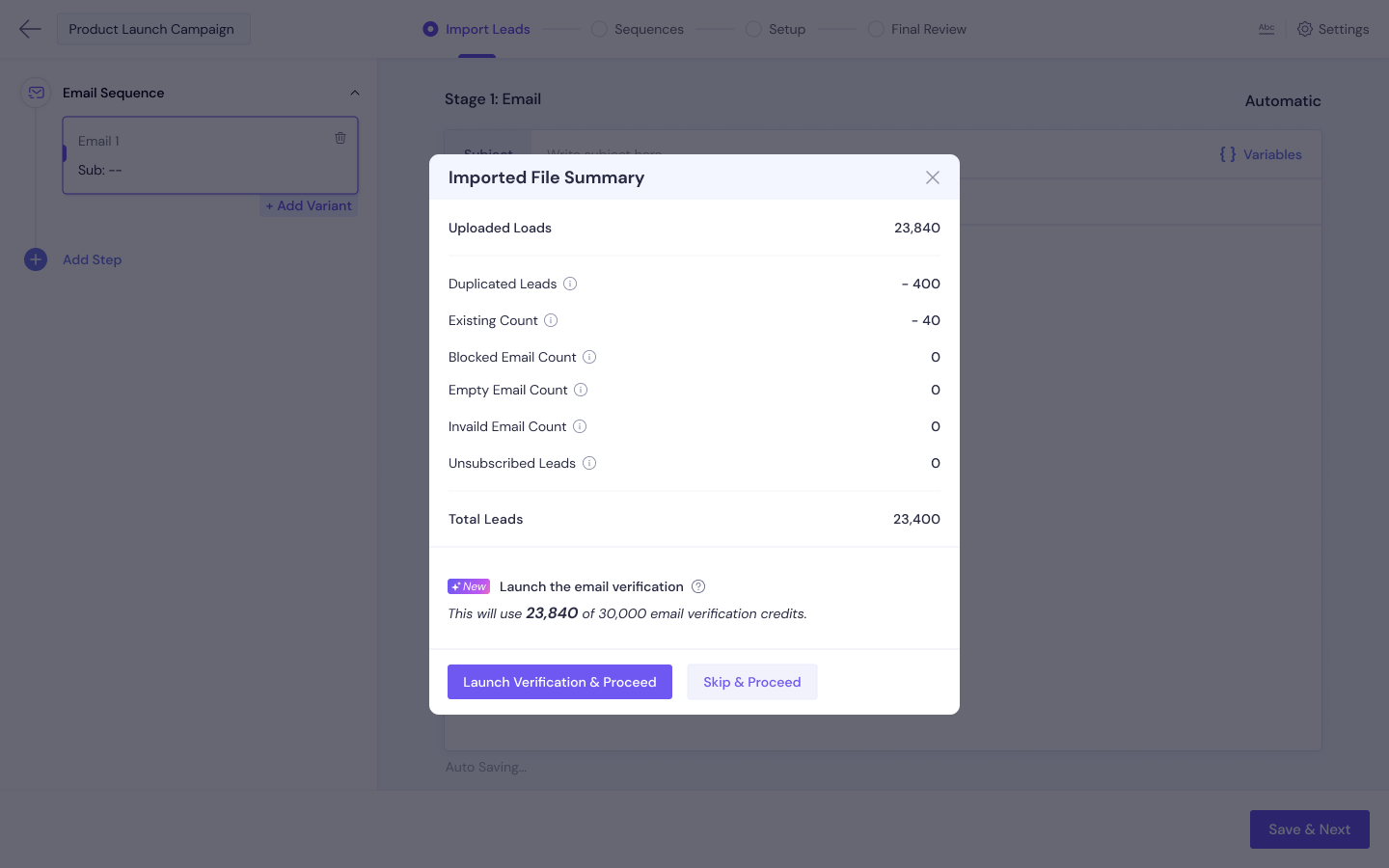
- Review the import summary for rejected or duplicate rows. Don't assume the upload worked cleanly just because it finished.
🚀 Turn Email Into Pipeline
With 224.7K+ leads generated, 53,000+ meetings booked, and $312M+ pipeline, Cleverly helps 10,000+ businesses scale outbound.
Write and Structure Your Sequence
A three to four step sequence is the right starting point: an intro, a value-driven follow-up, a different angle, then a short close. Resist the urge to build something longer for a first run.
Space each step a few days apart rather than sending on consecutive days. Back-to-back sends read as aggressive and give the recipient no room to actually consider replying.
Keep every email short and in plain text. Designed, HTML-heavy emails hurt both deliverability and reply rates in cold outreach, even though they look more "professional." Lead with a specific, real reason for reaching out, not a company introduction nobody asked for. Make the ask small, a quick question or a short conversation, never a demo request in the first touch.
Use personalization variables carefully and set fallback values so nothing renders blank if a field is missing. Add spintax on subject lines and openers so what actually sends varies across recipients. Avoid links and attachments entirely in the first email; both are common deliverability red flags for new domains.
Set up A/B variants from the start. A first campaign should produce learning, not just send volume. If you only test after launch, you've already lost the chance to compare variants on the audience that matters most.
Set the Schedule and Sending Limits
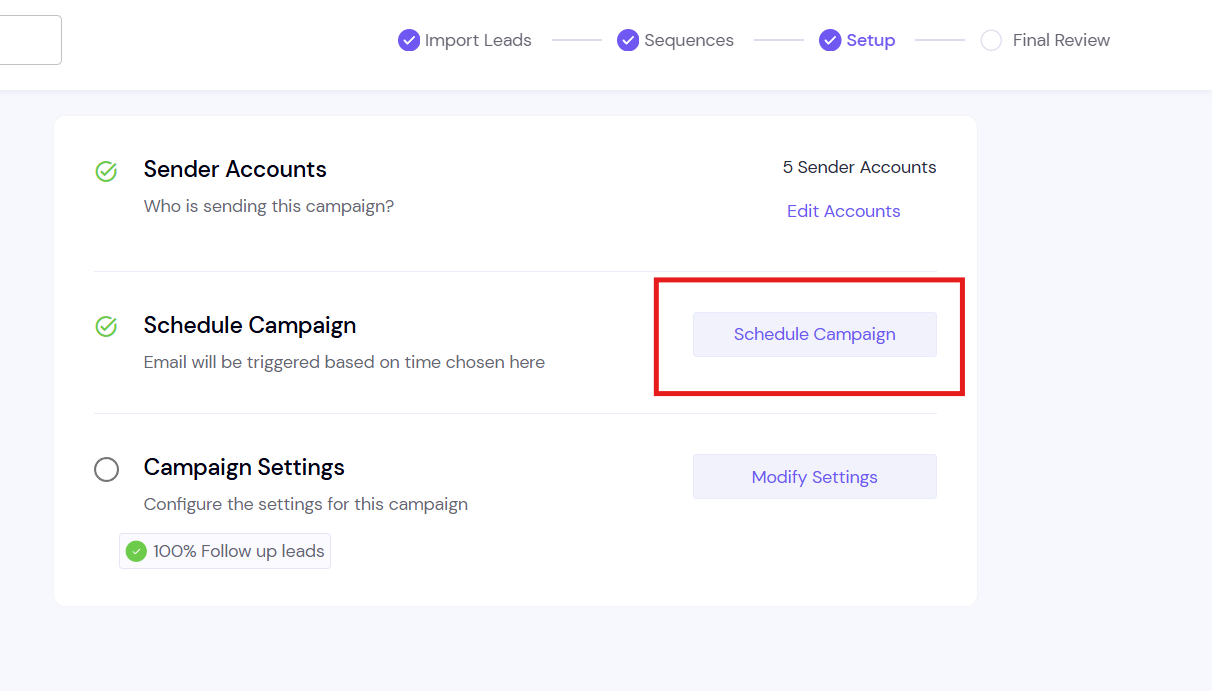
Send on weekdays, within business hours, in your recipient's time zone. On a first campaign, keep the per-mailbox daily cap conservative and well below the platform maximum. You're not trying to hit a ceiling; you're trying to prove the campaign works before you scale it.
Calculate your total daily volume as mailboxes multiplied by per-mailbox limit. It's not a number you pick out of ambition; it's math based on what your infrastructure can actually support.
Configure stop conditions so anyone who replies exits the sequence immediately. Nothing damages a positive reply faster than a follow-up email landing in their inbox a day later. Decide deliberately on open and click tracking. Tracking pixels carry a small deliverability cost, and for a first campaign, the data they provide often isn't worth the tradeoff.
Set your campaign to ramp volume gradually instead of starting at full capacity on day one, and confirm your schedule actually respects your mailbox's current warmup state before you hit launch.
Pre-Launch Checklist
Before you launch your first cold email campaign, run through this list. It's the most practical part of this guide, and it's worth bookmarking for every campaign after this one too.
- SPF, DKIM, and DMARC verified on every sending domain.
- Every mailbox warmed and showing a healthy status.
- List verified, deduplicated, and checked against your suppression list.
- All personalization variables populated, with fallbacks in place.
- Sequence proofread and tested by sending to your own inbox first.
- Rendering checked in both Gmail and Outlook, on desktop and mobile.
- Reply-stop conditions configured and tested.
- Sending window and per-account limits set.
- Unsubscribe mechanism in place.
- A clear owner assigned to handle replies, and how fast they'll respond.
What to Watch in the First 48 Hours
Your bounce rate is the first real signal. In 2026, a healthy cold email bounce rate stays under 3%, with the strongest senders staying below 1.5%. Anything higher means pause the campaign and fix the list before you send another batch.
Spam complaints matter even more than bounces, because they do longer-lasting damage to your sender reputation. Test placement with seed inboxes to confirm your sends are actually landing in the primary inbox, not just technically delivered. Keep an eye on mailbox health indicators for any account that starts degrading mid-campaign.
Read your early replies for signal, not just sentiment. If people are confused about why you're reaching out, that's a message problem, not a targeting problem. And resist the urge to increase volume in week one, even if the early metrics look good. Reputation builds slowly and can get undone quickly.
Know your intervention points going in:
Common First-Campaign Mistakes
Most failed first campaigns don't fail for complicated reasons. They fail because of a handful of avoidable mistakes that show up again and again, usually because someone was in a hurry to get the campaign live.
Sending from the primary brand domain. This is the one that does the most lasting damage. If your cold sends trigger spam complaints or get flagged, you're not just risking a secondary domain you can abandon and rebuild. You're putting your actual business email at risk, the same domain your invoices, client communication, and internal team emails run on. Once that domain's reputation takes a hit, it can affect every email you send from it, cold or not.
Skipping or shortening warmup. Three weeks feels like a long time when you're eager to start generating pipeline, so this is the step people cut corners on most often. The problem is that warmup isn't a formality. It's how you build the sending history that tells Gmail and Outlook your domain is trustworthy. Skip it, and your first cold send goes out from a domain with zero reputation, which is exactly the profile spam filters are built to catch.
Launching at full volume on day one. Even with warmup done properly, jumping straight to your maximum planned sending volume on launch day puts unnecessary strain on a mailbox that's still proving itself. Reputation builds gradually, and spam filters pay attention to sudden spikes in outbound volume from any account, new or established. Ramping up over the first week or two protects the mailbox you just spent three weeks warming.
Uploading an unverified list. A list that hasn't been verified will almost always contain some percentage of dead or invalid addresses, even if it looked clean when you built it. On an established domain with years of sending history, a few bounces barely register. On a brand-new domain with no track record yet, those same bounces do outsized damage and can stall a campaign before it even gets going.
Writing long, formatted, pitch-heavy emails. It's tempting to make your first cold email look polished, with logos, colored buttons, and a full pitch laid out clearly. In practice, heavily designed HTML emails read as marketing to both spam filters and recipients, and they tend to get lower reply rates than a short, plain-text message that reads like it came from an actual person who did their homework.
Including too many links or attachments in the first touch. A first email packed with links to your website, a calendar booking page, and a case study attachment is a common deliverability red flag, especially from a domain that's still building trust. It also puts too much ask on a recipient who hasn't agreed to anything yet. Save the links for later in the sequence, once there's actually a conversation happening.
Forgetting a suppression list. Without one, there's a real chance your campaign ends up cold emailing existing customers, people already mid-deal with your sales team, or contacts you've reached out to in a different campaign. Beyond the awkwardness, it signals disorganization to the exact people you've already built trust with.
No one assigned to handle replies. This mistake is invisible until it's too late. A campaign can get strong positive replies and still produce zero meetings, simply because nobody was watching the inbox closely enough to respond within a reasonable window. Interest in cold email cools fast, and a reply that sits unanswered for two days is often a reply that goes cold for good.
Judging the campaign on opens instead of replies and booked meetings. Open rates feel like an easy number to track, but they're also one of the least reliable metrics in cold email right now, especially with Apple's privacy protections inflating the numbers for a large share of recipients. The only two numbers that actually tell you whether a campaign is working are how many people replied and how many of those replies turned into a meeting on the calendar.
How Cleverly Runs Cold Email Campaigns End to End
The platform is genuinely the easy part. Domains, warmup, deliverability monitoring, and reply handling are the ongoing work that actually decides whether a campaign turns into pipeline, and that work doesn't stop after launch week.
Worth noting honestly: Smartlead is part of Cleverly's own sending stack, so this isn't a theoretical recommendation.
Cleverly runs the full process end to end: ICP definition and verified, multi-source list building, domain and inbox infrastructure setup, ongoing warmup and deliverability management, sequence copywriting, and reply handling all the way through to a booked meeting.
For a reader setting this up for the first time, the practical difference is this: no three-week wait on warmup before pipeline starts, and no deliverability firefighting learned the hard way on your own domain.
The messaging frameworks running through Cleverly's campaigns have been tested across thousands of client sequences, which shortens the trial-and-error period most teams go through on their first few campaigns.
The goal isn't open rates or send volume. It's qualified replies and meetings that actually land on a calendar.
Rather skip the setup and the three-week warmup wait? Get a free consultation and let Cleverly run cold email for you.
Conclusion
Smartlead is a capable platform, but infrastructure is what decides whether a campaign lands or disappears into spam folders. The order matters: domains, authentication, warmup, a verified list, then your sequence. Reverse that order and you're building on a foundation that isn't ready.
Start small, start slow, and treat volume as something you earn as your mailbox health proves out, not something you assume from day one. If you're beginning your Smartlead campaign setup today, the practical next step is simple: buy your domains and start warmup now, because that three-week clock runs regardless of how fast you build the rest of the campaign.
Judge your first send on replies and meetings booked, then scale what actually worked instead of sending more of everything.
Frequently Asked Questions
Free Resource
How to Scale a Profitable Cold Call System
Get the complete guide — download it instantly now.

Free Ebook
Download the Free Guide
Enter your details to get instant access.
You're all set! 🎉
Your ebook is downloading now.
Click below if the download didn't start automatically.