Table of Contents
What Your LinkedIn Headline Actually Has to Do
The Character Limit and What Actually Gets Seen
The Structure of a LinkedIn Headline for Lead Generation That Works
LinkedIn Headline Formulas You Can Adapt
LinkedIn Headline Examples by Role
Mistakes That Make Headlines Stop Working
How to Test and Improve Your Headline
How Your Headline Fits the Rest of Your LinkedIn Profile
How Cleverly Turns an Optimized Profile Into Booked Meetings
Conclusion
Frequently Asked Questions
Modified On :
October 12, 2026
Key Takeaways
- A headline has two jobs, being found and being believed. For outbound, being believed matters far more.
- Everything a prospect must read goes in the first 60 characters. The back half is only for search.
- Lead with who you help and what changes for them, not with your job title.
- Specificity and proof beat adjectives. In a crowded space like lead generation, the niche, channel, or number is your differentiator.
- Treat your headline as a test. Change one element at a time, track connection acceptance rate, and make sure the rest of your profile backs up its claim.
Your LinkedIn headline is the most-seen line you own on the platform. It sits under your name in search results, on every connection request, in every comment, and in every message notification. Prospects often decide in that one line whether you’re worth a click.
The stakes are high. LinkedIn has passed 1.2 billion members, and about 80% of B2B social media leads come from it, according to figures widely attributed to LinkedIn. But the field is tiny. It holds 220 characters, and only the first 60 to 70 reliably show where outbound happens.
A strong LinkedIn headline for lead generation has to do two jobs. It has to help the right people find you, and it has to convince someone who just clicked your name that you’re worth a reply. Weak headlines fail the second job because they describe a job title instead of naming who you help.
This guide covers the two jobs, a four-part structure, seven formulas, examples by role, common mistakes, and how to test. It’s written for founders, sales reps, consultants, and lead generation professionals.
We review headlines on every LinkedIn campaign we set up at Cleverly, so what follows comes from real acceptance rates.
What Your LinkedIn Headline Actually Has to Do
Think of your headline as a LinkedIn profile for lead generation in one line. It carries two jobs that pull in different directions.
Job one: be findable
When someone searches LinkedIn for “lead generation specialist” or “B2B SaaS sales consultant,” keywords in your headline help decide whether you show up. More relevant terms mean a better chance of surfacing.
Job two: be clickable and credible
When a prospect sees your connection request, your headline is most of what they have to go on. They look at your name, your photo, and that one line. If the line doesn’t tell them quickly what you do and who it’s for, they ignore the request or hit decline.
Why the two jobs conflict
Keyword density helps search. Clarity helps conversion. A headline stuffed with every relevant term ranks fine and reads like a list of nouns. A headline written purely for humans might skip terms that people search for.
The resolution: front-load for humans
Put the human-readable part first and the search terms second.
- First 60 characters: who you help and what you help them do
- Remaining characters: specialization, industry, and search terms
Where your headline shows up
Your headline appears in:
- LinkedIn search results
- Connection requests you send
- Comments you leave on other people’s posts
- Message threads and message notifications
- Post previews and the people-you-may-know feed
- The top card of your own profile
The honest point: for outbound, job two matters far more. Your prospect isn’t searching for you. You’re sending the request, so the headline’s job is to make a stranger comfortable saying yes.
🔗 Turn Your Profile Into a Lead Magnet
Cleverly’s done-for-you LinkedIn outreach helps 10,000+ businesses connect with qualified prospects and generate consistent B2B leads.
The Character Limit and What Actually Gets Seen
LinkedIn allows 220 characters in the headline field. That’s well above the much shorter limit it used to have, but the number is misleading.
Only roughly the first 60 to 70 characters display reliably in search results, connection requests, and comments. Some mobile profile cards show more, closer to 120. Display length changes by device and placement, so treat these as planning numbers, not exact rules.
Here’s how one headline can get cut across placements:
The practical rule: everything that must be read goes in the first 60 characters. The rest is for search.
Don’t feel obliged to fill all 220. A headline stuffed to the limit reads like keyword spam and damages credibility, especially with senior buyers.
Pro tip: before you publish, check your headline on both mobile and desktop. Look at how it truncates in a connection request, since that’s the placement that matters most for outbound.
The Structure of a LinkedIn Headline for Lead Generation That Works
Use this four-part structure. Each part has to earn its place.
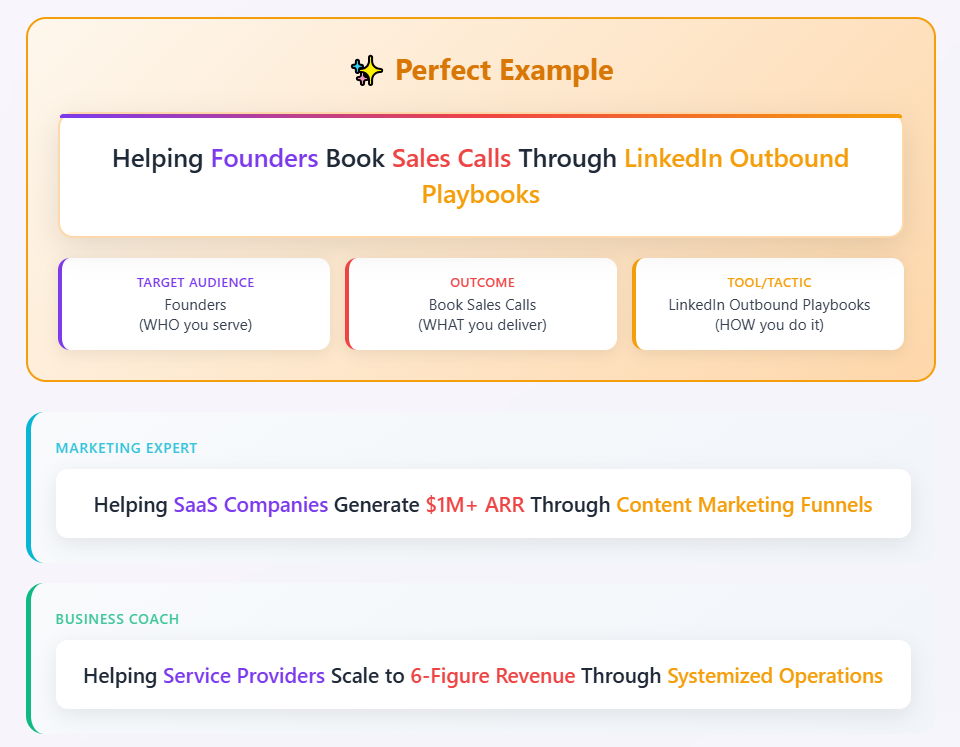
[Who you help] + [what you help them do] + [proof or differentiator] + [search keywords]
Part 1: Who You Help
Name the specific buyer, not a vague category. “B2B SaaS founders” beats “businesses.” “IT services firms with 20 to 200 employees” beats “companies.”
Specificity does two things. It makes the right person stop scrolling, and it lets the wrong person keep going. That’s a feature. A headline that appeals to everyone persuades no one.
This part always belongs in the first 60 characters.
Part 2: What You Help Them Do
State the outcome in your buyer’s language, not your service name.
- Weak: “Outbound lead generation services”
- Stronger: “Book qualified sales calls”
Focus on the result they want, not the mechanism you use to get it. A founder doesn’t wake up wanting “multichannel sequencing.” They want a full calendar.
Part 3: Proof or Differentiator
Add one number, credential, or specific claim that makes parts one and two believable.
- “400+ meetings booked for B2B clients”
- “Ex-enterprise sales leader”
- “134% of quota, four quarters running”
Measurable outcomes beat adjectives every time. “Results-driven” tells a buyer nothing. “1,500+ meetings booked” tells them something they can weigh.
Part 4: Search Keywords
Put secondary terms in the back half of the headline, where readers rarely look but LinkedIn search still indexes them. Terms like “LinkedIn Outreach,” “Cold Email,” “Sales Navigator,” or your industry work well here.
Separate them with pipes or bullets so the line stays scannable.
🚀 Turn LinkedIn Into Pipeline
Starting at $397/month, Cleverly helps B2B teams combine targeted prospecting and personalized outreach to generate more qualified conversations.
LinkedIn Headline Formulas You Can Adapt
If you’re wondering how to write a powerful LinkedIn job title for lead generation experts, start with a formula and then make it specific. Below are seven, each filled in with an example.
All numbers and company names in these examples are illustrative. Swap in your own real figures.
1. Audience + outcome
Formula: Helping [specific audience] achieve [specific outcome]
Example: Helping B2B SaaS founders fill their calendar with qualified demos | LinkedIn Outreach
Best when: You have a clear niche and your outcome is easy to state in one phrase.
2. Role + audience + proof
Formula: [Title] for [audience] | [measurable result]
Example: Lead Generation Specialist for IT services firms | 1,200+ meetings booked for clients
Best when: You have a real number you can stand behind.
3. Problem-led
Formula: Turning [known problem] into [desired state] for [audience]
Example: Turning silent outbound into booked meetings for B2B agencies | LinkedIn & Cold Email
Best when: Your audience already knows and complains about the problem.
4. Credential-led
Formula: [Title] | [notable proof point] | [audience served]
Example: Senior SDR | 134% of quota, four quarters running | Booking meetings with mid-market CISOs
Best when: You’re an individual contributor whose track record is your pitch.
5. Mechanism-led
Formula: [Service] for [audience] without [common objection]
Example: LinkedIn outreach for consulting firms without ads, cold calls, or a full-time SDR
Best when: Your buyers hesitate over a specific cost, risk, or hassle.
6. Pipe-separated keyword format
Formula: [Title] | [specialization] | [industry]
Example: Lead Generation Specialist | LinkedIn Outreach | B2B SaaS & Fintech
Best when: Search visibility matters most, such as when recruiters or buyers look for specialists by title. It’s the weakest of the seven for conversion, so keep the audience visible early.
7. Founder format
Formula: Building [company] | helping [audience] do [outcome]
Example: Building [Company] | Helping B2B consultancies turn LinkedIn into a steady source of sales calls
Best when: You’re a founder whose personal profile also needs to carry the company’s pitch.
Pro tip: don’t use any formula as written. Read your finished headline out loud. If it sounds like a template, rewrite it with details only you would know.
LinkedIn Headline Examples by Role
Here are LinkedIn headline examples for sales and outbound roles, each with a note on why it works. Copy the structure, not the words.
For Founders and Business Owners
Founders have to balance company-building credibility with a clear audience.
- Founder | Helping IT services firms turn LinkedIn into a steady source of sales calls
Why it works: The audience and outcome land in the first 60 characters. - Co-founder, [Company] | Outbound pipeline for seed-stage B2B SaaS | Ex-enterprise sales leader
Why it works: It names a narrow stage of company and adds a credential for trust. - CEO, [Company] | Fewer no-shows, more qualified demos for B2B software teams
Why it works: It states a specific, measurable pain instead of a general promise. - Founder | Helping consultancies replace referrals with predictable pipeline
Why it works: The “replace X with Y” framing shows a before and after.
For Sales Reps and SDRs
The goal is to make a cold connection request feel legitimate, not salesy.
- SDR at [Company] | Booking meetings with RevOps leaders at mid-market SaaS
Why it works: It tells the reader exactly who the rep talks to, so relevance is clear before they open the profile. - BDR, [Company] | Cybersecurity for healthcare IT leaders | 128% of quota, Q1 to Q3 2026
Why it works: A named niche and a concrete quota number replace “motivated team player.” - Sales Development Rep | Helping HR leaders at 200 to 2,000 person companies fix onboarding
Why it works: It reads like a rep with a point of view, not a script. - SDR | Fintech & payments | Booked 90+ first meetings in 2026
Why it works: Short, specific, and easy to trust.
For Consultants and Agency Owners
Services are sold on trust, so lean on specialization and proof.
- Outbound consultant for B2B agencies | From referral-only to predictable pipeline
Why it works: It names the buyer’s current pain and the destination. - Fractional CMO for B2B SaaS under $10M ARR | Positioning, pipeline, and paid
Why it works: The revenue band filters out buyers who aren’t a fit. - RevOps consultant | Cleaner CRM data and faster handoffs for scaling SaaS teams
Why it works: It names two outcomes buyers can picture. - Sales consultant for professional services firms | Built pipeline for 40+ boutique consultancies
Why it works: A volume of past clients in one niche acts as a credibility signal.
For Lead Generation Specialists and Experts
This group has a trap. Everyone claims to generate leads, so “Lead Generation Expert” on its own says nothing. The differentiator has to be the niche, the channel, or the number. Preferably more than one.
Here’s a LinkedIn headline for lead generation specialist and expert roles that avoids the trap:
- LinkedIn Lead Generation Specialist for B2B SaaS | 1,500+ qualified meetings booked
Why it works: Channel, niche, and number all show before the cutoff. - Lead Generation Expert for law firms | LinkedIn outreach | 15% average reply rate
Why it works: A narrow vertical plus a metric that is easy to verify in a call. - Cold email lead generation for cybersecurity vendors | 4,000+ meetings booked since 2022
Why it works: It names a channel few generalists claim, plus a long track record. - B2B Lead Generation Expert | Helping recruiting agencies fill their calendar | Sales Navigator, Cold Email
Why it works: The audience and outcome come first, and the tool keywords sit in the back half for search.
Mistakes That Make Headlines Stop Working
These are the patterns we see most often when we audit profiles. Each one weakens either search, conversion, or both.
1. Using only a job title. “Sales Manager at [Company]” tells a prospect nothing about whether to care. Add who you help and what changes.
2. Vague audience terms. “Businesses” and “clients” describe everyone, so they attract no one. Name a segment.
3. Unsubstantiated superlatives. “Best,” “leading,” and “top-rated” are claims, not proof. Replace them with a number.
4. Keyword stuffing all 220 characters. It reads as spam and signals low trust, especially to senior buyers.
5. Burying the important part. If your audience or outcome appears after character 70, many readers never see it.
6. Writing in first person. “I help” and “We specialize in” burn characters without adding meaning. “Helping...” does the same job in fewer.
7. Putting an email or phone number in the headline. It looks desperate, invites spam, and takes space that should carry your value.
8. Emoji overload. A single symbol can work as a separator, but a row of rockets and charts reads as noise to senior decision-makers.
9. Copying a competitor’s headline. Their niche, proof, and audience aren’t yours. Borrow the structure and rewrite every detail.
10. Writing it once and never revisiting it. Your offer, ICP, and results change. Your headline should change with them.
Here’s a quick before-and-after:
How to Test and Improve Your Headline
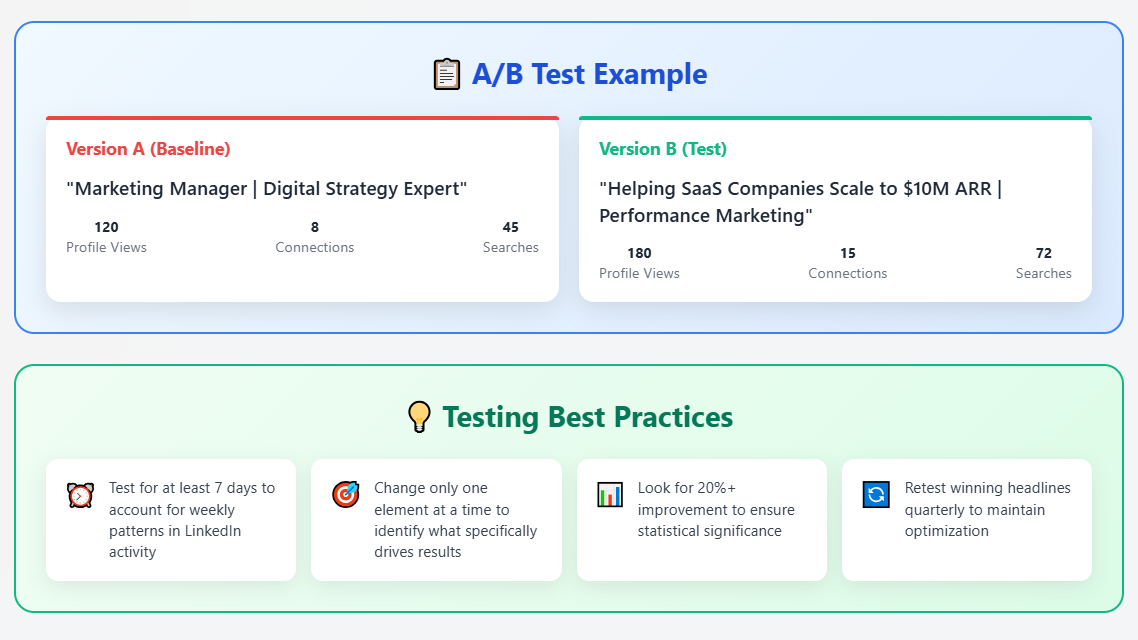
Headlines are easy to change, which makes them easy to improve if you track results. Here’s a simple process for your LinkedIn profile for lead generation tests.
- Set a baseline first. Before changing anything, note your profile views, search appearances, and connection acceptance rate (accepted requests divided by requests sent). You need a starting point to judge the change.
- Change one element at a time. If you rewrite the headline, banner, and About section together, you won’t know what worked.
- Give each version a few weeks. Profile metrics move slowly. A few days of data is mostly noise.
- Track acceptance rate above all. For outbound, it’s the metric that matters most. Profile views are nice. Accepted requests are conversations.
- View your own profile on mobile and desktop. Check where the headline truncates, and confirm the key message appears before the cutoff.
- Ask three people in your target audience. Show them only the headline and ask what they think you do. If their answer doesn’t match your intent, rewrite it.
- Revisit when things change. A new ICP, offer, or positioning means a new headline.
Pro tip: keep a simple log with the date, the headline version, and the acceptance rate for the period. After three or four versions you’ll see a pattern in what your audience responds to.
For a deeper look at the metric that matters most here, read our guide on automating LinkedIn connections, where acceptance rate is covered in depth.
How Your Headline Fits the Rest of Your LinkedIn Profile
Your headline opens the conversation. The rest of your profile has to finish it.
- Banner image: reinforce the same audience and outcome. A banner that says “what you do and who for” works harder than a stock photo.
- About section: expand the headline’s claim with proof and detail. If the headline says “1,500+ meetings booked,” the About section should explain how.
- Featured section: give a prospect somewhere to go next, such as a case study, a short guide, or a booking link.
- Experience and recommendations: these supply the credibility your headline asserts. A recommendation from a client in your target niche is worth more than a dozen generic endorsements.
Consistency matters. A sharp headline over a thin profile reads worse than a plain headline over a solid one, because prospects feel the gap between the promise and the proof.
The sequencing advice: fix the headline first, since it’s the highest-leverage line on the page. Then work down to the banner, About section, and Featured items.
How Cleverly Turns an Optimized Profile Into Booked Meetings
A strong headline lifts acceptance and reply rates, but it only works on people who actually see your profile. That takes consistent outreach week after week. This is where most self-managed efforts stall. People optimize the profile, send requests for a few weeks, and stop when billable work gets busy.
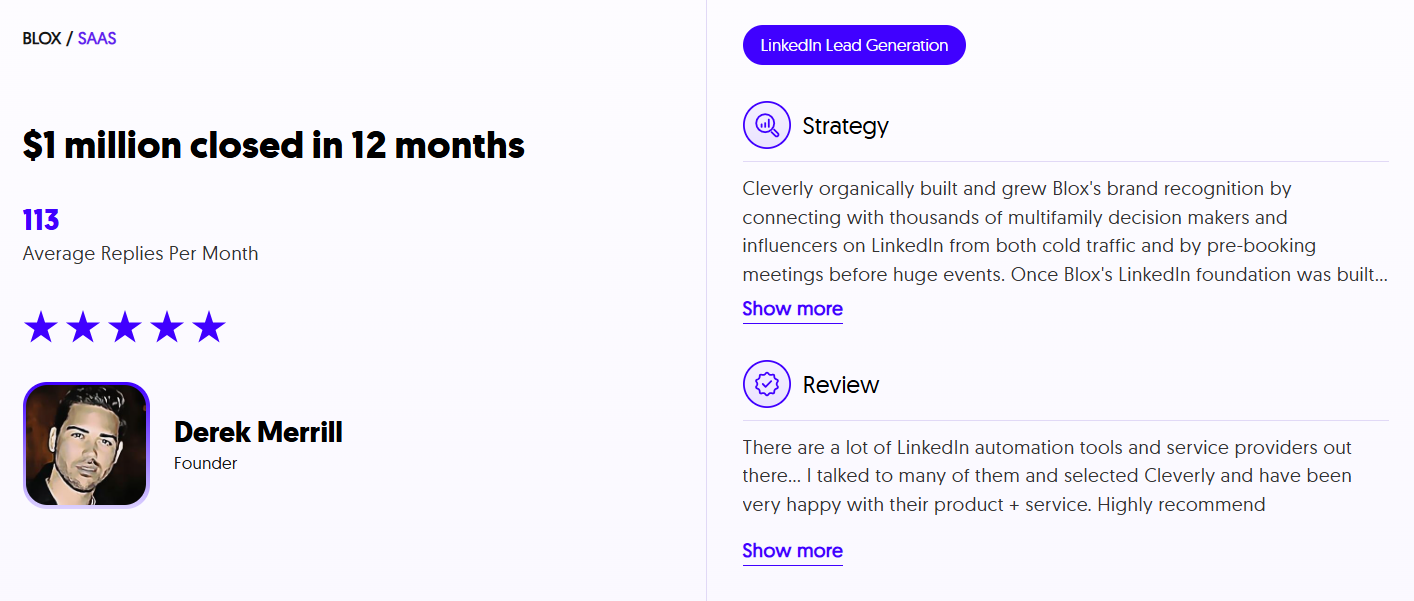
At Cleverly, a LinkedIn lead generation agency that runs everything done-for-you, we handle the whole workflow. That includes profile and headline optimization, ICP and Sales Navigator targeting, verified list building, outreach and messaging, reply handling, and meetings booked straight onto your calendar. Profile optimization is built into how we set up campaigns, because acceptance rate depends on it.
The messaging frameworks we use have been tested across thousands of campaigns, which is what turns an accepted connection into a real conversation. We optimize for qualified conversations with decision-makers, not profile views or connection counts.
Our LinkedIn lead generation services have generated $312M in pipeline revenue and $51.2M in closed revenue for clients, and our LinkedIn lead generation starts at $397 a month on a month-to-month basis.
Great headline, no pipeline? Let Cleverly run LinkedIn outreach for you. Book a free consultation call!
Conclusion
A LinkedIn headline for lead generation has two jobs, and for outbound the conversion job matters more than the search job. Put who you help and what you help them do inside the first 60 characters. Then use specificity and proof, not adjectives and keyword volume, to earn trust.
Your next step is simple. Rewrite your headline using the audience-plus-outcome structure, then track your acceptance rate for a month. A headline earns its keep by making the right people stop and the wrong people scroll past.
Frequently Asked Questions
Free Resource
How to Scale a Profitable Cold Call System
Get the complete guide — download it instantly now.

Free Ebook
Download the Free Guide
Enter your details to get instant access.
You're all set! 🎉
Your ebook is downloading now.
Click below if the download didn't start automatically.