Table of Contents
What Is an Email Sequence?
Types of High-Converting Email Sequences (With Examples)
How to Build a High-Reply Cold Email Sequence
6-Part Welcome or Onboarding Email Sequence (With Purpose for Each Step)
Writing Formulas to Create High-Converting Emails in Any Sequence
Email Sequence Templates You Can Use (Cold + Onboarding)
How to Measure Email Sequence Performance (Cold + Welcome Metrics)
Common Mistakes to Avoid When Creating Email Sequences
How Cleverly Builds High-Converting Email Sequences for B2B Brands
Conclusion
Frequently Asked Questions
Modified On :
September 14, 2026
Key Takeaways
- Email sequences give you 5-7 chances to connect instead of one, which is why they generate 3x higher reply rates than standalone emails.
- Email verification (validating email addresses before sending) keeps your bounce rate under 3% and protects your sender reputation—skip this and your deliverability tanks.
- Each email in your sequence needs a different angle—social proof in one, pain point in another, value in the next—not the same pitch repeated six times.
- Space cold email sequences 2-4 days apart (3 days is ideal) and keep emails under 100 words with one clear, low-friction CTA.
- Track reply rate and positive reply rate for cold outreach, click-through rate and conversion rate for onboarding—these metrics tell you what's actually working.
- Personalize the first email with something specific about them (company, role, recent activity)—generic openers kill your credibility before you even start.
- Multi-channel sequences that combine LinkedIn touchpoints with email generate up to 287% more replies than email alone — the extra coordination is worth it for high-value accounts and enterprise ICPs.
- Always configure exit conditions in your sequence tool: when a prospect replies, books a meeting, or unsubscribes, the sequence should stop immediately — failing to do this is one of the fastest ways to annoy prospects and create compliance risk.
Sending one email and hoping for a reply is like asking someone to marry you on the first date. It's awkward, rarely works, and you'll probably get ghosted.
That's exactly why we use email sequences instead of one-off messages.
They miss messages, forget to respond, or need multiple touchpoints before they're ready to engage. A single email just doesn't cut it anymore.
We typically work with two types of email sequences: Cold email sequences and Lifecycle sequences. (More about this later in the guide)
Today, we're breaking down everything you need to 3x your reply rates in 2026: the psychology behind effective sequences, proven frameworks that actually work, real email sequence examples from campaigns that generated millions in pipeline, ready-to-use templates, and the exact metrics you should track to measure cold email outreach success.
Let's get into it.
What Is an Email Sequence?
An email sequence is a pre-written series of automated emails that get sent based on specific timing or user behavior.
Instead of manually writing and sending individual emails, you set up the sequence once, and it runs on autopilot like automated lead nurturing.
Email sequences exist for one reason: they work. Whether you're trying to book meetings with cold prospects, onboard new users, or re-engage leads who went silent, sequences give you multiple chances to connect without being pushy or manually tracking every conversation.
Here are the main types of email sequences we see working right now:
- Cold outreach sequences – You're reaching out to prospects who don't know you yet. The goal is simple: book a meeting or start a conversation. These typically run 4-7 emails over 2-3 weeks.
- Onboarding email sequences – Someone just signed up for your product, downloaded your resource, or became a lead. These emails guide them through the next steps and help them get value fast.
- Welcome/lead nurture sequences – These warm up new subscribers or leads over time. You're building trust, sharing helpful content, and positioning your solution before making any big asks.
- Re-engagement sequences – For leads or customers who went cold. You're trying to re-engage lost leads and figure out if they're still interested.
- Sales follow-up sequences – After a demo, proposal, or initial conversation, these keep the momentum going and move deals forward.
So why do email sequences crush one-off emails every single time? Because people are busy. They miss emails. They mean to respond but forget. They need to see your message multiple times before it clicks.
A good sequence gives you 5-7 chances to break through the noise instead of just one—and that's exactly why reply rates and conversions go up when you use them.
Check These Out: Sample Emails to Approach New Clients (Proven Templates + Tips)
🔥 Get Meetings on Autopilot
Let Cleverly run your cold email outreach and deliver qualified, meeting-ready leads straight to your inbox.
Types of High-Converting Email Sequences (With Examples)
Not all email sequences are built the same. The sequence that books meetings with cold prospects looks completely different from one that onboards new users.
Here's a breakdown of the best email sequences we've tested across thousands of campaigns—and when to use each one.
Cold Email Sequences (B2B Sales)
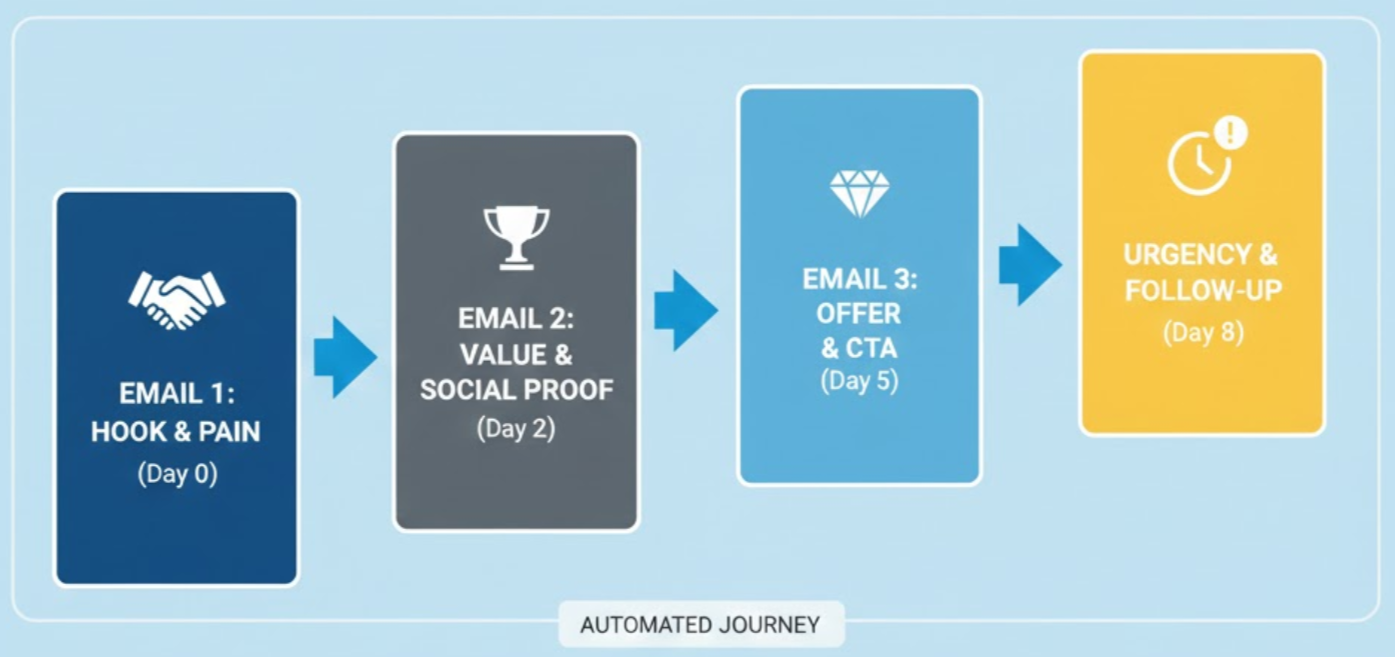
These are designed for one thing: booking meetings with prospects who've never heard of you. Your cold email sequence typically runs 4-7 emails over 2-3 weeks, with each message adding new value or a different angle.
Use case: You're an agency trying to land enterprise clients, a SaaS company reaching out to potential customers, or a sales team prospecting into new accounts.
We've run tens of thousands of cold email sequences at Cleverly, and the ones that work best follow a simple pattern: lead with value in email 1, add social proof in email 2, address objections in email 3, and make it easy to respond throughout.
Also Check: 10+ High-Converting ChatGPT Prompts for Cold Emails
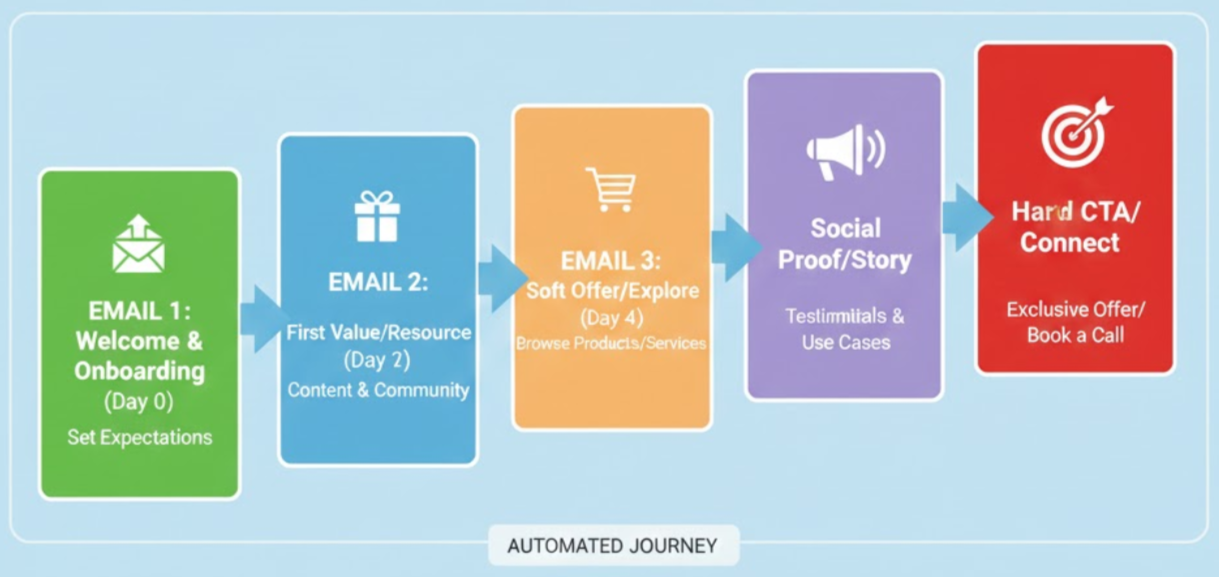
Welcome Email Sequences (New Subscribers)
Someone just joined your email list, downloaded a resource, or opted into your content. Welcome email sequences introduce your brand, set expectations, and start building trust right away.
Use case: You run a newsletter, offer lead magnets, or have a content-heavy marketing strategy. These sequences turn subscribers into engaged readers (and eventually customers).
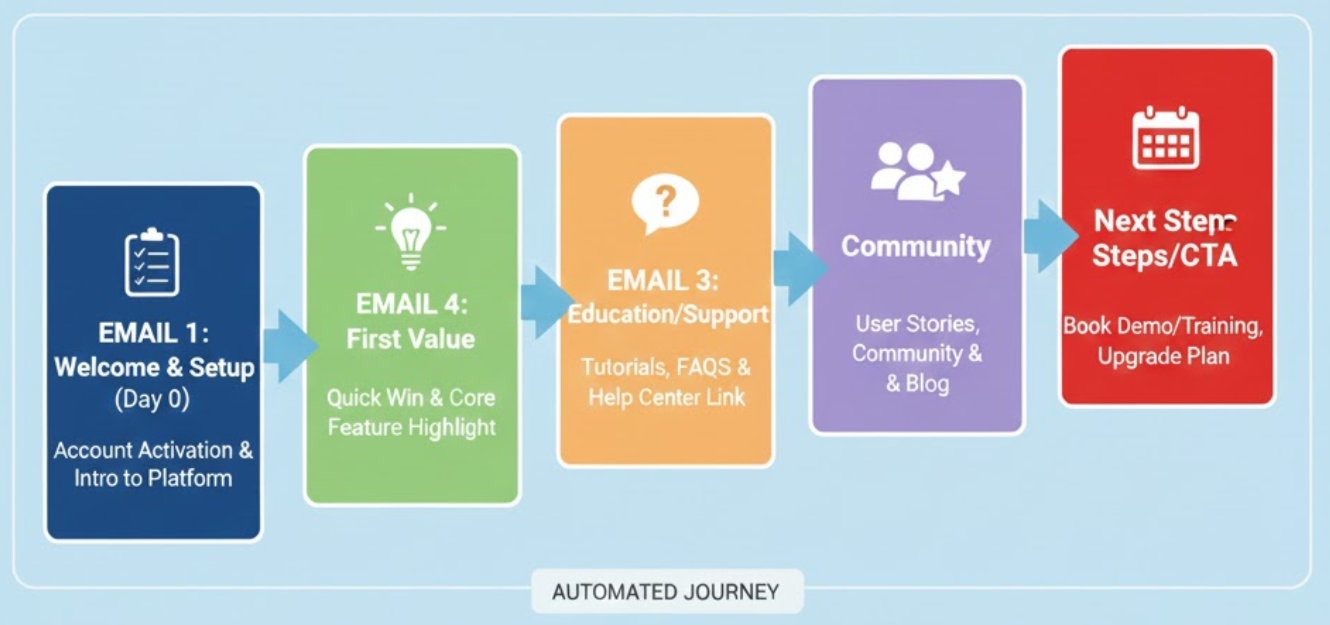
Onboarding Email Sequences (SaaS or Client Onboarding)
Onboarding email sequences guide new users or clients through their first days or weeks with your product or service. The goal is to drive activation, show quick wins, and reduce churn.
Use case: You have a SaaS product with a free trial, you just closed a new client, or someone signed up for your service. These emails walk them through setup, highlight key features, and keep them engaged during the critical early phase.
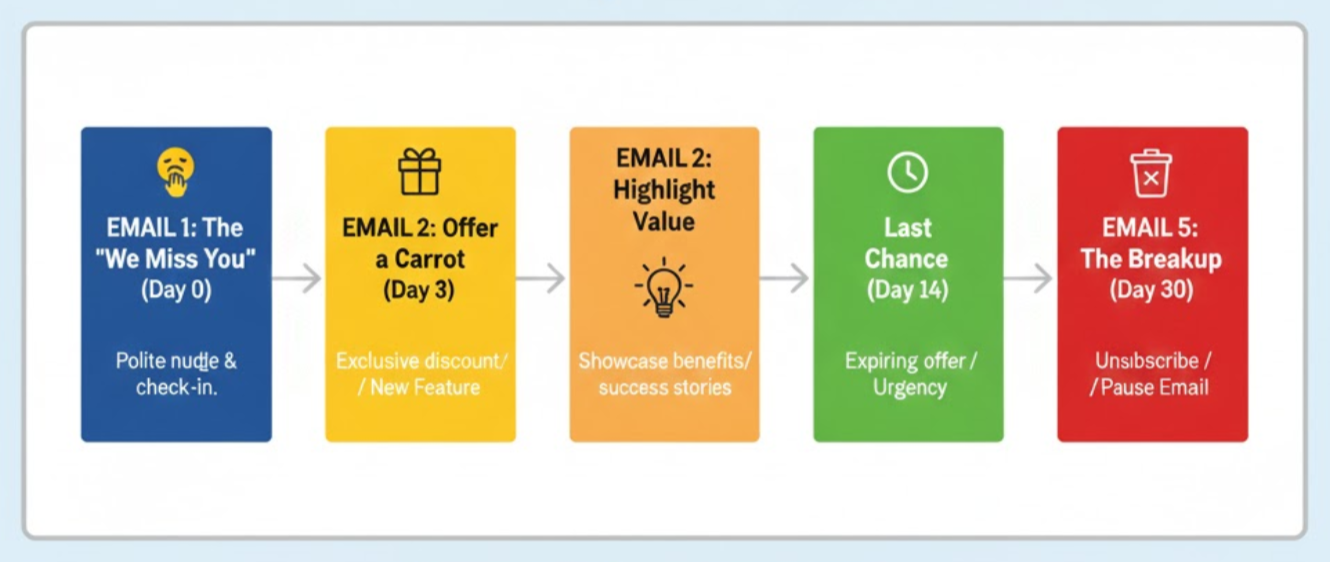
Re-Engagement Sequences
Leads or customers who went silent. Re-engagement sequences try to revive the conversation by offering something new, checking in, or simply asking if they're still interested.
Use case: You have leads who stopped responding mid-funnel, trial users who didn't convert, or past customers who haven't engaged in months.
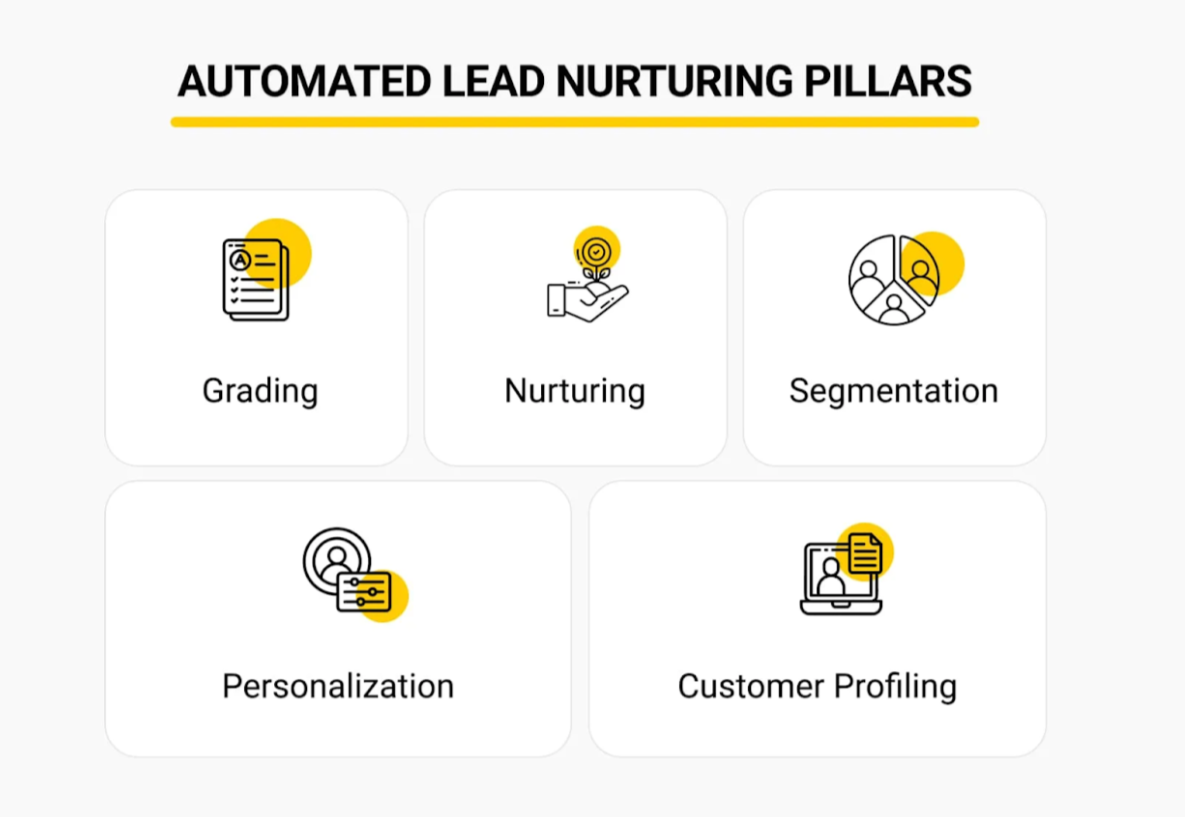
Lead Nurturing Sequences
Not every lead is ready to buy right now. Lead nurturing sequences keep you top-of-mind by sharing helpful content, case studies, and insights over time—until they're ready to have a sales conversation.
Use case: You have a longer sales cycle, you're building a pipeline of warm leads, or you want to educate prospects before they ever talk to sales.
Cart Abandonment Sequences
Someone added your product to their cart but didn't check out. These sequences remind them what they left behind, address common objections (like price or trust), and give them a reason to complete the purchase.
Use case: You're in ecommerce, selling digital products, or running any business with an online checkout process.
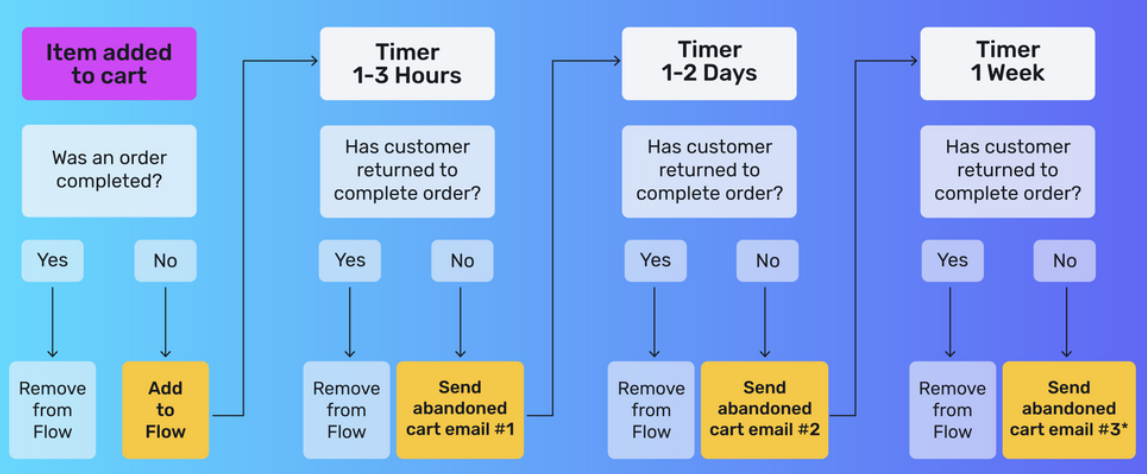
The best email sequences match the goal. Cold outreach sequences book meetings. Onboarding sequences drive activation. Nurture sequences build pipeline. Pick the right type for your situation, and you're already halfway to better results.
Best Email Sequence Software & Tools (2026)
The right email sequence software makes or breaks your results. A great tool handles deliverability, keeps your sequences running, and gets out of the way. A bad one burns your domains, buries replies, and costs you more than it saves.
Here's how the landscape breaks down right now — and what to choose based on your actual use case.
Cold Email Sequencing Tools (High-Volume Outbound)
If you're running cold outreach at scale — prospecting into new accounts, booking meetings with strangers — you need a dedicated cold email sending platform. These are not the same as marketing tools. They're built for deliverability, inbox rotation, and sequence management at volume.
The six tools that consistently come up in serious cold outbound stacks in 2026:
1. Smartlead is the go-to for agencies and teams managing multiple client domains. Unlimited mailbox warm-up is included at the base tier, and the platform's per-inbox throttling has produced inbox placement rates around 87% in independent tests. If you're running 30+ sending domains or managing outreach for multiple clients, Smartlead's economics are hard to beat. Starting at $39/month.
2. Instantly wins on ease of use and warm-up network size — its network covers over 4.2 million mailboxes, the largest in the category. It's the fastest path from zero to a functioning cold outbound sequence, with clean UX and strong CRM integrations (HubSpot, Salesforce, Pipedrive native). Best for 2-20 person sales teams doing founder-led or SDR outreach. Starting at $37/month.
3. Lemlist is the pick when personalization is your edge. Dynamic image personalization, video thumbnails per prospect, and native LinkedIn steps in a single sequence workflow set it apart from pure sending platforms. Lower volume, higher touch. If your ICP is narrow and you want every email to feel handcrafted, Lemlist handles that at scale. Starting at $59/month.
4. Apollo plays a different game. It's a lead database and sales engagement platform combined — 275 million contacts with built-in sequencing. The tradeoff: its sending infrastructure isn't as deep as Smartlead or Instantly for serious volume. Most high-output teams use Apollo for prospecting data and pipe those leads into a dedicated sender. Starting at $49/user/month.
5. Skylead brings LinkedIn automation, cold email, prospecting, enrichment, and AI SDR conversations into one workflow for agencies and sales teams. B2B database and AI enrichment helps sharpen ICP targeting, while AI SDR handles conversations from the first reply to a booked call.
Unlike most tools, agencies can turn their outreach know-how into protected AI Training Sets and scale with flat pricing: $999 for 50 seats or $1,999 for unlimited seats. For sales teams, pricing is $100 per seat, and the AI usage priced $1 per 100 credits - more cost-effective compared to other tools.
6. Flodesk is the pick when your welcome and onboarding sequences need to look like your brand rather than a template. Multi-trigger automations handle split paths and rejoin logic, and behavior-based triggers connect to Flodesk Checkout, Shopify, ThriveCart, Squarespace and Wix - so a post-purchase or abandoned-cart sequence fires on real events, not just a timer. Starting at $19/month billed annually.
Unlimited sends on every paid plan means running a 6-part welcome series alongside broadcast email doesn't change your bill. Weakest fit for B2B teams that need CRM-native deal-stage syncing; strongest for creators, coaches and product businesses selling directly.
Lifecycle and Onboarding Email Tools
For welcome sequences, onboarding flows, and lifecycle automation — where you're messaging people who already know you — you need a different category of tool. These prioritize behavioral triggers, CRM connectivity, and segmentation over raw sending volume.
7. ActiveCampaign is the most complete option for small to mid-size B2B teams. Its automation builder handles time-based, action-based, and inaction-based triggers, and the CRM layer lets you keep deal stages and email sequences in sync. Strong for onboarding sequences that need to branch based on user behavior.
8. HubSpot is the right choice when your sales and marketing teams share a CRM. Sequences, deal stages, and contact records all live in one system. The tradeoff is cost — HubSpot gets expensive fast as your contact count grows — but if your team is already in HubSpot, the native integration is worth it.
9. Mailchimp covers the basics for smaller teams or founder-run operations. The automation builder is straightforward, the free tier is genuinely functional, and it handles welcome sequences and broadcast email without friction. It's not built for sophisticated behavioral branching, but for most early-stage onboarding sequences, it's enough to start.
10. Klaviyo is the category leader for ecommerce — abandoned cart sequences, post-purchase flows, browse abandonment, and VIP segments are all first-class features. If you're running a DTC brand or any business with an online checkout, Klaviyo's revenue attribution and segmentation tools are hard to match. Starting at $45/month for up to 1,000 contacts.
Free vs. Paid: What You Actually Get
Most tools offer a free tier or trial. Here's the honest version of what that means:
Apollo free: Limited to 5 export credits per month. Useful for exploring the database, not for running actual sequences.
Mailchimp free: Up to 500 contacts, 1,000 emails/month, basic automations. Enough to build a welcome sequence and test it before committing to a paid plan.
HubSpot free: CRM and basic email templates are free. Sequences (the automated multi-step feature) require a paid Sales Hub plan.
Flodesk free: Unlimited forms and landing pages with no subscriber cap, but no email sending. Useful for building a list before you commit to a paid plan — not for running the sequence itself.
Smartlead and Instantly: No meaningful free tier. Both require a paid plan to access the multi-inbox infrastructure that makes their deliverability work. Don't try to evaluate either on a trial — the economics of cold email depend on multi-domain sending, which the free tiers don't support.
The honest rule: free plans are useful for exploring a tool's interface, not for running real campaigns. If you're serious about sequences, budget for a paid plan from day one.
What to Look For in Any Email Sequence Tool
Before you commit to a platform, check these five things:
1. Deliverability infrastructure. Does it include mailbox warm-up, inbox rotation, and bounce monitoring? These aren't nice-to-haves — they're the foundation. A poorly delivered sequence is a waste of every other resource you put into it.
2. Behavioral triggers. Can the tool start or stop sequences based on what a prospect does? Clicking a link, visiting a page, not opening after 3 days — these should all be configurable. Time-based sequences are fine. Behavior-based sequences are better.
3. A/B testing. Can you test subject lines, email body variants, and send times inside the same sequence? If not, you're optimizing blind.
4. CRM integration. Does the tool talk to your CRM natively? Sequence activity — replies, clicks, meetings booked — should flow back into your pipeline automatically, not require manual exports.
5. Reporting depth. Can you see performance at the individual email level, not just the sequence level? You need to know which email in the chain is losing people — not just whether the sequence "worked."
Comparison Table: Email Sequence Tools at a Glance
The tool you choose should match your motion — not the other way around. High-volume cold outbound? Smartlead or Instantly. Personalized, low-volume enterprise outreach? Lemlist. Lifecycle automation in a CRM-connected stack? ActiveCampaign or HubSpot. Ecommerce? Klaviyo.
How to Build a High-Reply Cold Email Sequence
A good cold email sequence doesn't just repeat the same message six times. Each email needs a different angle, a new reason to respond, and a clear purpose.
Exact structure we use to book thousands of qualified meetings for clients across industries:
The 6-Email Structure That Actually Works
📌 Email 1: Personalized Intro + Soft Ask
This is your first impression. Lead with a personalized observation about their company, role, or recent activity. Then make a soft, low-friction ask—like "worth a quick chat?" or "open to exploring this?"
The goal isn't to close a deal. It's to start a conversation. Keep it short (under 100 words), focus on them, and make it easy to say yes.
📌 Email 2: Social Proof or Case Study
No response yet? They might not trust you. Email 2 adds credibility by showing you've done this before—successfully. Share a quick case study, mention a client in their industry, or drop a stat that proves your results.
Example: "We helped [Similar Company] book 40 qualified meetings in 60 days using the same approach."
📌 Email 3: Pain Point Reframing
By email 3, you're shifting the angle. Instead of pitching your solution, call out a specific problem they're likely facing. Reframe it in a way that makes them think, "Wait, yeah—that's exactly what's happening."
This email works because it shows you understand their world. You're not guessing. You know what keeps them up at night.
📌 Email 4: Value Nugget / Helpful Resource
Give before you ask. Share something useful—a framework, a quick tip, a relevant article, or a tool they can use right now. No strings attached.
This cold email sequence touchpoint builds goodwill. Even if they don't respond, you've added value, and they'll remember you for it.
📌 Email 5: Follow-Up Based on Assumption
Assume they've been busy and position the follow-up as checking in. Something like: "I know you're probably buried in Q1 planning—just wanted to circle back on this."
You're giving them an out while keeping the door open. It's direct but not pushy.
📌 Email 6: Breakup Email
This is your last shot, and it's often the most effective. Let them know you're moving on but leave the door open if they change their mind.
Example: "I'll stop bugging you after this—but if timing improves, just reply 'interested' and I'll send over details."
Breakup emails work because they create urgency and remove pressure at the same time.
Timing: The 2-4 Day Rule
Space your cold email sequence emails 2-4 days apart. Too fast and you look desperate. Too slow and they forget who you are.
We've tested this across millions of emails—3 days is the sweet spot for most industries.
Read Here: Best Time to Send Cold Emails (Backed by Data & Research)
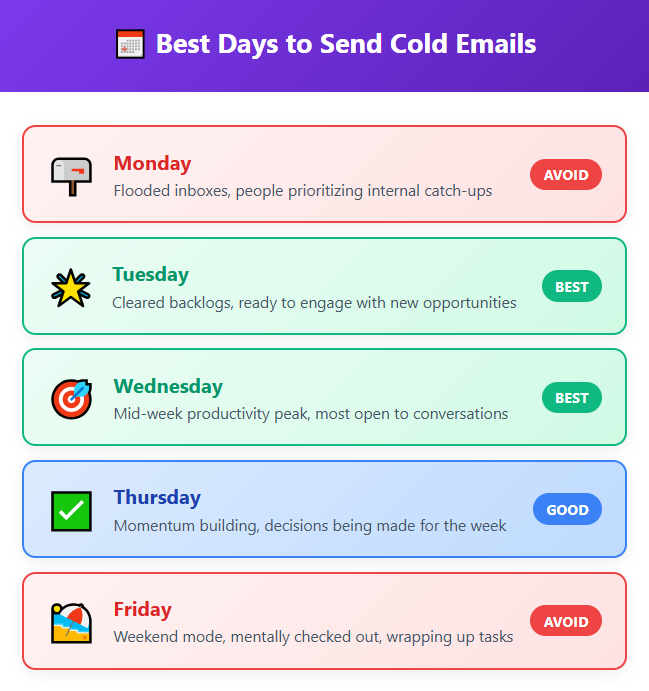
Best CTAs for Cold Sequences
Your call-to-action should match the email's intent:
- Email 1: "Worth a quick chat?" or "Open to discussing this?"
- Email 2-3: "Should I send over some details?" or "Want to see how this works?"
- Email 4: No CTA—just value
- Email 5-6: "Still interested?" or "Should I close your file?"
Keep CTAs low-commitment. You're not asking them to sign a contract. You're asking for 15 minutes.
Explore More: Cold Email Blueprint to Generate Leads (100% Tested)
Make Every Email Unique and Non-Repetitive
Here's where most cold email sequences fall apart: people just rehash the same pitch six times. Don't do that.
Each email should have a different hook, angle, and reason to respond. Email 1 is about them. Email 2 is about proof. Email 3 is about their problem. Email 4 is about giving value. They should feel like a natural progression—not a copy-paste job.
If someone reads all six emails, they should think, "This person really gets it," not "Why are they sending me the same email again?"
Multi-Channel Email Sequences: LinkedIn + Email Combined
Email-only sequences are getting harder to scale. Cold email reply rates have dropped steadily — Instantly's 2026 Benchmark Report puts the platform average at 3.43%, down from over 7% just a few years ago. Inboxes are noisier. Spam filters are smarter. And prospects have been trained to ignore polished outreach copy they've seen a hundred times before.
The teams consistently hitting 15-25% reply rates aren't using better email copy. They're using a different model: multi-channel sequences that coordinate LinkedIn and email into one cohesive sequence.
According to data from Outreaches.ai, multi-channel sequences using three or more touchpoints across channels deliver up to 287% more responses than single-channel outreach. That's not a marginal improvement — that's a different result category entirely.
Why Single-Channel Sequences Underperform in 2026
The core problem is recognition. When a prospect gets a cold email from a domain they've never seen, they have no reason to trust it. It looks like every other outbound message they delete. LinkedIn changes that equation.
When someone sees your profile, your role, and your shared connections before your email hits their inbox, they already know who you are. The email doesn't feel cold — it feels like a follow-up from someone real. Trust is built before you've written a single word of copy.
Research on B2B buying behavior shows that most buyers now require 6 to 8 touchpoints across multiple channels before they'll engage with a vendor conversation. A 6-email cold sequence hits one channel, six times. A coordinated multi-channel sequence hits two channels in a way that each reinforces the other — and that's where the reply rate lift comes from.
The 6-Step LinkedIn + Email Sequence Structure
This is the sequence structure we've seen work for B2B outreach in 2026. Each step has a specific job — nothing is redundant.
Day 1 — LinkedIn Connection RequestSend a personalized connection request (under 300 characters). Reference something specific about their role, company, or recent activity. Do not pitch. The goal is to get accepted, not to sell. Keep it human.
Day 3 — LinkedIn Message (Post-Connection)Once they've connected, send a short LinkedIn message. This is your first real touchpoint. Keep it under 100 words. Reference something relevant and make a soft open-ended ask — "would it be worth a quick chat?" Post-connection message reply rates average 10-11%, according to Expandi's 2026 benchmark data across 13.2 million LinkedIn interactions.
Day 5 — Cold Email #1Your first email references the LinkedIn conversation without being formulaic about it. Something like "We just connected on LinkedIn and wanted to follow up here too." Lead with personalization, keep it short, make a soft CTA.
Day 8 — Cold Email Follow-UpSecond email in the email track. Different angle from Email 1 — add social proof, a quick case study, or a pain point reframe. Don't rehash the same pitch.
Day 10 — LinkedIn Engagement on Their ContentComment meaningfully on a post they've published or shared. Not a generic "Great post!" — something specific to the content. This keeps you visible in their feed without sending another message. It reinforces recognition.
Day 13 — Final Email (Breakup)The last touchpoint. Low-pressure, leaves the door open. "I'll stop following up after this — but if timing ever shifts, just reply 'interested' and I'll send details." Breakup emails are often the highest-reply touchpoint in a sequence because they create urgency without pressure.
Tools That Run LinkedIn + Email in One Workflow
The sequence above only works if both channels share context and conditional logic. If you're running LinkedIn outreach in one tool and email in another, you're manually coordinating two separate campaigns — which defeats the purpose.
These tools run LinkedIn + email in a single sequence workflow:
1. Apollo handles LinkedIn steps natively alongside email sequences. Best for teams that want prospecting data, sequencing, and basic LinkedIn touchpoints in one platform.
2. Lemlist is the most popular choice for multi-channel B2B outreach. LinkedIn connection requests, direct messages, and email steps all live inside the same sequence builder. Dynamic personalization works across both channels.
3. La Growth Machine is built specifically for multi-channel sequencing — LinkedIn, email, and Twitter in one flow. Popular with European B2B teams and agencies running high-personalization campaigns.
4. Expandi focuses on LinkedIn automation with email integration. Strong for LinkedIn-heavy sequences where the email steps are supplementary touchpoints rather than the primary channel.
The right tool depends on whether LinkedIn or email is your primary channel and how much personalization complexity you need.
When to Use Multi-Channel vs. Email-Only
Not every campaign justifies the extra coordination. Here's the honest breakdown:
Use multi-channel when:
- Your ICP is enterprise or senior-level (VP+, C-suite) — these buyers are harder to reach via email alone and are often more active on LinkedIn.
- Your deal size is large enough to justify the extra effort per prospect.
- You have a narrow, high-value target list where quality of engagement matters more than volume.
- You're seeing below-average reply rates on your email-only sequences and have tested the basics (copy, subject lines, timing).
Stick to email-only when:
- You're running high-volume outbound to a broad ICP (thousands of prospects per month).
- Your deal size doesn't justify the per-prospect effort of LinkedIn coordination.
- Your team doesn't have bandwidth to manage two channels simultaneously.
- You're still testing and optimizing your core email sequence — nail that first before adding complexity.
The mistake most teams make is jumping to multi-channel before their email sequences are dialed in. Get the fundamentals right first.
How to Measure Whether LinkedIn Touchpoints Are Working
Before you assume multi-channel is better for your specific ICP, measure it.
Set up an A/B test: run your standard email-only sequence on one segment. Run the LinkedIn + email sequence on a matched segment with the same ICP, same list quality, same email copy.
Track these metrics separately for each group:
- Overall reply rate
- Positive reply rate (meetings booked / conversations that moved forward)
- LinkedIn connection acceptance rate
- Reply rate on LinkedIn messages vs. email touchpoints
If the multi-channel group's positive reply rate and meetings booked are materially higher — and the extra coordination time is worth the output — scale the multi-channel approach. If the lift is marginal, the email-only sequence is more efficient for that ICP.
Email Sequence Templates You Can Use
Most teams find multi-channel wins on positive reply rate and deal quality, while email-only wins on volume and cost per meeting. The goal is to match the approach to the deal size.
🚀 Scale Your Pipeline Faster
Pay only for leads we book. Join 10,000+ companies using Cleverly to land clients like Google, Amazon, and PayPal.
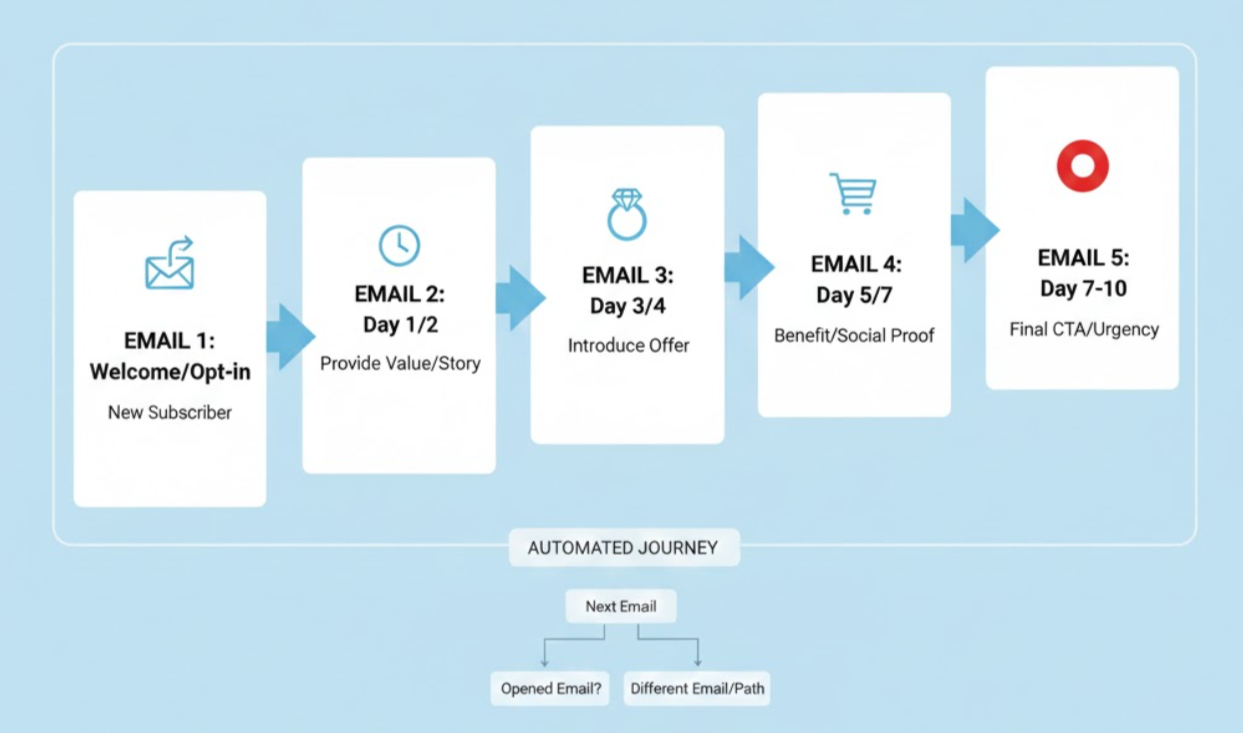
6-Part Welcome or Onboarding Email Sequence (With Purpose for Each Step)
An onboarding email sequence isn't just about saying "welcome." It's about guiding someone through their first experience with your product or brand—and making sure they stick around.
A well-built sequence can dramatically improve retention, activation, and long-term engagement.
Here's the 6-step framework we use to turn new sign-ups into active, engaged users or customers.
Step 1: Welcome + Expectation Setting
Purpose: Make a strong first impression and tell them exactly what happens next.
This email hits their inbox immediately after they sign up. Thank them for joining, confirm what they'll get from you, and set clear expectations (how often you'll email, what kind of content they'll receive, etc.).
Behavioral trigger: Sent immediately upon sign-up or account creation.
Step 2: Brand Story / Value Proposition
Purpose: Build connection and remind them why they signed up in the first place.
Now that the welcome is out of the way, tell your story. Why does your company exist? What problem are you solving? What makes you different? This email creates an emotional connection and reinforces the value they're about to get.
Behavioral trigger: Sent 1-2 days after the welcome email.
Step 3: Key Features / Benefits
Purpose: Show them how to get value fast.
This is where you walk them through the most important features or actions they should take. Don't overwhelm them with everything—focus on the 2-3 things that deliver quick wins. The faster they see value, the more likely they'll stay engaged.
Behavioral trigger: Sent 2-3 days after email 2, or triggered when they log in but haven't completed key actions.
Step 4: Social Proof
Purpose: Build trust and reduce doubt.
By now, they've had a few days with your product or content. This onboarding email sequence touchpoint adds credibility by showing that other people (especially people like them) have succeeded with you. Share testimonials, case studies, or user stats.
Behavioral trigger: Sent 5-7 days after sign-up, or after they've engaged with a key feature.
Step 5: Helpful Resource / Education
Purpose: Give them something useful—no strings attached.
This email deepens engagement by offering educational content: a guide, a webinar, a tutorial, a framework they can use. You're positioning yourself as a helpful resource, not just a company trying to sell them something.
Behavioral trigger: Sent 7-10 days after sign-up, or when engagement starts to drop off.
Step 6: Conversion CTA
Purpose: Move them to the next step—whether that's upgrading, booking a call, or completing a purchase.
This is your ask. If they're on a free trial, this email pushes them toward paid. If they're a lead, it invites them to schedule a demo. If they're a new customer, it upsells them to a higher tier or additional service.
Behavioral trigger: Sent 10-14 days after sign-up, or right before a trial ends.
Why This Improves Retention + Engagement
A strong onboarding email sequence does three things: it reduces confusion (people know what to do next), it accelerates time-to-value (they see results faster), and it builds trust over time (they feel supported, not sold to).
The companies with the best retention don't just throw people into the deep end. They guide them step-by-step—and that's exactly what this sequence is designed to do.
Writing Formulas to Create High-Converting Emails in Any Sequence
You don't need to reinvent the wheel every time you write an email. The best email sequence examples follow proven formulas that work across industries, audiences, and goals.
Here are the exact frameworks we use to write emails that actually get responses.
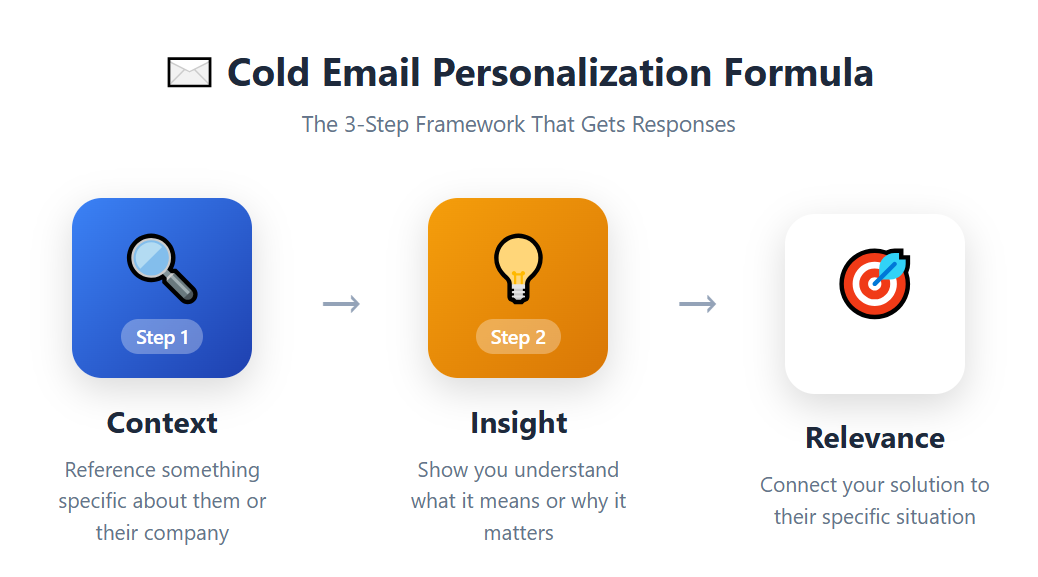
Personalization Formula (Context → Insight → Relevance)
- Context: Reference something specific about them (their company, role, recent news, or activity).
- Insight: Share an observation or pattern you've noticed that relates to them.
- Relevance: Connect it back to how you can help or why this matters to them right now.
Example: "Saw you just raised a Series B—congrats. We've noticed that fast-growing companies usually hit a wall around lead gen at this stage. We help teams like yours scale outbound without hiring 10 more SDRs."
This formula works when writing cold email because it shows you've done your homework. You're not sending a generic blast.
Pain-Point Formula
Start with the problem they're facing. Agitate it just enough to make it real. Then offer a solution (or at least a path forward).
Example: "Most agencies waste 20+ hours a week on lead gen that doesn't convert. You're chasing prospects who ghost you, running campaigns that don't scale, and still not hitting pipeline targets. What if you could outsource the whole thing and only pay for qualified meetings?"
The pain-point formula works in email sequence examples because people respond to problems they recognize—especially when you articulate it better than they could themselves.
Social Proof Formula
Mention a similar company, share a result, and tie it back to them.
Example: "We helped [Company X] book 50 demos in 60 days using the same approach. They were struggling with the same cold outreach challenges you're probably dealing with—low reply rates, unqualified leads, wasted time. Want to see how we'd approach this for your team?"
Social proof reduces risk. If it worked for someone like them, it can work for them too.
Value-First Formula
Give something useful before you ask for anything. A tip, a resource, a framework, or an insight they can use immediately.
Example: "Quick tip: if your cold emails aren't getting replies, check your subject lines. We've found that subject lines under 4 words get 30% higher open rates. Try '[First Name] + [Company Name]' as a test."
Value-first emails build goodwill and trust. Even if they don't respond right away, they'll remember you as someone who helped them—not just pitched them.
CTA Formula: Soft, Hard, Micro-CTAs
Your call-to-action should match the email's intent and the relationship stage.
- Soft CTA: Low-commitment, conversational. "Worth a quick chat?" or "Curious to see how this works?"
- Hard CTA: Direct and clear. "Book a 15-minute call here [link]" or "Reply with your availability."
- Micro-CTA: A tiny ask that moves things forward. "Just reply 'yes' and I'll send details" or "Should I send over the case study?"
The best email sequence examples use soft CTAs early in the sequence (emails 1-3), then escalate to harder CTAs as engagement builds. Don't ask for a demo in email 1. Build up to it.
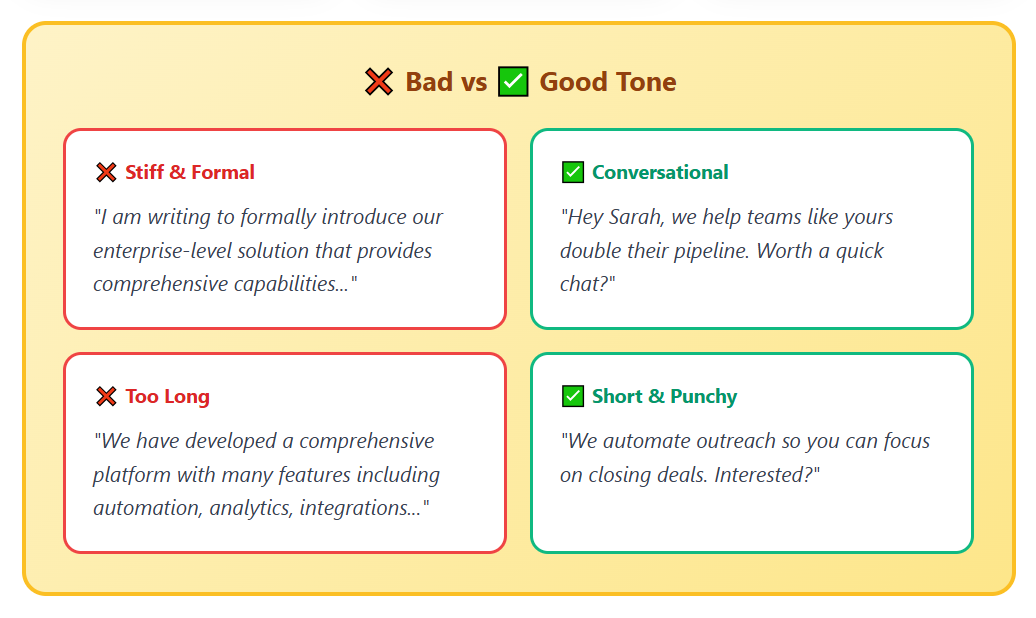
What Good Email Tone Looks Like: Conversational, Short, Frictionless
Here's the truth: nobody wants to read a wall of text from a stranger. The emails that convert sound like they're written by a human, not a marketing robot.
- Conversational: Write like you're talking to a colleague. Use "you" and "we." Avoid jargon and corporate-speak.
- Short: Keep it under 100 words for cold emails. Under 150 for nurture or onboarding. If you can't explain your point in 3-4 sentences, you're overcomplicating it.
- Frictionless: Make it stupid-easy to respond. Don't make them think. Don't ask for a 60-minute call. Don't bury your ask in paragraph 4. Get to the point, make it clear, and give them a simple way to say yes.
The best emails feel effortless to read and effortless to reply to. That's the tone you're aiming for across every email in your sequence.
Email Sequence Templates You Can Use (Cold + Onboarding)
Here are plug-and-play email sequence templates you can adapt for your business. These are based on campaigns that have actually worked—no fluff, just frameworks that get replies.
📌 Cold Email Sequence Template (6 Steps)
Email 1: The Personalized Opener
Subject: Quick question, [First Name]
Hey [First Name],
Noticed [specific observation about their company/role/recent activity]. We work with teams like yours at [similar company] to [specific outcome].
Worth a quick chat to see if this makes sense for [Company Name]?
[Your Name]
Email 2: Social Proof Drop
Subject: Re: Quick question, [First Name]
[First Name],
Not sure if you saw my last note—but wanted to share this quick win:
We helped [Similar Company] [specific result—e.g., "book 40 qualified meetings in 60 days"] using the same approach.
Figured it might be relevant for what you're building at [Company Name].
Open to a 15-minute call this week?
[Your Name]
Email 3: The Pain Point Reframe
Subject: [Company Name] + lead gen
[First Name],
Most [their role/industry] teams we talk to are dealing with the same thing:
Spending hours on outreach that doesn't convert. Chasing leads who ghost. Hitting a ceiling on pipeline growth.
Sound familiar?
We've built a system that fixes this—happy to show you how it works.
[Your Name]
Email 4: Value-First Email
Subject: Quick resource for you
Hey [First Name],
No pitch here—just wanted to share something that might help.
[Share a quick tip, framework, or link to a helpful resource relevant to their pain point.]
Hope it's useful. Let me know if you ever want to chat about [specific topic].
[Your Name]
Email 5: The Assumption Follow-Up
Subject: Timing off?
[First Name],
I know you're probably buried right now—just wanted to circle back before I close your file.
Still worth a conversation, or should I check back in a few months?
[Your Name]
Email 6: The Breakup Email
Subject: Last one, I promise
Hey [First Name],
I'll stop bugging you after this—but didn't want to give up without one last try.
If timing improves or you want to see how we've helped teams like [similar company], just reply "interested" and I'll send details.
Otherwise, no worries—good luck with everything you're building.
[Your Name]
📌 Welcome + Onboarding Email Sequence Template
Email 1: Welcome + Expectation Setting
Subject: Welcome to [Company Name]!
Hey [First Name],
Thanks for signing up! Here's what happens next:
Over the next week, we'll send you a few emails to help you get the most out of [product/service]. We'll cover [benefit 1], [benefit 2], and [benefit 3]—all designed to get you results fast.
Ready to dive in? Start here: [link to first action or resource].
[Your Name]
Email 2: Brand Story
Subject: Why we built this
[First Name],
Quick story: we started [Company Name] because we kept seeing [specific problem] everywhere.
We tried the existing solutions. They didn't work. So we built something better.
Today, we help [type of customer] [specific outcome]—without [common pain point].
That's what you just signed up for. Let's make it happen.
[Your Name]
Email 3: Key Features Walkthrough
Subject: Here's how to get started
Hey [First Name],
The fastest way to see results? Focus on these 3 things first:
1. [Feature/Action 1] – [Brief benefit and what to do]
2. [Feature/Action 2] – [Brief benefit and what to do]
3. [Feature/Action 3] – [Brief benefit and what to do]
Start with #1 today. You'll see the impact immediately.
Need help? Just reply to this email.
[Your Name]
Email 4: Social Proof
Subject: You're in good company
[First Name],
You're not the only one using [Company Name] to [achieve specific goal].
Here's what [Customer Name] at [Similar Company] said after their first month:
"[Specific testimonial or result]"
You're on the same path. Keep going.
[Your Name]
Email 5: Helpful Resource
Subject: This will help
Hey [First Name],
Wanted to share something that's been super helpful for our users: [link to guide, webinar, tutorial, or tool].
It covers [specific topic] and will save you a ton of time as you're getting up to speed.
Check it out when you have a minute.
[Your Name]
Email 6: Conversion CTA
Subject: Ready to level up?
[First Name],
You've been using [product/service] for [X days]. Here's what we're seeing: [specific engagement or progress they've made].
Want to unlock even more? [Upgrade/book a call/take next step] and we'll show you how to [specific benefit].
[Link or CTA]
Let's do this.
[Your Name]
📌 Re-Engagement Email Sequence Template
Email 1: The Check-In
Subject: Still interested?
Hey [First Name],
Haven't heard from you in a while—just wanted to check in.
Are you still looking to [original goal or pain point they had]? Or did timing shift?
Let me know either way—happy to help if it makes sense.
[Your Name]
Email 2: The Update
Subject: Quick update
[First Name],
A lot has changed since we last talked. We just [new feature, case study, result, or update].
Thought it might be relevant for what you're working on at [Company Name].
Worth reconnecting?
[Your Name]
Email 3: The Final Offer
Subject: One last thing
Hey [First Name],
I'll stop here if this isn't a priority anymore—but wanted to leave this on your radar:
[Specific offer, resource, or case study that addresses their original pain point.]
If it's a fit, let's talk. If not, no worries at all.
[Your Name]
📌 Lead Nurture Email Sequence Template
Email 1: Educational Value
Subject: Quick tip for [their goal/pain point]
Hey [First Name],
Saw you downloaded [resource]—figured you might find this helpful:
[Share a quick tip, insight, or framework related to their interest.]
Let me know if you have questions. Happy to chat.
[Your Name]
Email 2: Case Study Share
Subject: How [Similar Company] did this
[First Name],
Quick story: [Similar Company] was dealing with [pain point]. Here's how they solved it:
[Brief case study or result.]
Sound familiar? We can walk you through the same approach.
[Your Name]
Email 3: Soft Ask
Subject: Worth a conversation?
Hey [First Name],
You've been checking out our stuff for a while now—appreciate the interest.
Think it's worth hopping on a quick call to see if we can help with [specific goal]?
No pressure—just want to make sure we're useful.
[Your Name]
These email sequence templates are your starting point. Personalize them, test them, and tweak them based on what your audience responds to. The structure works—you just need to make it sound like you.
How to Set Up Email Sequence Automation (Step-by-Step)
Templates give you the copy. The setup is what makes them run. And here's where most teams leave time on the table — they have great emails, but the automation is configured badly, so sequences fire at the wrong time, keep sending after a prospect replies, or never connect back to the CRM.
Here's exactly how to configure an email sequence that actually runs the way it's supposed to.
The Three Trigger Types That Power Every Sequence
All email sequence automation comes down to three trigger types. Understanding them determines how smart your sequences can get.
1. Time-based triggers send emails after a fixed delay from a starting event. "Send Email 2 three days after Email 1 was sent." Simple to configure, always reliable. This is the default for cold email sequences and most welcome series. The limitation: it doesn't care what the prospect actually did — it fires on schedule regardless.
2. Action-based triggers fire when a prospect takes a specific action: clicks a link, visits a page, opens an email, downloads a resource. These are more powerful because they respond to real intent. If someone clicks your pricing page link in Email 3, you can immediately trigger a follow-up that addresses price objections — without waiting for Day 8. According to industry data, behavior-based automated sequences generate significantly higher conversion rates than time-only drip campaigns, because they respond to what users are actually doing rather than an assumed timeline.
3. Inaction-based triggers fire when a prospect does NOT take an action within a defined window. They haven't opened after 4 days. They haven't completed setup after signing up. They haven't replied to your first two emails. These "if nothing happens" triggers are what power re-engagement nudges and sequence escalations. They require a bit more setup but fill the gaps that time-based triggers miss.
Most sequences use all three: time-based delays for the default cadence, action-based triggers to accelerate based on engagement, and inaction-based triggers to handle the non-responders.
Step-by-Step Setup in a Typical Email Tool
Regardless of which platform you use, the setup process follows the same logic:
1. Build your contact list. Import verified contacts. Segment by ICP if you're running multiple sequences. Do not skip email verification — bounce rates above 3% damage sender reputation fast. Use a tool like NeverBounce or ZeroBounce before importing.
2. Define your trigger. What starts the sequence? A new contact added to a list, a form submission, a sign-up event, a tag applied in your CRM? The trigger determines when the clock starts for every contact in the sequence.
3. Build the email chain. Add each email in order. Write the subject line and body for each. Configure any personalization tokens (first name, company, etc.). Keep your cold emails under 100 words. Keep your onboarding emails under 150.
4. Set delays between emails. For cold outreach: 3 days is the sweet spot between most emails, with 2 days on the later follow-ups. For onboarding: space emails 2-7 days apart depending on the goal — more frequent early on, spreading out as activation is confirmed.
5. Configure exit conditions. This is the most important step and the one most teams skip. More on this below.
6. Test before activating. Send test emails to yourself. Confirm personalization tokens populate correctly. Check that your domain is warmed and authentication (SPF, DKIM, DMARC) is in place. Use a deliverability test tool to confirm inbox placement before going live.
7. Activate and monitor. Once the sequence is live, check the first 48-72 hours for any bounce spikes, deliverability issues, or configuration errors. Then set a weekly review cadence for reply rate, click-through rate, and sequence completion.
Exit Conditions: The Setting Most Teams Miss
Exit conditions tell your sequence when to stop sending. Configure them wrong, and your tool keeps firing emails at a prospect who already replied, already booked a meeting, or already unsubscribed.
That's how you annoy the exact people who were interested.
Every sequence should have these exit conditions configured by default:
- Stop if the prospect replies. This is non-negotiable. No one should receive Email 4 if they've already responded to Email 2. Most cold email tools handle this automatically if you set it up — but check, because it's not always the default.
- Stop if the prospect books a meeting. Connect your calendar tool (Calendly, Chili Piper, HubSpot Meetings) to your sequence platform via Zapier or a native integration. When a meeting is booked, the sequence should stop.
- Stop if the prospect unsubscribes. This one should be automatic in any compliant tool. But verify that unsubscribes from one sequence suppress the contact from all other active sequences in your account.
- Stop if the prospect converts. For onboarding sequences, define what "converted" means — upgraded to paid, completed setup, booked an onboarding call — and configure the sequence to exit when that milestone is hit.
Missing exit conditions isn't just an annoyance issue. Continuing to email someone who has already engaged is a top cause of spam complaints and CAN-SPAM/GDPR compliance risk. Set these before you activate.
How to Connect Your CRM to Your Email Sequences
The sequence is where the emails run. The CRM is where the results live. If these two systems aren't connected, your sequence data dies in the email tool and your sales team has no visibility into what's happening.
Here's what a proper CRM connection does:
1. Reply tracking: When a prospect replies, that activity should appear in their CRM contact record automatically — not require someone to manually log it.
2. Deal stage updates: If a prospect clicks a meeting link or replies positively, the connected CRM should move that deal to the appropriate stage. This removes manual CRM hygiene from your reps' workflow.
3. Sequence exit triggers: When a deal stage changes in the CRM (for example, "Meeting Booked" or "Proposal Sent"), the CRM should signal the email tool to exit that contact from the active sequence.
4. Reporting sync: Open rates, click rates, and reply rates from your sequences should flow into your CRM reporting so you can attribute pipeline to specific sequences — not just "email" as a category.
Most major email tools connect to HubSpot, Salesforce, and Pipedrive natively. For everything else, a Zapier or Make workflow handles the handoff. Set this up before you start sending — retrofitting CRM integrations after a sequence has run is painful and loses historical data.
How to Measure Email Sequence Performance (Cold + Welcome Metrics)
You can't improve what you don't measure. Whether you're running a cold email sequence or an onboarding email sequence, tracking the right metrics tells you what's working—and what's not. Here's exactly what to monitor and why it matters.
Core Metrics to Track
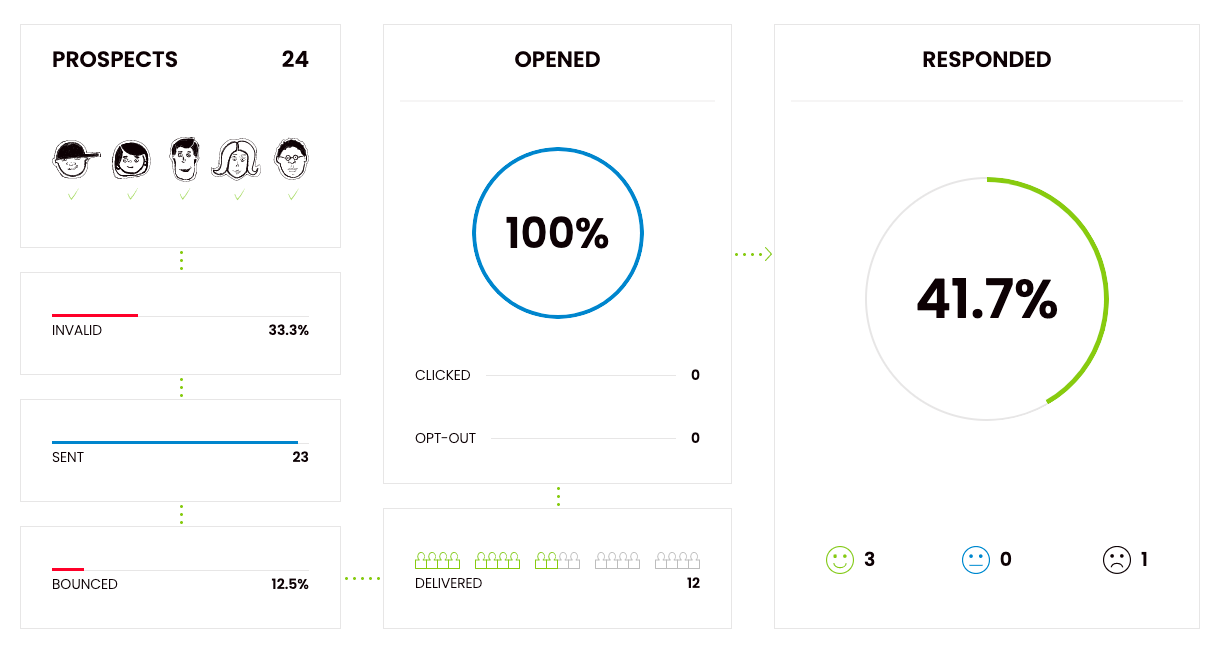
- Open Rate: The percentage of people who opened your email. This tells you if your subject line is compelling enough to break through inbox clutter.
Benchmark: 40-60% for cold emails, 60-80% for welcome/onboarding emails.
- Reply Rate: The percentage of people who responded to your email. This is your most important metric for cold outreach—it shows real engagement.
Benchmark: 5-15% for cold sequences, 10-30% for onboarding sequences.
- Positive Reply Rate: Not all replies are created equal. Positive replies are the ones that move the conversation forward (meeting requests, questions, interest). This is what actually matters for pipeline.
Benchmark: 3-8% for cold emails.
- Click-Through Rate (CTR): The percentage of people who clicked a link in your email. This measures curiosity and intent, especially in nurture or onboarding sequences.
Benchmark: 2-5% for cold emails, 10-20% for onboarding emails.
- Conversion Rate: The percentage of people who completed your desired action—booked a meeting, signed up for a trial, upgraded their account, etc. This is your bottom-line metric.
Benchmark: 1-5% for cold sequences, 10-25% for onboarding sequences.
- Unsubscribe Rate: The percentage of people who opted out. A high unsubscribe rate means your messaging is off or you're hitting the wrong audience.
Benchmark: Under 0.5% for cold emails, under 2% for marketing emails.
- Bounce Rate: The percentage of emails that didn't get delivered. High bounce rates kill your sender reputation and tank deliverability.
Benchmark: Under 3% (anything higher is a red flag).
Cold Sequence vs Onboarding Sequence Metric Differences
Cold email sequences and onboarding email sequences need to be measured differently because the goals are completely different.
For cold sequences, focus heavily on reply rate and positive reply rate. These tell you if you're breaking through to the right people. Open rates matter, but replies matter more. You're trying to start conversations, not just get clicks.
For onboarding sequences, prioritize click-through rate and conversion rate. You want people taking action—logging in, completing setup, upgrading their account. Opens are important, but engagement and activation are what drive retention.
When evaluating how to measure success of welcome email sequence campaigns specifically, track engagement over time. Are people still opening emails by email 3 or 4? Are they clicking through to resources? Are they converting by the end of the sequence? If drop-off happens early, your messaging or timing is off.
How to Run A/B Tests to Improve Sequences Over Time
A/B testing is how you turn a decent sequence into a killer one. Here's what to test:
Subject lines – Test different lengths, personalization styles, or angles. Even small tweaks can boost open rates by 10-20%.
CTAs – Test soft vs. hard asks. Test different wording. Test placement (early in the email vs. at the end).
Email length – Test short (50-75 words) vs. slightly longer (100-150 words). Sometimes more context converts better.
Timing and cadence – Test 2-day gaps vs. 4-day gaps. Test sending emails at different times of day.
Personalization level – Test hyper-personalized openers vs. pattern-interrupt hooks vs. straight-to-the-point messaging.
Run one test at a time so you know what actually moved the needle. Give each test at least 100-200 sends before drawing conclusions.
Importance of Deliverability Monitoring
None of this matters if your emails aren't landing in the inbox. Email Deliverability is the foundation of every successful sequence.
Monitor these signals closely:
- Bounce rate (keep it under 3%)
- Spam complaint rate (should be near zero)
- Domain reputation (use tools like Google Postmaster or MXToolbox)
- Inbox placement rate (are you landing in primary inbox, promotions, or spam?)
If your deliverability drops, your entire sequence tanks—no matter how good the copy is. Warm up new domains properly, keep your email list clean, avoid spammy language, and never buy email lists.
At Cleverly, we obsess over deliverability because it's the difference between a 10% reply rate and a 1% reply rate. If you're not monitoring it, you're flying blind.

Common Mistakes to Avoid When Creating Email Sequences
Even the best email sequences can fail if you make these critical mistakes. We've analyzed thousands of campaigns and seen the same errors kill reply rates over and over.
Here's what to avoid—and how to fix it.
❌ Sending All Emails With the Same Angle
If every email in your sequence says the same thing in slightly different words, you're wasting touchpoints. Email 1 shouldn't sound like Email 4.
Each email needs a different angle: value in one, social proof in another, pain point in the next. Give prospects multiple reasons to engage instead of repeating yourself six times.
Fix: Map out distinct hooks for each email before you start writing. Ask yourself: "What's unique about this touchpoint?"
❌ Long Paragraphs + Selling Too Early
Nobody wants to read a novel from a stranger. And nobody wants to be pitched in the first sentence.
Long paragraphs get skipped. Hard sells in email 1 get ignored. The best email sequences are short, conversational, and build to the ask—they don't lead with it.
Fix: Keep cold emails under 100 words. Lead with curiosity or value, not your product. Save the bigger pitch for email 3 or 4 when you've earned their attention.
❌ Not Personalizing the First Email
Generic openers like "I hope this email finds you well" or "I wanted to reach out" kill your reply rate before you even get started.
If your first email doesn't show you've done your homework, prospects assume it's mass spam—and they're probably right.
Fix: Personalize the first 1-2 sentences with something specific about them, their company, or their industry. It doesn't need to be elaborate—just real.
❌ Overusing Images/Links → Deliverability Drop
Loading your emails with images, GIFs, or multiple links might look polished, but it tanks your deliverability. Email providers flag heavily formatted emails as promotional or spam.
Fix: Stick to plain text for cold sequences. Use one link max (your CTA). Save the fancy formatting for marketing emails to people who already know you.
❌ No CTA Clarity → Prospects Don't Know What to Do
If your email ends with "Let me know your thoughts" or "Would love to connect," you're making prospects work too hard. Vague CTAs get ignored.
People need to know exactly what you're asking for and how to respond.
Fix: Be specific. "Open to a 15-minute call this week?" or "Should I send over a quick case study?" Clear, simple, one action.
❌ Not Verifying Email Lists Before Sequencing
Sending to invalid, outdated, or low-quality email addresses destroys your sender reputation and bounce rate—which kills deliverability for everyone on your list.
If you're running sequences on unverified emails, you're basically sabotaging yourself.
Fix: Verify every email before it goes into your sequence. Use email verification tools like NeverBounce, ZeroBounce, or built-in verification from your email platform. Keep your bounce rate under 3%.
❌ Using the Same Sequences for Every ICP
Your enterprise prospects don't respond to the same messaging as your SMB prospects. Your agency clients have different pain points than your SaaS clients.
The best email sequences are tailored to the audience. If you're using one-size-fits-all messaging, you're leaving replies on the table.
Fix: Build separate sequences for each ICP (ideal customer profile). Adjust the pain points, social proof, and examples to match who you're talking to. It takes more work upfront, but the reply rates make it worth it.
Avoiding these mistakes won't guarantee success—but making them will almost guarantee failure. The best email sequences are personalized, varied, deliverable, and tailored to the audience. Get these fundamentals right, and everything else gets easier.
How Cleverly Builds High-Converting Email Sequences for B2B Brands
We've spent years perfecting cold email sequences for one reason: they work when they're done right. And most companies don't have the time, team, or infrastructure to do it right.
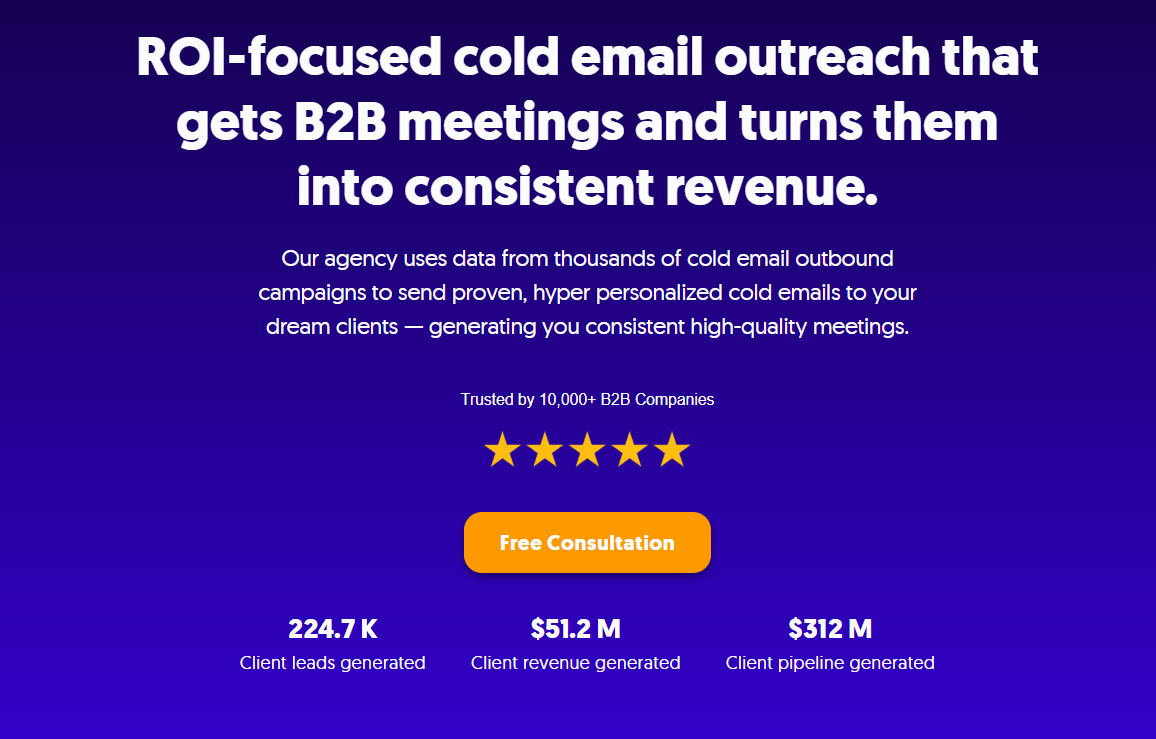
At Cleverly, we've helped 10,000+ clients generate qualified meetings with companies like Amazon, Google, Uber, PayPal, Slack, and Spotify.
…The results? $312 million in pipeline revenue and $51.2 million in closed revenue—all from strategic, high-converting email sequences that actually get replies.
Here's how our cold email services work:
✅ We build the sequences. Every email is customized to your ICP, your value prop, and your goals. We're not sending generic templates, we're crafting messages that sound like they came from your team.
✅ We handle the outreach. From list building to personalization to follow-ups, we manage the entire campaign. You don't touch a thing.
✅ You only pay for results. Our pricing model is simple: pay per meeting-ready lead. No wasted budget on unqualified prospects. No paying for "email sends" that go nowhere. You only pay when we deliver a qualified lead ready to talk.
We've run millions of emails. We know what gets replies, what kills deliverability, and how to scale outbound without your team lifting a finger.
If you're tired of low reply rates, unqualified leads, and campaigns that don't convert—we've already solved it. Let's talk.
Book a call with Cleverly
Conclusion
Email sequences aren't optional anymore—they're how you scale outreach, nurture leads, and book meetings without burning out your team.
The difference between sequences that work and sequences that flop? Three things: personalization, timing, and deliverability. Nail those, and your reply rates will climb. Ignore them, and you're just adding to inbox noise.
Use the frameworks and templates we've shared here. Test them. Tweak them. Track what works. If you follow the structure—different angles per email, clear CTAs, smart cadence—you'll 3x your response rates in 2026.
And if you want someone to handle the heavy lifting? That's literally what we do at Cleverly.
We've built email sequences that generated hundreds of millions in pipeline for clients across every industry. We know what works because we've tested it at scale.
Ready to stop guessing and start booking meetings? Let's build your sequence together →

Frequently Asked Questions
Free Resource
How to Scale a Profitable Cold Call System
Get the complete guide — download it instantly now.

Free Ebook
Download the Free Guide
Enter your details to get instant access.
You're all set! 🎉
Your ebook is downloading now.
Click below if the download didn't start automatically.