Table of Contents
What to Decide Before You Build the Sequence
Structuring a Multichannel Sequence That Works
Using Conditional Steps to Branch on Behavior
Two Branch Examples You Can Diagram
Personalization in Lemlist: What Helps and What Hurts
Adding LinkedIn Steps Without Risking the Account
Setting Sending Limits and Schedules
Pre-Launch Checklist for Your Lemlist Campaign
What to Monitor After You Launch
How Cleverly Runs Multichannel Outreach Without You Managing the Tool
Conclusion
Frequently Asked Questions
Modified On :
October 7, 2026
Key Takeaways
- A multichannel sequence only works when the steps react to what the prospect does. Channels running side by side on a fixed calendar are just parallel campaigns.
- Deliverability and list quality come before the sequence builder. A perfect flow on a burned domain sends nothing useful.
- LinkedIn's weekly connection ceiling, not your email capacity, sets the real size of a multichannel campaign.
- Personalize on a problem or a trigger. Visual tricks add cost and rarely add replies with senior B2B buyers.
- Start with one simple branched sequence for one narrow segment. Add complexity only after you can read the results.
A sequence that fires on a fixed calendar treats a prospect who read your email three times the same as one who never saw it. That is the gap a Lemlist multichannel sequence is built to close.
The pressure to get this right is real. Gartner predicted that 80% of B2B sales interactions between suppliers and buyers would happen in digital channels.
Gartner also found that buyers spend only about 17% of their purchase journey meeting with potential suppliersl. Split that across three or four vendors and you get a few percent of attention each. One channel will not earn it.
Lemlist's real edge is not email with LinkedIn bolted on. It runs email, LinkedIn, and calls inside one sequence, with conditional branching. The tool handles orchestration well. Targeting and messaging still decide whether anyone replies.
In this guide, we cover what to decide before you build, how to structure the steps, how to use conditions, LinkedIn limits, personalization, launch checks, and what to monitor.
It's written for founders, SDRs, and agencies. For sequencing strategy, see our multichannel appointment setting guide. For the product verdict, read our Lemlist review.
What to Decide Before You Build the Sequence
Most Lemlist campaign setup problems start before you open the builder. Settle these four things first.
Sort Out Deliverability First
Email is still the backbone of most sequences, so protect it.
- Use a separate sending domain. Never send cold email from your primary brand domain.
- Get SPF, DKIM, and DMARC live before any sending starts.
- Run warm-up for roughly three weeks before cold volume. Lemlist includes warm-up tooling on every plan, so there's no reason to skip it.
- Plan your sender count from target volume at a conservative per-inbox daily rate.
A simple example. If you want to send about 300 cold emails a day and each inbox sends 30, you need 10 inboxes. Work backward from the volume you want, then buy the senders.
Pro tip: Warm-up is not a one-time task. Keep it running at a maintenance level after launch.
Know Your LinkedIn Constraint
LinkedIn caps how many connection requests you can send each week. That ceiling limits your whole multichannel sequence, not your email capacity.
So decide early what LinkedIn is for:
- Primary channel: Your list size is capped by what LinkedIn lets you invite, so keep the list small and sharp.
- Warming layer: Use profile views and connections to make your emails feel familiar. Email carries the volume.
Pick one before you build. It changes how many steps you put on each channel.
Build the List With Both Channels in Mind
A true multichannel sequence needs two data points on every record: a verified email and a LinkedIn URL.
If a record is missing one, Lemlist skips those steps. Nothing breaks and no error shows. Your real volume just shrinks quietly.
Before import:
- Verify every email address.
- Check that LinkedIn URLs resolve to real profiles.
- Remove duplicates and anyone on your suppression list.
Draft the Messaging Outside the Tool
Write all your copy in a doc first. Editing in an interface leads to rushed, inconsistent messages. Decide two things before you start building:
- The channel order.
- The single ask for the sequence.
One ask. Not three. If you can't say it in one sentence, the sequence will wander.
📧 Go Beyond Cold Email
Cleverly combines LinkedIn, cold email, and cold calling to help B2B teams reach more prospects and generate qualified meetings.
Structuring a Multichannel Sequence That Works
A good multichannel outreach campaign reads like one person following up in a sensible way. It does not read like three tools firing at once.
Here is a structure that works as a starting point:
- LinkedIn profile view
- LinkedIn connection request
- Context-setting email
- LinkedIn message when the invite is accepted
- Follow-up email with a new angle
- Call or voice note for high-priority accounts
A Day-by-Day Layout You Can Copy
Rules That Keep It Human
- Space steps several days apart. Stacking touches close together feels like pressure.
- Alternate channels. Don't run three emails in a row when a LinkedIn touch would break the pattern.
- Keep the first ask small. A reply or a short conversation. Never a demo.
- Give every step a new angle. A reminder of the last message is not a new angle.
- Make steps reference each other. If your email mentions a LinkedIn visit, say so. It should read like one person, not three campaigns.
Example: Email 1 talks about how similar companies handle onboarding delays. Your LinkedIn message after acceptance says, "Sent you a note about onboarding earlier. Curious how you handle it today." Same thread. Different channel.
Using Conditional Steps to Branch on Behavior
This is the section that justifies choosing Lemlist. Conditions let your Lemlist automation respond to what the prospect actually did instead of firing on a schedule.
Start With the Practical Gate
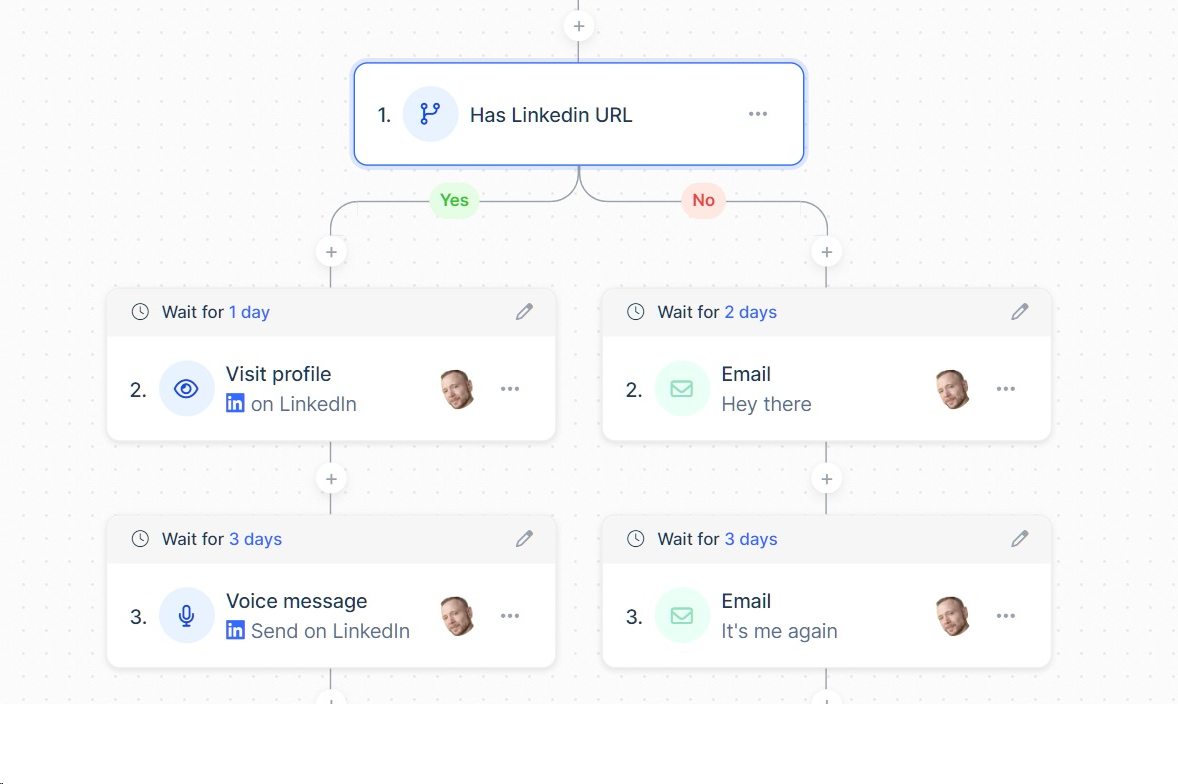
Before anything clever, add a simple gate: only send LinkedIn steps to records that have a LinkedIn URL. Everyone else stays on email. This one condition stops the silent skipping we covered earlier.
Branch on Invite Acceptance
- Accepted: Send a LinkedIn message.
- Not accepted: Stay on email and move to the next email step.
Accepted leads already said yes to a small thing. Treat them differently.
Branch on Engagement
If a prospect hasn't opened your emails after several days, another email likely won't help. Trigger a LinkedIn touch instead. A different channel gets a different chance.
You can also use engagement thresholds to trigger calls. Reps only dial people who showed some signal, such as repeat opens or a profile visit back. That saves hours of dialing cold.
Always Set a Reply-Stop Condition
Anyone who responds must exit the sequence immediately. Nothing damages trust faster than a prospect replying "interested" and getting an automated follow-up the next morning.
🚀 Turn Sequences Into Pipeline
With 53,000+ meetings booked, 224.7K+ leads generated, and $312M+ pipeline, Cleverly helps 10,000+ businesses scale multichannel outbound.
Two Branch Examples You Can Diagram
Branch A: Invite acceptance
Branch B: Engagement-based call trigger
Keep it simple on your first campaign. Complex trees become hard to maintain and nearly impossible to diagnose when results drop. Two or three branches is plenty to start. Some users also report that setting up conditions takes real time to learn, so give yourself room.
Personalization in Lemlist: What Helps and What Hurts
Personalization is where many Lemlist email sequence builds go wrong. The tool gives you a lot of options, and more options means more ways to overdo it.
What Lemlist Offers
- AI-generated icebreakers pulled from LinkedIn profiles
- Conditional text through liquid syntax
- Dynamic images
- Custom videos
- Personalized landing pages
Where It Genuinely Helps
- Conditional text. Adapt one message by segment. A message for a VP of Sales can mention quota pressure while the same email for a founder mentions pipeline gaps.
- Icebreakers grounded in something real. A recent post, a role change, a hiring signal. If it's true and relevant, it earns attention.
Where It Can Backfire
- Dynamic images and video can look gimmicky to senior B2B buyers. They can also carry a small deliverability cost.
- Untested AI icebreakers vary in quality. Read a sample of them before trusting them at volume.
Rule of thumb: Personalize on a problem or a trigger, not on visual novelty.
Protect Yourself From Blank Variables
Always set a fallback on every variable. Nothing says "mass email" like "Hi ," followed by nothing. Test with a few records that have missing fields.
The honest point: in B2B, strong plain-text email usually beats a decorated one.
Adding LinkedIn Steps Without Risking the Account
Your Lemlist LinkedIn sequence runs through your real account. LinkedIn automation goes against LinkedIn's terms, so pacing and volume matter more than which tool you use.
Keep Your Limits Conservative
- Stay well below the platform ceiling on daily connection requests.
- Keep weekly totals inside LinkedIn's limit. LinkedIn doesn't publish an official number, and community reports generally put it around 100 per week.
- Ramp up slowly on new or quiet accounts.
Some sources describe Lemlist's own LinkedIn limits as deliberately conservative, with a daily cap and a ramp-up period. That reduces risk, but it also limits scale. Check the current limits inside your account.
Build for Interruption
Some users report friction with the browser extension, including needing to reinstall it or having steps pause when the browser is closed. Don't assume it runs perfectly. Check on it daily and expect gaps.
Rules for the Connection Request
- Never pitch in the connection note. It lowers acceptance and raises the odds of someone reporting you.
- Leave the note blank or keep it short and human.
Watch Acceptance Rate
Acceptance rate is your health metric. If it drops, fix your targeting before you touch volume. A falling rate usually means your list or your profile isn't landing.
Also withdraw stale pending invitations regularly. Hundreds of unanswered requests don't look good on your account.
For more on this, read our guide on automating LinkedIn connections safely.
Setting Sending Limits and Schedules
Sending settings decide whether your emails reach inboxes or spam folders. Don't accept the defaults.
- Set per-inbox daily caps conservatively. Lower is safer, especially early on.
- Calculate total volume. Senders multiplied by the per-inbox limit. Ten inboxes at 30 emails a day gives you 300.
- Match sending windows to the recipient's time zone. Business hours, not midnight.
- Add randomized delays between sends. Machine-regular patterns are easy to spot.
- Ramp up gradually. A new campaign should not start at full capacity.
- Confirm the schedule respects your warm-up state. Don't push volume on inboxes that aren't ready.
A cost note: Additional email senders are charged separately in Lemlist, so volume has a direct price. Multichannel plans are also priced per user, and sources report different figures depending on billing period and plan changes. Check Lemlist's pricing page before you budget.
Pre-Launch Checklist for Your Lemlist Campaign
Use this as your Lemlist tutorial cheat sheet. Run through it before every launch.
- Separate sending domain with SPF, DKIM, and DMARC verified.
- Inboxes warmed, with warm-up still running at maintenance level.
- List verified, deduplicated, and checked against suppression lists.
- Every record checked for both an email and a LinkedIn URL.
- All variables populated, with fallbacks in place.
- Conditional logic tested, including the reply-stop condition.
- Sequence sent to your own inbox and LinkedIn to check rendering.
- LinkedIn daily and weekly limits set conservatively.
- Sending windows and randomized delays configured.
- A named owner for replies, with a response-time expectation.
That last one gets skipped most often. A reply sitting for two days is a lost meeting. Decide who answers and how fast before you press launch.
What to Monitor After You Launch
Good Lemlist campaign examples are only useful if you know how to read the results. Track these in order of urgency.
Intervention Points
- High bounces: Pause and clean the list.
- LinkedIn warnings: Cut volume right away.
- Very low replies: Rewrite the copy, not the schedule.
Resist the urge to scale in week one, even when numbers look healthy. Early results are noisy. Give it time.
Judge the campaign on replies and meetings, not opens. Open tracking is unreliable, and a high open rate with no replies means your message isn't working.
Common Mistakes When Building Multichannel Sequences in Lemlist
We see the same errors over and over. Avoid these:
- Launching before domains are warmed. The damage to sender reputation is slow and expensive to undo.
- Treating parallel channels as multichannel. If no conditions connect them, you have two separate campaigns.
- Over-complex branching. If nobody can debug it later, it's too complicated.
- Pitching in the connection note. Acceptance drops and report risk goes up.
- Leaning on dynamic images and video instead of a relevant message. Novelty doesn't fix a weak offer.
- Records missing LinkedIn URLs. Half your sequence silently skips steps.
- No reply-stop condition. People who respond keep getting automation.
- Repeating the same message across channels. Every step needs a new angle.
- Judging the campaign on opens. Replies and meetings are the scoreboard.
How Cleverly Runs Multichannel Outreach Without You Managing the Tool

Lemlist handles orchestration well. What it doesn't do is run the work around it: domains, warm-up, LinkedIn account health, list quality, and reply handling. That work is ongoing, and it adds up. You pay per seat and per sender, and someone still spends hours every day on limits, branching logic, and the inbox.
At Cleverly, we run all of this for you as a LinkedIn lead gen and cold email agency that also handles cold calling. We define your ICP, build verified lists from multiple sources, set up domains and inboxes, run the outreach, and handle replies until a meeting lands on your calendar.
For you, that means no three-week warm-up wait before pipeline starts, and no deliverability lessons learned the expensive way. Our sequencing frameworks are tested across thousands of campaigns, so the trial-and-error phase is already done. We optimize for qualified replies and booked meetings, not open rates or sequence completion.
So far, that approach has generated $312M in pipeline for clients.
Want multichannel outreach running without building and babysitting it? Book a strategy call with Cleverly!
Conclusion
The advantage of a Lemlist multichannel sequence is conditional branching. If you aren't using it, you're paying for a feature you don't use. Keep the logic simple, build around LinkedIn's weekly ceiling instead of your email capacity, and personalize on problems and triggers rather than visual tricks.
Your next step is small. Build one branched sequence for one narrow segment and run it before adding anything else. The builder only executes what you set up, so infrastructure and targeting will decide the results.
Frequently Asked Questions
Free Resource
How to Scale a Profitable Cold Call System
Get the complete guide — download it instantly now.

Free Ebook
Download the Free Guide
Enter your details to get instant access.
You're all set! 🎉
Your ebook is downloading now.
Click below if the download didn't start automatically.