

Table of Contents
What Is N8N and Why Does It Work for Lead Generation?
The 4 Core Stages of an N8N Lead Generation Workflow
Step-by-Step: How to Build an N8N Lead Generation Workflow
Advanced N8N Lead Generation Automation Strategies
N8N Lead Generation Workflow Templates to Use Right Now
Best Tools to Pair with N8N for Lead Generation
How Much Does It Cost to Run N8N Lead Gen Automation?
N8N Lead Generation Mistakes to Avoid
When N8N Isn't Enough — Why Some Teams Use a Lead Gen Agency
How Cleverly Helps B2B Teams Scale Outreach
Conclusion
Frequently Asked Questions
Modified On :
July 30, 2026
Key Takeaways
- N8N lead generation workflows automate the full pipeline — from lead capture to CRM push — in under 30 seconds, without writing a single line of code.
- The four core stages of every N8N system are: capture, enrichment, AI scoring, and CRM sync plus outreach trigger.
- N8N's self-hosted model means no per-contact pricing — you scale your lead volume without scaling your costs.
- Companies that excel at lead nurturing generate 50% more sales-ready leads at 33% lower cost — automation is what makes that possible at scale.
- N8N handles the infrastructure, but it still needs a clean ICP, verified data, and strong copy to produce real pipeline.
Manual prospecting has a ceiling. You can hire more SDRs, build bigger spreadsheets, and buy more contact lists — but at some point, the model breaks. It doesn't scale, it's expensive, and it burns your best people on work that shouldn't require a human at all.
That's exactly where n8n lead generation comes in.
N8N is an open-source, node-based workflow automation platform that connects your entire lead gen stack — from data capture to CRM sync — without custom code. There are over 662 community lead gen workflows available on n8n, which means you don't need to build from scratch either.
Companies that excel at lead nurturing generate 50% more sales-ready leads at 33% lower cost. The difference between those companies and the rest is almost always automation maturity.
This guide covers everything: what N8N is, how to build a core workflow step by step, advanced strategies that unlock serious volume, the best tools to pair with it, and an honest look at when DIY automation isn't enough.
Whether you're a founder, SDR, RevOps lead, or marketer building your first outbound system, this is the playbook.
What Is N8N and Why Does It Work for Lead Generation?
N8N for lead generation works because of what it is: not a CRM, not an outreach tool, but the automation layer that connects all of them. Think of it as the central nervous system of your lead gen stack. Every tool you use — Apollo, HubSpot, Instantly, Slack, Clearbit — can talk to each other through N8N without manual handoffs.
It's open-source and self-hostable, which means you own your data and your infrastructure. No black-box pricing, no per-seat surprises.
Three things make N8N stand out over other lead gen automation tools:
✅ No per-contact pricing. Most platforms charge you more as you scale. N8N scales with your infrastructure, not your volume. A $5/month VPS handles hundreds of leads per day.
✅ Native integrations with the tools you already use. Apollo, Clearbit, HubSpot, Salesforce, LinkedIn, Instantly, Lemlist, Slack — all connect natively or via HTTP request nodes.
✅ Conditional logic and AI nodes. You can build workflows that think. Route leads based on score, fire different sequences by industry, or use an LLM to evaluate free-text fields and return a qualification decision. That's what makes N8N behave more like an intelligent SDR than a simple zap.
✅ N8N vs. Zapier: Zapier is fine for simple one-step automations. But for lead gen, you need loops, sub-workflows, conditional branching, and AI nodes. N8N handles all of that, and it costs a fraction of what Zapier charges at volume.
🤖 Automation Finds Leads. We Turn Them Into Meetings.
We run LinkedIn, cold email & calling campaigns end-to-end. More replies. More calls. Zero busywork.
The 4 Core Stages of an N8N Lead Generation Workflow
Every solid n8n lead generation workflow runs through four stages. N8N handles all of them — and when they're connected properly, the whole process from lead capture to sales notification completes in under 30 seconds.
Stage 1 — Lead Capture (Trigger)
This is where every workflow starts. Your trigger could be a web form submission (Typeform, Webflow, Instapage), a LinkedIn Sales Navigator export, a gated content download, or a live signal from an intent data provider via API.
N8N handles all of these via a Webhook trigger node, scheduled HTTP requests, or native app integrations. One trigger node starts everything that happens downstream — automatically, every time, with no human involved.
Stage 2 — Lead Enrichment
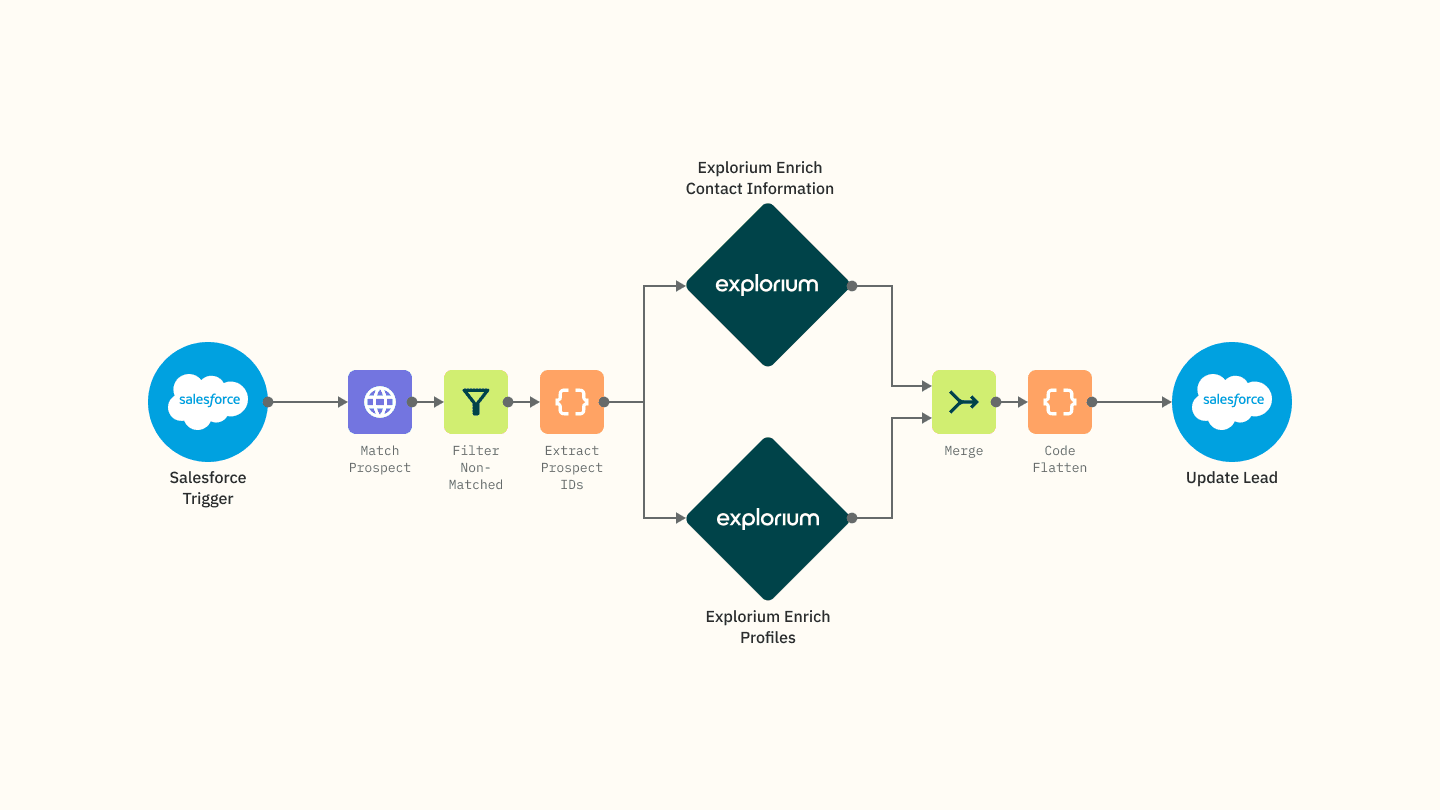
Raw data isn't enough. A name and email address doesn't tell you whether someone fits your ICP. N8N connects to enrichment APIs including Clearbit, Apollo.io, and Hunter.io to automatically append job title, seniority, company size, industry, LinkedIn URL, and tech stack data.
Enrichment happens via parallel API calls inside the workflow. The lead doesn't wait in a queue — it all happens in seconds.
Stage 3 — Lead Qualification and AI Scoring
Conditional nodes score leads against predefined ICP criteria — company size, job title, domain match, industry. You can layer an AI node here, calling an LLM via the N8N AI Agent or OpenAI node, to evaluate free-text fields and return a qualification score.
Set it up to return a score from 1 to 10 with reasoning, and store that score as a workflow variable for routing. Qualified leads go to your CRM. Unqualified leads go to a nurture list in Google Sheets or a low-touch sequence.

Stage 4 — CRM Sync and Outreach Trigger
N8N pushes the enriched, scored record to HubSpot, Salesforce, or Pipedrive. It creates the contact, creates the deal, and assigns the lead to the right sales owner via round-robin or territory logic — all automatically.
From there, it can trigger an outreach sequence in Instantly, Smartlead, or Lemlist, and send a Slack DM to the assigned rep with the full enriched lead details — name, company, AI score, LinkedIn URL, and a direct CRM link.
By the time your rep opens Slack, the lead is already in the CRM, scored, enriched, and ready to work.
Step-by-Step: How to Build an N8N Lead Generation Workflow
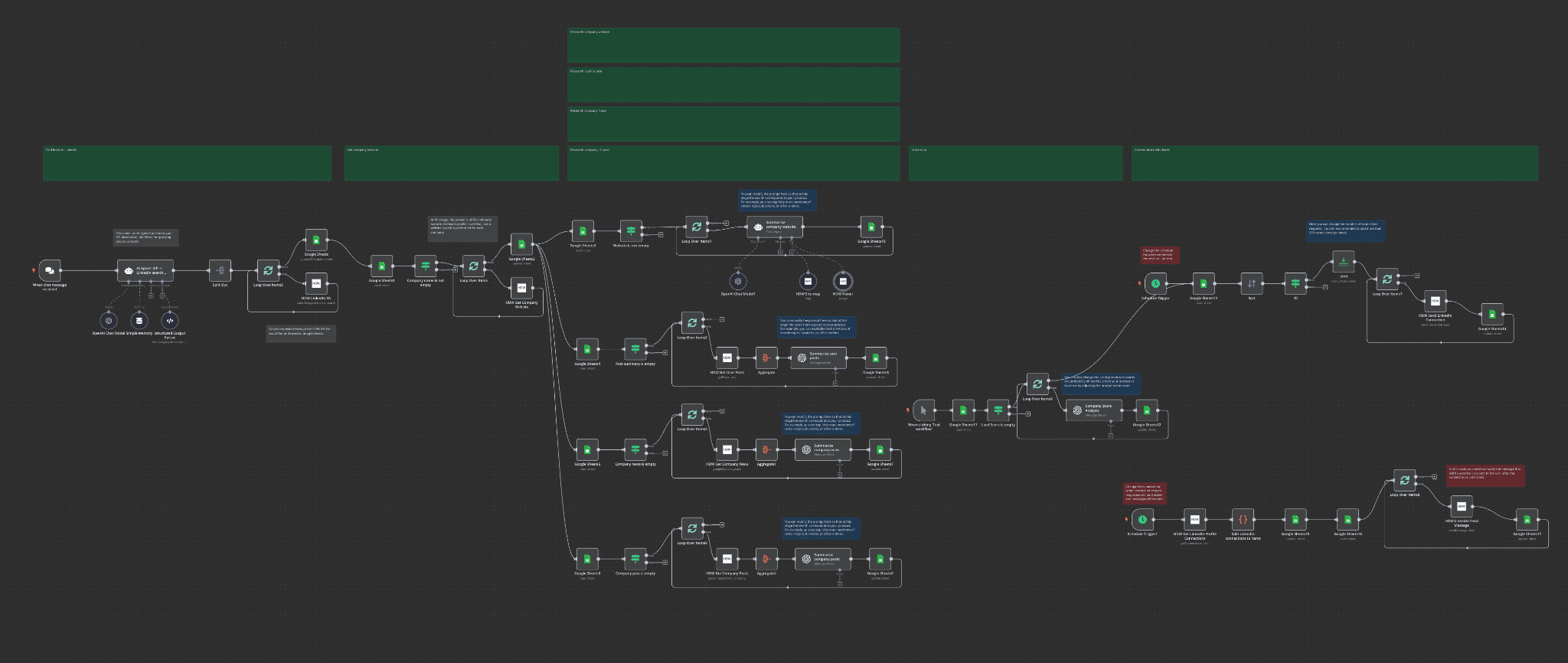
Here's a practical walkthrough of an n8n workflow for lead generation: Typeform form submission → Clearbit enrichment → AI scoring → HubSpot contact creation → Slack notification.
Step 1 — Set Up the Trigger Node
Open a new workflow in N8N and add a Webhook trigger node. Copy the webhook URL and paste it into your Typeform response destination settings. Every new form submission now automatically starts the workflow.
This works the same way for any form tool — Webflow, Instapage, Gravity Forms — wherever your leads are coming in.
Step 2 — Enrich the Lead Data
Add an HTTP Request node and point it to the Clearbit Enrichment API. Pass the email from the form submission as a query parameter. Map the returned fields — job title, company size, LinkedIn URL — to output variables that the next node can read.
You can chain multiple enrichment sources here. Apollo for contact data, Hunter.io for email confidence scores, Clearbit for company firmographics. Run them in parallel to keep the workflow fast.
Step 3 — Score with AI
Add an OpenAI node or the N8N AI Agent node. Write a prompt that passes the enriched data and asks the model to return a qualification score from 1 to 10 with a one-sentence reasoning statement.
Something like: "Based on the following lead data, score this prospect on a scale of 1–10 for fit with a B2B SaaS company targeting mid-market sales teams. Return only a JSON object with score and reason."
Store the score as a workflow variable. You'll use it in the next step to decide where this lead goes.
Step 4 — Branch on Score
Add an "If" node. Set the condition: if score is 7 or higher, route the lead to HubSpot. If it's under 7, route it to a nurture Google Sheet.
This is the logic that separates your hot prospects from your longer-term nurture list without anyone making that decision manually.
Step 5 — Create the CRM Record
Use the HubSpot node to create a new contact and set the deal stage to "New Prospect." Use a Switch node to assign the lead owner based on territory or round-robin logic. All of the enriched data — company size, title, score — maps directly to custom HubSpot properties.
Step 6 — Notify the Sales Rep
Add a Slack node. Send a DM to the assigned rep with: lead name, company, AI score, LinkedIn URL, and a direct link to the HubSpot record. Your rep sees the full picture before they've even opened the CRM.
That's the moment where automation stops being a process improvement and becomes a competitive advantage.
Pro Tip — Add Error Handling
Add an error handler node after every external API call. If Clearbit returns a 404, configure the workflow to continue with whatever data it has rather than stopping entirely.
A resilient n8n workflow for lead generation never drops a lead because of a single API failure.
🚀 Unlimited Leads Mean Nothing Without Pipeline
$312M pipeline generated across outbound channels. We handle targeting → outreach → booking. You close.
Advanced N8N Lead Generation Automation Strategies
Once your core workflow is running, you can layer on advanced tactics that compound over time. These are the strategies that move you from "automated lead gen" to genuinely unlimited top-of-funnel volume.
1) LinkedIn Outreach Automation
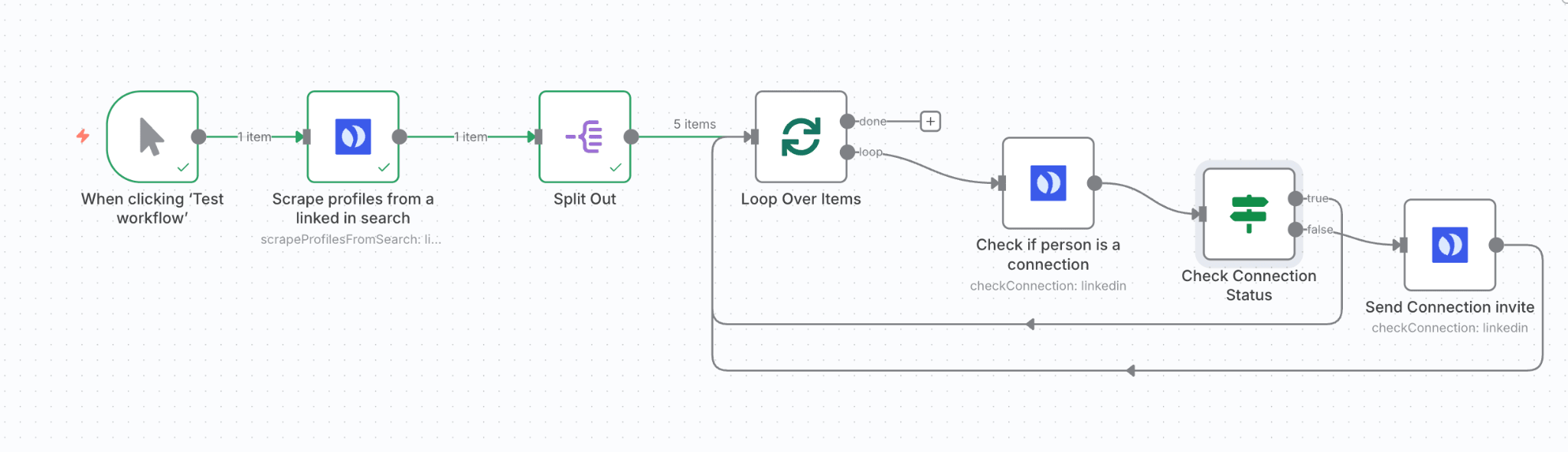
Connect Phantombuster or LinkedHelper to N8N via an HTTP Request node. N8N orchestrates the full sequence: trigger outreach after a lead clears qualification, throttle connection requests to stay within LinkedIn's daily limits, and log replies back to the CRM automatically.
This setup automates LinkedIn prospecting from ICP-to-outreach, using AI to analyze lead data, score clients, and prioritize outreach efforts — including automated connection requests and personalized follow-up messages.
The key is letting N8N handle the pacing and logging so your LinkedIn activity doesn't trip safety flags.
2) Competitor Intent Monitoring
Set up a scheduled workflow that checks G2, Capterra, or Trustpilot for new reviews of your top competitors. Extract the reviewer's company name, enrich it via Apollo, and add it to a targeted outreach list.
These prospects are actively evaluating solutions right now. They're not cold — they've already decided they have a problem. This is some of the highest-intent lead sourcing available without paid ads.

3) AI-Powered Account Research
Build a workflow that takes a target company's domain, queries a web search API, pulls press releases and recent funding news, and feeds it to an LLM that generates a personalized account brief for your sales rep.
This cuts per-account research from 30 minutes to under 2 minutes and scales to hundreds of accounts per day. Your reps stop going into calls blind, and personalization stops being a bottleneck.
4) Event-Triggered Outreach Sequences
Connect N8N to your product analytics platform. Set a trigger: when a free-trial user hits a key usage threshold — say, three report exports in seven days — fire an automated upgrade email sequence.
This bridges product-led growth and sales-assisted conversion without anyone watching a dashboard. The workflow sees the signal and responds before a human even notices.
N8N Lead Generation Workflow Templates to Use Right Now
You don't need to build any of this from scratch. The N8N community has over 662 lead gen workflow templates available on n8n.io. Search the "Lead Generation" category and you'll find ready-to-use workflows for almost every use case.
A few worth using immediately:
Apollo + AI + Instantly.ai — Sources targeted leads from Apollo, enriches them with context from LinkedIn posts and company news, and launches a hyper-personalized multi-sequence campaign in Instantly.ai — all orchestrated by N8N.
Google Maps Lead Scraper — Scrapes business data including company name, website, phone, address, and category using Apify, then extracts verified email addresses from each business website using AI.
LinkedIn Lead Gen + AI Scoring + Communication Agent — Automates the full LinkedIn prospecting process from ICP definition to personalized outreach, with AI-driven lead scoring and prioritization built in.
Lead Gen Agent — A fully autonomous AI agent that researches and qualifies leads end-to-end with minimal setup.
To use any of them: go to n8n.io/workflows → search "Lead Generation" → click "Use for free" → swap in your API keys and customize the nodes for your stack.
Best Tools to Pair with N8N for Lead Generation
N8N is the engine. These tools are the fuel. Here's the stack that makes n8n for lead generation actually work:
You don't need all of these on day one. Start with capture, one enrichment source, and CRM sync. Add AI scoring and outreach triggers once the base workflow is stable.
How Much Does It Cost to Run N8N Lead Gen Automation?
This is where lead generation automation with N8N really wins.
Self-host N8N on a VPS for as low as $5/month. Run AI scoring locally using Ollama (free, open-source models) or use the OpenAI API at roughly $0.002 per 1,000 tokens — which means thousands of scored leads for pennies.
For enrichment: Clearbit has a free tier, Apollo gives you 50 credits/month free, Hunter.io starts with 25 free searches per month. For outreach, Instantly.ai starts at $47/month, Lemlist at $59/month.
Your total minimum stack cost lands somewhere between $50–100/month for a fully automated lead gen system that processes hundreds of leads per day.
Compare that to per-contact platforms like ZoomInfo or Lusha, and the N8N stack runs 80–90% cheaper at volume. For growing B2B teams, that cost difference compounds fast.
N8N Lead Generation Mistakes to Avoid
Building the workflow is one thing. Keeping it running reliably is another. These are the mistakes that kill N8N lead gen automation setups in the first few weeks:
❌ No error handling
One failed API call shouldn't break your entire workflow and drop the lead. Add error handlers after every external call. Route failed enrichments to a fallback path, not a dead end.
❌ No ICP criteria before building
Enrichment and scoring are useless if you haven't defined what a qualified lead actually looks like first. Nail your ICP before you write a single node.
❌ Skipping email verification
Unverified leads sent to an outreach tool = high bounce rates and a damaged sender reputation. Verify before you sequence.
❌ Over-automating LinkedIn
Exceeding LinkedIn's daily rate limits will get your account flagged or banned. Build in throttling logic from day one, not after it happens.
❌ Not testing on small batches
Run 10–20 leads through any new workflow before you scale it to hundreds. Catch the edge cases early.
When N8N Isn't Enough — Why Some Teams Use a Lead Gen Agency
N8N is genuinely powerful. But it has a hard prerequisite: someone has to build it, maintain it, and fix it when API providers change their endpoints. That's not nothing.
Signs the DIY route isn't working:
- Workflows breaking every few weeks because a third-party API updated its schema.
- High lead volume but low reply rates — that's a targeting or copy problem, not an automation problem.
- No dedicated resource to iterate the system as your ICP evolves.
The automation layer and the strategy layer are different things. N8N handles the first. It can't write your sequences, define your ICP, source verified lists, or tell you why your reply rates dropped.
This is where a lead gen agency fills the gap.
How Cleverly Helps B2B Teams Scale Outreach

At Cleverly, we've spent years working with 10,000+ B2B companies — from early-stage startups to teams at Amazon, Google, Uber, and PayPal — and we know exactly what separates a lead gen system that produces pipeline from one that produces activity metrics.
We run fully done-for-you LinkedIn outreach, cold email, and cold calling services.
That means we handle everything: ICP definition, verified list building, multi-touch sequence copy, deliverability infrastructure, campaign management, and ongoing optimization. You don't manage tools — you get qualified meetings in your calendar.
Our LinkedIn outreach starts at $397/month with no long-term contracts. Our cold email service operates on a pay-per-lead model — you only pay for meeting-ready leads we actually deliver.
And our cold calling system uses a dedicated no-accent appointment setter trained in two weeks, with custom scripts, full tech stack, and a power dialer included. We've set 53,000+ appointments and generated $312M in pipeline across our client base.
N8N is a great foundation if you have the technical resources to build and maintain it. But if you'd rather skip the infrastructure and focus on closing, we handle the entire system for you.
Want leads without building the system yourself? Book a strategy call with Cleverly.
Conclusion
N8N lead generation is the most cost-effective way to build a 24/7 automated outbound system in 2026. The core workflow — trigger, enrich, AI score, CRM push, sales notification — runs in under 30 seconds and costs less than your morning coffee subscription to operate.
Start simple: trigger plus CRM push in week one. Add enrichment in week two. Layer in AI scoring in week three. From there, the advanced strategies — competitor intent monitoring, LinkedIn automation, AI account research — compound over time without adding headcount.
Just remember: N8N is the automation layer. It still needs a clear ICP, clean data, and messaging that actually resonates to generate real pipeline. Get those right, and the system scales on its own.
Frequently Asked Questions
Free Resource
How to Scale a Profitable Cold Call System
Get the complete guide — download it instantly now.

Free Ebook
Download the Free Guide
Enter your details to get instant access.
You're all set! 🎉
Your ebook is downloading now.
Click below if the download didn't start automatically.


