Table of Contents
What to Sort Out Before You Build a Campaign (How to Use HeyReach)
Connecting LinkedIn Accounts and Configuring Limits (HeyReach LinkedIn Automation)
Building Your Lead List and Importing It (Import Leads Into HeyReach)
Setting Up Your Message Sequence (HeyReach Message Sequence)
Assigning Senders and Setting Up Rotation (LinkedIn Campaign Automation)
Pre-Launch Checklist (HeyReach Outreach Campaign)
What to Monitor After Launch (HeyReach Campaign Setup)
Common HeyReach Mistakes That Cost You Accounts (HeyReach Tutorial)
Why Done-For-You LinkedIn Outreach Beats Running Software Yourself
Conclusion
Frequently Asked Questions
Modified On :
October 6, 2026
Key Takeaways
- Account health comes before sending volume. Warm profiles and tight targeting protect your senders better than any setting inside the tool.
- Rotation protects accounts only when per-sender limits are conservative. Spreading volume across more accounts is safer than pushing fewer accounts harder.
- Acceptance rate is the number that governs both results and safety. When it drops, fix targeting before touching volume.
- A strong sequence earns replies by giving each message a new angle. It doesn't remind people that you messaged.
- The platform handles safe sending. Targeting, messaging, monitoring, and reply handling are still your job.
One LinkedIn account can only do so much before LinkedIn starts asking questions. HeyReach's answer is multi-sender rotation: one campaign, several accounts, no single profile carrying the load. That is the core of any good HeyReach campaign setup.
The numbers explain why people want it. In Expandi's analysis of 13.2 million connection requests, the platform-wide average connection acceptance rate was 28.5%.
HeyReach itself caps connection requests at 200 per sender each week, with a recommended default of 25 per day once an account is warmed up. Do the math on one account and you can see why agencies and sales teams spread volume across several.
But the trade-off is real. The same setup that multiplies your volume also multiplies your risk. Several accounts are now exposed instead of one, and a bad limit or a cold profile can hurt all of them.
In this guide we'll walk through pre-launch prep, connecting accounts, limits, list import, sequence building, rotation, a launch checklist, and what to monitor. It's built for agencies, founders, and sales teams running LinkedIn outreach at multi-account scale.
If you want the broader safety picture first, read our guide on automating LinkedIn connections safely.
What to Sort Out Before You Build a Campaign (How to Use HeyReach)
Most "how to use HeyReach" tutorials start at the login screen. We start earlier, because that is where campaigns are won or lost. The software takes about an hour to configure. The decisions behind it take longer.
Decide How Many Sender Accounts You Need
Work backwards from the volume you want, at a conservative per-account rate. Don't start with the platform maximum.
The platform lets each sender send up to 40 connection requests per day, but recommends 25 per day as the default. For a first campaign, we'd run at 20 to 25 and keep the maximum as a ceiling you almost never touch.
Here is what that looks like in practice. These are illustrative numbers that assume five sending days per week and the 28.5% average acceptance rate:
Five accounts at 25 requests each gets you meaningful daily volume with no account under pressure. More accounts at lower volume each is always safer than fewer accounts pushed hard.
Pro tip: Don't count senders who haven't earned it yet. A brand-new account counts as half a sender until it has a few weeks of clean activity behind it.
Make Sure Every Account Is Warm and Credible
New or sparse profiles get restricted fastest, regardless of the tool you use. Before any account joins a campaign, check that it has:
- A real photo and a clear headline
- Work experience filled in
- A reasonable connection base
- Some activity history, like posts, comments, or reactions
Accounts that have never sent requests manually should ramp gradually. Start them at 5 to 10 requests a day, then step up over a couple of weeks. Don't launch them at full volume.
Confirm Your Targeting Is Ready
Build the Sales Navigator search or list before you touch campaign setup. Acceptance rate governs account health, and tight targeting is what protects it. If you send 600 requests to people who don't care, every sender pays for it.
Also build your suppression list now. Pull in:
- Existing clients
- Open conversations and live deals
- Anyone you've contacted before
Write the Sequence Before You Build It
Draft and review your messaging in a doc first. You want to be editing copy, not fighting an interface. Decide whether you're sending connection notes or blank requests before launch, so you aren't making that call halfway through a build.
🔗 Launch LinkedIn Outreach
Cleverly handles targeting, list building, messaging, and campaign management to generate 15–30 qualified meetings every month.
Connecting LinkedIn Accounts and Configuring Limits (HeyReach LinkedIn Automation)
This is the safety layer of HeyReach LinkedIn automation, so take your time here.
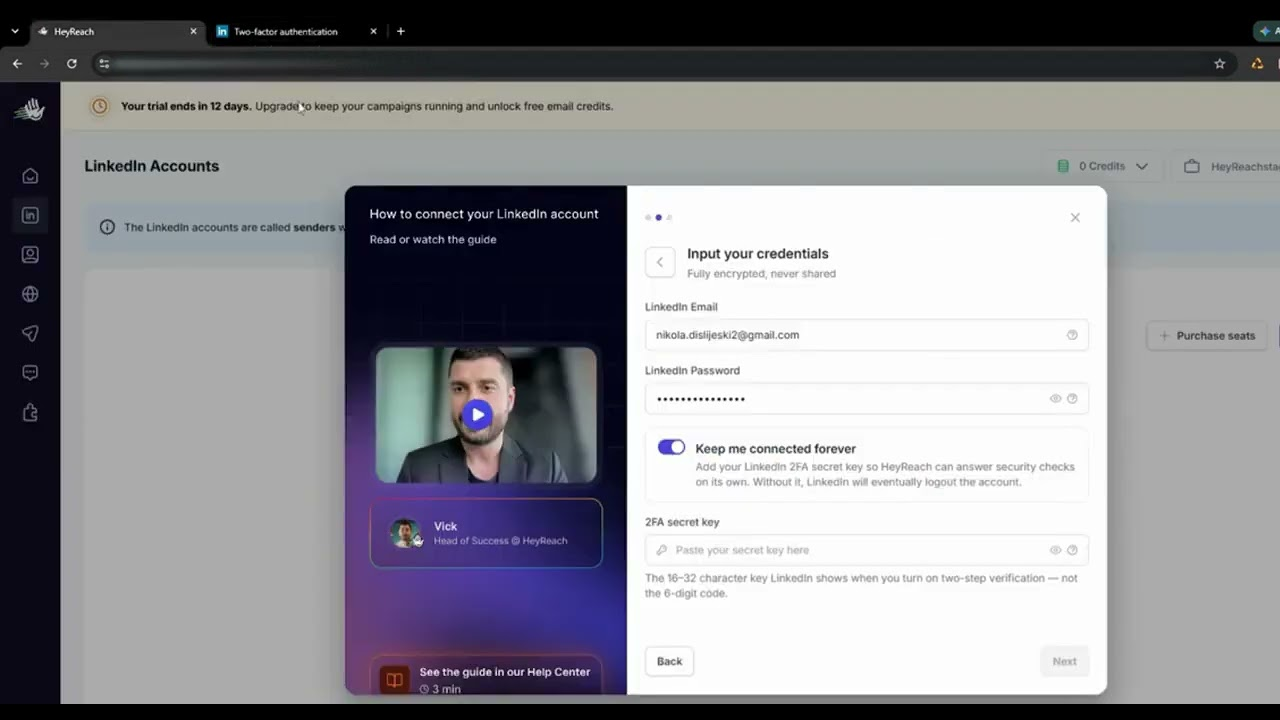
Connect Each Account Individually
Connect each LinkedIn account one at a time. After connecting, confirm it authenticates cleanly and shows as active before moving to the next. If one account throws errors now, it will throw them mid-campaign too.
HeyReach's help center states that each LinkedIn account gets its own dedicated static residential proxy, and that IP is never shared between two accounts. That stability is a feature. Don't undermine it. Avoid logging into the same profile from other devices or locations while a campaign runs, because inconsistent logins give LinkedIn exactly the signal you're trying to avoid.
Set Per-Account Limits Deliberately
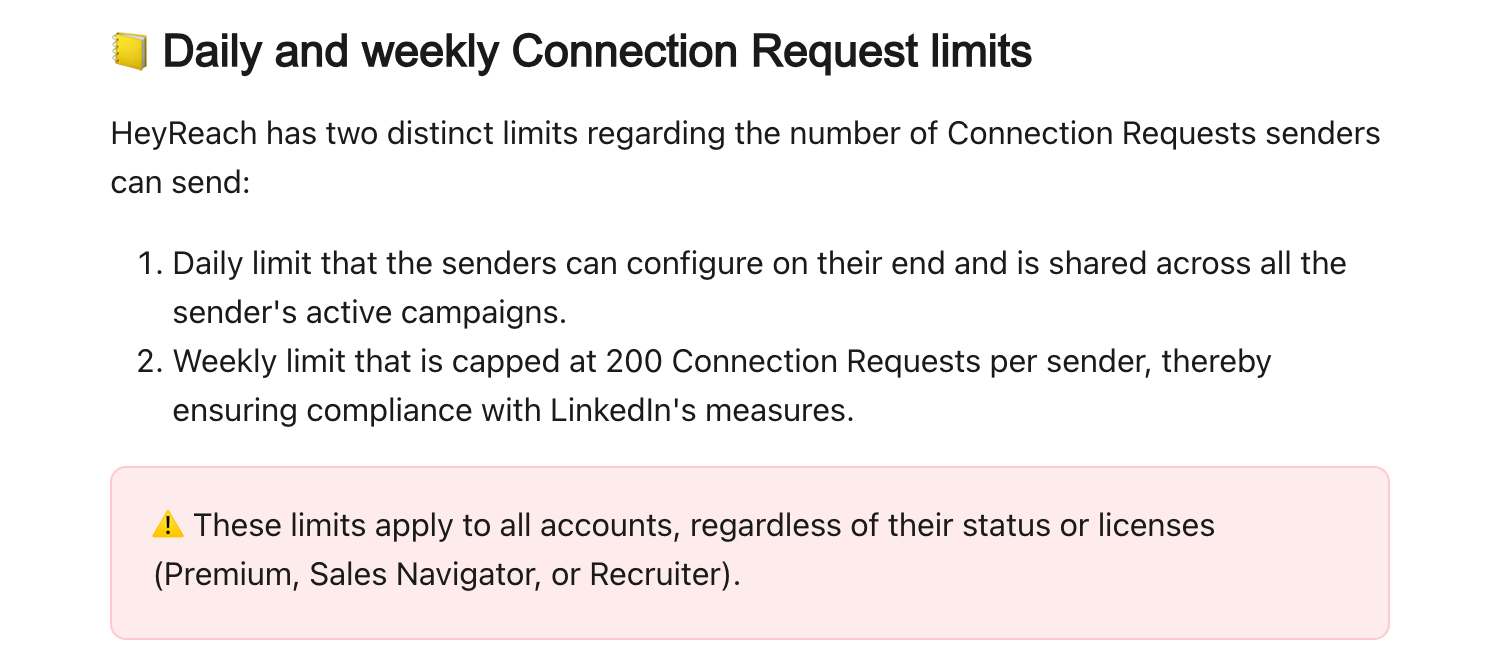
Don't accept the defaults without looking at them. HeyReach notes that the limits you configure are the maximum per day, and the tool will always try to reach them. So whatever number you enter is the number you'll run.
Keep these points in mind:
- Limits are per account, not per campaign. If a sender has a limit of 20 and sits in three campaigns, the limit is shared between them.
- Actions can limit each other. If your "like post" limit is lower than your connection limit and the delay between steps is short, the lower number can quietly cap your requests.
- Weekly totals matter more than people think. HeyReach's weekly cap is 200 requests per sender, and once HeyReach hits it, sending stops until the following Monday. LinkedIn's real ceiling for your account may be lower than that, so plan around your account's actual behavior.
For a first campaign, we suggest 20 to 25 connection requests per day and a weekly total well under the cap.
Configure Working Hours and Delays
Set working hours in each account's own time zone, so activity looks like a person working a normal day. In HeyReach, you set these via "Configure limits" under "LinkedIn accounts," then "Go to account schedule".
One catch: short sending windows, such as three hours, can stop you from reaching daily limits because of randomized delays. A realistic workday window is better than a cramped one. Keep randomized delays between actions turned on.
Pro tip: Platform caps are a safety ceiling, not a target. If you're running every sender at the maximum, you've turned the guardrail into the speed limit.
Building Your Lead List and Importing It (Import Leads Into HeyReach)
How you import leads into HeyReach matters less than what you import. Still, the mechanics are worth getting right.
Choose Your Import Method
You have three common routes:
- Sales Navigator search URL. Best when your targeting lives in filters.
- CSV upload. Best when your list is built and enriched elsewhere.
- A list built in another tool. Useful when you enrich or score prospects before they reach HeyReach.
Define the ICP First, Then Keep the List Small
A narrow list keeps acceptance rates healthy. For your first campaign, load a few hundred prospects, not thousands. You're testing messaging and account behavior, and you want clean data before you scale.
A tight ICP looks like this: VPs of Sales at US-based B2B SaaS companies with 50 to 200 employees, who changed roles in the last year. A loose one looks like "sales leaders." The first gets accepted. The second burns accounts.
Clean the Import Before You Launch
Run these checks every time:
- Duplicates. Remove repeated profiles from the list.
- Existing connections. Check for people already connected to one of your senders.
- Suppression. Remove clients, open deals, and prior outreach before launch, not after someone complains.
- Custom fields. Map every field you plan to use for personalization, such as company, role, or a trigger event.
- Profile URLs. Confirm they resolved correctly. Failed records quietly reduce your actual volume, and you'll wonder why a 500-person list only sent 430.
🚀 Turn LinkedIn Into Pipeline
Starting at $397/month, Cleverly helps 10,000+ businesses generate qualified B2B leads through done-for-you LinkedIn outreach.
Setting Up Your Message Sequence (HeyReach Message Sequence)
A good HeyReach message sequence is short, specific, and patient. Here is a workable first build:
The Connection Request
Keep the note short, or leave it blank. Test both. Blank requests often accept better, because there's nothing to judge. If you do add a note, don't pitch in it.
A starting shape:
"Hi Sarah, saw your post on outbound hiring. We work with a lot of SaaS sales teams, so thought it made sense to connect."
The First Message After Acceptance
Reference a specific reason for reaching out. Don't open with your pitch. Something like:
"Thanks for connecting, Sarah. I noticed you're growing the SDR team. Curious how you're handling pipeline while new reps ramp?"
Follow-Ups That Don't Nag
Each follow-up needs a new angle. A reminder is not a new angle. Try this progression:
- Message 2: Share something useful, like a short insight or a relevant result.
- Message 3: Ask a direct, low-pressure question, or offer a quick call.
Build in the Details
- Use variables with fallbacks so nothing renders as a blank or "Hi ,".
- Add conditional steps where available, so people who reply exit the sequence immediately.
- Keep messages mobile-short. If someone has to scroll, it's too long.
- Mix in post engagement and profile views so your activity isn't purely outbound requests.
Be careful with that last one. Each extra action type draws on its own daily limit, and as noted earlier, those limits can restrict each other.
Assigning Senders and Setting Up Rotation (LinkedIn Campaign Automation)
This is where LinkedIn campaign automation at scale gets its edge. You assign multiple senders to a single campaign, and HeyReach spreads the volume automatically. Total campaign volume goes up, and per-account volume stays low.
Match Senders to the Audience
The profile sending should look plausible to the person receiving. A founder profile reaching out to other founders reads naturally. A junior account messaging a CFO about enterprise software does not. Where you can, match seniority, industry, and region.
Stagger Your Launch
Don't start every account on day one. Bring senders online over a week or two, for example:
- Days 1 to 3: Sender A and B
- Days 4 to 7: Add Sender C
- Week 2: Add the rest
This gives you early signals. If acceptance looks off, you've only exposed a couple of accounts.
Check the Details That Break Rotation
- Individual limits. Rotation respects per-account caps, so confirm each sender's limits are actually set.
- Overlap. Make sure the same prospect isn't receiving requests from two of your senders.
- Growth plan. Decide how new senders will be added as volume needs grow, so scaling doesn't become a scramble.
On cost, one third-party review lists HeyReach's Growth plan at $79 per sender per month. Check the live pricing page before you budget, since SaaS pricing changes often.
Pre-Launch Checklist (HeyReach Outreach Campaign)
Before you hit start on any HeyReach outreach campaign, run through this list. Copy it into your own doc and reuse it.
Accounts
- Every sender is warm, credible, and authenticating cleanly.
- Per-account daily and weekly limits are set conservatively.
- Working hours and randomized delays are configured per account.
- Senders are staggered, not all starting at once.
List
- List is narrow, deduplicated, and suppression-checked.
- Profile URLs resolved correctly.
- Personalization variables are populated, with fallbacks.
Sequence
- Copy is proofread and tested on a colleague's profile.
- Reply-stop conditions are enabled.
Replies
- Unified inbox access is set up for whoever handles replies.
- A named owner handles replies, with a response time expectation.
That last item is where many campaigns quietly fail. A reply sitting for three days is a lead gone cold.
What to Monitor After Launch (HeyReach Campaign Setup)
Your HeyReach campaign setup isn't finished at launch. The first two weeks decide whether it scales or stalls.
Watch Acceptance Rate First
Acceptance rate is the headline metric. It governs both results and account safety. Benchmark against your industry, not just the platform average. As an example, Expandi's data shows software companies averaging 27.5% acceptance, so 27% there is on par.
If acceptance drops meaningfully, pause and fix targeting before you adjust volume. Sending more to a bad list only damages more accounts faster.
Monitor Each Account Separately
One profile can degrade while the others stay healthy. Review each sender on its own, not just the campaign total.
Manage Pending Invitations
Watch pending invitations and withdraw stale ones regularly. A large pile of unanswered requests is a bad signal for an account. HeyReach's own guidance on hitting daily targets includes removing all unanswered pending connection requests on LinkedIn.
Treat Warnings as Hard Stops
Any LinkedIn warning or feature restriction means you stop that account immediately. Don't wait to see if it clears. For the full list of early signals, read our piece on warning signs before a LinkedIn restriction.
Track Reply Rate by Step
Look at reply rate for each step of the sequence. If message one gets replies and message three gets none, you know exactly where the conversation dies.
Resist the Urge to Scale in Week One
Even if everything looks healthy, don't raise the volume in the first week. Healthy early numbers are a reason to keep going, not a reason to speed up.
Common HeyReach Mistakes That Cost You Accounts (HeyReach Tutorial)
Every good HeyReach tutorial should tell you what goes wrong. These are the mistakes we see most often.
1. Running Every Sender at the Platform Maximum - Max limits feel efficient. They leave no buffer. Run conservative rates and treat the cap as a safety net.
2. Using Brand-New or Incomplete Profiles - Sparse profiles get restricted first. Warm them up, or don't use them.
3. Launching All Accounts on the Same Day - A cluster of new activity on day one looks like a pattern. Stagger the start.
4. Broad Targeting - Loose lists drag acceptance rates down across every sender at once. Tighten the ICP before adding volume.
5. Pitching in the Connection Note - A pitch in the first touch gets ignored or reported. Earn the connection first.
6. Identical Messaging Across Senders - Identical copy from several accounts creates a detectable pattern. Vary phrasing, openers, and angles by sender.
7. No Suppression - Without suppression, existing clients and live conversations get cold requests. That damages relationships, and it takes one awkward message to cost you a deal.
8. Nobody Watching the Unified Inbox - Replies go cold fast. Assign an owner and a response time.
9. Judging the Campaign on Connections Made - Connections are a vanity number. Judge the campaign on conversations started and meetings booked.
Why Done-For-You LinkedIn Outreach Beats Running Software Yourself
HeyReach is a capable platform, and it handles sending safety well. What it doesn't do is pick the right prospects, write the messages, manage account health, or answer everyone who replies. Doing it yourself means paying for the subscription and sender accounts, plus someone who owns limits, acceptance rates, inbox monitoring, and weekly iteration.
That's where a LinkedIn lead generation agency like us fits in.
At Cleverly, we run ICP and Sales Navigator targeting, verified list building, messaging, reply handling, and booking meetings straight onto your calendar. You get booked meetings, not a configured tool.
We run this volume daily across many clients, so account safety is standard practice for us. Our messaging frameworks have been tested across thousands of campaigns, which removes the trial-and-error phase that usually costs teams restricted accounts and low acceptance. Our work has generated $312M in pipeline and $51.2M in closed revenue for clients. We optimize for qualified conversations with decision-makers, not connection counts.
LinkedIn lead generation starts at $397 a month, month to month.
Rather have the meetings than manage the software? Get a free consultation from Cleverly.
Conclusion
The real reason to use HeyReach is rotation. It lets you scale LinkedIn volume without overloading one profile. But acceptance rate, not sending capacity, is what keeps accounts healthy and campaigns working.
Start conservative on limits and stagger your senders. Volume is something you earn as accounts prove stable. For your next step, launch one small campaign on a narrow list with two senders before you add more. The platform makes sending safe at scale, but targeting and messaging still decide whether anyone replies.
Frequently Asked Questions
Free Resource
How to Scale a Profitable Cold Call System
Get the complete guide — download it instantly now.

Free Ebook
Download the Free Guide
Enter your details to get instant access.
You're all set! 🎉
Your ebook is downloading now.
Click below if the download didn't start automatically.