Table of Contents
How ChatGPT Helps You Write Better Cold Emails
How to Use ChatGPT to Write Cold Emails
10+ Best ChatGPT Prompts for Cold Emails
Best Practices and Common Mistakes for Using ChatGPT in Cold Email Outreach
How Cleverly Uses AI + Strategy to Run High-Performing Cold Email Campaigns
Final Thoughts
Frequently Asked Questions
Modified On :
June 16, 2026
Key Takeaways
- ChatGPT prompts for cold email work best when you provide specific context—ICP, pain points, personalization details, and clear constraints like tone and length.
- Keep emails under 100 words, conversational, and focused on one clear CTA to maximize response rates.
- Always add real personalization inputs like LinkedIn activity or company news—generic AI emails get ignored.
- Test for deliverability before sending at scale—avoid spam triggers, excessive links, and promotional language.
- Use ChatGPT to draft and iterate, but edit outputs to sound human—over-automation kills authenticity and replies.
Staring at a blank email draft wondering what to write is the worst part of cold outreach.
You know your offer is solid, but turning that into a cold email that actually gets responses? That's where most of us get stuck.
That's where ChatGPT prompts for cold email come in. Instead of spending hours writing the perfect cold email, you can use the right prompts to generate high-converting emails in minutes.
We're talking personalized, engaging messages that don't sound like they came from a robot.
In this guide, we're sharing the exact ChatGPT cold email prompts we've tested and refined.
Whether you're an SDR trying to hit quota, a founder doing outreach yourself, or running a sales team, these prompts will help you write emails that actually get meetings booked.
Let’s get started with practical ChatGPT prompts you can copy, customize, and start using today.
How ChatGPT Helps You Write Better Cold Emails
We've all been there—you need to send 50 emails today, but you're stuck rewriting the same opener for the tenth time. ChatGPT cold email writing changes that entire process.
Here's what it actually does for your outreach:
📌 Kills writer's block instantly. No more staring at your screen trying to figure out how to start. Give ChatGPT the basics about your prospect and offer, and it generates a solid first draft in seconds.
📌 Handles the heavy lifting on personalization. Instead of manually crafting unique intros for each prospect, you can feed ChatGPT details like their recent LinkedIn post, company news, or role—and it'll weave that into a natural opening line.
📌 Helps you nail the right tone. Whether you need casual and conversational or professional and direct, the right prompt gets you there. You're not second-guessing if you sound too pushy or too passive.
📌 Creates variations fast. Testing different angles? ChatGPT can give you 3-5 versions of the same email in different styles, so you can A/B test what resonates with your audience.
📌 Focuses on actual pain points. When you prompt it correctly, ChatGPT helps you articulate the problems your prospects are dealing with—not just what you're selling.
But here's the catch: ChatGPT cold email results are only as good as your prompts. Vague inputs get you generic, boring emails. Specific context and clear instructions? That's when you get emails worth sending.
Which ChatGPT Model Works Best for Cold Emails in 2026?
Not all ChatGPT models produce the same output — and for cold email, the difference between models is actually noticeable.
Here's the quick breakdown:
GPT-4o and GPT-4.1 are your best options for cold email. Both models are strong at following nuanced instructions, producing natural-sounding prose, and staying within your tone constraints. If you tell them "casual and direct, under 80 words, no corporate speak," they actually deliver that. GPT-4.1 in particular was built for instruction-following in professional workflows, which makes it a solid choice for structured prompting.
GPT-4o mini is useful for volume, not polish. It's faster and cheaper, which makes it fine for generating a batch of rough first drafts you plan to edit heavily. But if you're planning to send something close to what ChatGPT returns, mini models tend to produce more generic outputs — especially when you have tight personalization requirements.
Avoid older models like GPT-3.5 for anything you're actually sending. The output is noticeably more formal and AI-sounding. It also has a much older knowledge base, which means any context around industry trends or recent events will be stale.
One practical tip for any model: set your company description, ICP, and preferred tone in ChatGPT's custom instructions (found in Settings). That way you don't have to re-enter your context every session — your prompts can go straight to the specific email task.
The gut check that works every time: paste any AI-generated email into a text doc and read it aloud. If you'd never say it in a conversation, it doesn't go out. Regenerate with a conversational constraint added.
Read More: How to Use ChatGPT for LinkedIn Lead Generation (Prompts, Strategy & Tools
✉️ ChatGPT Can Write Emails — We Make Them Convert
Cleverly runs done-for-you cold email campaigns with perfect targeting, deliverability, and messaging that actually gets replies — not crickets.
How to Use ChatGPT to Write Cold Emails
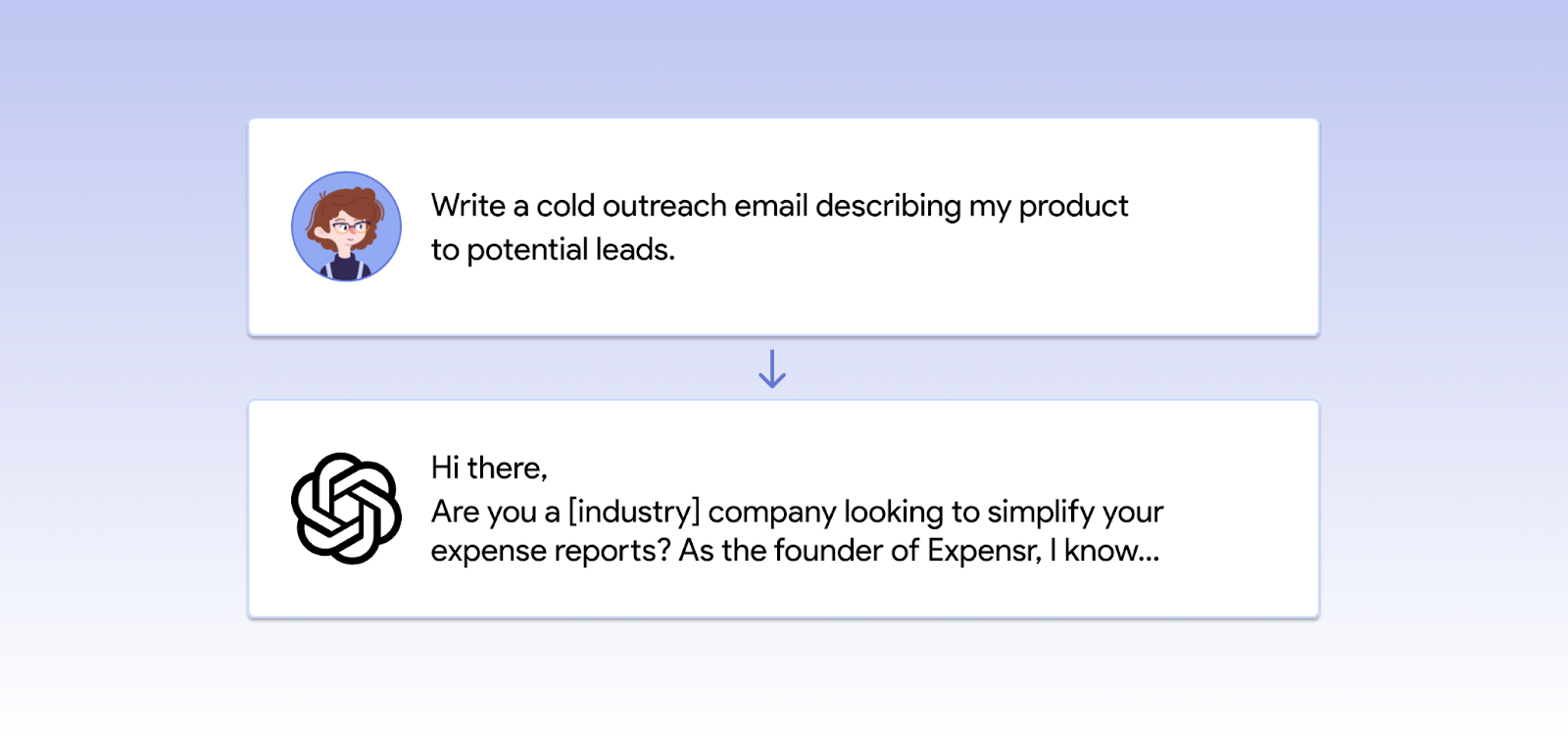
Knowing how to use ChatGPT to write cold emails isn't just about typing "write me a cold email" and hoping for the best.
If you want emails that actually convert, you need to give ChatGPT the right instructions. Here's how we do it:
Provide Context (Industry, ICP, Value Prop)
The quality of your prompt directly determines the quality of your email. If you tell ChatGPT "write a cold email for my SaaS product," you'll get something generic that could apply to anyone.
Instead, give it the details:
- What industry are you targeting? (e.g., real estate, legal, finance)
- Who's your ideal customer profile? (e.g., VP of Sales at 50-200 person B2B companies)
- What's your value proposition? (e.g., we help sales teams book 20% more meetings through AI-powered outreach)
The more context you provide upfront, the less editing you'll do later.
Define a Goal for the Email
Before you write anything, ask yourself: what do you want this email to accomplish?
ChatGPT needs to know your specific goal:
- Book a 15-minute intro call?
- Get them to reply with interest?
- Download a lead magnet or case study?
- Schedule a product demo?
Different goals need different structures. A demo request email looks nothing like an email asking for a quick reply. Be specific about what action you want the recipient to take.
Read More: Cold Email Outreach Best Practices: The Ultimate Guide
Add Personalization Inputs
Generic emails get ignored. How to use ChatGPT to write cold emails that get responses? Feed it real details about your prospect.
Give ChatGPT things like:
- A recent LinkedIn post they shared
- Something from their company's About page
- A quote from a podcast they were on
- News about a job change or promotion
- A pain point their industry is dealing with right now
Even one personalized detail makes your email feel like it was written for them, not blasted to 500 people.
Include Constraints
If you don't set boundaries, ChatGPT will give you a 300-word essay when you needed three sentences. Tell it exactly what you want:
- Length: Keep it under 100 words
- Tone: Casual and conversational, not corporate
- Style: Direct and to the point, no fluff
- CTA type: One clear question at the end
Constraints force ChatGPT to focus. You'll get tighter, more effective emails.
Explore More: Cold Email Subject Line Secrets - How to Make Prospective Clients Open Your Email
Use Iterative Prompts
Your first output won't always be perfect—and that's fine. The key to how to use ChatGPT to write cold emails that actually work is refining through follow-up prompts.
Try things like:
- "Make this shorter and more direct"
- "Rewrite the opening line to focus on their pain point"
- "Change the tone to be more casual"
- "Give me 3 variations of the CTA"
Each iteration gets you closer to an email you'd actually send. Don't settle for the first draft.
The 7-Part ChatGPT Prompt Structure for Cold Emails That Always Works
Most people's prompts are too vague, and they don't realize it. "Write me a cold email for a VP of Sales" gives ChatGPT almost nothing to work with. The output reflects that.
The fix is a structured prompt that gives ChatGPT everything it needs before it writes a single word. Here's the framework we use — and it consistently produces emails worth sending on the first try.
Part 1: Role assignment
Start every prompt with: "You are a [B2B sales rep / SDR / founder] at a [type of company]."
This sets the voice and perspective for the entire email. ChatGPT writes very differently when it thinks it's a founder at a 10-person startup versus a corporate account exec. Get the role right and the tone follows naturally.
Part 2: ICP description
Tell ChatGPT exactly who the email is going to. Industry, company size, job title, seniority level — the works.
"The prospect is a VP of Operations at a 100-200 person logistics company" produces a completely different email than "the prospect is a decision-maker." The more specific you are here, the less generic the output.
Part 3: Pain point
Name the single most pressing problem your ICP is dealing with right now. One specific pain beats three vague ones every time.
"They're losing deals because their SDR team has no scalable outreach process" is a pain point. "They want to grow their business" is not.
Part 4: Value proposition
State what you do and what measurable result you deliver. Not features — results.
"We help B2B companies book 15+ qualified meetings per month through done-for-you cold outreach" is a value prop. "We offer lead generation services" is not.
Part 5: Tone and style
Pick one and name it explicitly: casual and conversational, or professional and direct. Both work. Mixing them doesn't.
If you're writing to a startup founder, casual usually lands better. If you're writing to a CFO at an enterprise company, go direct and professional. Either way, tell ChatGPT — don't leave it to guess.
Part 6: Word count and constraints
Set a hard limit. For cold email, under 100 words is the target. Elite cold email senders average fewer than 80 words per first-touch email — brevity forces clarity, and every word has to earn its place.
Also specify: no corporate speak, one CTA only, no filler phrases like "I hope this email finds you well."
Part 7: Output format
Tell ChatGPT exactly what to return: subject line + email body in plain text. Without this instruction, outputs vary wildly — sometimes you get bullet points, sometimes three paragraphs with a header, sometimes a whole fictional email thread. Be explicit about the format and you'll get something you can actually use immediately.
Put all seven parts together and your prompt might look like this:
"You are an SDR at a B2B SaaS company that helps HR teams automate employee onboarding. Write a cold email to a Head of HR at a 200-500 person tech company. Their main pain point is that new hire onboarding takes too long and creates a poor first impression. Our solution cuts onboarding time by 60%. Tone: casual and conversational. Keep it under 85 words, no corporate speak, one CTA asking if they're open to a 15-minute call. Return: subject line + email body in plain text."
That prompt will get you something worth sending. Adjust the seven parts for your ICP and offer — the framework stays the same.
10+ Best ChatGPT Prompts for Cold Emails
Below are the best chatgpt prompts for cold emails we've tested and refined.
These aren't your generic "write me a cold email" prompts—each one is built to handle a specific use case and generate emails that actually convert.
1) ChatGPT Prompts for Personalized Cold Emails
Prompt:
“Write a personalized cold email for a prospect named [Name], who is the [Job Title] at [Company]. Use these details to personalize the intro: [Add LinkedIn notes, achievements, content they posted, or mutual connections]. Keep it under 120 words and include a soft CTA.”
Output:

2) ChatGPT Prompts for Icebreakers Based on LinkedIn Activity
Prompt:
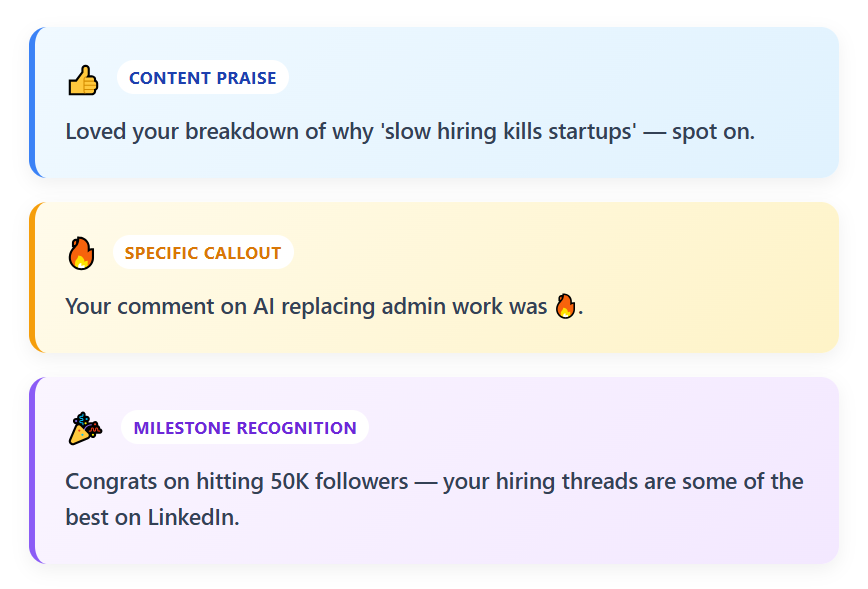
“Create 3 cold email icebreakers based on this prospect’s LinkedIn activity: [paste LinkedIn posts, comments, or about section]. Make them hyper-personalized, conversational, and under 18 words each.”
Output:
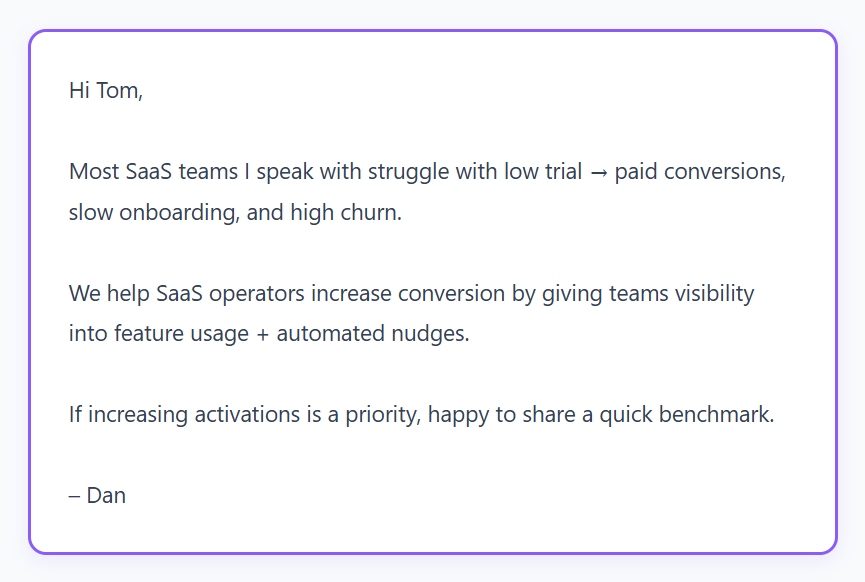
3) ChatGPT Prompts for Industry-Specific Cold Emails
Prompt:
“Write an industry-specific cold email for a prospect in the [industry]. Address 3 common pain points: [pain 1], [pain 2], [pain 3]. Keep tone professional, concise, and value-driven.”
Output:
4) ChatGPT Prompts for Role-Specific Cold Emails (CEO, Founder, SDR, VP, etc.)
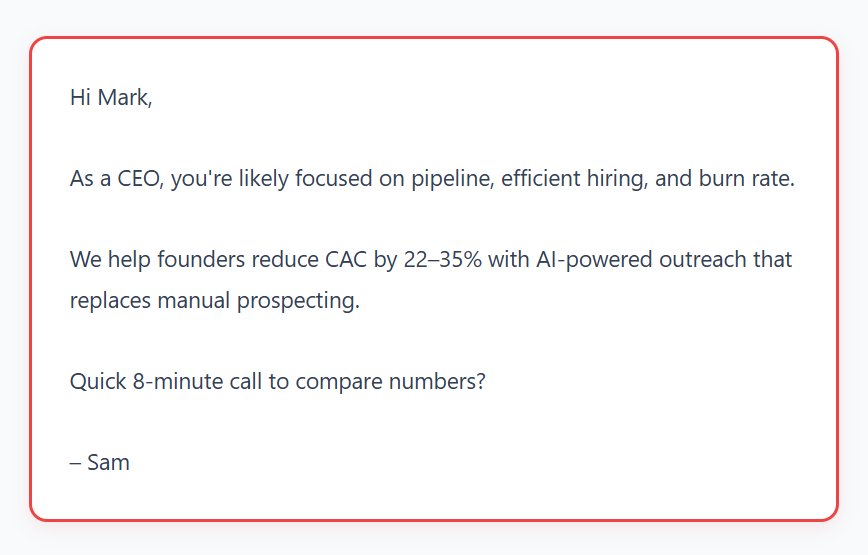
Prompt:
“Write a short cold email tailored specifically for a [Role: CEO, Founder, VP Sales, SDR, etc.]. Highlight what they care about most: [enter priorities]. Keep it concise and outcome-focused.”
Output:
5) ChatGPT Prompts for Pain-Point Focused Cold Emails
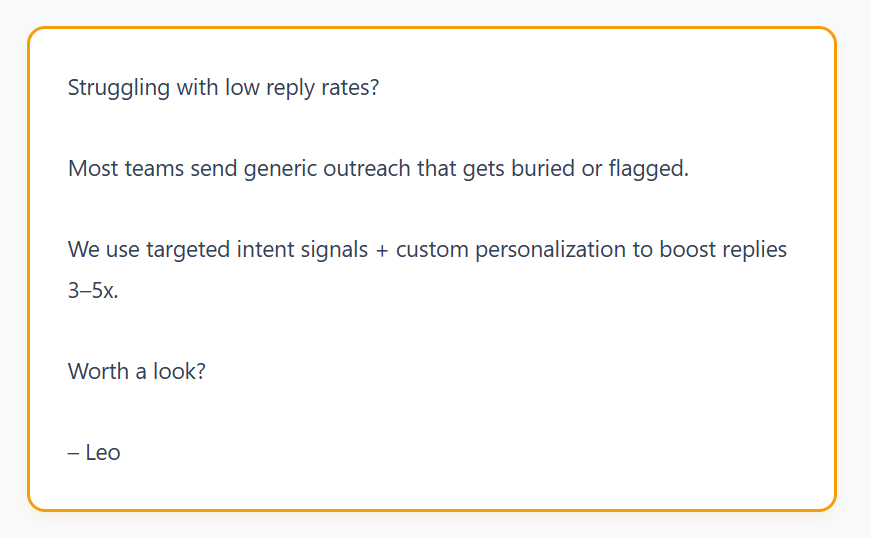
Prompt:
“Write a cold email using the PAS framework (Pain–Agitate–Solution). Pain: [insert]. Agitate subtly. Present our offer as the clearest solution. Keep it under 100 words.”
Output:
6) ChatGPT Prompts for Value-Driven Cold Emails (Audits, Insights, Offers)
Prompt:
“Write a value-first cold email offering a free audit/analysis/insight for a prospect in [industry]. Make the offer specific and irresistible without sounding salesy.”
Output:

7) ChatGPT Prompts for Short ‘No-Scroll’ Cold Emails
Prompt:
“Write a super short, no-scroll cold email (under 40 words). Direct, casual, and easy to reply to.”
Output:

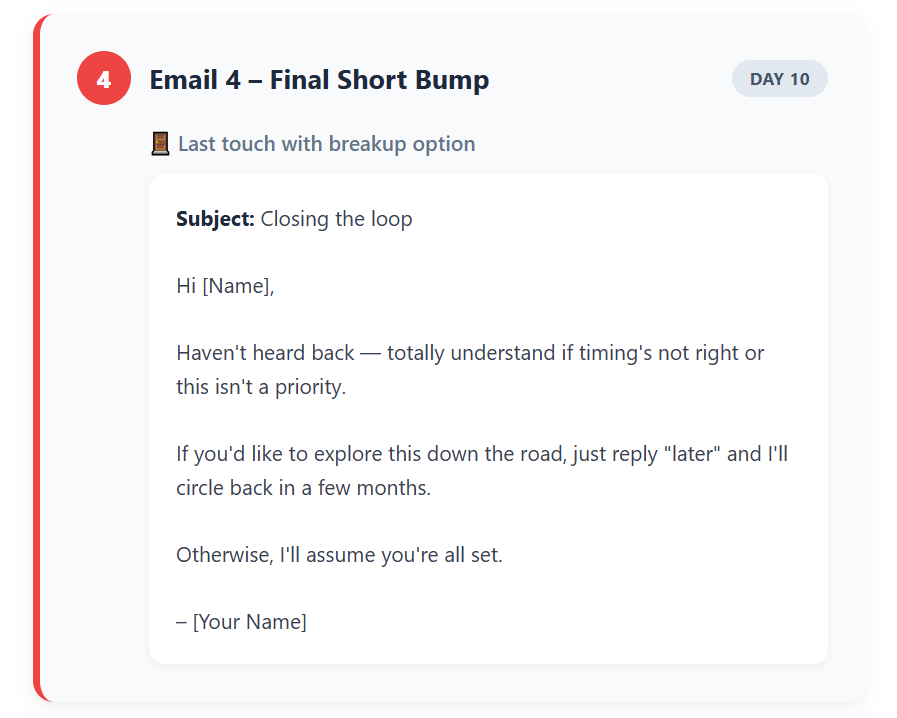
8) ChatGPT Prompts for Multi-Step Cold Email Sequences (3–5 Steps)
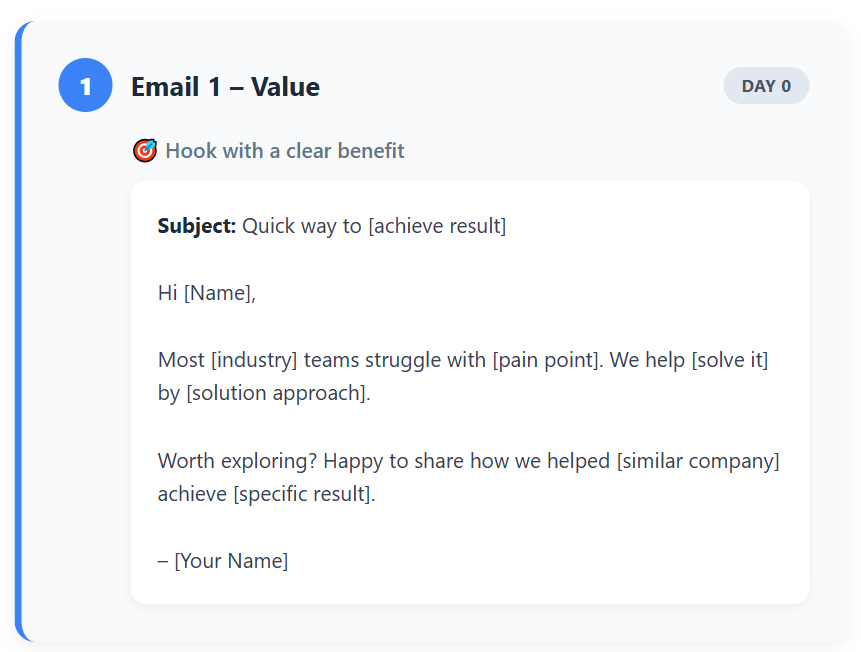
Prompt:
“Create a 4-step cold email sequence for prospects in [industry]. Include:
• Email 1 – Value
• Email 2 – Social proof
• Email 3 – Resource or insight
• Email 4 – Final short bump
Short, punchy, and conversion-focused.”
Output:


9) ChatGPT Prompts for Cold Email Subject Lines
Prompt:
“Give me 10 high-performing cold email subject lines tailored to [role/industry], under 4 words, curiosity-driven but not clickbait.”
Output:

10) ChatGPT Prompts to Improve Tone, Clarity & Personalization
Prompt:
“Improve the tone of this cold email. Make it clearer, warmer, more conversational, and more personalized. Do NOT lengthen it. Here’s the email: [paste email].”
Example Output:

Bonus Tip: Test these prompts, tweak them for your ICP, and save the ones that work. The more you refine your inputs, the better your outputs get.
That's the real power of using ChatGPT prompts for cold email—it learns what works for your audience.
ChatGPT Prompts for Specific Outreach Scenarios
The 10 prompts above cover your core cold outreach needs. But some of the highest-converting emails aren't classic cold emails — they're warm touches that need a different angle.
Here are four scenario-specific prompts worth having in your library.
11) Conference / Post-Event Follow-Up Prompt
Post-event follow-ups have some of the highest reply rates in outbound — you already have a reason to reach out.
Prompt:
"You are a [role] at [company]. Write a follow-up email to [Name], who I met at [Event Name]. We briefly talked about [topic or challenge they mentioned]. Keep the tone warm and casual. Reference where we met, what we discussed, and close with a soft CTA to reconnect for a 15-minute call. Under 90 words. Return: subject line + email body in plain text."
Why it works: The shared context does the personalization for you. You're not cold — you're continuing a conversation. Lead with the event reference in the subject line.
12) Partnership / Collaboration Outreach Prompt
Partnership emails fail when they're vague or all about what you want. The best ones open with a shared angle.
Prompt:
"You are a [role] at [company]. Write a partnership outreach email to [Name] at [Company]. We serve a similar audience: [describe shared audience or space]. I want to propose [specific collaboration — co-webinar, referral partnership, content collab]. Keep it conversational, lead with the shared audience angle, make the ask narrow and easy to say yes to. Under 100 words. Return: subject line + email body in plain text."
Why it works: Leads with common ground instead of a pitch. The narrower the ask, the higher the response rate.
13) Re-Engagement Prompt for Cold or Lost Leads
Someone went quiet. Here's how to bring them back without being annoying about it.
Prompt:
"You are a [role] at [company]. Write a re-engagement email to [Name], who we spoke with [timeframe] ago but went cold. Reference our last interaction briefly. Introduce something new — [product update / relevant industry change / new case study]. Keep the tone light, no pressure, no guilt-tripping. Under 80 words. Return: subject line + email body in plain text."
Why it works: The new-angle hook gives them a reason to reconsider without making them feel bad for going quiet.
14) Referral Request Prompt
If a current client is happy, a referral ask takes 60 seconds. This prompt makes it easy.
Prompt:
"You are a [role] at [company]. Write a short email to [Client Name] asking for a referral. Express genuine appreciation for the results we've achieved together — [specific result if possible]. Describe the type of contact we'd love to be introduced to: [ICP description]. Mention [specific benefit to the referrer if applicable]. Keep it brief and warm, under 80 words. Return: subject line + email body in plain text."
Why it works: Gratitude first, then the ask. The ICP description makes it easy for your client to think of someone specific.
Using These Prompts for LinkedIn DMs
The exact same prompt structure works for LinkedIn outreach — just adjust three things:
Reduce word count to under 50 words. Remove the formal subject line instruction and replace it with "Return: connection request message + follow-up DM" or just "Return: LinkedIn DM in plain text." Drop any formal greeting and open with something direct.
LinkedIn is a faster, more conversational channel. The message that works there reads like a text from someone you know, not an email from someone you don't. The 7-part structure still applies — just compress it.
🚀 Inbox-Friendly Emails. Calendar-Filling Results.
From list-building to copywriting to follow-ups, we handle everything and generate qualified sales conversations on autopilot.
Best Practices and Common Mistakes for Using ChatGPT in Cold Email Outreach
You can have the perfect chatgpt prompts for cold email, but if you're not using them right, you're still going to get mediocre results.
Here's what actually works—and what tanks your campaigns.
Best Practices That Actually Move the Needle
✅ Provide real personalization inputs
Don't just tell ChatGPT "make it personalized." Give it actual details: their recent LinkedIn post, a podcast they were on, their company's latest funding round, a job posting they shared.
The more specific your inputs, the less your email sounds like it was written by AI. Generic personalization is worse than no personalization—it's obvious and lazy.
✅ Keep emails short and human
Even if ChatGPT gives you a 200-word masterpiece, cut it down. Most chatgpt cold emails that convert are under 100 words.
Real people don't write novels in cold emails. They get to the point, sound like themselves, and ask one clear question. If it doesn't sound like something you'd send to a colleague, rewrite it.
✅ Avoid over-automation
Yes, ChatGPT speeds things up. But if you're just copy-pasting outputs without editing, people will notice. The best cold emailers use AI to draft, then add their own voice.
Change a word here, adjust the tone there, make it sound like you. Over-automation kills authenticity, and authenticity is what gets replies.
✅ Run A/B tests and refine outputs
Don't assume the first version ChatGPT gives you is the winner. Test different angles, subject lines, CTAs, and openings. Try a pain-focused email against a value-driven one.
See which tone resonates more—casual or professional. The data will tell you what works for your audience. Use that feedback to improve your prompts over time.
✅ Always test deliverability
Before you hit send on 500 emails, check them for spam triggers. Run your drafts through a email deliverability checker.
Make sure you're not using words like "free," "guaranteed," or "limited time." Keep links to a minimum. Best chatgpt prompts for cold emails don't matter if your emails never make it to the inbox.
Dive Deeper Into: Best Cold Email Blueprint to Generate Leads (100% Tested)
Common Mistakes That Kill Cold Email Campaigns
❌ Letting AI over-write in an unnatural tone
ChatGPT sometimes sounds too polished, too formal, or too "corporate speak." If your email reads like a press release or sounds like it was written by a marketing team, you've lost.
People respond to people, not robots pretending to be people. Always do a gut check: does this sound like how I'd actually talk?
❌ No deliverability considerations
This is the silent killer. You could write the best cold email in the world, but if it lands in spam, it doesn't matter. AI doesn't know about spam filters, rate limits, or sender reputation.
It'll happily generate an email packed with trigger words and multiple links. You need to be the filter here. Always review for deliverability before sending.
❌ Using AI without checking accuracy
ChatGPT can hallucinate details, get company info wrong, or make assumptions that aren't true. If you're referencing a prospect's recent achievement or company milestone, double-check it's real.
Sending an email that says "congrats on your Series B" when they didn't raise money? That's an instant delete and a credibility hit you won't recover from.
The bottom line: How to use ChatGPT to write cold emails effectively is about combining AI speed with human judgment. Let it do the heavy lifting, but you're still the one steering the ship.
How Cleverly Uses AI + Strategy to Run High-Performing Cold Email Campaigns
ChatGPT prompts for cold email get you started—but turning prompts into actual an pipeline? That's where most teams hit a wall.
Writing the email is just step one. You still need verified leads, proper domain setup, deliverability monitoring, A/B testing, follow-up sequences, and someone to handle replies.
For most sales teams, that's a full-time job on top of actually closing deals.
That's the problem we solve at Cleverly.
We're a cold email outreach agency that's helped over 10,000 clients—including teams at Amazon, Google, Uber, PayPal, Slack, and Spotify—generate $312 million in pipeline revenue and $51.2 million in closed revenue.

Here's how we do it differently:
We combine AI-powered personalization with human strategy. Our team writes emails that sound like they came from your sales team, not a template factory.
We handle everything from lead sourcing to inbox management, so you're only paying attention when a qualified lead actually wants to talk.
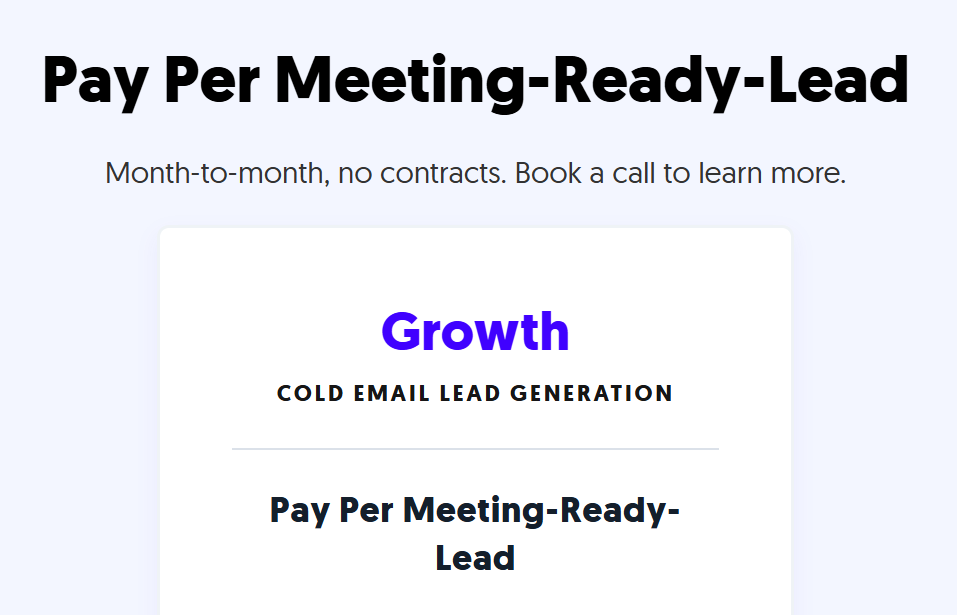
Straight n Simple Pricing
You only pay for meeting-ready leads we send your way. No retainers. No wasted budget on unqualified contacts. Just qualified conversations that move your pipeline forward.
If you're spending more time writing emails than closing deals, we should talk. See how Cleverly runs cold email campaigns that actually convert. 🔥
🔥 Book a call with Cleverly →

Final Thoughts
ChatGPT prompts for cold email aren't a magic button—but they're the closest thing to it if you use them right.
The difference between emails that get ignored and emails that book meetings comes down to how specific you are with your prompts, how much real personalization you add, and whether you're treating AI as a co-pilot, not a replacement for thinking.
Use the prompts we've shared here as your starting point. Test them. Tweak them. Refine them based on what actually gets responses from your audience. The more you experiment, the better your results get.
And remember: chatgpt cold email writing is about speed and scale, but the human touch is what closes deals. AI helps you write faster—you're still the one who makes it sound real.
Now go write some emails that actually get opened.
Frequently Asked Questions
Free Resource
How to Scale a Profitable Cold Call System
Get the complete guide — download it instantly now.

Free Ebook
Download the Free Guide
Enter your details to get instant access.
You're all set! 🎉
Your ebook is downloading now.
Click below if the download didn't start automatically.