Table of Contents
What Is a LinkedIn Summary and Why It Matters
How to Write a Great LinkedIn Summary (Step-by-Step)
10 LinkedIn Summary Examples by Profession
LinkedIn Summary Templates You Can Customize
Common Mistakes to Avoid When Writing Your LinkedIn Summary
Amplify Your LinkedIn Profile with Cleverly’s Ghostwriting Services
Conclusion
Frequently Asked Questions
Modified On :
June 23, 2026
Key Takeaways
- A LinkedIn summary is your chance to tell your story, show your value, and attract opportunities.
- Crafting a good LinkedIn summary requires a clear hook, measurable achievements, personality, and a strong CTA.
- Match your tone and content to your target audience — recruiters, clients, or collaborators.
- Avoid clichés, vague buzzwords, overly long or short summaries, and missing CTAs.
- Using keywords strategically improves discoverability and profile SEO.
When someone visits your LinkedIn profile, your LinkedIn summary (also known as the About section) is the first real chance you get to tell your story. It’s where your personality meets your professional value.
A strong LinkedIn summary can instantly build trust, spark curiosity, and even start conversations that can add to your B2B lead generation efforts.
That’s where knowing how to write a LinkedIn summary that sounds like you (but optimized for visibility) really matters.
In this blog, we’ll walk you through 10 LinkedIn summary examples that actually work — from B2B founders and marketers to sales reps and freelancers.
You’ll learn what to write in a LinkedIn summary, what makes a good LinkedIn summary, and even get a LinkedIn summary template you can adapt for your own profile.
What Is a LinkedIn Summary and Why It Matters
Before you decide what to write in a LinkedIn summary, it’s important to understand why this section exists and how much it really matters.
Your LinkedIn summary — also called the About section — is a short, 2,000-character space on your profile where you introduce yourself in your own words.
It’s your chance to explain who you are, what you do, and why it matters beyond what your job titles say.
While your LinkedIn headline grabs attention, your LinkedIn profile summary keeps visitors engaged long enough to understand your skills, goals, and value.
Here’s why your summary matters more than most people realize:
- First impressions count. A well-written summary is often what decides whether someone scrolls further or clicks away.
- It boosts discoverability. Including relevant keywords (like your skills, industry, and role) helps your profile appear higher in LinkedIn searches.
- It humanizes your profile. People connect with people — not resumes. A good summary adds warmth, personality, and intent.
- It drives real opportunities. Whether it’s a recruiter looking for talent or a prospect searching for a service like yours, your summary can turn profile views into leads or job offers.
Your LinkedIn summary is the digital version of your first conversation with a potential client or employer. And when written strategically, it can do the heavy lifting of building your personal brand and attracting opportunities even while you’re offline.
🌟 Great Summary, Greater Leads
Your profile can impress, but Cleverly turns it into a lead-generating machine with done-for-you outreach. Start generating leads from just $397/month.
How to Write a Great LinkedIn Summary (Step-by-Step)
If you’re wondering how to write a LinkedIn summary, think of this as a short conversation you’d have with someone who could help your career — except it needs to work 24/7.
Below we break it down into simple, practical steps you can apply right away.
Know Your Audience & Goal
Before you type a single word, decide who you’re writing for and what you want them to do. Different audiences change the tone and focus.
- Recruiters → emphasize impact, promotions, and measurable results.
- Clients/prospects → focus on problems you solve and ROI.
- Collaborators/partners → highlight expertise, tools, and how you like to work.
Job Seekers vs. Business Professionals — What's Different
The audience you're writing for changes almost everything about your summary. These two modes are not interchangeable.
If you're a job seeker, you're writing for recruiters and hiring managers. They're scanning for career trajectory, skill alignment with job descriptions, and signs that you're the right level for the role. Your summary should emphasize measurable achievements, use language that matches how job postings in your industry are written, and signal openness to opportunities clearly.
The tone here is more narrative and credential-focused. Think of it as your professional story compressed into 200 words — where you've been, what you've built, and where you're headed.
If you're a business professional — a founder, consultant, sales leader, or service provider — you're writing for clients and prospects, not recruiters. They don't care about your career arc. They care about the problem you solve, the outcomes you deliver, and whether you work with people like them.
The tone here shifts toward value proposition. Lead with who you help and what changes for them. Include a CTA that invites direct outreach. Credentials take a back seat to proof of results.
One signal that tells you which mode you're in: If you're not actively job hunting, remove any "open to opportunities" language from your summary entirely. Replace it with a client-facing CTA — something like "If you're looking to [outcome], send me a message." That single swap repositions your entire profile from passive candidate to active practitioner.
Start With a Hook
Open with something that stops the scroll. A one-line story, surprising stat, or clear mission. The first 2–3 lines are the most important because LinkedIn truncates the About section.
- Use an active voice and simple language.
- Avoid starting with your job title alone — lead with value.
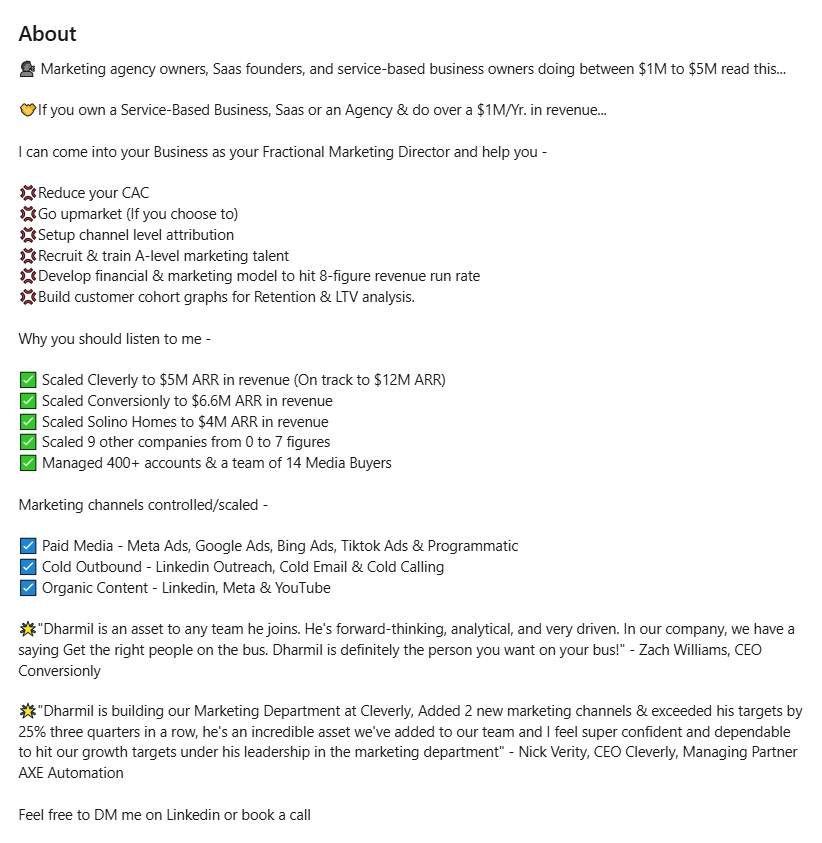
Highlight Skills & Achievements
This is where you translate experience into credibility. Pick the highest-impact skills and back them up with numbers.
- Use short bullets or a 1–2 sentence paragraph to list 3–5 core strengths.
- Include measurable outcomes: revenue generated, % growth, number of deals, clients served.
- If relevant, reference roles or industries (e.g., B2B SaaS, enterprise sales).
Show Personality
You don’t need to be casual, but you should sound human. Personality builds rapport, especially when many profiles read like resumes.
- Use one line to share why you do what you do (motivation or values).
- Add a small, non-work detail if it feels natural (e.g., how you unwind or a short hobby mention like doing yoga or learning French).
- Avoid overused buzzwords and vague phrases; be specific and conversational.
End With a CTA
Close by telling readers what to do next — don’t assume they’ll figure it out. A clear call-to-action boosts connections and leads.
- Invite a specific action: “Message me about X,” “Book a discovery call,” or “See my case studies.”
- Add contact options: email, Calendly link, or portfolio link (keep it short).
- If you want passive outreach, add: “Open to X opportunities” or “Available for freelance/consulting.”
⭐ Tip: If you want a quick starting point, adapt a LinkedIn summary template with your hook, 3 achievement bullets, a personality line, and a single CTA — then tweak for tone and keywords. That’s the fastest route to a profile that actually converts.
How to Format Your LinkedIn Summary for Maximum Readability
Writing a great LinkedIn summary is only half the job. The other half is making sure people actually read it.
LinkedIn's About section has no native bold, italic, or underline formatting. That means visual hierarchy depends entirely on how you use white space, line breaks, and a few formatting tricks that experienced profile writers rely on.
Here's how to make your summary easy to scan and hard to click away from.
Keep paragraphs short
Dense walls of text kill engagement fast. Readers skim before they commit. Break your summary into chunks of 2 to 3 sentences, then hit return. The breathing room signals confidence and clarity — two things a crowded paragraph never communicates.
Front-load everything that matters
LinkedIn truncates the About section after the first 2 to 3 lines, showing a "see more" button. Most visitors never click it. That means your hook, your value prop, and your strongest claim all need to live in those first two lines. Write the rest assuming people are skimming down, not reading every word.
This ties into how people naturally read digital content — research into reading behavior consistently shows that most people follow an F-pattern, scanning across the top first, then down the left side. The first word of every paragraph gets more attention than anything in the middle of a sentence. Use that. Start each paragraph with a strong noun or verb, not a filler phrase.
Use formatting symbols to create visual breaks
LinkedIn doesn't support headers, but you can create visual structure using:
- Unicode symbols like ▸ ▪ → to introduce bullet-style points
- ALL CAPS for short mini-headers (e.g., WHAT I DO | WHO I WORK WITH | LET'S CONNECT)
- Spacing between sections to create distinct "blocks"
Keep it simple. One or two symbol types per summary. Overusing them turns a clean profile into a cluttered one.
On emojis: use them strategically, not decoratively
Emojis can work as visual anchors — a small marker that pulls the eye down the page. In creative industries, marketing, or startup environments, a well-placed emoji can add personality without costing professionalism.
The rule: use no more than three distinct emoji types per summary. Stick to functional ones (📌 to mark a key point, 📞 near your CTA) rather than decorative ones. And if you're in a regulated or formal industry — finance, law, healthcare, enterprise sales — skip them entirely. They read as unprofessional in those contexts and won't help you with the audience you're trying to reach.
A quick formatting checklist before you publish:
- First two lines contain your strongest hook
- No paragraph runs longer than 3 sentences
- Each new thought gets its own line break
- CTA is clearly visible without clicking "see more" — or at minimum appears immediately after
Know Your Audience & Goal - Symbols and emojis used consistently, not randomly
10 LinkedIn Summary Examples by Profession
Let’s now look at some LinkedIn profile summary examples that someone would look and say “That’s a good LinkedIn summary”.
We have listed examples industry-wise but you can use them for any industry by customizing a little bit.
LinkedIn Summary Example for Students/Graduates

✨ What Makes This Summary Effective:
- Clear career passion.
- Specific technical skills (Java, Python, SQL).
- Relevant tools listed (TensorFlow, Tableau).
- Personal qualities (problem solver, team player).
- Forward-looking mindset.
- Call-to-action ending ("Let's connect!")
LinkedIn Summary Example for Sales & Marketing Professionals
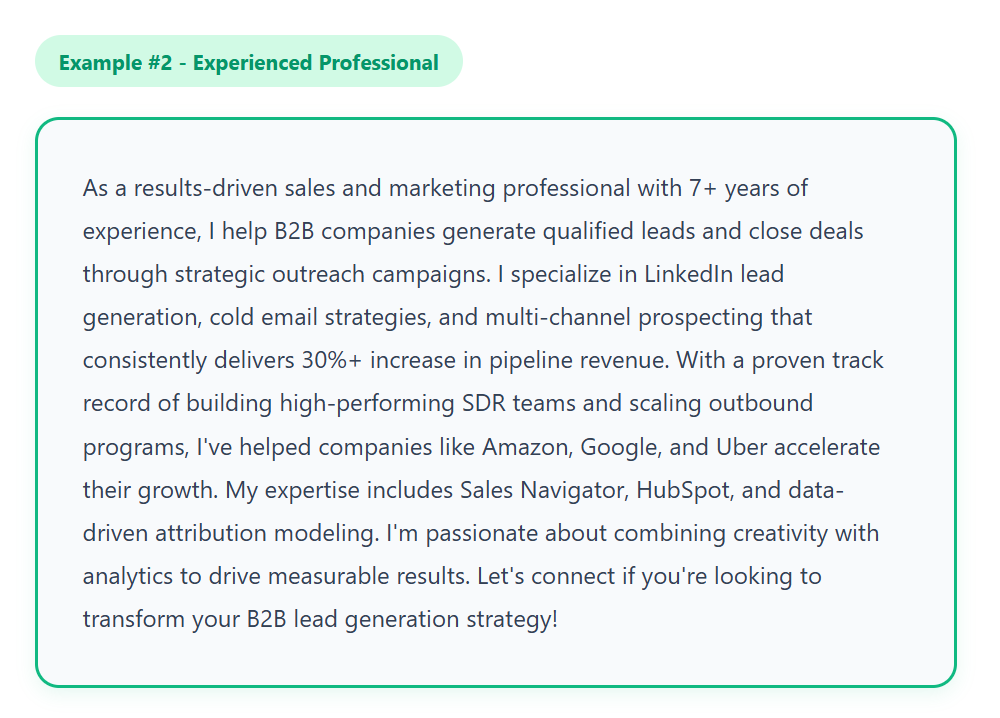
✨ What Makes This Summary Effective:
- Quantified results (30%+).
- Years of experience stated.
- Big-name social proof.
- Specific expertise areas.
- Industry-specific tools.
- Strong CTA for prospects.
LinkedIn Summary Example for Full-Stack Developers

✨ What Makes This Summary Effective:
- Technical stack clearly listed.
- Quantified achievements (40%, 60%).
- Real project impact shown.
- Modern tech mentioned (AI, serverless).
- Personal interests included.
- Community involvement (open-source, mentoring)
LinkedIn Summary Example for Product Managers
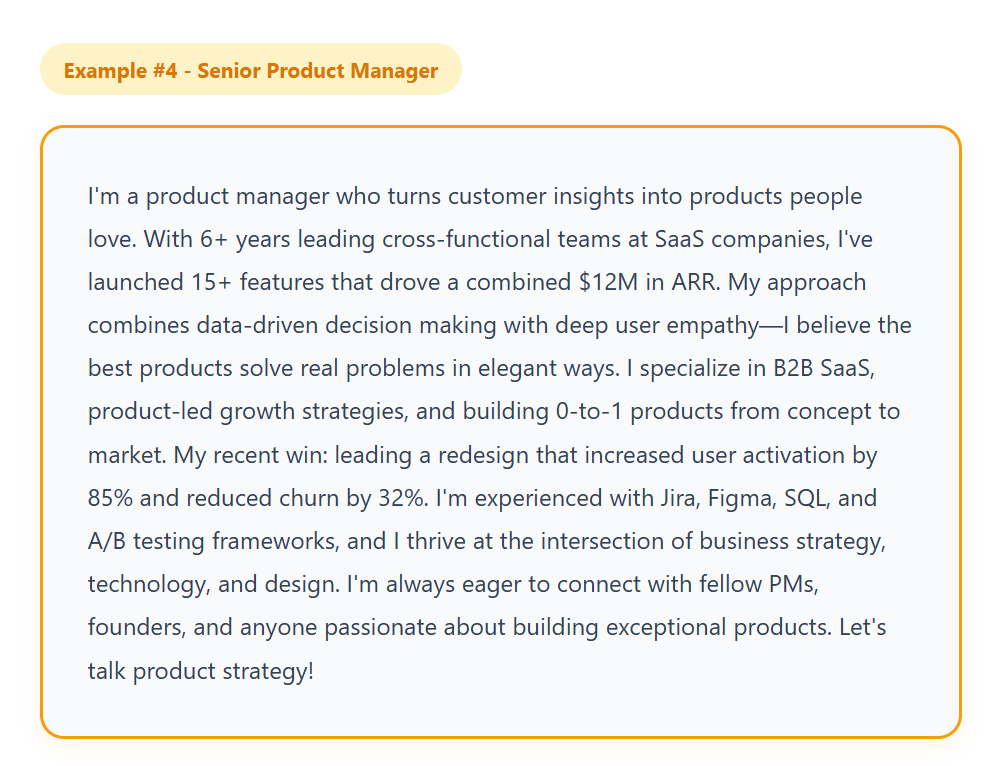
✨ What Makes This Summary Effective:
- Revenue impact quantified ($12M ARR).
- Product philosophy stated clearly.
- Specific metrics (85%, 32%).
- Technical proficiency shown.
- Cross-functional leadership emphasized.
- Clear target audience CTA.
LinkedIn Summary Example for Designers & Creatives
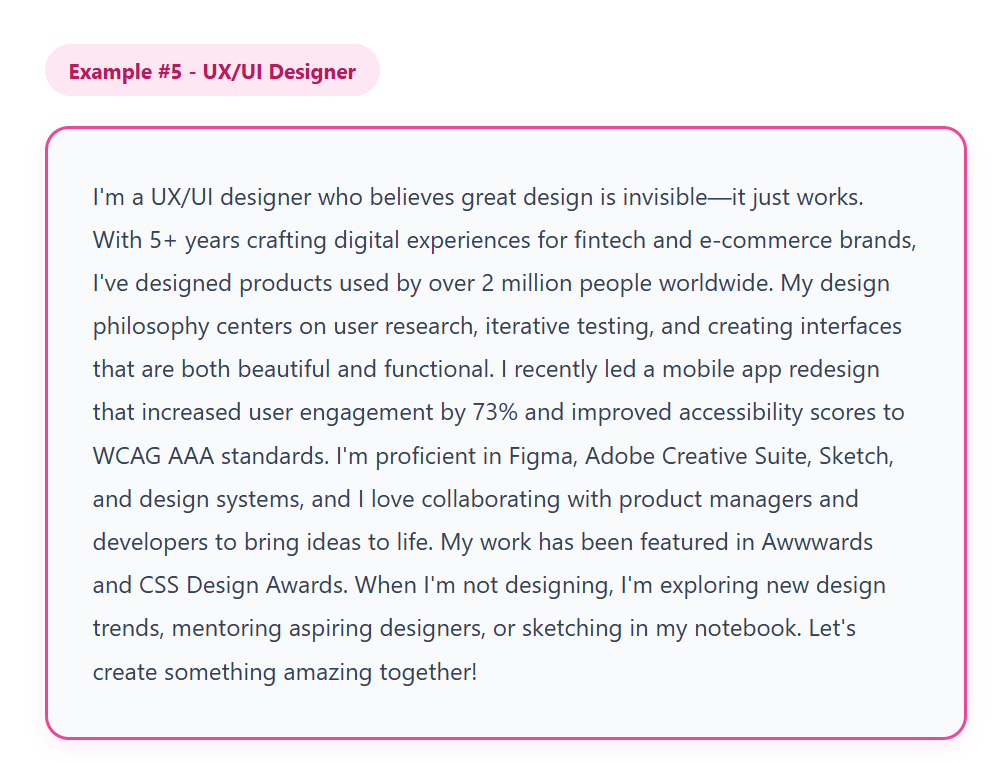
✨ What Makes This Summary Effective:
- Design philosophy clearly stated.
- User impact quantified (2M+ users).
- Measurable improvements (73%).
- Industry recognition mentioned.
- Tool proficiency listed.
- Personal passion shared.
LinkedIn Summary Example for Freelancers & Consultants
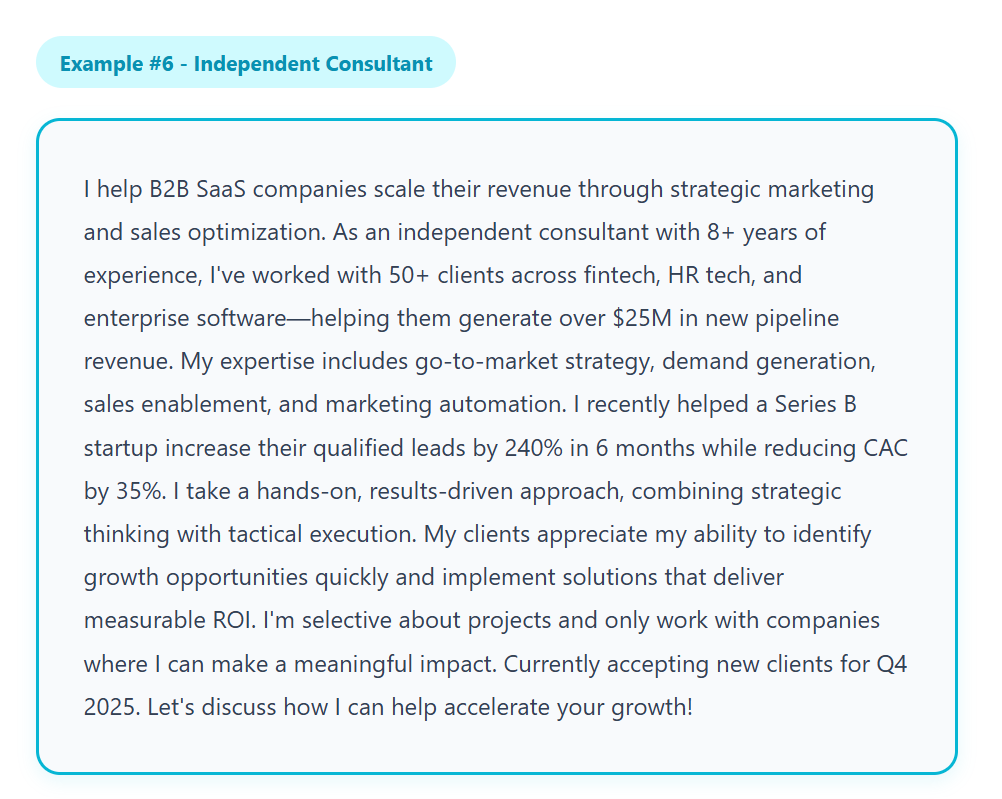
✨ What Makes This Summary Effective:
- Clear value proposition upfront.
- Client results showcased (50+ clients).
- Specific metrics ($25M, 240%, 35%).
- Expertise areas listed clearly.
- Positioning as selective (premium positioning).
- Availability clearly stated (creates urgency).
LinkedIn Summary Example for Founders & Entrepreneurs

✨ What Makes This Summary Effective:
- Clear company mission stated.
- Impressive scale (10K+ clients, $2B).
- Origin story included (relatable problem).
- Credible background (Amazon, Google).
- Growth metrics shared (Series B, 200+ team).
- Thought leadership mentioned.
LinkedIn Summary Example for Healthcare/Medical Professionals
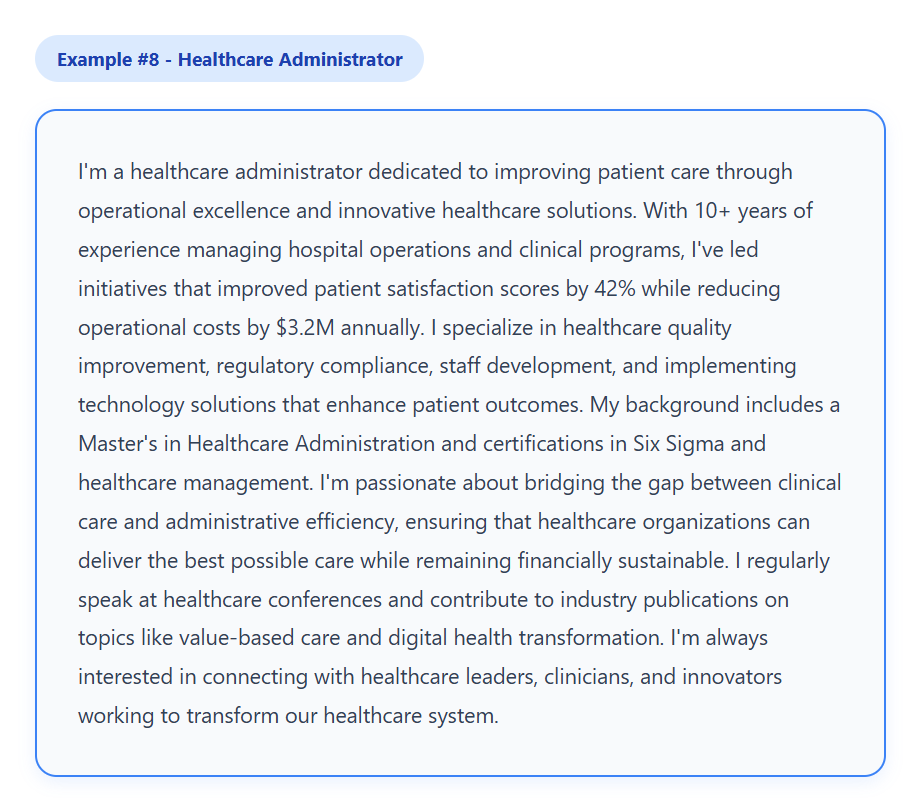
✨ What Makes This Summary Effective:
- Patient-centered mission clearly stated.
- Quantified improvements (42%, $3.2M).
- Credentials highlighted appropriately.
- Specialized expertise listed.
- Industry involvement shown.
- Professional tone maintained throughout.
LinkedIn Summary Example for HR Professionals

✨ What Makes This Summary Effective:
- People-first philosophy clearly stated.
- Retention metrics showcased (92%).
- Business impact demonstrated.
- Specific achievements (67%, $1.2M).
- Professional certification mentioned.
- Strategic positioning (not just administrative).
LinkedIn Summary Example for Real Estate Agents and Brokers
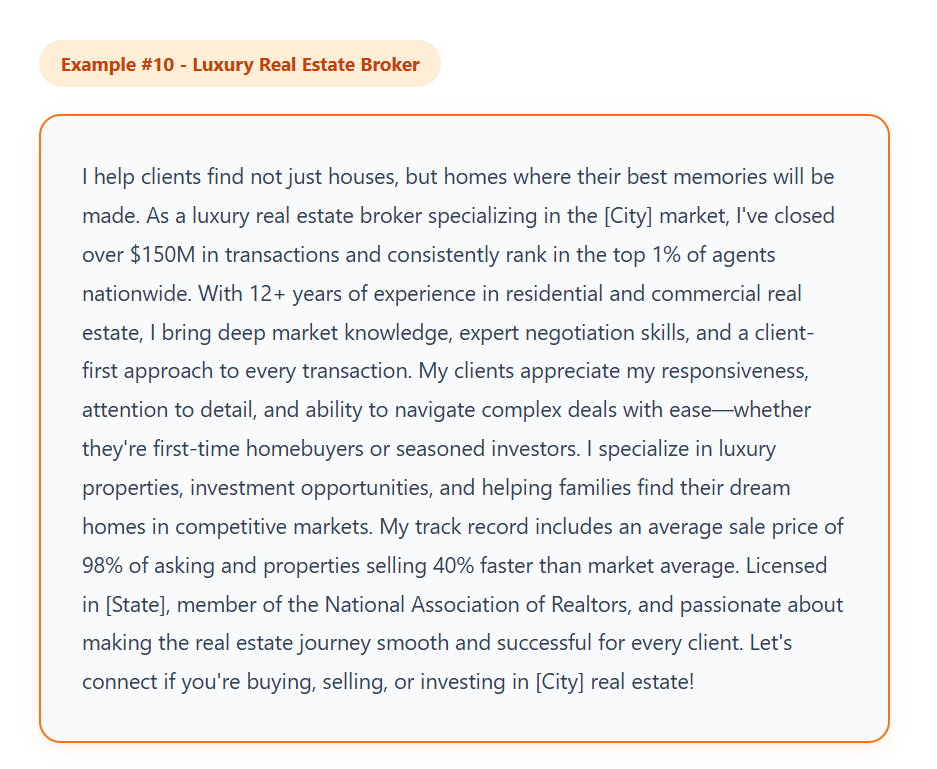
✨ What Makes This Summary Effective:
- Emotional connection opening (homes, not houses).
- Transaction volume showcased ($150M).
- Top 1% ranking mentioned (credibility).
- Specific specializations listed.
- Performance metrics (98%, 40%).
- Clear CTA for prospects.
🚀 From Profile Views to Sales Meetings
We pair optimized summaries with proven LinkedIn campaigns to consistently book qualified meetings. Book your free strategy call today.
LinkedIn Summary Templates You Can Customize
If you’re looking for a shortcut to a standout profile, using a LinkedIn summary template is a smart move.
Templates save time, help maintain consistency across your profile, and give you a framework to highlight your skills, achievements, and personality.
Here are 3 formats you can adapt:
1. Storytelling Format
"I started my career in [industry/role] because [personal motivation]. Over the past [X] years, I’ve helped [clients/companies] achieve [specific results]. I’m passionate about [your passion] and always looking for ways to [impact/outcome]. When I’m not working, you can find me [personal detail/hobby]. Let’s connect if you’re interested in [collaboration, opportunity, or service]."
2. Achievement-Driven Format
"I’m a [role/industry] professional with [X] years of experience in [specialization]. I’ve helped [clients/companies] achieve [specific measurable results], including [example]. My expertise includes [key skills or tools]. Open to connecting with [target audience] who are looking to [desired outcome]."
3. Professional Yet Friendly Tone
"Hi! I’m [Name], a [role] passionate about [industry focus]. I specialize in [skills/expertise] and have helped [clients/companies] achieve [results]. I enjoy [personal touch or hobby] and love connecting with professionals interested in [shared goal]. Feel free to reach out — I’m always open to collaboration and new opportunities."
Using a LinkedIn summary template like these makes it easier to craft a polished summary that’s both professional and authentic. You can tweak the tone, achievements, or personal touches to suit your audience, ensuring your profile stands out in 2025.
10 Things NOT to Put in Your LinkedIn Summary
You know what makes a good LinkedIn summary. Here's what ruins one.
1. Negative references to past employers
Even vague language like "after a difficult transition" or "looking for a healthier environment" sends the wrong signal. It raises red flags for recruiters and prospects before you've had a chance to make a case for yourself. Leave it out entirely.
2. "Actively seeking opportunities" as your opening
Leading with what you need instead of what you offer is a guaranteed way to lose the reader in the first line. A strong summary leads with value — what you do, who you help, what changes because of your work. Your job search status belongs at the end, if anywhere.
3. A summary that references a role you left years ago
A summary that mentions a job title, company, or project you moved on from signals neglect. Recruiters and prospects notice. LinkedIn rewards recency — a profile that was optimized once and never touched again will gradually lose search ranking to actively maintained profiles. Review your summary every time your role changes.
4. Confidential project details or client names
Outcomes and scale are fair game. Specific client names, proprietary systems, or internal project details are not — especially if you're in consulting, finance, legal, or enterprise sales. Speak to the size of the impact, not the specifics that could create legal or professional exposure.
5. Vague identity statements
"Experienced professional in technology" tells a recruiter or prospect exactly nothing. Specificity is what makes a profile memorable. Name the industry, the role, the outcome, the client type. The more precise you are, the more relevant you become to exactly the right people.
6. A list of soft skills with no proof
"Passionate. Results-driven. Team player." Every profile says this. None of it lands without evidence. If you're going to mention a trait, anchor it to something real — a result, a metric, a scenario where it showed up.
7. Your full work history
Your summary is not a second resume. It's a pitch. Summarize your arc in a sentence or two and let your experience section carry the details. Cramming every role into your About section creates noise and buries the most important information.
8. Generic CTAs that go nowhere
"Feel free to reach out" is not a CTA. It gives the reader no direction and no reason to act. Tell them exactly what to do and why — "If you're scaling a sales team and want to book more meetings from LinkedIn, send me a note" is a CTA. "Feel free to reach out" is not.
9. Keyword lists disguised as sentences
Stuffing your summary with comma-separated skill strings ("SEO, SEM, PPC, content marketing, demand generation, conversion optimization…") used to work. LinkedIn's 2025 algorithm update actively penalizes this approach. Weave relevant keywords naturally into sentences instead.
10. A summary you wrote once and never updated
This is the most common mistake on the list. A stale summary referenced a version of you that may no longer exist. Treat your About section like a living document. Update it when you change roles, hit a major milestone, or shift your target audience.
Common Mistakes to Avoid When Writing Your LinkedIn Summary
Even if you know how to write a LinkedIn summary, small missteps can turn a potentially good LinkedIn summary into a profile that’s overlooked.
Here’s what to watch out for:
❌ Using Buzzwords or Clichés
Words like “innovative,” “guru,” or “team player” are overused and don’t show real value.
Instead of listing vague traits, focus on specific achievements, skills, or outcomes. Readers want proof, not fluff.
❌ Writing Too Long or Too Short Summaries
- Too long: Your audience may never read past the first few lines. Keep paragraphs concise and scannable.
- Too short: A summary with 1–2 sentences misses the chance to showcase your skills, personality, and results. Aim for a balance, enough detail to be informative, but concise enough to stay engaging.
❌ Being Too Formal or Too Casual for Your Audience
Tone matters.
- Too formal: Reads like a resume and can feel cold or unapproachable.
- Too casual: May seem unprofessional or unclear about your expertise.
Match your voice to your audience while staying authentic — your ideal reader should feel like they’re talking to a competent, relatable professional.
❌ Forgetting to Include a Call-to-Action
A profile without direction leaves opportunities on the table. A good LinkedIn summary always tells readers what to do next — connect, message, check a portfolio, or book a meeting.
Without a CTA, you miss out on turning views into real leads or conversations.
By avoiding these mistakes, your LinkedIn profile summary examples will not only read well but also drive engagement, connections, and opportunities.
Amplify Your LinkedIn Profile with Cleverly’s Ghostwriting Services
Writing a standout LinkedIn summary takes time, focus, and the right words — which isn’t always easy when you’re busy running your business or career.
That’s where Cleverly’s LinkedIn ghostwriting service comes in.

Our team helps professionals craft compelling summaries and posts that showcase expertise, highlight achievements, and reflect authentic personality.
With our help, you can:
- Save time by letting experts handle your content.
- Maintain consistency across your profile and posts.
- Improve engagement and profile impressions, ensuring your audience notices and connects.
At Cleverly, we’ve helped over 10,000+ clients, including companies like Amazon, Google, Uber, PayPal, Slack, and Spotify, generate $312 million in pipeline revenue and $51.2 million in closed deals through LinkedIn.
The real power comes when you pair LinkedIn ghostwriting with Cleverly’s LinkedIn lead generation services.
Every optimized summary and post becomes a magnet, converting profile views into real business opportunities, leads, and partnerships.
Let’s talk and we’ll make sure your profile doesn’t just look good — it performs for you.

Conclusion
Your LinkedIn summary is more than just an About section — it’s your chance to tell your story, showcase your skills, and attract the right opportunities.
By following these LinkedIn summary examples and best practices, you can craft a profile that stands out, feels authentic, and converts views into connections.
Take the first step — let us help you craft a profile that gets noticed and delivers opportunities.
Frequently Asked Questions
Free Resource
How to Scale a Profitable Cold Call System
Get the complete guide — download it instantly now.

Free Ebook
Download the Free Guide
Enter your details to get instant access.
You're all set! 🎉
Your ebook is downloading now.
Click below if the download didn't start automatically.