Table of Contents
What Are LinkedIn InMails?
LinkedIn Messages: The Power of Direct Connection
Key Differences: LinkedIn InMail vs Messages for Lead Generation
LinkedIn InMail Best Practices That Actually Get Replies
The Hybrid Approach: Combining LinkedIn InMail and Messages for Lead Generation
Conclusion
Frequently Asked Questions
Modified On :
July 15, 2026
Key Takeaways
- InMail provides immediate access to anyone on LinkedIn but costs premium credits, making it best for high-value prospects.
- Regular messages have higher response rates (25-35%) than InMails (10-15%) due to pre-existing connections.
- The most effective strategy in 2026 combines both approaches, connection requests first, followed by InMail for non-responders.
- Personalization increases response rates by up to 300% for both InMail and regular messages.
- Subject lines in InMails significantly impact open rates; personalized references to content or company news perform best.
- Omnichannel strategies that integrate LinkedIn outreach with other touchpoints drive 3-5x higher conversion rates.
Struggling to cut through the noise on LinkedIn and actually connect with potential clients?
Of course, you're not alone.
In 2026, LinkedIn remains the gold standard for B2B lead generation, but the platform has evolved, and so have the strategies that *actually* work.
The burning question on every marketer's mind: should you shell out for Premium LinkedIn InMails or stick with good old-fashioned LinkedIn connection messages? 🤔
Cleverly has spent years running LinkedIn outreach campaigns for over 10,000 B2B clients — testing InMail sequences, connection request cadences, and hybrid approaches across industries and deal sizes. What follows reflects patterns from that real-world campaign data, not just platform documentation.
In this guide, we'll cut through the confusion and give you the straight facts on LinkedIn InMail lead generation versus connection messages in 2025.
Let's dive in!
What Are LinkedIn InMails? Understanding the Premium Option
Ever received a message from someone you're not connected with on LinkedIn? That's InMail in action! 📩
LinkedIn InMail is essentially your VIP pass to slide into anyone's inbox on the platform, even if you're not connected.
Think of it as LinkedIn's premium messaging feature that lets you bypass the traditional connection request process and reach decision-makers directly.
Definition and Key Features of LinkedIn InMail
InMail is LinkedIn's way of giving you direct access to potential leads while maintaining a professional environment.
Here's what makes InMail special:
- Direct access to anyone: You can message 1st, 2nd, and 3rd-degree connections without requiring a connection first.
- Subject lines: Unlike regular messages, InMails let you craft attention-grabbing subject lines (up to 200 characters)
- Longer messages: You can write up to 1,900 characters, giving you plenty of space to make your pitch
- Professional context: Recipients see that it's an "InMail," which often gets higher attention than regular messages
- Credit refunds: If someone responds within 90 days, you get your InMail credit back!
LinkedIn InMail Cost Structure and Credits System
Let's talk money—because InMail isn't free, and knowing the investment helps you calculate ROI properly.
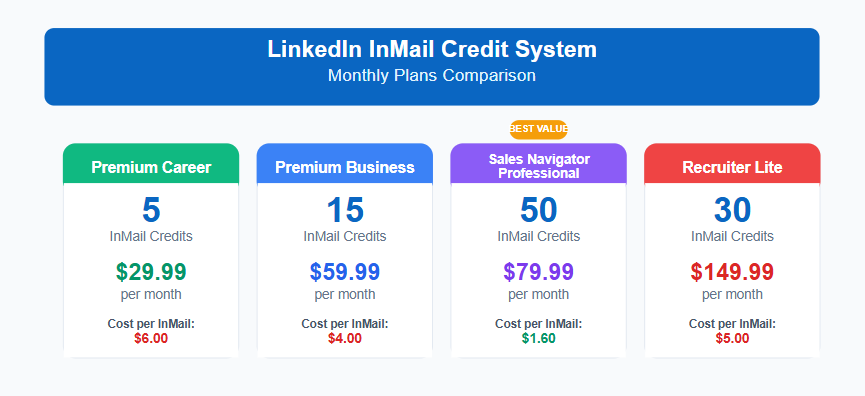
LinkedIn InMail operates on a credits system that varies based on your LinkedIn Premium subscription level:
- Premium Career: 5 InMail credits monthly ($29.99/month)
- Premium Business: 15 InMail credits monthly ($59.99/month)
- Sales Navigator Professional: 50 InMail credits monthly ($79.99/month)
- Recruiter Lite: 30 InMail credits monthly ($149.99/month)
Once you've used up your monthly credits, additional LinkedIn InMails cost around $10 each. So if you're planning large-scale outreach, those costs can add up quickly!
One pricing note the credits table doesn't capture: LinkedIn Premium members can enable Open Profile, making their inbox accessible to anyone for free — no credit required. If a target has Open Profile active, you can send them an InMail without spending a credit.
For campaigns running at scale, filtering for Open Profile accounts first and routing them to a no-credit path is a straightforward way to extend your monthly allotment.
Also worth knowing: unused InMail credits roll over for up to 3 months on most Premium plans, with a cap depending on your subscription level — so if you send fewer InMails one month, those credits carry forward rather than disappearing.
Also Check: High-Converting LinkedIn InMail Templates to Boost Your Outreach Success
Benefits of LinkedIn InMail: Reaching Anyone Directly
The power of LinkedIn InMail lies in its ability to get you in front of the right people, right away:
- Bypass gatekeepers: Message decision-makers directly without waiting for connection approvals.
- Higher visibility: InMails stand out in recipients' inboxes and get priority notifications.
- Performance tracking: You can monitor open rates, response rates, and other key metrics to optimize your approach.
- Multi-channel notifications: Recipients get notified via LinkedIn, mobile app, and email—triple the chance of being seen!
- 3x higher response rate than traditional email or cold calls (when done right).
Limitations of InMail for Lead Generation
Despite its perks, InMail isn't a magic bullet for lead generation. Here are the honest downsides:
- Cost barrier: The premium pricing can be prohibitive for small businesses or solopreneurs
- Limited scale: With monthly credit restrictions, it's difficult to run large-scale campaigns
- No follow-up capability: You can't send follow-up InMails until the recipient responds
- Perceived as sales-y: Some users view InMails as inherently promotional and skip them
- Competition for attention: As more salespeople use InMail, effectiveness may decrease over time
The bottom line?
InMail can be incredibly powerful for reaching high-value prospects when every conversation counts, but it's not always the most cost-effective solution for broad outreach campaigns.
📩 InMail or Message? Confused? Don't Worry!
Our data-backed outreach strategy uses the best channels to get you real leads. No ads, no fluff. Let us handle it for you.
LinkedIn Messages: The Power of Direct Connection
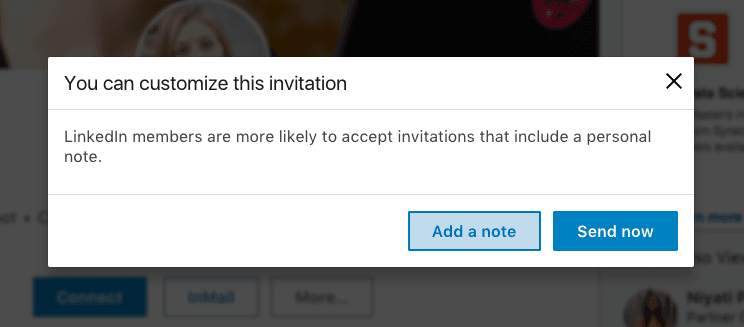
Let's talk about the OG way to connect on LinkedIn—good old direct messages! 💬
While InMails might get all the premium attention, regular LinkedIn messages remain the backbone of organic networking and lead generation on the platform.
These are the messages you send to people you're already connected with (your 1st-degree connections).
How Regular LinkedIn Messages Work
LinkedIn messages are the platform's standard communication tool—simple, direct, and free. Here's the lowdown:
- Connection required: You can only message people who've accepted your connection request.
- No subject lines: Unlike InMails, regular messages jump straight into the conversation.
- Character limits: While there's no official limit, extremely long messages get truncated.
- Grouped conversations: Messages appear in ongoing threads, creating conversation history.
- Free for everyone: Available to all LinkedIn users regardless of account type.
Connection Requirements and Limitations
The "you must be connected" rule is both the biggest strength and limitation of regular messages:
- Connection request limits: LinkedIn caps you at approximately 100 connection requests per week in 2026.
- Acceptance barrier: Your target must accept your connection before you can message them.
- Time investment: Building a connection first creates a relationship hurdle (but that can be good!)
- Network growth: Each new connection expands your reach to their network.
- Long-term access: Once connected, you can message them anytime without additional costs.
Advantages: Higher Response Rates Due to Pre-existing Connections
Here's where regular messages really shine compared to InMail:
- Higher trust factor: People tend to be more responsive to messages from connections
- Warm approach: The connection creates a foundation of familiarity before messaging.
- Visibility in feed: Being connected means they've likely seen your content already.
- Relationship building: Regular messages feel more conversational and less transactional.
- Long-term nurturing: You can send multiple follow-ups without additional costs.
Message Constraints and Best Practices
To maximize your regular message strategy, be aware of these constraints and opportunities:
- Connection fatigue: Sending too many connection requests too quickly can restrict your account.
- Visible profile views: Targets can see when you've viewed their profile (use this strategically!)
- Limited initial context: Without subject lines, your opening line needs to do heavy lifting.
- Message spacing: Bombarding new connections with sales pitches immediately after connecting is a major turn-off.
- Content engagement first: Commenting on their posts before messaging significantly increases response rates.
The beauty of regular messages is that they foster authentic relationships rather than transactional ones.
While they take more time to set up (waiting for connection acceptance), they often yield higher-quality conversations that lead to more sustainable business relationships.
Think of regular messages as the "slow food" of LinkedIn outreach—it takes more time, but the results are often worth the wait!
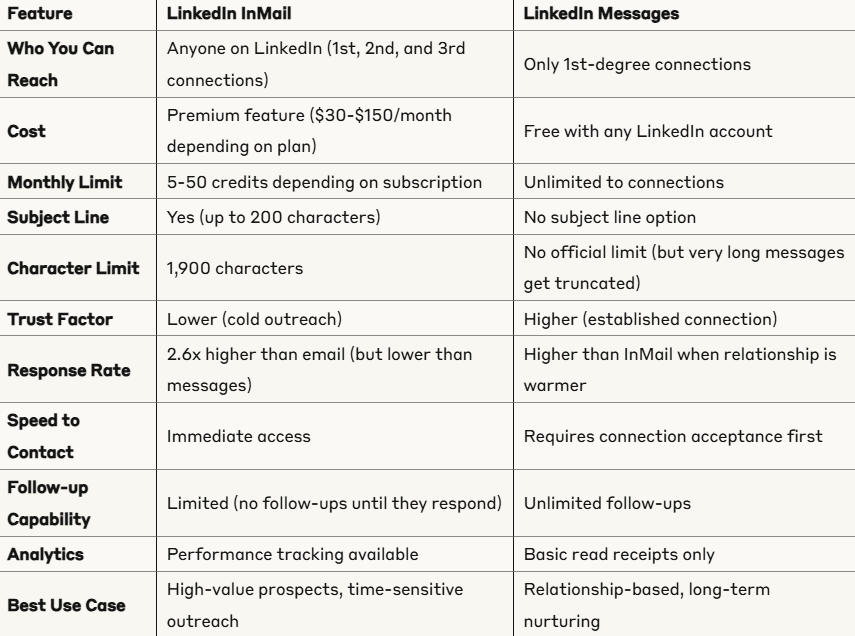
Key Differences: LinkedIn InMail vs Messages for Lead Generation
Let's break down exactly how InMail and regular messages stack up against each other in 2026!
When it comes to LinkedIn lead generation, choosing the right outreach method can make or break your results.
Here's a clear, visual comparison to help you decide which approach fits your strategy best.
When InMail Outperforms: Reaching High-Value Prospects Instantly
InMail takes the crown in these specific situations:
- Urgent opportunities: When you need to reach someone immediately without waiting for connection approval.
- High-profile prospects: For connecting with C-suite executives who rarely accept connection requests.
- Competitor's clients: When you're targeting people connected to competitors who might not accept your connection.
- Event-based outreach: For time-sensitive invitations or following up after events
- Job applications: When applying for positions and wanting to stand out to hiring managers.
Cost Comparison and ROI Analysis: Linkedin Inmail vs Messages
Let's talk bottom line—what gives you more bang for your buck in 2026?
LinkedIn InMail Cost-Benefit:
- Investment: $79.99/month for Sales Navigator (50 InMails).
- Reach: Direct access to decision-makers.
- Time savings: Bypass connection phase.
- Best ROI: When targeting high-ticket clients ($10k+ deals).
LinkedIn Messages Cost-Benefit:
- Investment: Free (time investment in connection building).
- Reach: Limited to who accepts connections.
- Time cost: Slower process, requires relationship building.
- Best ROI: For volume outreach and long-term relationship building.
The verdict?
InMail gives you speed and direct access but at a premium price. Messages require more patience but build stronger foundations for long-term business relationships at no additional cost.
Response Rate Benchmarks: InMail vs Messages
A few additional data points worth knowing:
InMails over 1,200 characters perform 11% below the global average, per LinkedIn's own analysis. Messages that land in LinkedIn's "Other" inbox tab — the lower-priority section separate from the main Focused inbox — see substantially lower open rates than messages that land in the primary view.
InMails always land in the primary inbox. This is one practical reason InMails often outperform messages to non-connections even when the warmth factor is lower: guaranteed inbox placement.
For B2B lead generation, a well-run InMail campaign targeting the right ICP should produce a reply rate in the 18–25% range. Campaigns Cleverly runs for clients using connection messages to accepted 1st-degree connections consistently see reply rates from 25–40% when targeting and personalization are dialed in.
LinkedIn InMail vs Connection Request: Which Should Come First?
In any cold LinkedIn sequence, the real question isn't just InMail vs. message — it's whether to lead with a connection request or go straight to InMail. The answer depends on the prospect.
Lead with a connection request for most targets. Personalized connection notes from people sharing mutual connections or industry context get accepted 30–45% of the time. Once someone accepts, you can message for free indefinitely, follow up multiple times without cost, and build a relationship over multiple touches. Reserve your InMail credits for the targets who don't accept.
Lead with InMail for hard-to-reach executives. C-suite leaders at enterprise companies often ignore or decline connection requests from unknown senders. An InMail lands in their primary inbox with a subject line and triggers an email notification — it gets considered rather than dismissed with a click. For these targets, InMail is worth the credit.
Use InMail as a fallback after a connection request sits unanswered. Wait 5–7 days. If no acceptance, send an InMail referencing the pending request: "I sent a connection request last week and wanted to try a different channel." This multi-touch approach generates above-average reply rates because you've already created one touchpoint before the InMail lands.
The sequential approach — connection request first, InMail as fallback — is both the most credit-efficient and the most effective for most B2B outreach campaigns.
🔍 Still Deciding Between InMail and DMs?
We’ve already tested what converts best—so you don’t have to. Get warm leads with our done-for-you LinkedIn outreach service.
LinkedIn InMail Best Practices That Actually Get Replies
Most InMails fail not because InMail is ineffective, but because the fundamentals are off. Here's what consistently improves reply rates based on LinkedIn's own data and real campaign testing.
Keep It Under 400 Characters
LinkedIn's own analysis shows that InMails under 400 characters outperform the global average by 22%. Messages over 1,200 characters perform 11% below average. The instinct to front-load context, credentials, and background works against you. One problem, one hook, one ask — that's the frame.
Personalize to Something Specific
Personalized InMails perform 15% better than templated ones, according to LinkedIn research. But "personalized" doesn't mean using {first_name}. It means referencing something specific: a recent post they wrote, a company announcement, a hiring trend at their org, or a shared connection. The specificity signals you're a real person, not a sequence.
Lead with Their Problem, Not Your Product
"I'd love to show you what we do" goes straight to archive. "I noticed you're scaling your SDR team — curious how you're thinking about pipeline while they ramp" opens a conversation. The message recipients respond to is the one that makes them feel understood, not sold to.
Write a Subject Line That Creates Curiosity
InMails include a subject line (up to 200 characters) that appears as a preview in the inbox. Short, specific subject lines consistently outperform generic ones. "Question about your Q3 expansion" beats "Partnership opportunity." Reference something real about the recipient or their company — not what you want from them.
Target Open Profiles to Extend Your Credits
LinkedIn Premium members can enable Open Profile, which allows anyone — including people who aren't connected with them — to send them a message for free, without using an InMail credit. When building outreach campaigns, filtering for Open Profile accounts and routing them through a no-credit path preserves your credits for non-Open-Profile targets who are worth the spend. This is one of the most practical scale tactics for InMail at volume.
A/B Test One Variable at a Time
If you send more than 30 InMails a month, run structured tests — but test one variable at a time: subject line vs. subject line, opening sentence vs. opening sentence. Changing three things simultaneously makes it impossible to know what drove the result. Track reply rates per variant, cut what underperforms, and compound the improvement.
The Hybrid Approach: Combining LinkedIn InMail and Messages for Lead Generation
Why choose one when you can have the best of both worlds?
The smartest LinkedIn lead generators in 2026 aren't exclusively using either InMail or messages—they're strategically combining both approaches to maximize results while minimizing costs.
Let's dive into how this hybrid strategy works!
When to Use Each Approach in Your Funnel
The key to the hybrid approach is understanding which tool works best at each stage of your lead generation funnel:
Top of Funnel (Awareness):
- Content engagement: Comment on prospects' posts before any direct outreach.
- Profile views: Strategic profile views to get on their radar.
- Connection requests: For most prospects, especially those who engage with your content.
Middle of Funnel (Consideration):
- Regular messages: For nurturing existing connections with valuable insights.
- InMail: For high-value prospects who haven't accepted connection requests after 7 days.
- Voice messages: New in 2026, voice messages to connections are showing 34% higher response rates than text!
Bottom of Funnel (Decision):
- InMail: For urgent, time-sensitive offers to non-connections.
- Regular messages: For meeting scheduling and follow-ups with connections.
- Video messages: For personalized demos and proposals (showing 2x conversion of text-only messages)
Remember: Each channel reinforces the others. Your content strategy should align with your direct outreach to create a consistent experience for prospects.
Sequential Strategies: Connection Requests Followed by InMail
One of the most effective hybrid approaches follows this sequence:
- Send personalized connection request with contextual note.
- Wait 5-7 days for acceptance (industry standard acceptance window).
- If not accepted, send InMail with reference to previous connection attempt.
- If connected, follow nurturing message sequence (3-5 touch points before asking for meeting)
This approach works because:
- It gives prospects the chance to connect for free communication first.
- It reserves InMail credits for truly hard-to-reach prospects.
- It creates multiple touchpoints that increase brand recognition.
- It respects the prospect's communication preferences.
What Cleverly's InMail Campaigns Look Like in Practice
Across the LinkedIn campaigns Cleverly has run for B2B clients, InMail works best as a mid-funnel tool rather than a first-touch channel.
The highest-converting sequences follow this structure: a personalized connection request goes out first; if it's accepted within 5–7 days, the prospect enters a 3–4 message DM sequence; if no acceptance, an InMail fires with a reference to the pending connection request.
In campaigns Cleverly has tested with this structure, using InMail as a second-touch fallback for non-acceptances consistently produces reply rates 15–25% higher than InMail sent cold to the same list without a prior connection attempt.
The prior touchpoint creates context — the prospect has already seen your name once — which meaningfully changes how an InMail lands.
Cleverly's broader LinkedIn program has generated over 224,700 B2B leads across 10,000+ client campaigns, with $312M in attributed pipeline revenue. The InMail component works precisely because it's positioned as part of a multi-touch sequence, not a standalone channel.
Omnichannel Strategies Incorporating Both Methods
The most sophisticated lead generation strategies in 2026 go beyond just LinkedIn:
- LinkedIn content engagement → builds visibility and credibility.
- Connection request or InMail → establishes direct communication.
- Regular LinkedIn messages → nurtures the relationship.
- Cold Email outreach → provides more formal communication channel.
- Retargeting ads → keeps your brand top-of-mind.
- Phone/Zoom → deepens the relationship through live conversation
This multi-channel approach creates what marketers call "surround sound"—where prospects feel your presence across multiple touchpoints, dramatically increasing conversion rates.
Conclusion
So, what's the verdict in the InMail vs Messages showdown of 2026? 🏆
The truth is, there's no one-size-fits-all answer. The most effective LinkedIn lead generation strategy isn't about choosing one over the other, it's about strategically leveraging both based on your specific goals, target audience, and budget.
Remember that regardless of which method you choose, personalization remains the ultimate key to breaking through the noise.
Generic templates and automation without customization will fall flat in 2026's sophisticated LinkedIn environment.
The good news? You don't have to figure all this out on your own!
At Cleverly, we've helped 10,000+ clients generate leads with companies like Amazon, Google, UBER, PayPal, Slack, Spotify & more! 🚀
Our proven LinkedIn outreach strategies have delivered impressive results:
- $312 Million in Pipeline Revenue 💸
- $51.2 Million in Closed Revenue 💸

We've spent years perfecting the art and science of LinkedIn lead generation so you don't have to learn through costly trial and error.
So, stop wasting your InMail credits on low-converting campaigns or sending connection requests that go nowhere.
Let us help you implement the strategies we've covered in this guide with the precision that comes from thousands of successful campaigns.
If you're interested in generating qualified B2B Leads through LinkedIn then click here for more information.
Your next big client is on LinkedIn right now. The only question is: will you be the one who connects with them first? 💼
Frequently Asked Questions
Free Resource
How to Scale a Profitable Cold Call System
Get the complete guide — download it instantly now.

Free Ebook
Download the Free Guide
Enter your details to get instant access.
You're all set! 🎉
Your ebook is downloading now.
Click below if the download didn't start automatically.